Hacking Configurator for Configurable USB Loader

  • Thread starter Thread starter Dr. Clipper
  • Start date Start date
  • Views Views 426,617
  • Replies Replies 609
v49.2 of Configurator is out

download here

Changes in 49.2:
  • Added an asterisk before hidden games in the favorite/hidden list (which is all I can do to the appearance without a LOT of work).
  • Made the console text in the console wizard with the correct font and info to indicate how many lines and characters can be shown. Also support menu_plus and cursor options.
  • Settings.cfg is now loaded before theme.txt and is used to select the correct theme (as settings.cfg has priority over config.txt in the loader too)
Note: Displaying the text actually takes a lot of time as each letter is actually an image now. If you find the console wizard lagging, turn off the text display and it will likely become much easier to use. I've just had an idea to fix the problem and will try to get it into the next version.

There are no changes to the language database as there's no new controls!
 
dont know why, but the main "existing config file" in bottom left didnt read titles or setting in this setup.
mind you, theme.* isnt in there - i dont use them... does that matter?

here's the notable (non music files) in the folder i loaded config from:
Q:\apps\USBLoader\boot.dol 1139200 28/11/2009 14:12:26
Q:\apps\USBLoader\config.txt 2423 03/12/2009 20:22:46
Q:\apps\USBLoader\gamelist.txt 1048 14/11/2009 17:26:52
Q:\apps\USBLoader\titles.txt 72078 26/11/2009 22:59:50

new * is class, such a help to avoid unsuitable games for certain profiles

i do a lot of DB work, and the package i use its easy top do a grid (table) of columns of eg games
suprised that that maybe you dont have a grid of games in left column, then the nest columns are "hide" then "default profile", then "profile 2", "profile3" ... "Profile 10",etc.
That would avoid repeating games on each profile
(i have 5 'peopple's names' profiles then ones like 'sports, shooters, horror, family, platform')
However, VB or whatever you use could be way different

this is really really top class stuff!! many thanks, and remember we'd be stuck without you
well done !!
 
xakmad said:
dont know why, but the main "existing config file" in bottom left didnt read titles or setting in this setup.
mind you, theme.* isnt in there - i dont use them... does that matter?

here's the notable (non music files) in the folder i loaded config from:
Q:\apps\USBLoader\boot.dol 1139200 28/11/2009 14:12:26
Q:\apps\USBLoader\config.txt 2423 03/12/2009 20:22:46
Q:\apps\USBLoader\gamelist.txt 1048 14/11/2009 17:26:52
Q:\apps\USBLoader\titles.txt 72078 26/11/2009 22:59:50

new * is class, such a help to avoid unsuitable games for certain profiles
Where is your settings.cfg file? It should be in that directory too, unless you also have a config.txt in Q:\usb-loader. In that case, move config.txt from Q:\apps\USBLoader\config.txt to Q:\usb-loader (make sure it is gone from the apps directory) and then you'll get the auto-loading of settings.cfg, and the loader should still work the same way.

QUOTE said:
i do a lot of DB work, and the package i use its easy top do a grid (table) of columns of eg games
suprised that that maybe you dont have a grid of games in left column, then the nest columns are "hide" then "default profile", then "profile 2", "profile3" ... "Profile 10",etc.
That would avoid repeating games on each profile
(i have 5 'peopple's names' profiles then ones like 'sports, shooters, horror, family, platform')
However, VB or whatever you use could be way different
I might try turning it into a grid, I guess that would make sense. The only real issue is figuring out what sort of control I can use to allow the grid to scroll.

QUOTE
this is really really top class stuff!! many thanks, and remember we'd be stuck without you
well done !!
Thanks, it's always good to know the work's appreciated.
 
Spanish language files (updated to v49.2): http://www.mediafire.com/?dzzzjzzmi4o. I didn't translate the previous versions because I took some "vacations". I'm back to work right now,
smile.gif
.
 
v49.3 of Configurator is out

download here

Changes in 49.3:
  • Changed favorites/hidden wizard to a grid-based view.
  • Fixed display of hide_game on return of the wizard when changing the currently selected game.
Sample cdbs have been updated to remove most of the controls from the wizard (sorry Pablo
wink.gif
).
 
Dr. Clipper said:
v49.3 of Configurator is out

download here

Changes in 49.3:
  • Changed favorites/hidden wizard to a grid-based view.
  • Fixed display of hide_game on return of the wizard when changing the currently selected game.
Sample cdbs have been updated to remove most of the controls from the wizard (sorry Pablo
wink.gif
).

Spanish language files "updated": http://www.mediafire.com/?eb2or4iryzj (Who am I kidding? I just deleted some options, haha).
 
v49.4 of Configurator is out

download here

Changes in 49.4:
  • Added an option in the settings tab to add games straight from a txt file to the settings list. This allows you to still add games from gamelist.txt to the settings when you have already loaded titles from titles.txt.
  • Changed profile renaming wizard to be a complete management tool. You can now add,delete,rename and reorder profiles a lot easier.
Sample cdbs have been updated again (really sorry this time Pablo
wink.gif
).
 
v49.5 of Configurator is out

download here

This should be the last of the 49 versions, unless a new option pops up in the release version.

This version is actually optimised for the version of Cfg after 49b, so either 49b2 or 49. There is only one change option-wise (see change notes).

Changes in 49.5:
  • Changed default of fat_install_dir to 1 to match the new default future versions of the loader will have. It is still safe to use this version of the Configurator on 49a and 49b, though, the default just wont display correctly.
  • New option added to select between the plain and fat versions of the Loader. This only affects the display of default values, so you don't have to set it if you don't want to. The version will also be detected automatically whenever settings.cfg or gamelist.txt is read (current gamelist.txt does not include the version info, but all future versions will).
  • Fixed the text display slowdown in the console wizard
  • Added translation to all the strings used for warning and info messages, so now virtually every piece of text in the Configurator can be altered by the cdbs. Instructions are in configurator.cdb.
  • Note that with the translation method, you can rename the *Hidden* column in the favorites/hidden table to whatever name you like too :).
  • You can also change the text that displays in the console menu mockup within the console wizard if you like :).
Sample cdbs have been updated again.
 
Dr. Clipper said:
v49.5 of Configurator is out

download here

This should be the last of the 49 versions, unless a new option pops up in the release version.

This version is actually optimised for the version of Cfg after 49b, so either 49b2 or 49. There is only one change option-wise (see change notes).

Changes in 49.5:
  • Changed default of fat_install_dir to 1 to match the new default future versions of the loader will have. It is still safe to use this version of the Configurator on 49a and 49b, though, the default just wont display correctly.
  • New option added to select between the plain and fat versions of the Loader. This only affects the display of default values, so you don't have to set it if you don't want to. The version will also be detected automatically whenever settings.cfg or gamelist.txt is read (current gamelist.txt does not include the version info, but all future versions will).
  • Fixed the text display slowdown in the console wizard
  • Added translation to all the strings used for warning and info messages, so now virtually every piece of text in the Configurator can be altered by the cdbs. Instructions are in configurator.cdb.
  • Note that with the translation method, you can rename the *Hidden* column in the favorites/hidden table to whatever name you like too
    smile.gif
    .
  • You can also change the text that displays in the console menu mockup within the console wizard if you like
    smile.gif
    .
Sample cdbs have been updated again.

Whoa! I thought you wouldn't! I'm gonna work on this translation right now! This is going to be a big one, :3! I'll edit this post once the files are completed.
 
v49.6 of Configurator is out

download here

OK, so oggzee went and shocked me by adding overriding options. This means another new version! This one may be unstable, I haven't fully tested all the new features, but I believe they should work. Please test it out and let me know if you find any bugs or unexpected crashes.

This version should be suitable for the release of v49. The only difference is the [w]covers_size options will be overridable in the release version, so they are already made overridable here.

Changes in 49.6:
  • Added new tab to support config.txt overridable theme options. Basically, these are options that appear in a global context when using a theme.txt. They are treated like global options when generating the files
  • Added new button to base of the main form to allow copying options from the override page into the theme pages (in case you want to remove overrides)
  • Fixed a bug that caused the partition option to fail when reading partition=FAT1
Sample cdbs have been updated again.

Edit: I've reuploaded a new version of 49.6 with some bug fixes to the new copy button and the simple option.
 
v49.7 of Configurator is out

download here

Grr oggzee, you had to go and change something for the release...

Changes in 49.7:
  • Fixed operation of simple option so that the defaults for hide_hddinfo display correctly within the Configurator.
 
v50 of Configurator is out

download here

The big 5-0 eh?

Changes in 50:
  • Changed simple option to match 50x
  • Install_partition default changed to match 50x
  • gui_rows=3/4 bug fixed
  • titles_url default value fixed.
Edit: I discovered a bug in the v50 version and uploaded a new one. Please download again if you already got it. Kudos to anyone who can figure out where the bug was.
 
Dr. Clipper said:
v50 of Configurator is out

download here

The big 5-0 eh?

Changes in 50:
  • Changed simple option to match 50x
  • Install_partition default changed to match 50x
  • gui_rows=3/4 bug fixed
  • titles_url default value fixed.
Edit: I discovered a bug in the v50 version and uploaded a new one. Please download again if you already got it. Kudos to anyone who can figure out where the bug was.


Here are the new Spanish translation files: http://www.mediafire.com/?gj1mzwkmdgn. I didn't see anything wrong; however, the program doesn't show the text values for the "TO_gui_title_top_rad1" and "OO_gui_title_top_rad1" options:

2dwg6fd.jpg

... So, will that be fixed for the next release?
 
PabloACZ said:
Here are the new Spanish translation files: http://www.mediafire.com/?gj1mzwkmdgn. I didn't see anything wrong; however, the program doesn't show the text values for the "TO_gui_title_top_rad1" and "OO_gui_title_top_rad1" options:

... So, will that be fixed for the next release?
It will be fixed. It's not really a bug, I just didn't leave enough room for more than 0 and 1 there. Most of the other 0/1 options have similar space available and I'll correct those too.
 
love the config, still having difficulties with a "one-button to load titles, settings and config", even thou they're all in same folder...

re the grid for profiles -= brilliant!!!

final wee cahnge would be - can you add a click the column heading sorts the column a-z (ie click on hidden puts all the tick to the top or bottom), please?

oh, and it lets you add more than 10 profiles... has the limit of 10 been scrapped now?

thanks again
 
xakmad said:
love the config, still having difficulties with a "one-button to load titles, settings and config", even thou they're all in same folder...

re the grid for profiles -= brilliant!!!

final wee cahnge would be - can you add a click the column heading sorts the column a-z (ie click on hidden puts all the tick to the top or bottom), please?

oh, and it lets you add more than 10 profiles... has the limit of 10 been scrapped now?

thanks again
Sorry for the delay in responding, I've been away on holiday without Internet for a few days. Sorting the games would require a little bit of work given the way I've coded it, but it may not be too hard. I'll think about it. And how are you adding more than 10 profiles? The only way I think you could do that is reading in a config.txt that has more than 10 profiles, as I don't do a check when parsing the option, but trying to edit the box to add more than 10 or trying to use the add button in the profile manager when there are already 10 both fail.
 
ummm, the first reply a few days ago must have died in transit, so sorry for the apparent delay, trying to remember what i wrote...

re profiles, i just hit the add button and added 13 thinking the '10' restriction was lifted. it still saved ok, i THINK there were problem on the loads setting(?) but it was only a warning and still loaded all 13 in your configurator, but obv not in cfguslldr
 
v50.1 of Configurator is out

download here

Changes in 50.1:
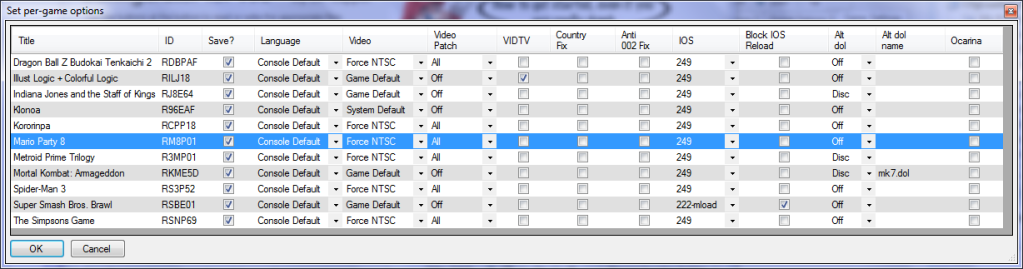
  • Made favorite/hidden games grid sortable by clicking on column headers
  • Made new button for editing the other per-game settings.cfg options via grid as well (see image below)
  • Added more space for text in options for translators (see PabloACZ's issue above)
options.png


Sample cdbs have been updated again.
 

Site & Scene News

Popular threads in this forum