ROM Hack Tinke 0.7.2

  • Thread starter Thread starter pleonex
  • Start date Start date
  • Views Views 134,013
  • Replies Replies 367
  • Likes Likes 9
New version of Tinke 0.8.0. This version is so much faster than before, decompressing, unpacking and opening roms.

Changelog:

*** Support for font files NFTR (edit and view)
*** Support to write Game plugins in other languages (like C/C++)
*** Interface to unpack "big files"
*** Improved the speed of the program, now the program it's so much faster opening roms and files.
** Improved decompress methods, now it's so much faster.

** Improved SDAT plugin:
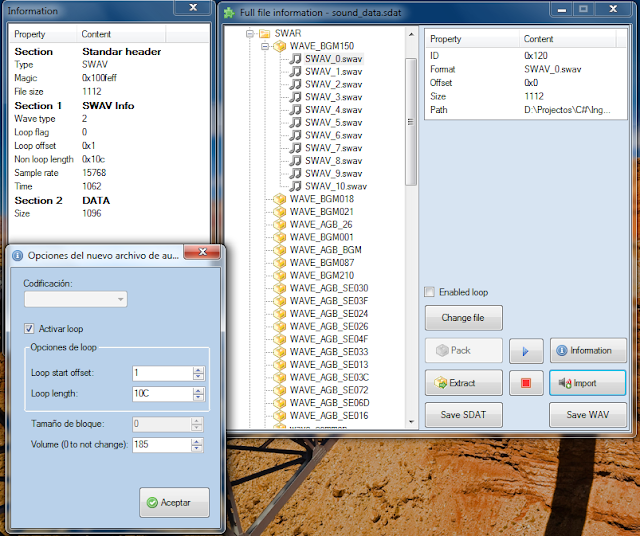
- Information dialog about sound files (STRM, SWAV and SWAR)
- WAV -> SWAV
- Play SWAV files in loop
- Create new SWAR
- Fixed some bugs
- Fixed important errors in SDAT plugin
- Add "change volume" while importing WAV and converting to SWAV audio
* Improved plugin TETRIS DS
* New option in menu "Open as..." -> Compress (you can select the start offset)
* New hotkeys (T to "Open as->Tile", P to "Open as->Palette", M to "Open as->Map", D to decompress)
* New search term: "Length: XXXX" to search files with XXXX bytes of length
* Improved "offset" in NSCR and NCGR files.
* Command to set a new transparent color in NCGR and NCER files
* Improved Images plugin and TGA support

Screenshot:
Font viewer and editor
nftr.PNG

Options to unpack big file "romfile.bin" in Ace Attorney Miles Investigation
pack.PNG

Updated SDAT plugin
sdat.PNG
 
Thank you very much.
wub.gif

The new features look cool.

By the way, from your Google Code download page, what's different between x64 and x86? Are they revision number? So should I use the Tinke 0.8.0 x86 if I want the latest one?
 
jjjewel said:
By the way, from your Google Code download page, what's different between x64 and x86? Are they revision number? So should I use the Tinke 0.8.0 x86 if I want the latest one?
The x86 version is for an architecture of 32 bits and the x64 for 64 bits. Just a little different if you have a computer of 64 bits you can use both version, but the 64 bits version should work faster.
 
pleonex said:
jjjewel said:
By the way, from your Google Code download page, what's different between x64 and x86? Are they revision number? So should I use the Tinke 0.8.0 x86 if I want the latest one?
The x86 version is for an architecture of 32 bits and the x64 for 64 bits. Just a little different if you have a computer of 64 bits you can use both version, but the 64 bits version should work faster.
Thank you. My computer is quite old, so I think I'll stay with 32 bits one.
happy.gif


Edited: Yep, tried the 64bits one and it didn't work on my computer, so I have to go with 32 bits.
By the way, the NFTR part would be nice if the char drop-down list would automatically be selected when we click on each character in the picture.
 
T.Kuranari said:
Can you please add support for Nine Hours, Nine Persons, Nine Doors (999)? All files in there are unknown.
Ok, but first I must guess what compression have the AT6P and AT5P files... If anyone know something about these files it will be faster.

About the SIR0 files I think that they are pack files with images or text, in the /cha/ folder they are images (you can check it using the menu "Open as", first open as palette with "Start byte" 32 and then as tile with "offset" 512, 8bpp and "No tiled") and in the /etc/ folder they are text ("Open as..->Text").

By the moment you can listen some sound of the game
rolleyes.gif
 
T.Kuranari said:
Oh, you are right. Maybe you can give me some advice how to adjust the image correctly?
The width of the image is 64 and 32. As you can view you need to make the "puzzle" of the image, generally using NCER files but in this case this information is inside of the image, so I'm going to make a plugin to view it correctly.

EDIT Sorry the offset value of the tile image is 544.
 
jjjewel said:
pleonex said:
jjjewel said:
By the way, from your Google Code download page, what's different between x64 and x86? Are they revision number? So should I use the Tinke 0.8.0 x86 if I want the latest one?
The x86 version is for an architecture of 32 bits and the x64 for 64 bits. Just a little different if you have a computer of 64 bits you can use both version, but the 64 bits version should work faster.
Thank you. My computer is quite old, so I think I'll stay with 32 bits one.
happy.gif


Edited: Yep, tried the 64bits one and it didn't work on my computer, so I have to go with 32 bits.
By the way, the NFTR part would be nice if the char drop-down list would automatically be selected when we click on each character in the picture.
is mean you computer is using 32 bit, 32 bit it can't run 64 bit, and 64 bit is still can run 32 bit......

@pleonex: wow thank you for update
wink.gif
XD

EDIT: hm ncer is not supported? o.oa

snag0016.png
 
Hmm, would it be possible to add support for Maplestory DS? (*.NXARC) and also Mobiclip files?
 
jjjewel said:
By the way, the NFTR part would be nice if the char drop-down list would automatically be selected when we click on each character in the picture.
Done!

andibad said:
EDIT: hm ncer is not supported? o.oa
There are some files NCER with an special value (0x04 as blocksize) that are different to the others, I'm working on it. In the next version it will be fixed probably.

QUOTE(ron975 @ Sep 15 2011, 02:25 AM)
Hmm, would it be possible to add support for Maplestory DS? (*.NXARC) and also Mobiclip files?
If you mean MODS files, is not possible as they have a specific codec for NDS and nobody knows how is.
About the NXARC file, this is a pack file and I can try to investigate how to unpack it but if you know any tool or the structure of the file, I can do the plugin faster.

EDIT: Problem with some files NCER, fixed!
 
andibad said:
is mean you computer is using 32 bit, 32 bit it can't run 64 bit, and 64 bit is still can run 32 bit......
Now I know. I was just curious so I tried both version. Haha.
biggrin.gif


QUOTE(pleonex @ Sep 15 2011, 10:27 AM) EDIT: Problem with some files NCER, fixed!
There are these files that didn't show up correctly on your program.
http://www.mediafire.com/file/8vdfrt4og85g...evoK_images.zip
They are files for Title image from Girlish Love Revolution (K) game.
It's okay if it doesn't work. I already finished editing the image (manually.)
But I think you might want something to test.
happy.gif


P.S. Love Plus's NFTR fonts didn't work with Tinke 0.8.
There are 2 fonts in the test_font subfolder.
Both of them showed "Arithmetic operation resulted in an overflow" message.
(Again, don't worry if it doesn't work. I don't really need to edit them.
I just play around with your program with the files I have.
biggrin.gif
)
 
jjjewel said:
There are these files that didn't show up correctly on your program.

They are files for Title image from Girlish Love Revolution (K) game.
It's okay if it doesn't work. I already finished editing the image (manually.)
But I think you might want something to test.
happy.gif


P.S. Love Plus's NFTR fonts didn't work with Tinke 0.8.
There are 2 fonts in the test_font subfolder.
Both of them showed "Arithmetic operation resulted in an overflow" message.
(Again, don't worry if it doesn't work. I don't really need to edit them.
I just play around with your program with the files I have.
biggrin.gif
)

Fixed both problems!, thanks for reporting.
 
pleonex said:
ron975 said:
Hmm, would it be possible to add support for Maplestory DS? (*.NXARC) and also Mobiclip files?
If you mean MODS files, is not possible as they have a specific codec for NDS and nobody knows how is.
About the NXARC file, this is a pack file and I can try to investigate how to unpack it but if you know any tool or the structure of the file, I can do the plugin faster.

Well, there is a tool called MapleTrans, it unpacks the NXARC file
http://www.mediafire.com/?vmynnnzellm
 

Site & Scene News

Popular threads in this forum