- Joined
- Nov 20, 2009
- Messages
- 637
- Reaction score
- 317
- Trophies
- 1
- Age
- 49
- Website
- www.gingerbeardman.com
- XP
- 1,407
- Country

Hi. Thanks for the quick reply!
Edit: I'm wondering if the safe zone image I posted is correct. It's from Opera Wii developer guide. I’ll try to find a better one. This page suggests safe area height is even smaller at 448 (so 480-32)
Have you marked up a screenshot? From Dolphin or Wii?
Yes, it’s always been an issue and it's been working it's way up my list until today. I believe it's mostly a WFL issue that has knock-on effects for themes. I believe WFL screen size setup could be incorrect.
Until now I’ve “corrected” it using WFL display size options but that results in uneven scaling and text becomes less readable. I run my Wii at EDTV 480p over Component cables to my 640x480 LCD. Wii menu fits perfectly, games fit perfectly, some homebrew fits perfectly, WFL and others don’t.
Whilst I would love it to be a simple setting my side I don't believe that's it. The Wii menu screen, for example, fits perfectly and if I adjust horizontal alignment even by 1px I see black background rather than overscan or cropped image.
The TV is centered (manually horizontal, automatically vertical) and the overscan I see is where the bezel on my TV obstructs the very top/bottom edges of the panel. I have no overscan at the left/right.
Here are some supporting photos, these all have captions:
Edit: I'm wondering if the safe zone image I posted is correct. It's from Opera Wii developer guide. I’ll try to find a better one. This page suggests safe area height is even smaller at 448 (so 480-32)
Have you marked up a screenshot? From Dolphin or Wii?
Yes, it’s always been an issue and it's been working it's way up my list until today. I believe it's mostly a WFL issue that has knock-on effects for themes. I believe WFL screen size setup could be incorrect.
Until now I’ve “corrected” it using WFL display size options but that results in uneven scaling and text becomes less readable. I run my Wii at EDTV 480p over Component cables to my 640x480 LCD. Wii menu fits perfectly, games fit perfectly, some homebrew fits perfectly, WFL and others don’t.
Whilst I would love it to be a simple setting my side I don't believe that's it. The Wii menu screen, for example, fits perfectly and if I adjust horizontal alignment even by 1px I see black background rather than overscan or cropped image.
The TV is centered (manually horizontal, automatically vertical) and the overscan I see is where the bezel on my TV obstructs the very top/bottom edges of the panel. I have no overscan at the left/right.
Here are some supporting photos, these all have captions:
Last edited by matt!,


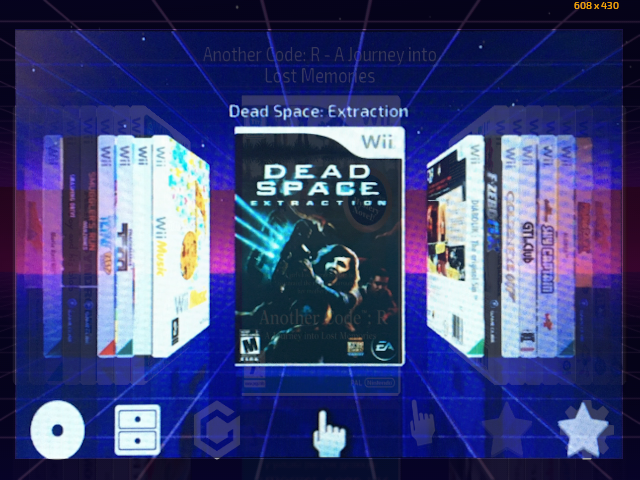
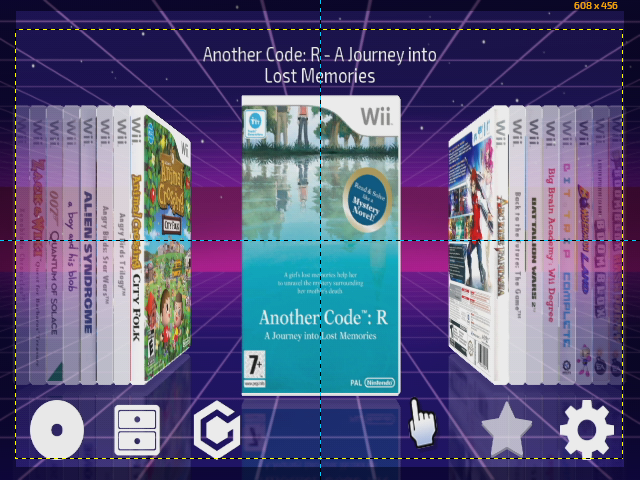


 ). This is noticeable in Dosbox Wii, as well. For this reason I couldn't play games like Alien Breed (all the important info like player energy, keys etc. are out of the screen). In general, every homebrew that outputs at 640x480 has this issue, and it can't be fixed adjusting the screen size on the TV.