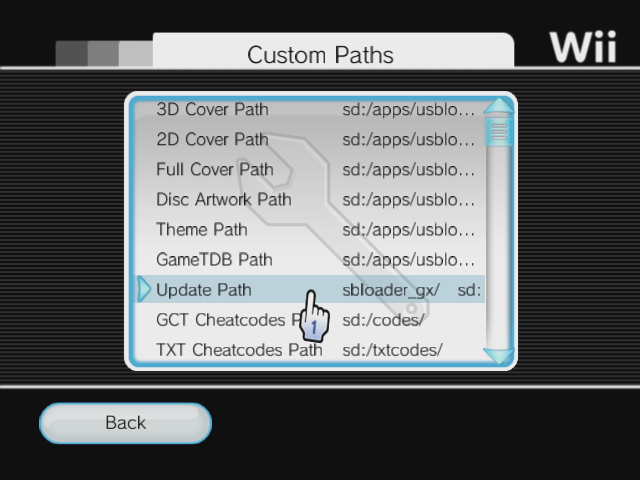
Yeah, clicking any of them in the "Custom Paths" was fine. I talked about the "Update Path", as it's the one that should be where the loader is located "sd:/apps/usbloader_gx/".
How many partitions do you have on your HDD? which formats are they? and which capacity is your drive ? (3TB+ with 4k sectors?)
Is it connected to the slot0 (near the edge) or slot1?
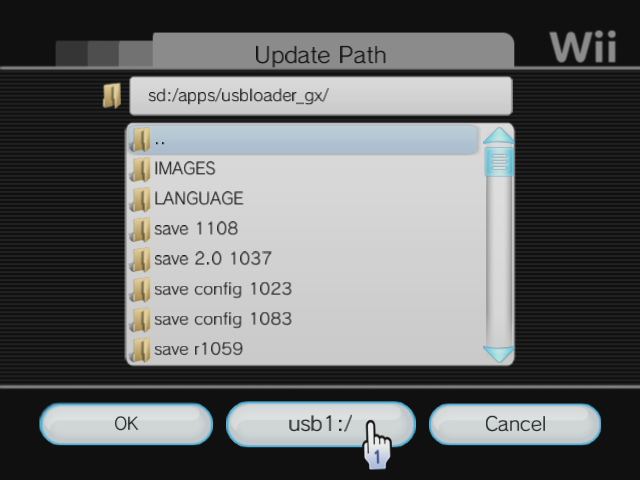
When I go to the "Custom Paths" and click on any entry, I have a middle-bottom button.

,

It's listing the next available device or partition number. If I'm currently on SD, it's listing usb1:/, if I click on it, it shows the content of USB1:/ (fat32) partition so I can browse the path and select one.
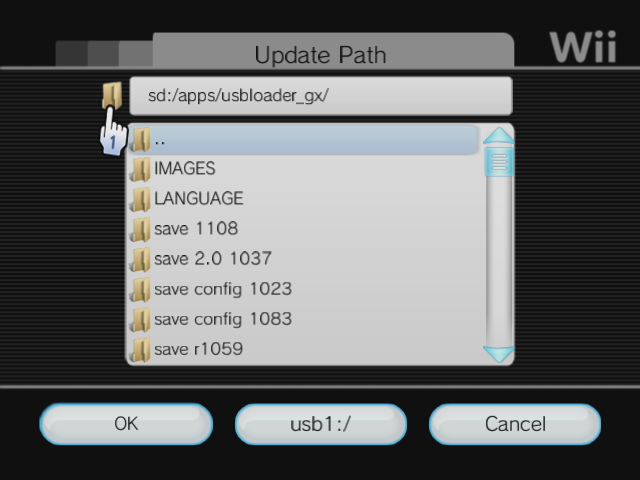
You can also write the path manually by clicking the folder icon here:

If you can't select an entry to edit, maybe it's because it couldn't create or can't access the GXGlobal.cfg file.
if all entries are listed as usb8:/ then it's because it didn't find any device to write the configs to, and stayed on the last tested partition number (we are testing SD, then usb partition 1 to 8 to find a write enabled partition, FAT32/NTFS/ext234)
Do you have any GXGlobal.cfg created on any of your parititons or sd ?
Could you try WiiXplorer homebrew and try to list all partitions and device's content? tell me if it's working with Wiixplorer.










 )
)