Hacking USB Loader GX

  • Thread starter Thread starter blackb0x
  • Start date Start date
  • Views Views 8,066,861
  • Replies Replies 30,226
  • Likes Likes 74
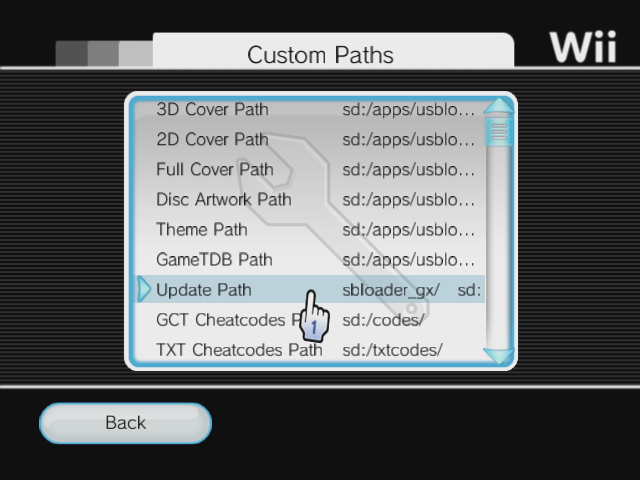
Yeah, clicking any of them in the "Custom Paths" was fine. I talked about the "Update Path", as it's the one that should be where the loader is located "sd:/apps/usbloader_gx/".

How many partitions do you have on your HDD? which formats are they? and which capacity is your drive ? (3TB+ with 4k sectors?)
Is it connected to the slot0 (near the edge) or slot1?

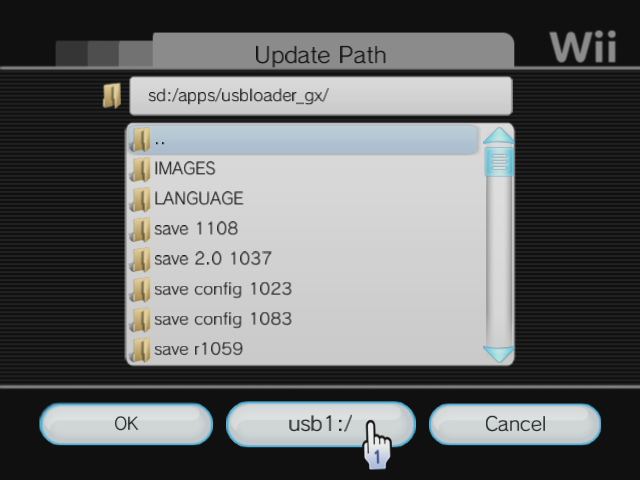
When I go to the "Custom Paths" and click on any entry, I have a middle-bottom button.
,
It's listing the next available device or partition number. If I'm currently on SD, it's listing usb1:/, if I click on it, it shows the content of USB1:/ (fat32) partition so I can browse the path and select one.

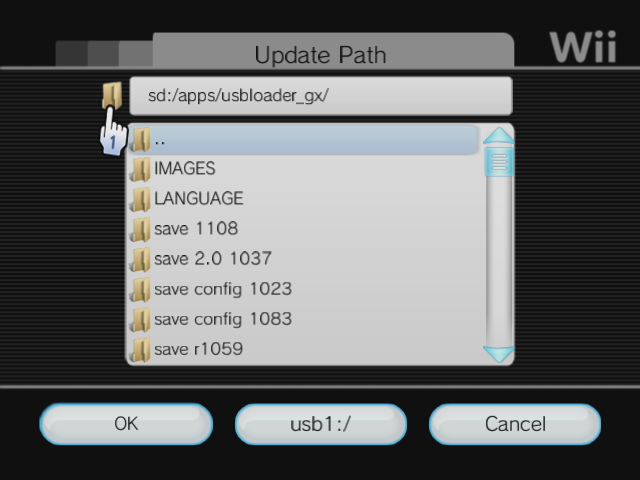
You can also write the path manually by clicking the folder icon here:


If you can't select an entry to edit, maybe it's because it couldn't create or can't access the GXGlobal.cfg file.
if all entries are listed as usb8:/ then it's because it didn't find any device to write the configs to, and stayed on the last tested partition number (we are testing SD, then usb partition 1 to 8 to find a write enabled partition, FAT32/NTFS/ext234)


Do you have any GXGlobal.cfg created on any of your parititons or sd ?

Could you try WiiXplorer homebrew and try to list all partitions and device's content? tell me if it's working with Wiixplorer.

When I click on the Update Path it just says Error, it doesn't go to any other window other than the error message, which I then have to click OK to get out of. I don't get into a folder structure like in your screenshot, and I can't find anyway to switch from (apparently) usb8 to sd.

My drive only has one partition, which is WBFS. As far as I'm aware, it shouldn't have anything else, as I entirely formatted it into WBFS to test this (and it was like that before, too). My drive is 250GB. It's connected to slot 0, near the edge of the Wii.

I don't see how I could have GXGlobal.cfg created anywhere, at least, in the first run since the format, considering both the SD and USB drive had been entirely cleaned. I'm not really sure how WiiXplorer works, but I guess I'll give it a try since I don't appear to have any other options. Thanks for your help so far.
 
so how do i fix a metafrotress responce, i get it with smuf dance, i tried on my wii an my nieces wii.(mine is more up to date then her's.) i've dumped the game 3 times, an still get the same thing, with the "update partition on the disk, an with it scrubbed.?
 
The metaFortress AP is checking if your boot.dol is modified (any ocarina, language selection different than the default from disc region, etc.)

SanGor also said it's checking (badly) if you have installed cIOS.
I don't know about that check.

Scrubbing the ISO has nothing to do with the Anti Piracy check, it's checking only the game's content or your Wii's content.


How do you know it's the metaFortress?
There's a message telling you, or it just black screen?
 
so far the tintin game is looking for:

Code:
/dev/sdio/sdhc
/dev/flash
/dev/mload
/dev/usb2
/dev/usb123

all UBIsoft games seem to do the same, maybe nintendo even supplies the functions?

The game also uses the Metafortress protection, see the .elf file on the disc.

edit: nvm those two (dev/listen the other was the BT dongle of the wii :P)
Do you mean that the game tries to open custom modules to detect the cios?
It shouldn't be a problem with d2x because all custom modules return -101 if any opening request arrives when a title is running.
 
How do you know it's the metaFortress?

the metafortress protection lets game makers specify a certain response for whenever it detects that the game has been modified. this can be subtle stuff like making a level unbeatable by hiding the exit door. it seems that most of the time, the game just immediately crashes. in the case of the smurf game, the programmers were feeling lazy that day, so they just made it display a message "metafortress response".
 
The metaFortress AP is checking if your boot.dol is modified (any ocarina, language selection different than the default from disc region, etc.)

SanGor also said it's checking (badly) if you have installed cIOS.
I don't know about that check.

Scrubbing the ISO has nothing to do with the Anti Piracy check, it's checking only the game's content or your Wii's content.


How do you know it's the metaFortress?
There's a message telling you, or it just black screen?
game doesn't load an the only thing on the screen is "metafortress responce"
 
does GX not recognize games on ntfs if the folder is only the game ID and if so is it possible to add it i would like to use GX as a secondary loader to wiiflow but i dont want to change all 275 of my games file names.
 
It seems it's only checking these paths:
usb:/wbfs/GAMEID.wbfs
usb:/wbfs/GAMEID.iso
usb:/wbfs/GAMEID.ciso
usb:/wbfs/TITLE[GAMEID]/GAMEID.xxx
usb:/wbfs/GAMEID_TITLE/GAMEID.xxx


Wiiflow is using this?
usb:/wbfs/GAMEID/GAMEID.xxx


I can try to add it myself, but don't expect it soon, I'm not good in C++ :unsure:
 
Wiiflow is using this?
usb:/wbfs/GAMEID/GAMEID.xxx
WiiFlow supports the following File Formats and Game Locations on USB:

usb:/wbfs/GAMEID.wbfs
usb:/wbfs/GAMEID_Game title.wbfs
usb:/wbfs/Game title [GAMEID].wbfs
usb:/wbfs/GAMEID/GAMEID.wbfs
usb:/wbfs/GAMEID_Game title/GAMEID.wbfs
usb:/wbfs/Game title [GAMEID]/GAMEID.wbfs

For a NTFS formatted partition .ISO is also supported, i am not sure about .CISO
 
You could change all the path quickly using WiiBackupManager's option :
fat/ntfs > Automatically update Storage Convention when drive is mounted.

Then select a format which exists in both usbloaders, like GameID_Title (you have four choices in WBM), then mount a partition and all will be renamed quickly without even telling you.
 
You could change all the path quickly using WiiBackupManager's option :
fat/ntfs > Automatically update Storage Convention when drive is mounted.

Then select a format which exists in both usbloaders, like GameID_Title (you have four choices in WBM), then mount a partition and all will be renamed quickly without even telling you.
yea i remembered that after i made the post took care of it hours ago lol
 
Actually, yes, but not graphical, and only from Real NAND.
There's a Title launcher in the Homebrew browser (click on the Wii's icon at the bottom).
There's no "return to" patch applied, so exiting will reload the Wii Menu.

But yes, he is currently working on adding VC/WiiWare screen for nand emu too.
 
quick question, i've been using crap channels for my games (kids).. they were working with wiiflow before the newer beta.( 355? was the last rev.they worked.after that they don't even load)
i want to stop using wiiflow. an use only gx.. will the new update work with crap.(yes i know the named changed, but hate the name). if so i guess it's time to spring clean before family comes for the holidays. thanks in advance.
 
I never used Crap, but I think it doesn't work with GX.

In fact I don't know how Crap is working, if it's a forwarder with an argument (gameID), then it should work.
Dimok talked about modifying our Forwarder to auto-load a game, so it should be compatible.

Maybe, just try?
 

Site & Scene News

Popular threads in this forum