Tutorial  Updated

Trinket Internal Install.

Here's A Guide To Installing The Trinket M0 Into The Switch.

Program The Trinket Before You Remove The Usb Port, Saves You Doing It After You Complete The Install.

First Thing To Do Is Remove The Usb Port From The Trinket, If You Have A Hot Air Wand Then Use That To Remove The Port It Will Reduce The Risk Of Damage To The Pads.
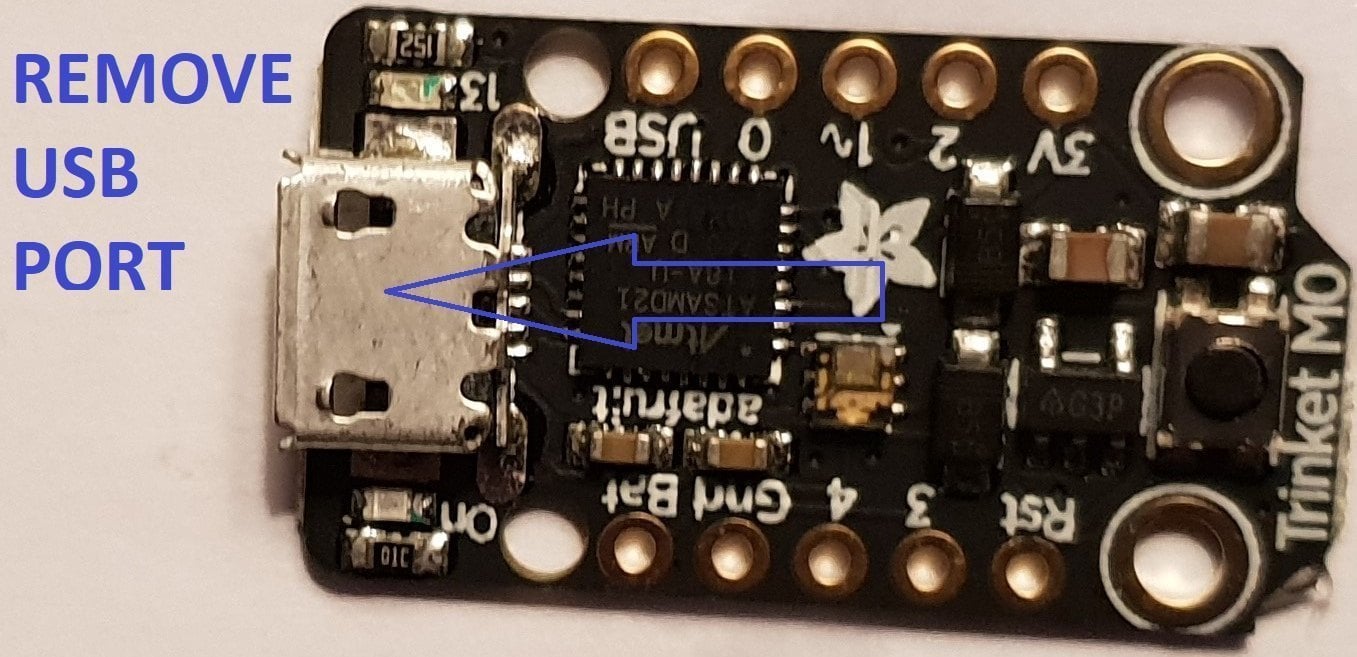
usb intact.jpg


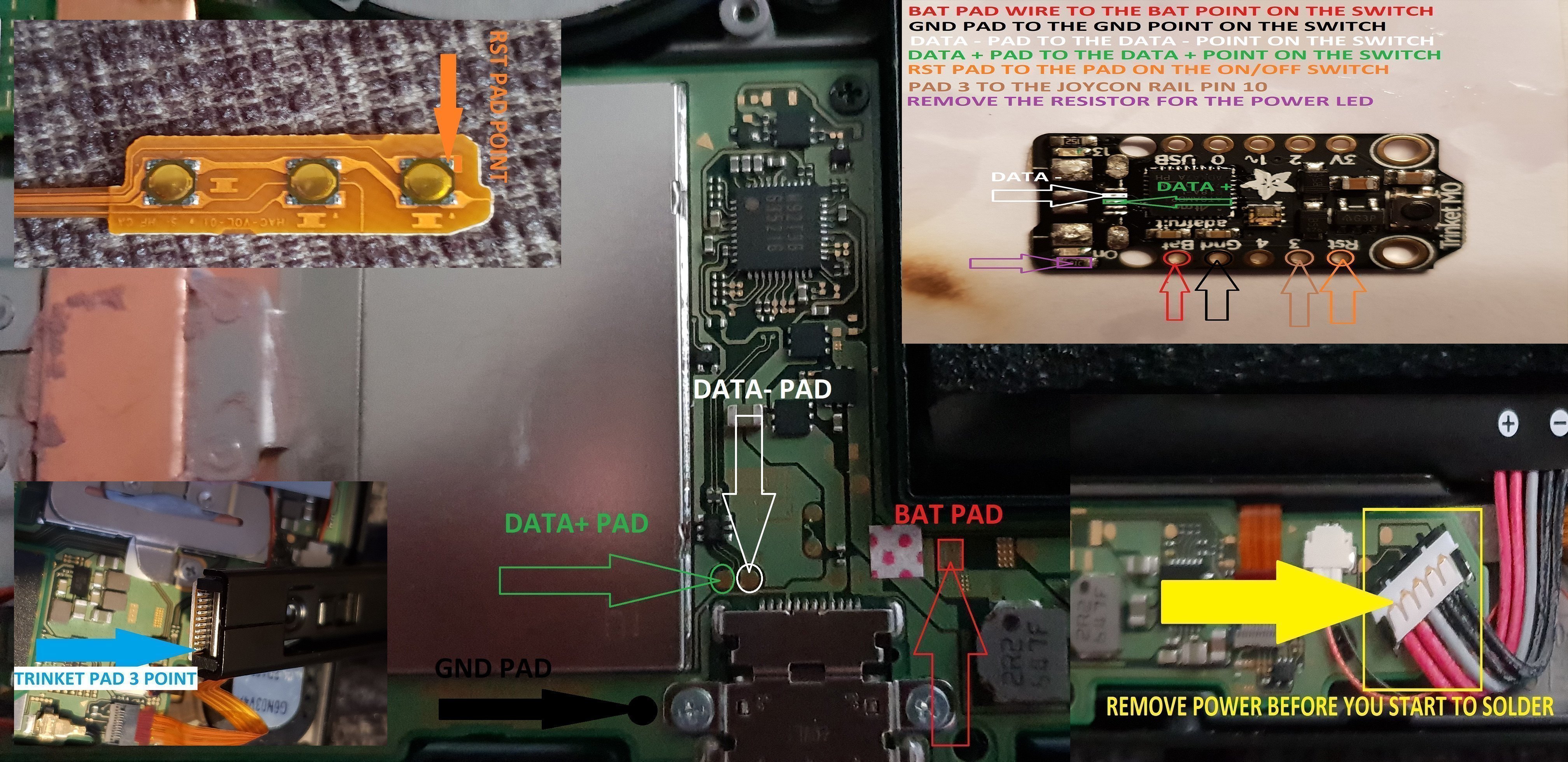
Now That The Usb Port Has Been Removed You Want To Solder Wire To The Data Pads, White = Data- And Green Data+ In This Guide.

Now Solder Wire To The Bat Pad = Red, Gnd Pad = Black, Pad 4 = Orange & Pad 3 = Brown In This Guide.

Also Remove The Resistor Next To The Ppower Led Mark Out In Purple In This Guide.
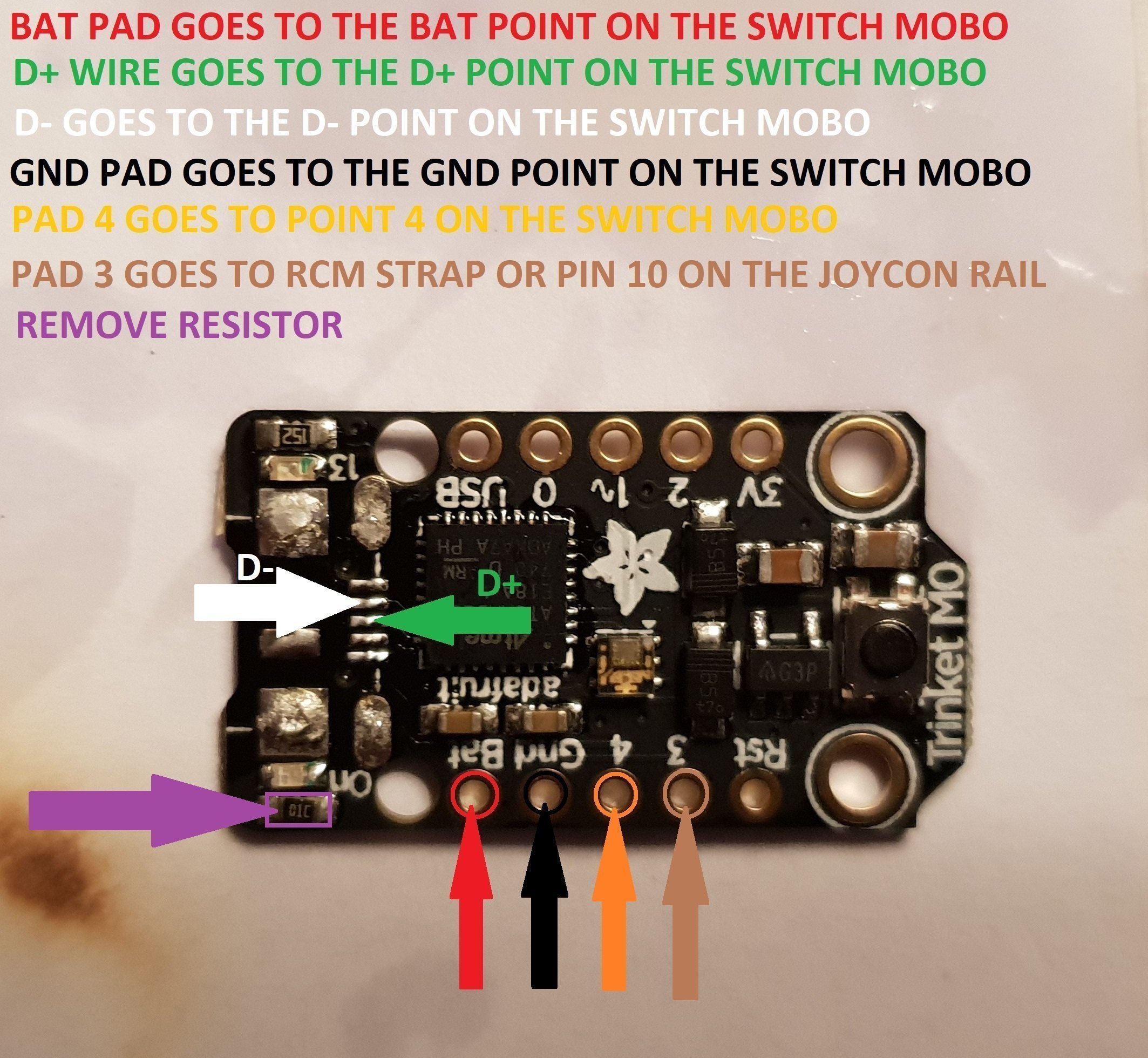
Trinket Points.jpg


When You Have The Trinket All Prepared, You Can Now Proceed To The Install To The Switch.
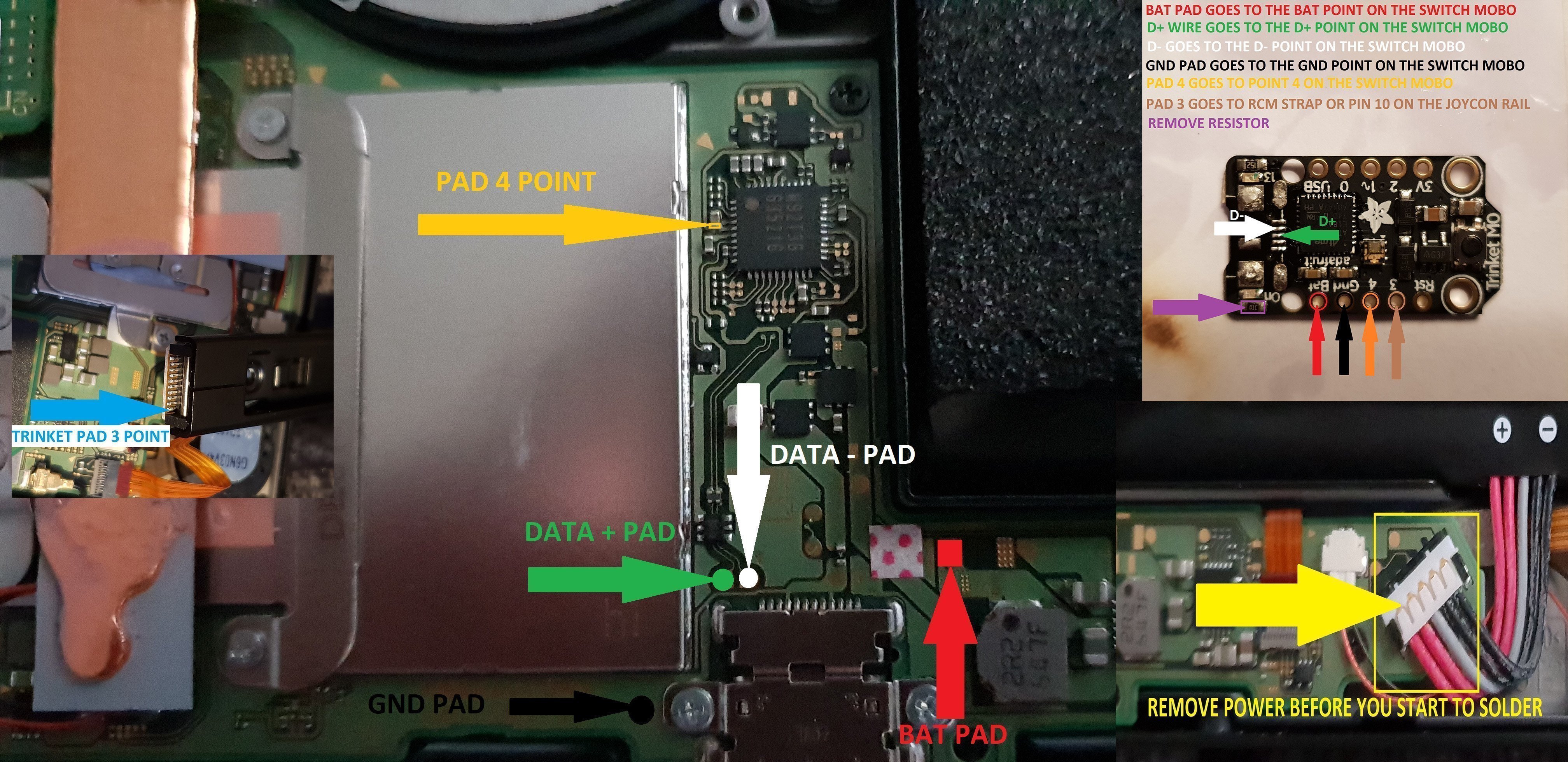
trinket install points.jpg


Once The Install Is Completely Done Then Clean Up The Points You Have Soldered To Using Isopropyl And Cotton Buds/Q-Tips.
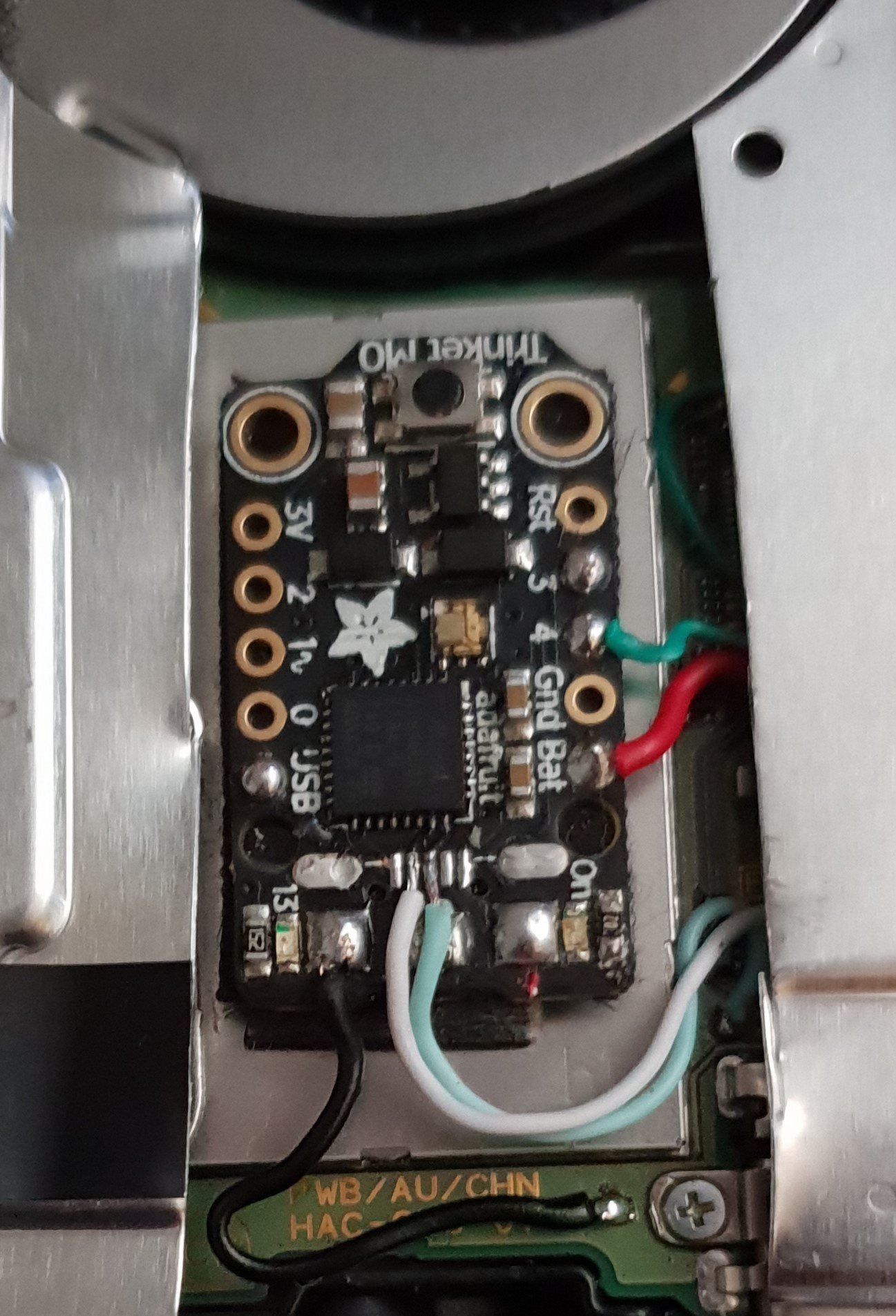
Finished.jpg


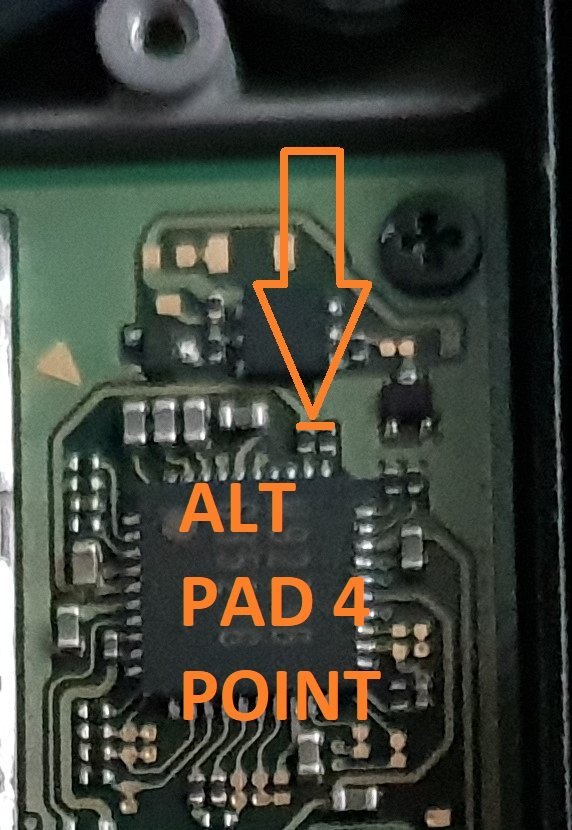
Alternative Point For Pad 4.

Altternative Pad 4 Point.jpg


Alternative Points For Joycon Rail Pin 10.

If You Decide On Using This Alternative Point Then Use Enamel Coated Jumper Wire 0.10mm.
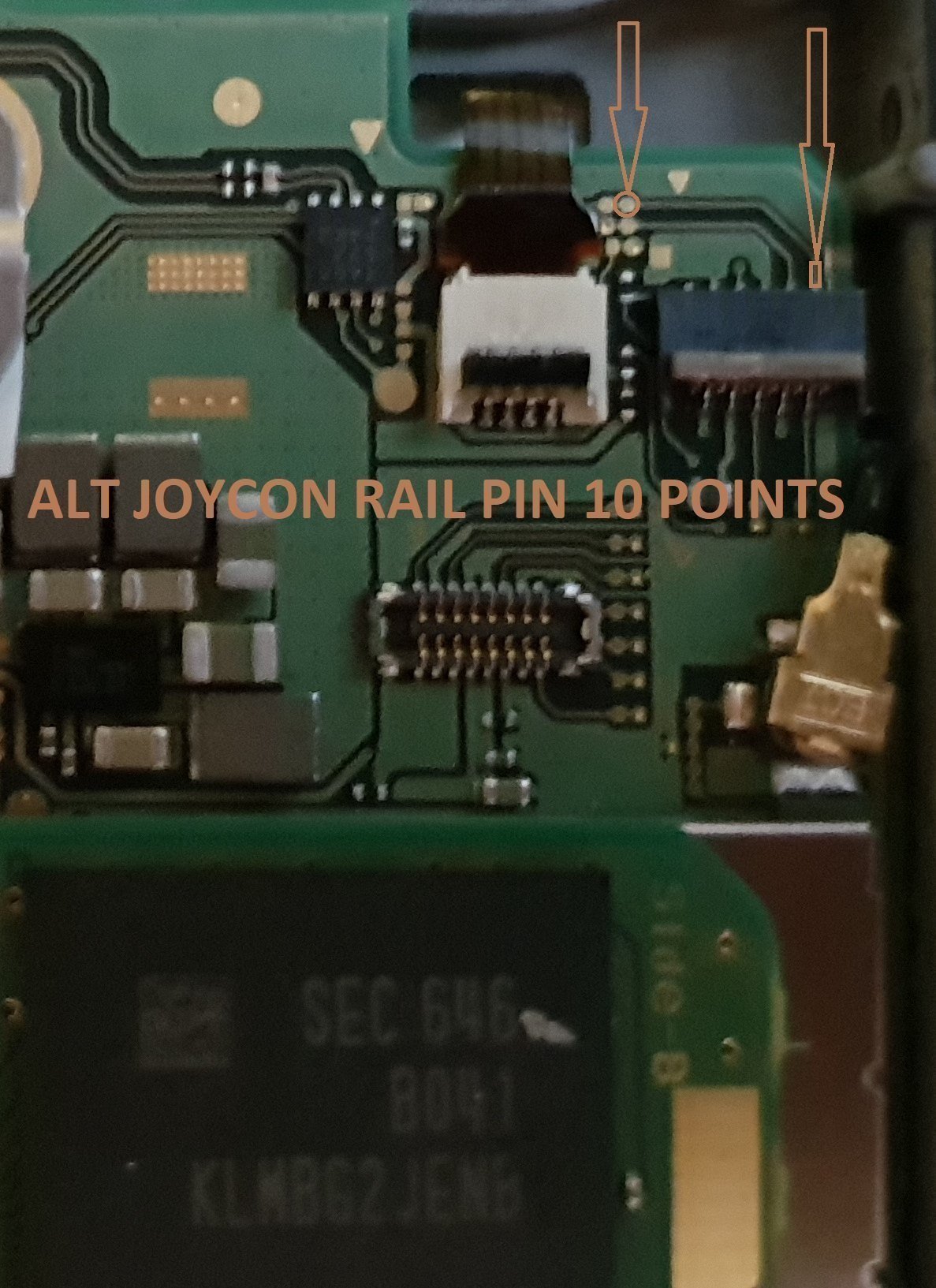
Alt Joycon Rail Pin 10 Point.jpg


Remember Take Your Time It's Not A Race lol. Rushing Can Lead To Mistakes.

Tools Required.

Kynar Wire 30 AWG.
Soldering Iron.
Hot Air Wand For Usb Port Removal(Optional)
Isopropyl.
Cotton Bud/Q-Tips.
Flux.
Solder.
Enamel Jumper Wire (Optional)


Thanks And Credit Goes To Xboxexpert For This Solution.

I Think That Covers Everything.

EDIT..

here's another method for the install of the trinket, this method does away with the pad 4, as some may find it tricky to solder to the cap used on the mobo.

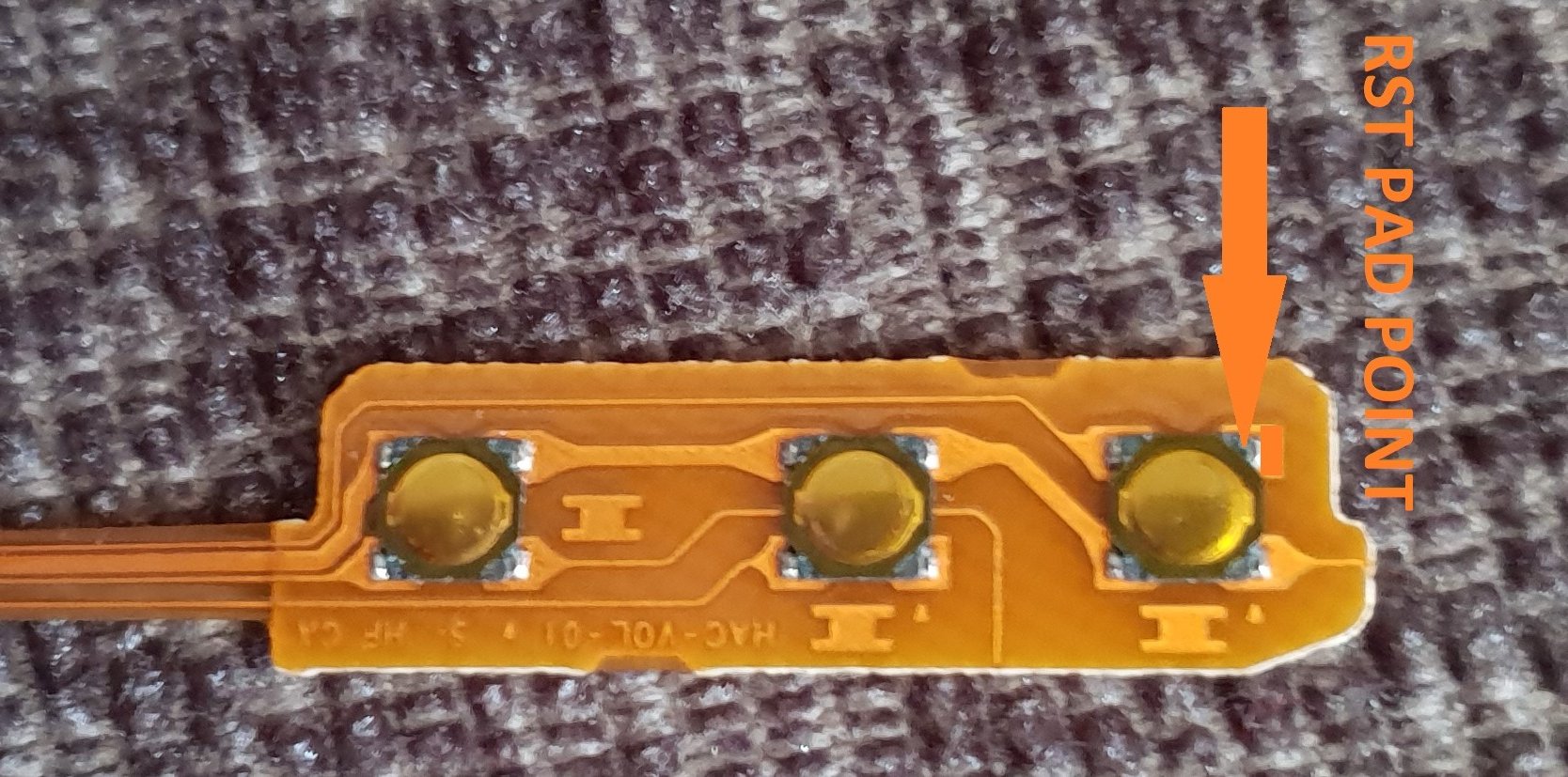
the rst pad is used instead and the wire is linked to the power button, Also this has a bonus that you can double press the power button to put the trinket into boot loader mode for uploading a new payload.

of course you don't have to use the rst pad at all, you can't just press power button and volume up button, then press reset button for rcm mode.

this method should be ok for the novices.

install at your own risk.
another install.jpg


the pad on the power button to use.

power button point.jpg


i have one more method to try but I really think this one is not to bad method.

the more methods the better I say, of course to try and make it as easy as possible for pros and novices.

EDIT...
another method for the install of the trinket.

this method is basically same as all other methods, just a different points uses for the bat pad and rst pad.

this install will allow you to have the trinket power off when you fully power off the switch.

double press the reset button on the trinket to get into boot loader mode, this may take a couple of attempts to do.

the payload that you use already will work with this method no need for new ones.

here's the diagram for method 3, you could possibly have this as a 4 wire install, if you install auto rcm mode, but as my sd card module port is buggerd I couldn't test that out.
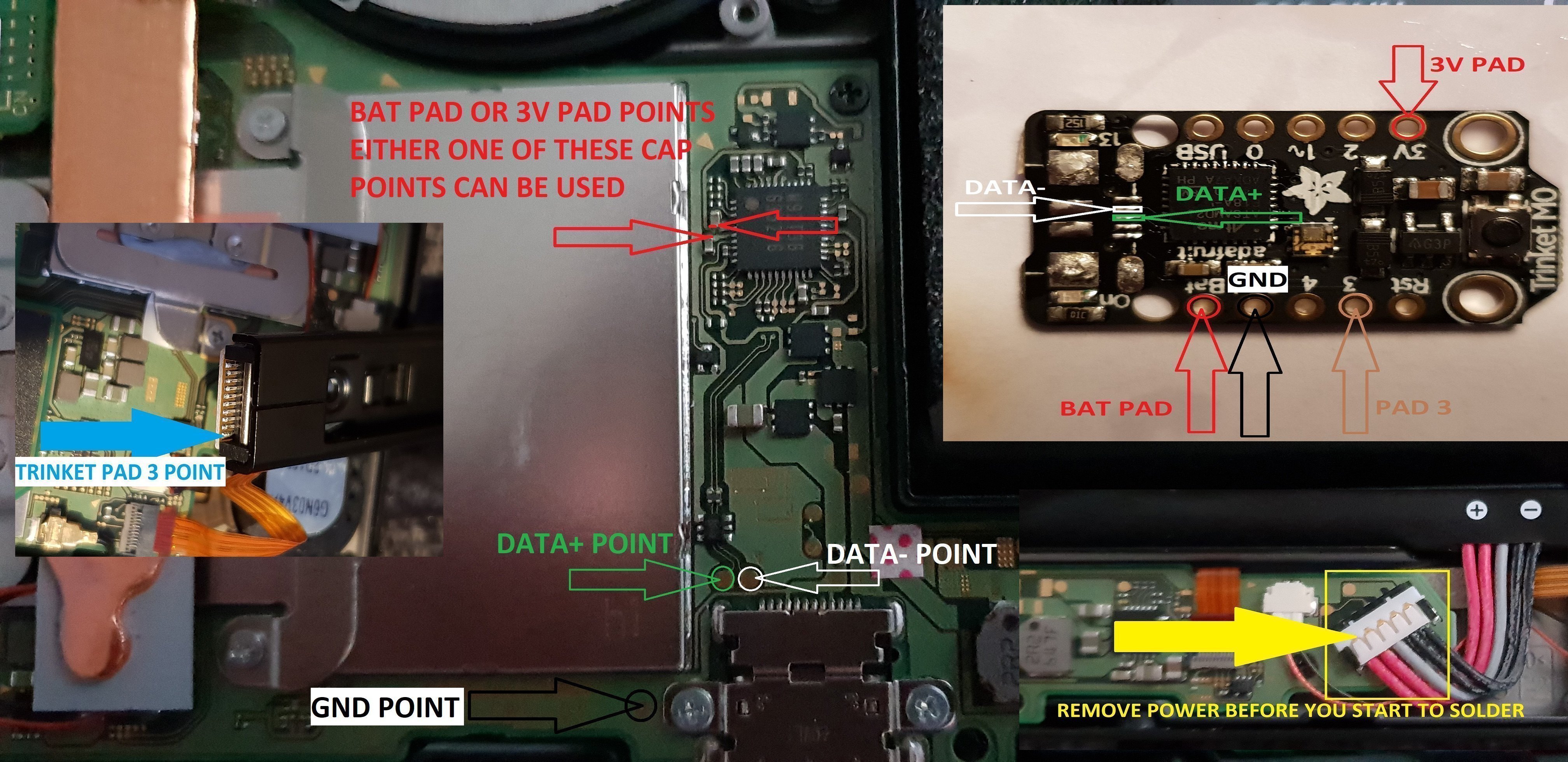
twinket power off.jpg


ok it seems method 3 needs auto rcm installed for it to work without the need to use the rst pad

so for them that don't want to use auto rcm mode then solder a wire from rst pad to the point on the power button, and use pad 3 to the pin 10 on the joycon rail or one of the alt points on mobo.

beware the alt points are small so use at your own risk.

ok anyone with changing issues test these 2 points, you should get 5v on the usb port side, and around 3.2v on the switch side.

if your getting the volts on the switch side that are fluctuating up & down then replace the part with the v on top it's a diode, you want one that fits so the actual size is either 0402 or 0603 in dimension (i'm using 0402/0603 as an example for size purpose only)

around page 16 has more info about this component..

dont come moaning if you damage your console doing this install, i'm not responsible for you opening or taking a soldering iron to your console.
you do this at your own risk any damage is down to yourself.
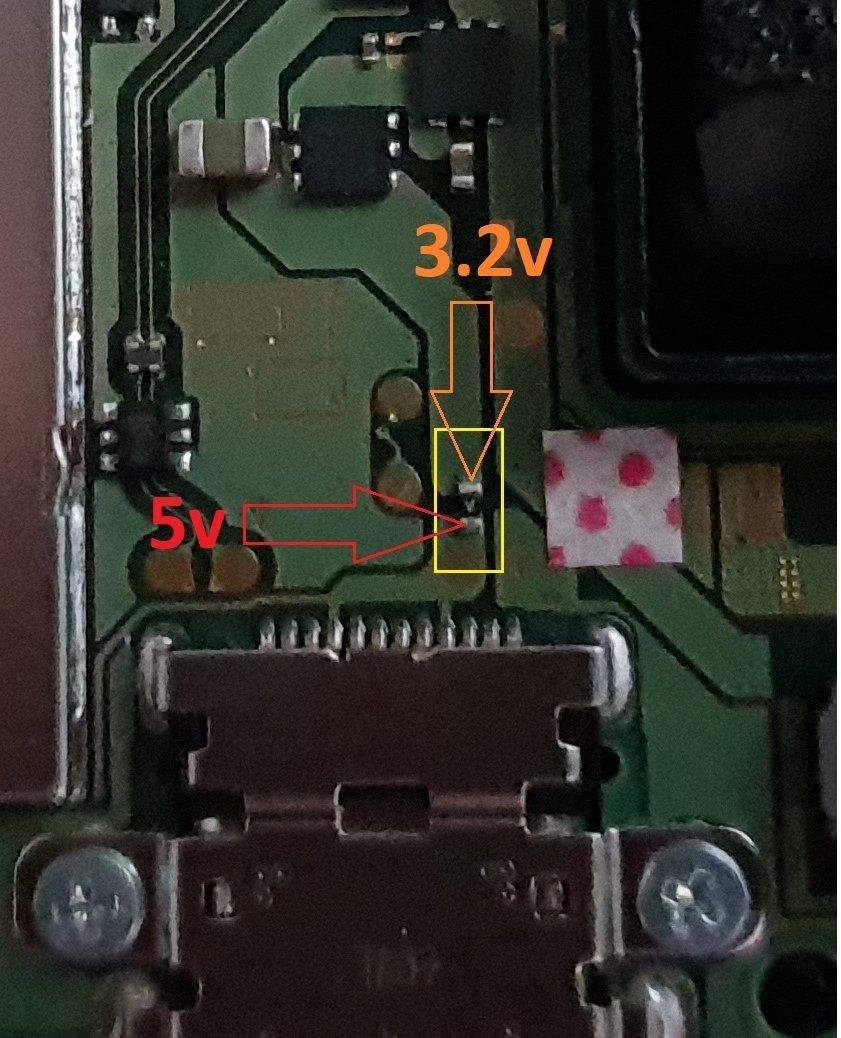

charger_issue_volts.jpg


another thing if your trinket starts to get very hot to the point you can't touch it, then the atmel ATSAMD21E18A-U ic is on it's way out, so you will need to replace the ic or just replace your trinket.

at some point it wont power up after this has happened.
1 = gets very hot.
2 = reset starts to become tempermental .
3 = dead
4 = fix replace the atmel ATSAMD21E18A-U ic

edit

added uf2 drag and drop files for r4 trinket gemma dongles or for a 4 wire internal install.

atmosphere
hekate 4.2
Sxos
rajnx
reinx
 

Attachments

  • Trinket All In One.jpg
    Trinket All In One.jpg
    123.9 KB · Views: 3,983
  • Trinket-R4-Gemma-D&D-Files.zip
    421.3 KB · Views: 534
Last edited by M-O-B, , Reason: added updated uf2 file.

mrdude

Developer
Developer
Joined
Dec 11, 2015
Messages
2,483
Trophies
1
Age
55
XP
6,616
@frep - you could test this circuit without connecting to a switch, use test using an led instead of connecting to M0.

Out of interest - what triggers D1 (pin 3) on your drawing - is this a timer you're going to set in the software?
 

frep

Well-Known Member
Newcomer
Joined
Jul 7, 2018
Messages
52
Trophies
0
Age
41
XP
464
Country
Switzerland
@frep - you could test this circuit without connecting to a switch, use test using an led instead of connecting to M0.

Out of interest - what triggers D1 (pin 3) on your drawing - is this a timer you're going to set in the software?

Yeah, no real switch involved for testing. My "beadboard-switch" is a lipo-battery and three buttons :-)
IMG_8288.JPG

But now I need order some suitable transistors in a sot23 package and some sot23 breakout-boards to test them on the breadboard.

D1 has to be set in the software. Init as output and set to high until all of the payload is sent, then set to low.
(Depending of the value of C4 and R4, feeding C4 through D1, is probably not even mandatory... the initial charge of C4 could be enough for the whole payload-sending process... in this case, Q3 and R3 would not be needed).
We will see once I have the parts on my breadboard.
 
  • Like
Reactions: mrdude

M-O-B

Well-Known Member
OP
Member
Joined
Jun 23, 2018
Messages
281
Trophies
0
Age
53
XP
573
Country
United Kingdom
this is my install, hope it helps, The pin 3 is the hardest, hope soon there will be an alt point for it.
I used the solder iron to trim down the reset button on the M0 so the case could close all way down.

only thing I'm not a fan of is hot glue on the pads you have the wires solder to on mobo.

potential of pulling the pads if you ever need to remove the trinket.
 
  • Like
Reactions: Deleted User

Ferris1000

Well-Known Member
Member
Joined
Mar 10, 2017
Messages
234
Trophies
0
Age
32
Location
Titan
XP
2,011
Country
Germany
I checked this unknown SMD part and if i power on my Nintendo Switch it’s 3.2v Output.

I bridged it and know with 5v it’s charging again.

I think it’s a fuse because if we plug any USB devices they get power from the USB C port.

What kind of fuse do I need? Does anyone know which one it is? I need the Voltage and amp values of the Fuse
 

taxco

Well-Known Member
Member
Joined
Jan 20, 2016
Messages
210
Trophies
0
Age
39
Location
NL
XP
391
Country
Netherlands
only thing I'm not a fan of is hot glue on the pads you have the wires solder to on mobo.

potential of pulling the pads if you ever need to remove the trinket.
Its jus a bit, to hold all in place. Removing its is not so hard, reheat it using hot air gun.
 

mrdude

Developer
Developer
Joined
Dec 11, 2015
Messages
2,483
Trophies
1
Age
55
XP
6,616
I checked this unknown SMD part and if i power on my Nintendo Switch it’s 3.2v Output.

I bridged it and know with 5v it’s charging again.

I think it’s a fuse because if we plug any USB devices they get power from the USB C port.

What kind of fuse do I need? Does anyone know which one it is? I need the Voltage and amp values of the Fuse

It's not a fuse - did you not read the posts before? If it was a fuse voltage would be the same either side of it. It's a diode - to stop current traveling from the switch to the usb device you have plugged into it - hence the different voltages either side of it. Go back a few posts and read - we even posted links on what to buy!

https://www.ebay.co.uk/itm/TVS-DIOD...979869?hash=item51ff90065d:g:xMEAAOSwqYhZ16Vh
 
Last edited by mrdude,
  • Like
Reactions: Deleted User

mrdude

Developer
Developer
Joined
Dec 11, 2015
Messages
2,483
Trophies
1
Age
55
XP
6,616
Last edited by mrdude,
D

Deleted User

Guest
ok anyone with changing issues test these 2 points, you should get 5v on the usb port side, and around 3.2v on the switch side.

if your getting the volts on the switch side that are fluctuating up & down then replace the part with the v on top, I'm not exactly sure what it is some kind of fuse or diode.

don't use the usb pad for the rst pad, although I've had no issues using this pad, just don't use it..

View attachment 135305

I'm going to cry if that's the mythical 3.x volt point we've been searching for lol, if that's stable we could bypass the voltage regulator and drop the power drain when in sleep mode to almost nothing.
 
  • Like
Reactions: mrdude

mrdude

Developer
Developer
Joined
Dec 11, 2015
Messages
2,483
Trophies
1
Age
55
XP
6,616
I'm going to cry if that's the mythical 3.x volt point we've been searching for lol, if that's stable we could bypass the voltage regulator and drop the power drain when in sleep mode to almost nothing.

I don't have my switch just now, I've left it at my nieces house so she can play on it during the holidays. But you could get a multi-meter and check on this side of that big ass capacitor: Also there's no need to bypass the voltage regulator then as it wouldn't be wasting any voltage, and the board would still be protected with a diode (so no reverse polarity) & the microprocessor would be protected from frying if the voltage went over 3.6v.

25uiphg.jpg
 
Last edited by mrdude,

Ferris1000

Well-Known Member
Member
Joined
Mar 10, 2017
Messages
234
Trophies
0
Age
32
Location
Titan
XP
2,011
Country
Germany
ok anyone with changing issues test these 2 points, you should get 5v on the usb port side, and around 3.2v on the switch side.

if your getting the volts on the switch side that are fluctuating up & down then replace the part with the v on top, I'm not exactly sure what it is some kind of fuse or diode.

don't use the usb pad for the rst pad, although I've had no issues using this pad, just don't use it..

View attachment 135305
what Kind of Part is this? is this a Resistor, a Diode or a Fuse?
i need more information and the required Values of this Part because Two of my Nintendo Switch Console still doesn't Charge because this Part is broken on my Switch Consoles.
I searched for SMD Parts with V at the Top but i couldn't find anything.
 

mrdude

Developer
Developer
Joined
Dec 11, 2015
Messages
2,483
Trophies
1
Age
55
XP
6,616
what Kind of Part is this? is this a Resistor, a Diode or a Fuse?
i need more information and the required Values of this Part because Two of my Nintendo Switch Console still doesn't Charge because this Part is broken on my Switch Consoles.
I searched for SMD Parts with V at the Top but i couldn't find anything.

FFS - you've already been told it's a DIODE - how many times do you need told - I've already posted an ebay link for what to get, any SMD diode that can work over 5 volts and 2 amps will work - there's no need to get a specific one, they all work the same way. (just make sure you solder it on the correct way around).
 
  • Like
Reactions: M-O-B

M-O-B

Well-Known Member
OP
Member
Joined
Jun 23, 2018
Messages
281
Trophies
0
Age
53
XP
573
Country
United Kingdom
I'm going to cry if that's the mythical 3.x volt point we've been searching for lol, if that's stable we could bypass the voltage regulator and drop the power drain when in sleep mode to almost nothing.

that's the usb point it won't work well it didn't for me, but maybe you have something different in mind to what I've tried.

I don't have my switch just now, I've left it at my nieces house so she can play on it during the holidays. But you could get a multi-meter and check on this side of that big ass capacitor: Also there's no need to bypass the voltage regulator then as it wouldn't be wasting any voltage, and the board would still be protected with a diode (so no reverse polarity) & the microprocessor would be protected from frying if the voltage went over 3.6v.

25uiphg.jpg

that big ass cap is on same line as the usb pad 3.2v

FFS - you've already been told it's a DIODE - how many times do you need told - I've already posted an ebay link for what to get, any SMD diode that can work over 5 volts and 2 amps will work - there's no need to get a specific one, they all work the same way. (just make sure you solder it on the correct way around).

I'll probably update the op with a bit of info about the diode coz not many read though a few old pages again.

also probably clean up the op a tad once I get time to do so.
 
Last edited by M-O-B,

djp-AKA-bionic

Well-Known Member
Member
Joined
Jan 3, 2018
Messages
102
Trophies
0
Age
40
XP
303
Country
United States
did i get a bad trinket m0? i cannot get windows or arduino to recognize it at all, tried 7 different usb cables, different ports, installed drivers, re-installed drivers, getting a solid green light
 

taxco

Well-Known Member
Member
Joined
Jan 20, 2016
Messages
210
Trophies
0
Age
39
Location
NL
XP
391
Country
Netherlands
did i get a bad trinket m0? i cannot get windows or arduino to recognize it at all, tried 7 different usb cables, different ports, installed drivers, re-installed drivers, getting a solid green light
Did you press the reset button 2 times fast?
Do you hear a sound when you connect it to usb?
 

djp-AKA-bionic

Well-Known Member
Member
Joined
Jan 3, 2018
Messages
102
Trophies
0
Age
40
XP
303
Country
United States
ive tried pressing reset twice fast, nothing happens, and no, no usb sound when connected.. i did notice a picture of the driver install here earlier in the thread, however it had more driver options, mine only showed 4, and i installed all 4

--------------------- MERGED ---------------------------

I had a feeling to order more than one... sucks.
 

M-O-B

Well-Known Member
OP
Member
Joined
Jun 23, 2018
Messages
281
Trophies
0
Age
53
XP
573
Country
United Kingdom
FFS - you've already been told it's a DIODE - how many times do you need told - I've already posted an ebay link for what to get, any SMD diode that can work over 5 volts and 2 amps will work - there's no need to get a specific one, they all work the same way. (just make sure you solder it on the correct way around).
ive tried pressing reset twice fast, nothing happens, and no, no usb sound when connected.. i did notice a picture of the driver install here earlier in the thread, however it had more driver options, mine only showed 4, and i installed all 4

--------------------- MERGED ---------------------------

I had a feeling to order more than one... sucks.

download this driver https://github.com/adafruit/Adafruit_Windows_Drivers/releases/latest just tick all the boxes that way your coverd for any other divices in future, or just follow this guide https://learn.adafruit.com/adafruit-trinket-m0-circuitpython-arduino/windows-driver-installation.

weather you have the drivers installed or not it should at least get 2 red leds when your double press the reset button,only needs power for that.
 
  • Like
Reactions: FXDX

djp-AKA-bionic

Well-Known Member
Member
Joined
Jan 3, 2018
Messages
102
Trophies
0
Age
40
XP
303
Country
United States
download this driver https://github.com/adafruit/Adafruit_Windows_Drivers/releases/latest just tick all the boxes that way your coverd for any other divices in future, or just follow this guide https://learn.adafruit.com/adafruit-trinket-m0-circuitpython-arduino/windows-driver-installation.

weather you have the drivers installed or not it should at least get 2 red leds when your double press the reset button,only needs power for that.

i dont get the 2 red lights at all, just a solid green light, still no go with the new drivers
 

M-O-B

Well-Known Member
OP
Member
Joined
Jun 23, 2018
Messages
281
Trophies
0
Age
53
XP
573
Country
United Kingdom
lhave updated the op to cover a bit about the charger issue..

i dont get the 2 red lights at all, just a solid green light, still no go with the new drivers

if your not getting 2 red leds then something not right, when you plug it in are you getting anything pop up on your pc.

what actually happens when you press the reset button,also post a image of your actual trinket, think someone the other day had order the incorrect one and had issues..
 

djp-AKA-bionic

Well-Known Member
Member
Joined
Jan 3, 2018
Messages
102
Trophies
0
Age
40
XP
303
Country
United States
lhave updated the op to cover a bit about the charger issue..


if your not getting 2 red leds then something not right, when you plug it in are you getting anything pop up on your pc.

what actually happens when you press the reset button,also post a image of your actual trinket, think someone the other day had order the incorrect one and had issues..

windows doesnt respond at all, no dings, dont see nothing in device manager, this is what i ordered

https://www.digikey.com/products/en?keywords=1528-2361-ND
 

M-O-B

Well-Known Member
OP
Member
Joined
Jun 23, 2018
Messages
281
Trophies
0
Age
53
XP
573
Country
United Kingdom
windows doesnt respond at all, no dings, dont see nothing in device manager, this is what i ordered

https://www.digikey.com/products/en?keywords=1528-2361-ND

ok so it powers up so it's getting power, is it only the green led that lights up, and when you press the reset button once what happens on the trinket, i would solder power direct to the bat and gnd pad to rule out any usb lead issues, that way you can test the reset and see if it gets the 2 red leds when you double press.

put a bit of pressure on the ic and see if anything changes, could be your just unlucky and got a faulty one these things can happen from time to time.
 
Last edited by M-O-B,
General chit-chat
Help Users
  • No one is chatting at the moment.
  • Skelletonike @ Skelletonike:
    3h left until work finishes, bah
  • Skelletonike @ Skelletonike:
    link doesn't work
    +2
  • Skelletonike @ Skelletonike:
    1H left, such a slow week.
  • Sonic Angel Knight @ Sonic Angel Knight:
    Okay, I had spaghetti :P
  • SylverReZ @ SylverReZ:
    Hope they made lots of spaget
  • K3N1 @ K3N1:
    Chill dog
  • SylverReZ @ SylverReZ:
    Chilli dog
  • Skelletonike @ Skelletonike:
    Damn, I'm loving the new zelda.
  • xtremegamer @ xtremegamer:
    loving the new zelda, i started a game, it was so fucking good, so i
    am waiting on my friend to get home so we can start a new one together
  • Skelletonike @ Skelletonike:
    I just dislike that they don't let me choose the voices before the game starts. Happened with botw as well, had to change to japanese and restart.
  • K3N1 @ K3N1:
    But the important question is can you choose gender
  • Skelletonike @ Skelletonike:
    Same way you can choose Gerald's gender.
  • Skelletonike @ Skelletonike:
    *Geralt, damn autocorrect.
  • Psionic Roshambo @ Psionic Roshambo:
    But can he be trans? Lol
  • K3N1 @ K3N1:
    Zelda transforms into link
  • Psionic Roshambo @ Psionic Roshambo:
    Link I'm not the princess your looking for.... *Pulls a crying game*
  • K3N1 @ K3N1:
    *skirt up* it's exactly what I always wanted
  • Skelletonike @ Skelletonike:
    Just scanned all my zelda amiibos, took a while but didn't get anything that cool, did get the lon lon ranch hylian fabrics though.
  • Skelletonike @ Skelletonike:
    It was pretty funny when I scanned wolf link and got a shit load of meat.
  • K3N1 @ K3N1:
    @Skelletonike, btw I ran that custom for mgs4 on the deck I'm amazed it got that far in game
  • K3N1 @ K3N1:
    Plug in*
    K3N1 @ K3N1: Plug in*