Tutorial  Updated

Trinket Internal Install.

Here's A Guide To Installing The Trinket M0 Into The Switch.

Program The Trinket Before You Remove The Usb Port, Saves You Doing It After You Complete The Install.

First Thing To Do Is Remove The Usb Port From The Trinket, If You Have A Hot Air Wand Then Use That To Remove The Port It Will Reduce The Risk Of Damage To The Pads.
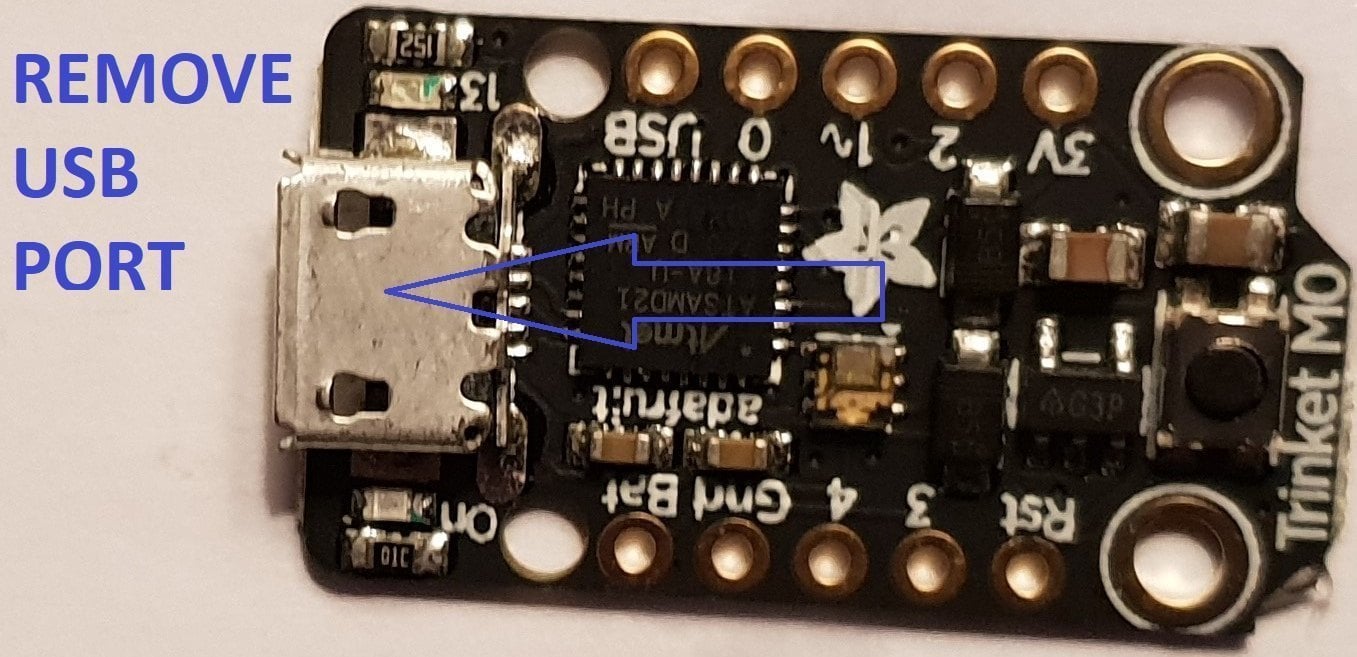
usb intact.jpg


Now That The Usb Port Has Been Removed You Want To Solder Wire To The Data Pads, White = Data- And Green Data+ In This Guide.

Now Solder Wire To The Bat Pad = Red, Gnd Pad = Black, Pad 4 = Orange & Pad 3 = Brown In This Guide.

Also Remove The Resistor Next To The Ppower Led Mark Out In Purple In This Guide.
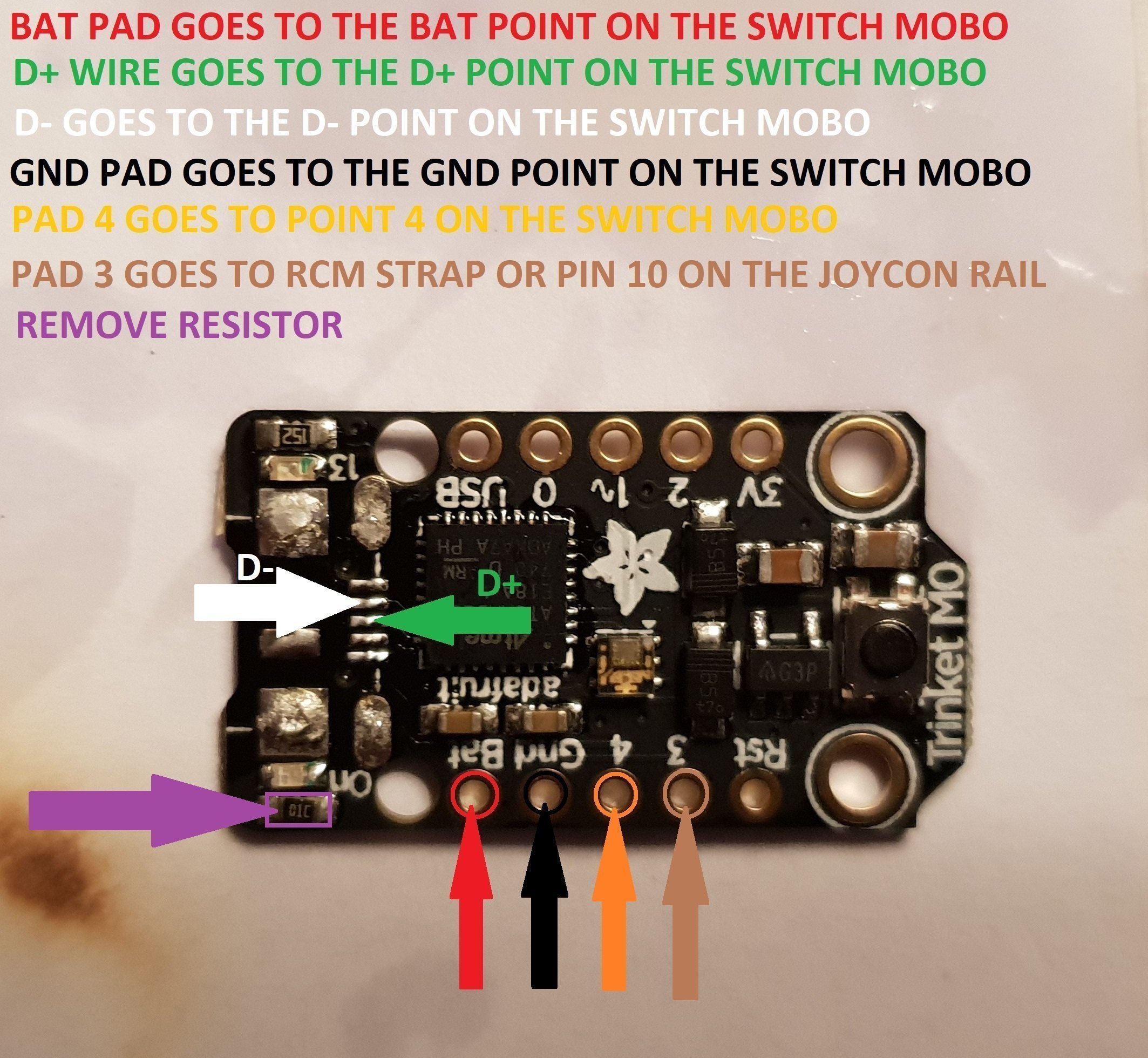
Trinket Points.jpg


When You Have The Trinket All Prepared, You Can Now Proceed To The Install To The Switch.
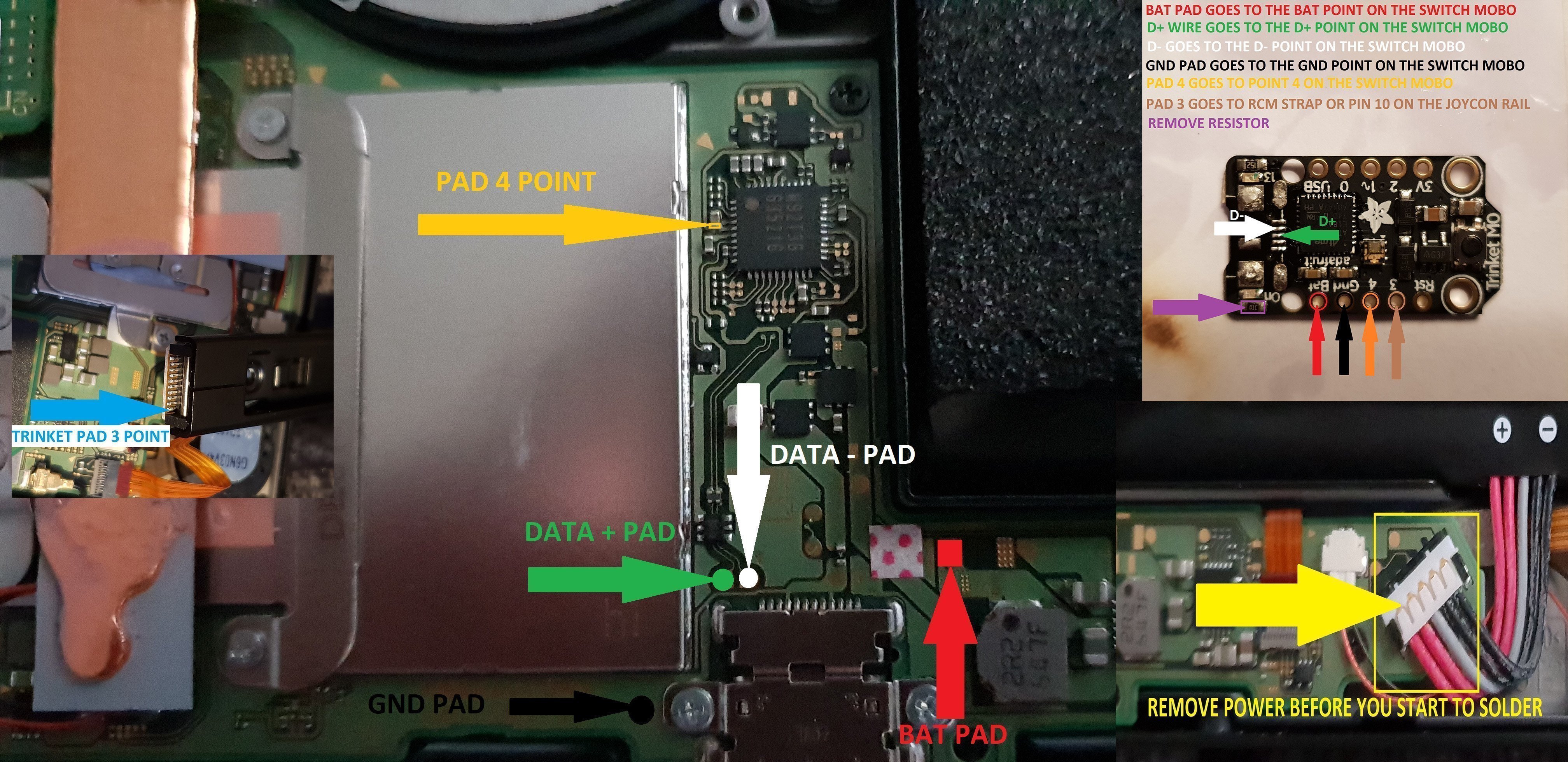
trinket install points.jpg


Once The Install Is Completely Done Then Clean Up The Points You Have Soldered To Using Isopropyl And Cotton Buds/Q-Tips.
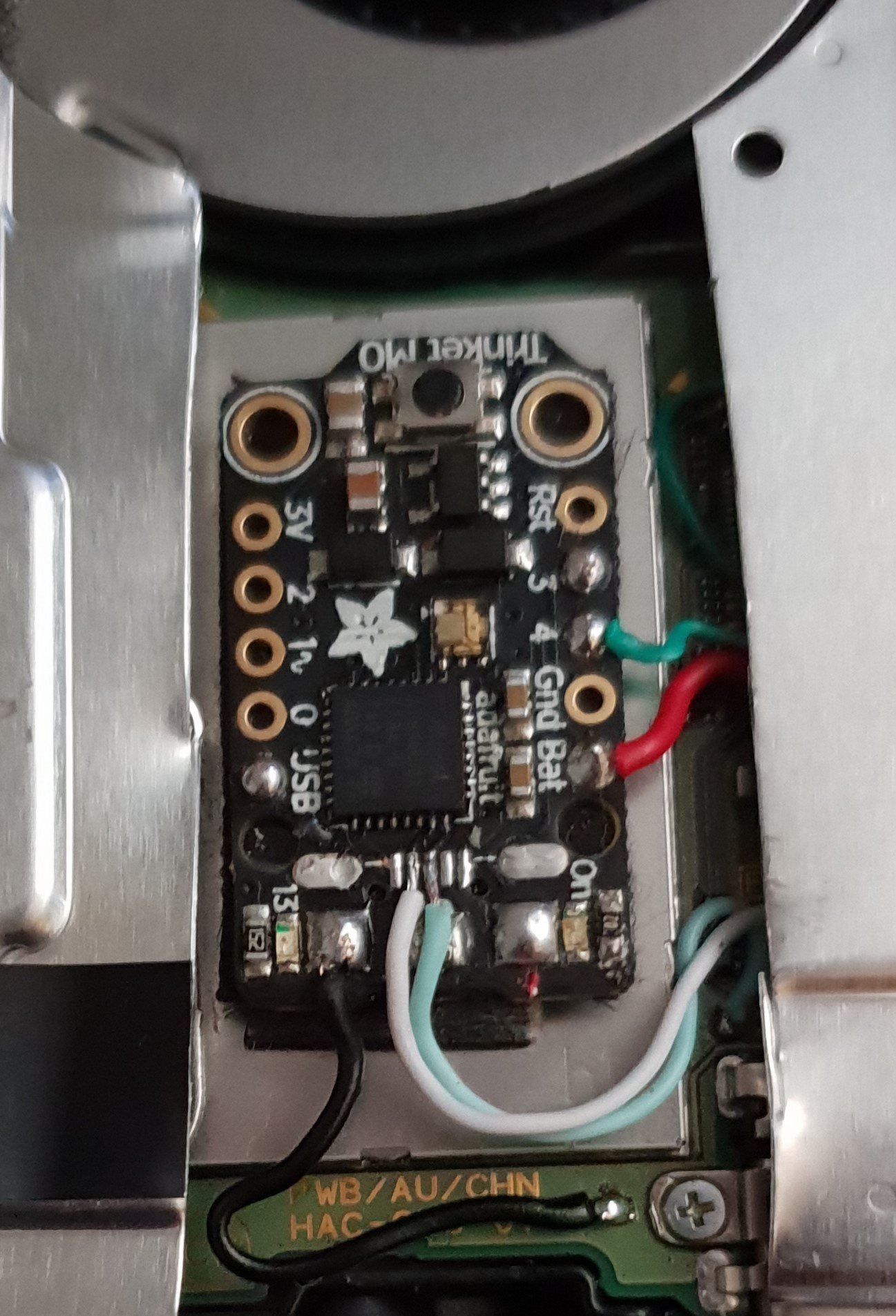
Finished.jpg


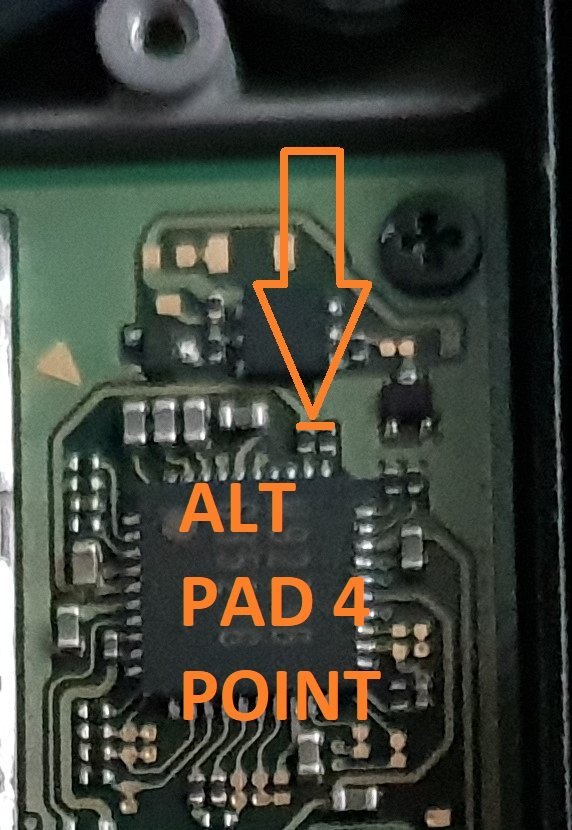
Alternative Point For Pad 4.

Altternative Pad 4 Point.jpg


Alternative Points For Joycon Rail Pin 10.

If You Decide On Using This Alternative Point Then Use Enamel Coated Jumper Wire 0.10mm.
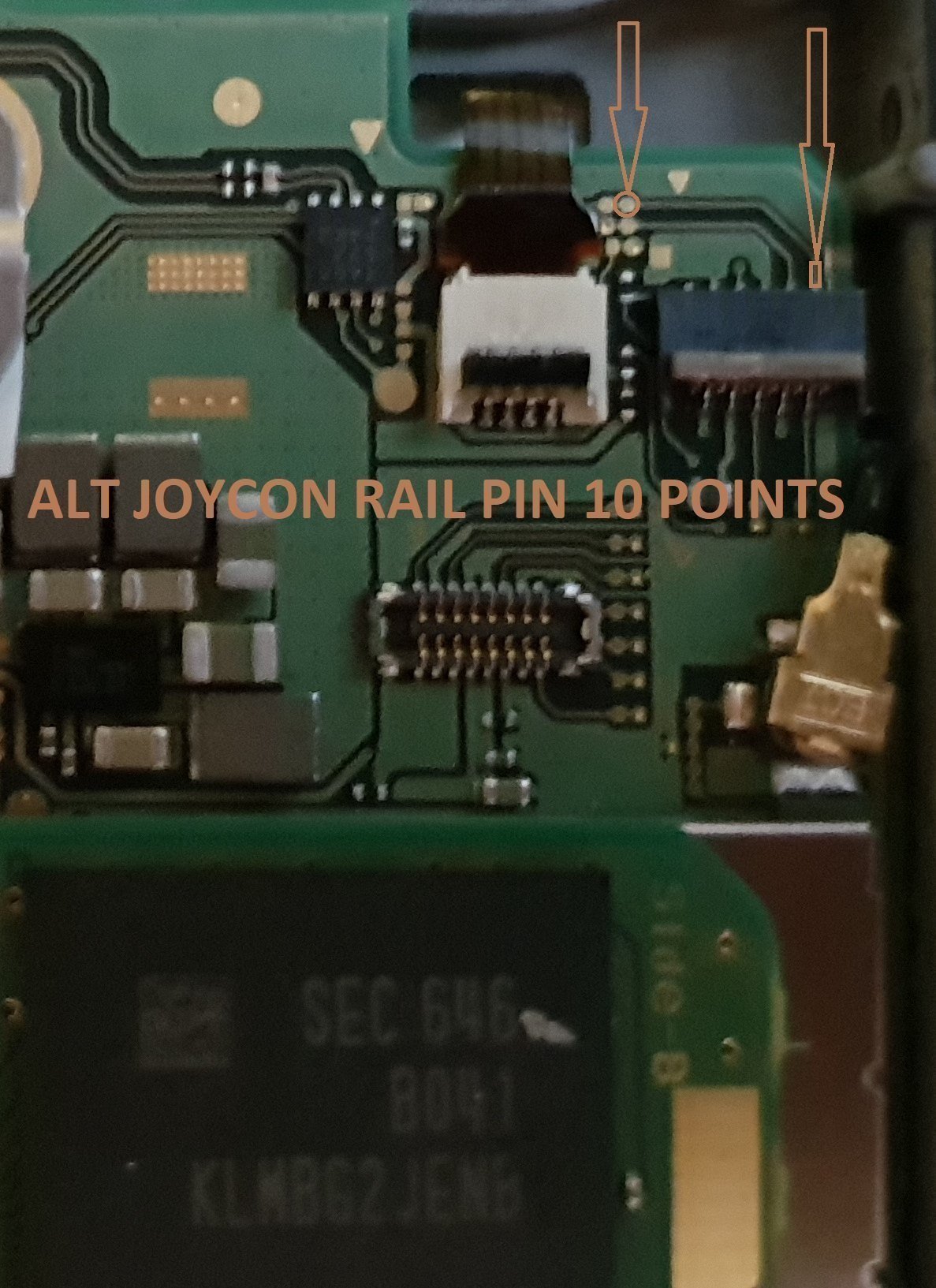
Alt Joycon Rail Pin 10 Point.jpg


Remember Take Your Time It's Not A Race lol. Rushing Can Lead To Mistakes.

Tools Required.

Kynar Wire 30 AWG.
Soldering Iron.
Hot Air Wand For Usb Port Removal(Optional)
Isopropyl.
Cotton Bud/Q-Tips.
Flux.
Solder.
Enamel Jumper Wire (Optional)


Thanks And Credit Goes To Xboxexpert For This Solution.

I Think That Covers Everything.

EDIT..

here's another method for the install of the trinket, this method does away with the pad 4, as some may find it tricky to solder to the cap used on the mobo.

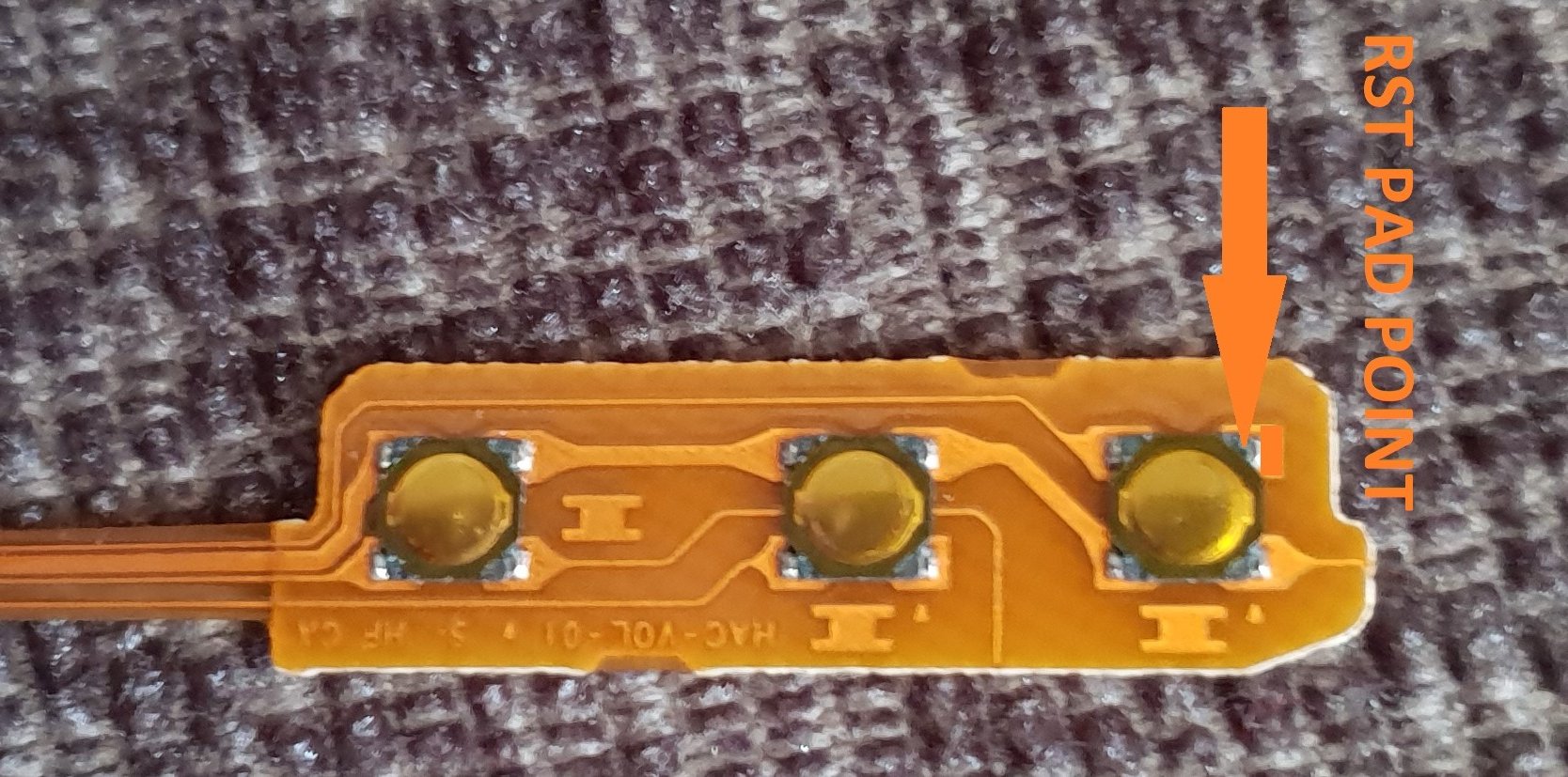
the rst pad is used instead and the wire is linked to the power button, Also this has a bonus that you can double press the power button to put the trinket into boot loader mode for uploading a new payload.

of course you don't have to use the rst pad at all, you can't just press power button and volume up button, then press reset button for rcm mode.

this method should be ok for the novices.

install at your own risk.
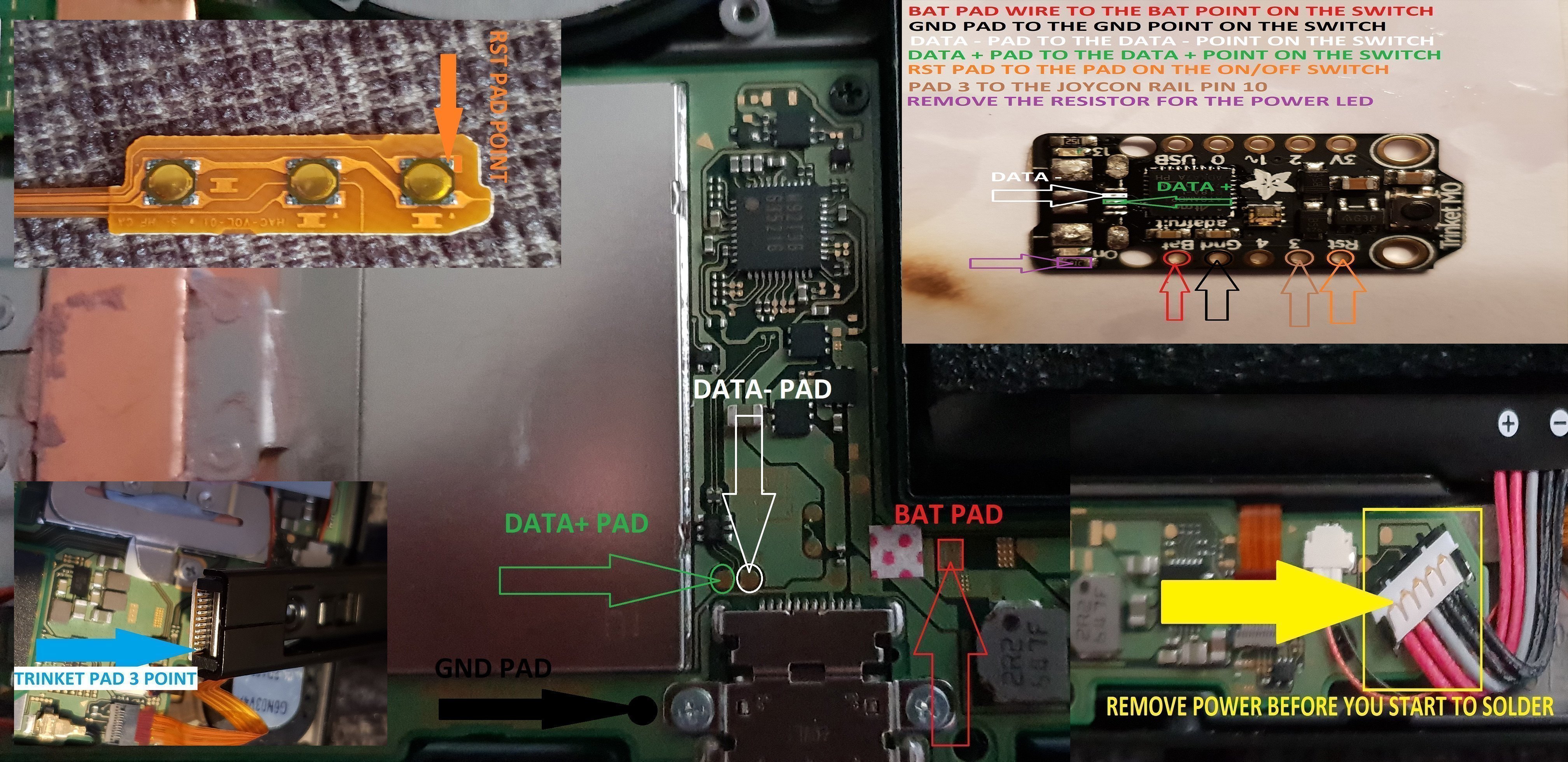
another install.jpg


the pad on the power button to use.

power button point.jpg


i have one more method to try but I really think this one is not to bad method.

the more methods the better I say, of course to try and make it as easy as possible for pros and novices.

EDIT...
another method for the install of the trinket.

this method is basically same as all other methods, just a different points uses for the bat pad and rst pad.

this install will allow you to have the trinket power off when you fully power off the switch.

double press the reset button on the trinket to get into boot loader mode, this may take a couple of attempts to do.

the payload that you use already will work with this method no need for new ones.

here's the diagram for method 3, you could possibly have this as a 4 wire install, if you install auto rcm mode, but as my sd card module port is buggerd I couldn't test that out.
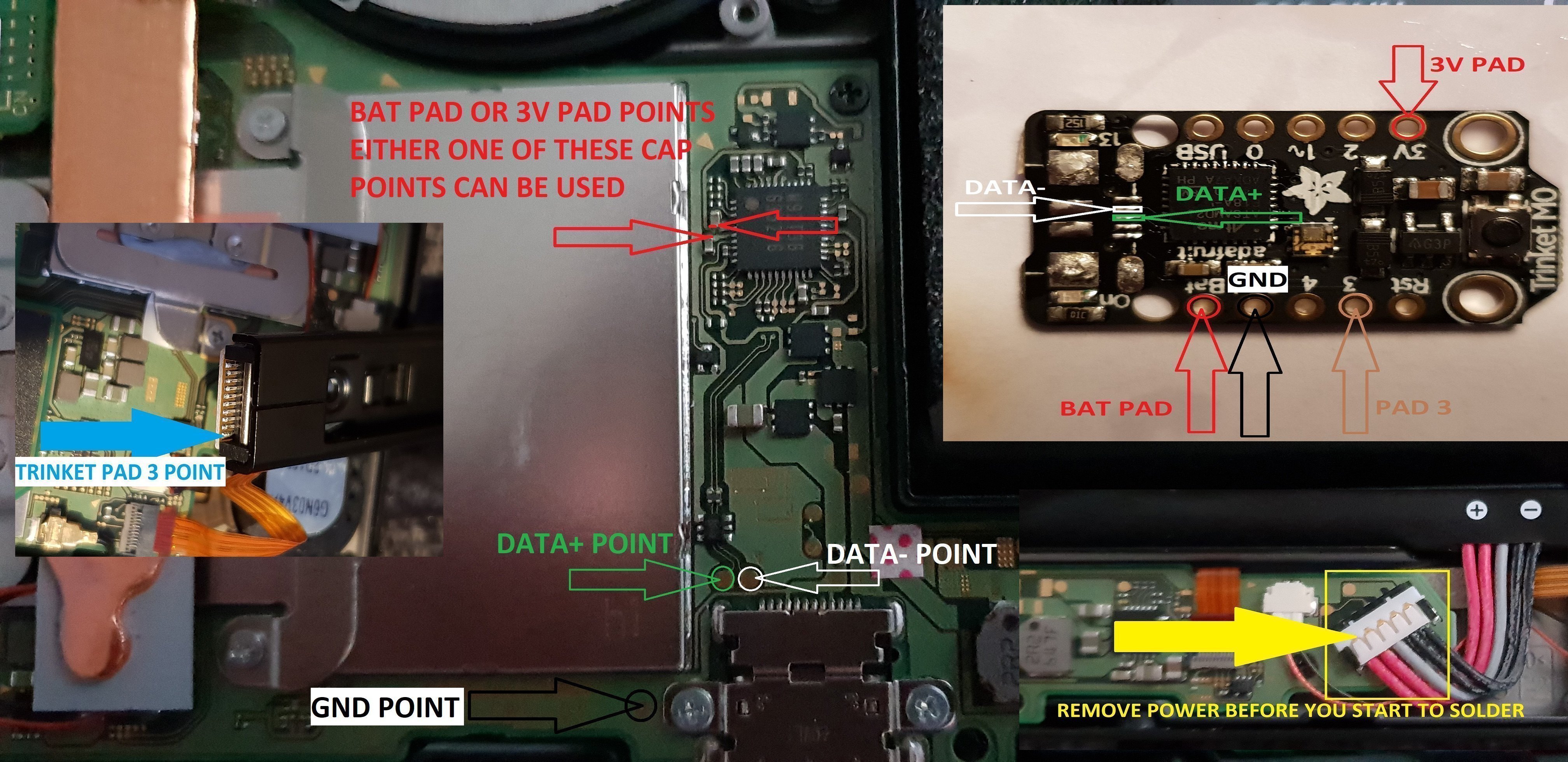
twinket power off.jpg


ok it seems method 3 needs auto rcm installed for it to work without the need to use the rst pad

so for them that don't want to use auto rcm mode then solder a wire from rst pad to the point on the power button, and use pad 3 to the pin 10 on the joycon rail or one of the alt points on mobo.

beware the alt points are small so use at your own risk.

ok anyone with changing issues test these 2 points, you should get 5v on the usb port side, and around 3.2v on the switch side.

if your getting the volts on the switch side that are fluctuating up & down then replace the part with the v on top it's a diode, you want one that fits so the actual size is either 0402 or 0603 in dimension (i'm using 0402/0603 as an example for size purpose only)

around page 16 has more info about this component..

dont come moaning if you damage your console doing this install, i'm not responsible for you opening or taking a soldering iron to your console.
you do this at your own risk any damage is down to yourself.
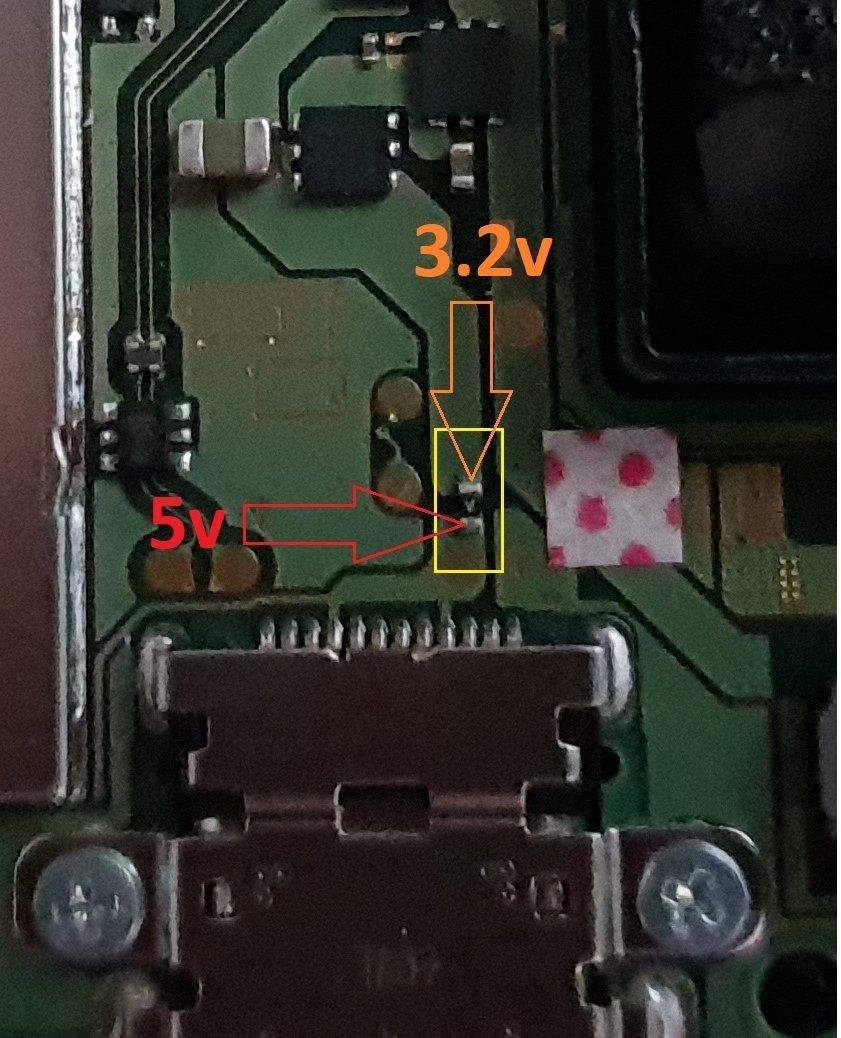

charger_issue_volts.jpg


another thing if your trinket starts to get very hot to the point you can't touch it, then the atmel ATSAMD21E18A-U ic is on it's way out, so you will need to replace the ic or just replace your trinket.

at some point it wont power up after this has happened.
1 = gets very hot.
2 = reset starts to become tempermental .
3 = dead
4 = fix replace the atmel ATSAMD21E18A-U ic

edit

added uf2 drag and drop files for r4 trinket gemma dongles or for a 4 wire internal install.

atmosphere
hekate 4.2
Sxos
rajnx
reinx
 

Attachments

  • Trinket All In One.jpg
    Trinket All In One.jpg
    123.9 KB · Views: 3,983
  • Trinket-R4-Gemma-D&D-Files.zip
    421.3 KB · Views: 534
Last edited by M-O-B, , Reason: added updated uf2 file.

Maximize0987

Well-Known Member
Newcomer
Joined
Jun 24, 2018
Messages
46
Trophies
0
Age
43
XP
306
Country
United States
codes are in the op, they are the same as others use, nothing different.

or get it from the source and compile them yourself.

--------------------- MERGED ---------------------------


that's probably the best route to go, I had some dual nand boards made for the 360 a few years ago, was cheap than buying one of tx or matrix ones.


nice. Thanks.
 
D

Deleted User

Guest
@Captain_Smek

We could always end up just making our own board with a push button (power on/off) latching circuit:

http://www.mosaic-industries.com/em...n-switch-turn-on/latching-toggle-power-switch

I've had pcb boards made before - they are very cheap to get produced. I got some made for PSVITA - ended up costing less that £20 for 50 boards (including shipping), just need to design a new circuit with eagle cad and then send the design away - you can even get the stencil for soldering with it for a bit extra (not expensive). I'm very busy from now until the end of summer - but unless TX or some other team made a new board, I might just make my own design which will be more suited for the switch. Probably make 100 or so and sell them on fleabay.

These were the boards I got made before:
2iqy05l.jpg

That's actually a really good idea, the trinket works but it's just so big and we are removing half the parts to fit it :wacko: Maybe if there isn't anything revolutionary in the next 2 months and the internal payload is still viable we can chip in with @M-O-B and make our own modchip with a nice step by step guide pdf.

If anything it would be easier for us when we do the installing for others :hateit: There's bound to be some "as-is" switches on eBay soon :D

TX OS is now decrypted BTW - well most likely end up a free version of os ox by the end of the day/week :-)

Yikes didn't see that coming this fast I just ordered a bunch of keys too fml


@M-O-B Excellent save on that trinket! I won't lie I've blown some bits off too forgetting to turn down the fan speed on the blower :lol: I've made a habit now of keeping a big steel washer on top of everything I dont want to fly away lol
 

M-O-B

Well-Known Member
OP
Member
Joined
Jun 23, 2018
Messages
281
Trophies
0
Age
53
XP
573
Country
United Kingdom
op files updated to hekate ctcaer 3.2.

only just noticed it was released.

TX OS is now decrypted BTW - well most likely end up a free version of os ox by the end of the day/week :-)

oh no 1 4 be released soon the.
 
Last edited by M-O-B,

IronWarship

Member
Newcomer
Joined
Jul 8, 2018
Messages
10
Trophies
0
XP
93
Country
United States
Could someone do a quick write-up on the progress so far? I don't mean to be harsh, but the broken English and jumbled-ness of the OP makes this a little hard to follow.

Which is currently the best way to wire the m0? Will we need to use autoRCM if using method 3? Is there still an issue of the Switch rebooting into RCM if Vol+ and RCM_STRAP are pulled?
 

Maximize0987

Well-Known Member
Newcomer
Joined
Jun 24, 2018
Messages
46
Trophies
0
Age
43
XP
306
Country
United States
So double clicking the switch puts it into bootloader mode, what does one click do? If nothing could you add in one click disables the trinket?

--------------------- MERGED ---------------------------

Could someone do a quick write-up on the progress so far? I don't mean to be harsh, but the broken English and jumbled-ness of the OP makes this a little hard to follow.

Which is currently the best way to wire the m0? Will we need to use autoRCM if using method 3? Is there still an issue of the Switch rebooting into RCM if Vol+ and RCM_STRAP are pulled?


if you do not wire in vol+ it will not engage it.
 

frep

Well-Known Member
Newcomer
Joined
Jul 7, 2018
Messages
52
Trophies
0
Age
41
XP
464
Country
Switzerland
@Captain_Smek

We could always end up just making our own board with a push button (power on/off) latching circuit:

Hey MrDude!
Quite funny, I also had nearly the same idea. Making a own pcb is a nice option. Practically only the m0 and the voltage regulator from the trinket is needed and for some powering options, some transistors :-)
But keep in mind that you also have to program the bootlader of the m0 it.
I think in one or two days, I shoud have a schematic ready. I show it here, when done.
 

mrdude

Developer
Developer
Joined
Dec 11, 2015
Messages
2,483
Trophies
1
Age
55
XP
6,616
Hey MrDude!
Quite funny, I also had nearly the same idea. Making a own pcb is a nice option. Practically only the m0 and the voltage regulator from the trinket is needed and for some powering options, some transistors :-)
But keep in mind that you also have to program the bootlader of the m0 it.
I think in one or two days, I shoud have a schematic ready. I show it here, when done.

You can buy a programmer to program the bootloader from ebay for about £5, or just make one yourself - you only need to connect 4 pins (v+/gnd/2 other pins - I can't remember of the top off my head).

There's also this:


The point is - it's fairly easy to do that.

You can also use a raspberry pi to do the same thing: (scroll to the bottom of the page)
https://learn.adafruit.com/compiling-m0-atsamd21-bootloader/compile
 
Last edited by mrdude,

Ferris1000

Well-Known Member
Member
Joined
Mar 10, 2017
Messages
234
Trophies
0
Age
32
Location
Titan
XP
2,011
Country
Germany
Methode 3 killed my Charging Controller Chip: i tought i did something wrong and tried again to install a trinket m0 on another console and this also doesn't charge anymore

Everything was very clean installed and it was working, was detected from my pc but after i plugged my switch into the dockingstation it stopped charging and my pc doesn't detect my switch anymore.

you should remove methode 3 because if someone also try this methode and plug the switch into the dockingstation the charging controller chip will die.

I already removed the trinket m0 but my Nintendo Switch still doesn't charge.
 
Last edited by Ferris1000,

Maximize0987

Well-Known Member
Newcomer
Joined
Jun 24, 2018
Messages
46
Trophies
0
Age
43
XP
306
Country
United States
I just installed the vol+ payload and ran the wire. Its working great:D. I posted earlier wondering if possible to put in 1 click of the button disables the trinket. I read through the code (i can read it ok, sure can't write it) and saw that one click restarts the code. I haven't seen a need for this yet. maybe a long press will shut it off? I just think a way to shut it off to boot clean into horizon (not loaded from tx payload) might prove to be useful, or even less detectable for future online possibilities. Let me know what you think.

THANKS!
 

Attachments

  • IMG_1280[2].JPG
    IMG_1280[2].JPG
    861 KB · Views: 142

mrdude

Developer
Developer
Joined
Dec 11, 2015
Messages
2,483
Trophies
1
Age
55
XP
6,616
Methode 3 killed my Charging Controller Chip: i tought i did something wrong and tried again to install a trinket m0 on another console and this also doesn't charge anymore

Everything was very clean installed and it was working, was detected from my pc but after i plugged my switch into the dockingstation it stopped charging and my pc doesn't detect my switch anymore.

you should remove methode 3 because if someone also try this methode and plug the switch into the dockingstation the charging controller chip will die.

I already removed the trinket m0 but my Nintendo Switch still doesn't charge.

I think the trinket is drawing too many amps/power from that point, it would be better to use the original Bat point you were using before - but use that 3v point in method 3 to send a small current to a transistor which would ground the trinket. That would work the same as method 3 but not put any strain on the IC you just fragged.

I keep saying to use a transistor - but it's falling on deaf ears, they are extremely cheap to buy (about 1 pence each for smd ones).
 

Ferris1000

Well-Known Member
Member
Joined
Mar 10, 2017
Messages
234
Trophies
0
Age
32
Location
Titan
XP
2,011
Country
Germany
Now it’s to late, my two switch consoles doesn’t charge anymore and I don’t know how to fix it. I removed the trinket but it didn’t fixed it. If someone has an idea how I can fix it (maybe it’s just a fuse) i would be happy to read it because I payed 660€ for the two consoles (I bought both 1 week ago)
 
Last edited by Ferris1000,

mrdude

Developer
Developer
Joined
Dec 11, 2015
Messages
2,483
Trophies
1
Age
55
XP
6,616
Now it’s to late, my two switch consoles doesn’t charge anymore and I don’t know how to fix it. I removed the trinket but it didn’t fixed it. If someone has an idea how I can fix it (maybe it’s just a fuse) i would be happy to read it because I payed 660€ for the two consoles (I bought both 1 week ago)

You need to replace that IC you destroyed - they cost about £20 for a new one - just read the number from the top of it, and search on google for a new one.

https://www.aliexpress.com/item/Dea...92T36-ic-for-Nintendo-Switch/32814421663.html

Watch this video on how to solder it on with solder paste (don't use an iron for this - use hot air).


Also the 3v pin you guys are using on the trinket is a 3.3v voltage output not an input - there's no diode protection on that so maybe you should use the bat point as at least that has polarity protection.
 
Last edited by mrdude,

M-O-B

Well-Known Member
OP
Member
Joined
Jun 23, 2018
Messages
281
Trophies
0
Age
53
XP
573
Country
United Kingdom
Methode 3 killed my Charging Controller Chip: i tought i did something wrong and tried again to install a trinket m0 on another console and this also doesn't charge anymore

Everything was very clean installed and it was working, was detected from my pc but after i plugged my switch into the dockingstation it stopped charging and my pc doesn't detect my switch anymore.

you should remove methode 3 because if someone also try this methode and plug the switch into the dockingstation the charging controller chip will die.

I already removed the trinket m0 but my Nintendo Switch still doesn't charge.


which version of method 3, I will take a look into that one, my switch changes still but I'm using the 4 wire version.

--------------------- MERGED ---------------------------

Now it’s to late, my two switch consoles doesn’t charge anymore and I don’t know how to fix it. I removed the trinket but it didn’t fixed it. If someone has an idea how I can fix it (maybe it’s just a fuse) i would be happy to read it because I payed 660€ for the two consoles (I bought both 1 week ago)

replace this and your switch will charge again.

20180711_031150.jpg
 
Last edited by M-O-B,
  • Like
Reactions: Deleted User

Ferris1000

Well-Known Member
Member
Joined
Mar 10, 2017
Messages
234
Trophies
0
Age
32
Location
Titan
XP
2,011
Country
Germany
which version of method 3, I will take a look into that one, my switch changes still but I'm using the 4 wire version.

I used the no autoRCM required method 3.

I think The 3v or rst killed the chip.

Switch console one: displays the Message „unable to charge“ and the docking station LED is blinking

Switch console 2: doesn’t recognize the charger at all and the docking station led is also blinking.

I cleaned the hole solder points and also cleaned the whole areas with PCB cleaner before testing and after I removed the trinket. I checked all connections with a microscope before I plugged in the battery to be sure that there are deffintly no shorts.

--------------------- MERGED ---------------------------

which version of method 3, I will take a look into that one, my switch changes still but I'm using the 4 wire version.

--------------------- MERGED ---------------------------


replace this and your switch will charge again.

View attachment 135285
What kind of part is it? Is it a fuse? If it’s a fuse which one do I need?
 
Last edited by Ferris1000,

M-O-B

Well-Known Member
OP
Member
Joined
Jun 23, 2018
Messages
281
Trophies
0
Age
53
XP
573
Country
United Kingdom
I used the no autoRCM required method 3.

I think it had to to with the 3v or rst.

Switch console one: displays the Message „unable to charge“ and the docking station LED is blinking

Switch console 2: doesn’t recognize the charger at all and the docking station led is also blinking.

I cleaned the hole solder points and also cleaned the whole areas with PCB cleaner before testing and after I removed the trinket. I checked all connections with a microscope before I plugged in the battery to be sure that there are deffintly no shorts.

ok I have removed that, version for now, I had no issues using that method, anyway I posted a image of what to replace and your switch will charge again.

you can just bridge it to test to see if switch starts charging again, then buy the replacement part, do not leave it bridged just do that to test.
 
  • Like
Reactions: Deleted User

starfox51

Member
Newcomer
Joined
Jul 4, 2018
Messages
11
Trophies
0
Age
29
XP
61
Country
United States
So I tried adding the plus volume to point 0 on the trinket. I soldered directly to the resistor. Was working great until I accidentally yanked the wire off of the resistor. Now my vol+ does not work so I can't get into RCM. Is there another point to trigger vol+ than the resistor point shown in the GitHub?
 

M-O-B

Well-Known Member
OP
Member
Joined
Jun 23, 2018
Messages
281
Trophies
0
Age
53
XP
573
Country
United Kingdom
So I tried adding the plus volume to point 0 on the trinket. I soldered directly to the resistor. Was working great until I accidentally yanked the wire off of the resistor. Now my vol+ does not work so I can't get into RCM. Is there another point to trigger vol+ than the resistor point shown in the GitHub?

can you post a image of the point you used.. I've not actually look at the install since it was released.
 

starfox51

Member
Newcomer
Joined
Jul 4, 2018
Messages
11
Trophies
0
Age
29
XP
61
Country
United States
Can't post links yet, post count too low

github(dot)com/Quantum-cross/sam-fusee-launcher-internal/blob/master/INSTALL.md

scroll down to optional vol+. There are two points. I used the on on the capacitor.

I tried the other point on the connector, but since I fucked up the resistor point, it won't work. I am going to try to add some more solder to get it to work again....
 
Last edited by starfox51,
General chit-chat
Help Users
  • No one is chatting at the moment.
  • Skelletonike @ Skelletonike:
    3h left until work finishes, bah
  • Skelletonike @ Skelletonike:
    link doesn't work
    +2
  • Skelletonike @ Skelletonike:
    1H left, such a slow week.
  • Sonic Angel Knight @ Sonic Angel Knight:
    Okay, I had spaghetti :P
  • SylverReZ @ SylverReZ:
    Hope they made lots of spaget
  • K3N1 @ K3N1:
    Chill dog
  • SylverReZ @ SylverReZ:
    Chilli dog
  • Skelletonike @ Skelletonike:
    Damn, I'm loving the new zelda.
  • xtremegamer @ xtremegamer:
    loving the new zelda, i started a game, it was so fucking good, so i
    am waiting on my friend to get home so we can start a new one together
  • Skelletonike @ Skelletonike:
    I just dislike that they don't let me choose the voices before the game starts. Happened with botw as well, had to change to japanese and restart.
  • K3N1 @ K3N1:
    But the important question is can you choose gender
  • Skelletonike @ Skelletonike:
    Same way you can choose Gerald's gender.
  • Skelletonike @ Skelletonike:
    *Geralt, damn autocorrect.
  • Psionic Roshambo @ Psionic Roshambo:
    But can he be trans? Lol
  • K3N1 @ K3N1:
    Zelda transforms into link
  • Psionic Roshambo @ Psionic Roshambo:
    Link I'm not the princess your looking for.... *Pulls a crying game*
  • K3N1 @ K3N1:
    *skirt up* it's exactly what I always wanted
  • Skelletonike @ Skelletonike:
    Just scanned all my zelda amiibos, took a while but didn't get anything that cool, did get the lon lon ranch hylian fabrics though.
  • Skelletonike @ Skelletonike:
    It was pretty funny when I scanned wolf link and got a shit load of meat.
  • K3N1 @ K3N1:
    @Skelletonike, btw I ran that custom for mgs4 on the deck I'm amazed it got that far in game
  • K3N1 @ K3N1:
    Plug in*
    K3N1 @ K3N1: Plug in*