Tutorial  Updated

Trinket Internal Install.

Here's A Guide To Installing The Trinket M0 Into The Switch.

Program The Trinket Before You Remove The Usb Port, Saves You Doing It After You Complete The Install.

First Thing To Do Is Remove The Usb Port From The Trinket, If You Have A Hot Air Wand Then Use That To Remove The Port It Will Reduce The Risk Of Damage To The Pads.
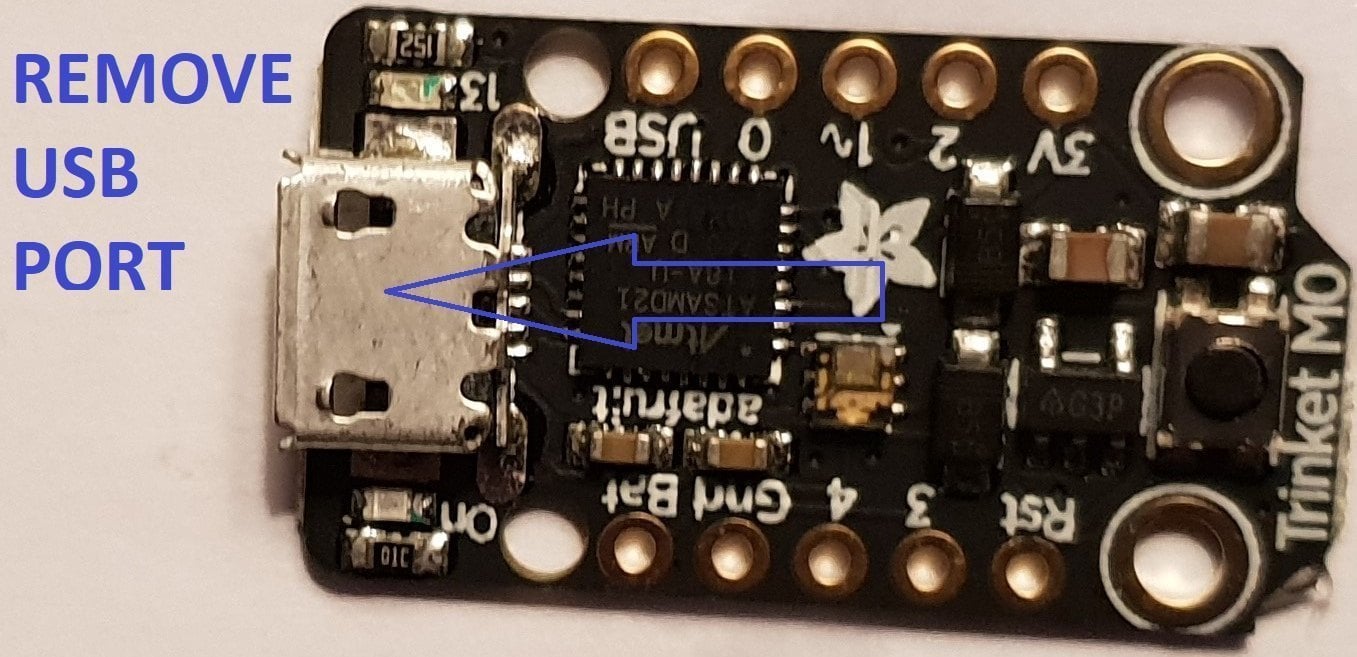
usb intact.jpg


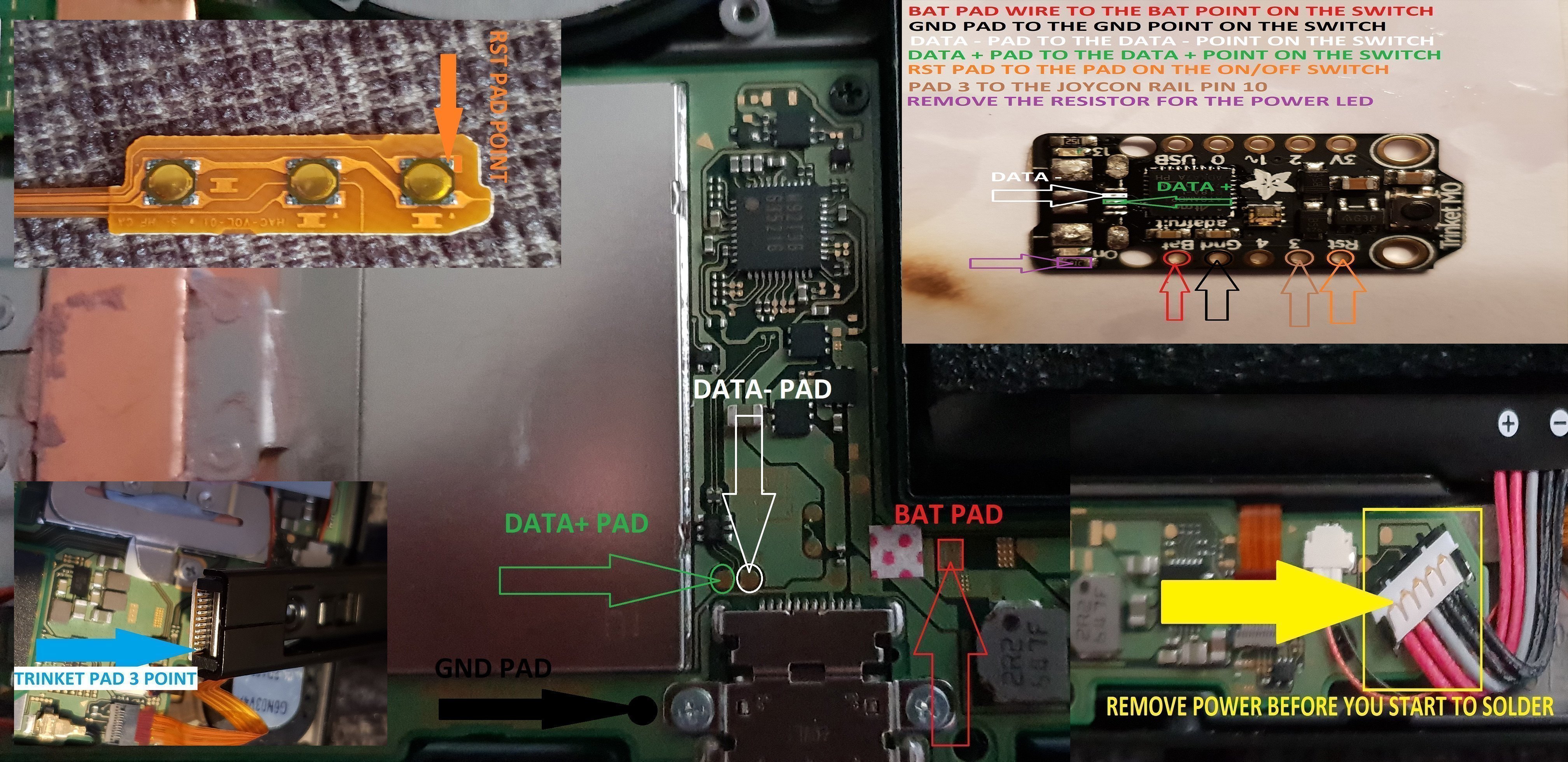
Now That The Usb Port Has Been Removed You Want To Solder Wire To The Data Pads, White = Data- And Green Data+ In This Guide.

Now Solder Wire To The Bat Pad = Red, Gnd Pad = Black, Pad 4 = Orange & Pad 3 = Brown In This Guide.

Also Remove The Resistor Next To The Ppower Led Mark Out In Purple In This Guide.
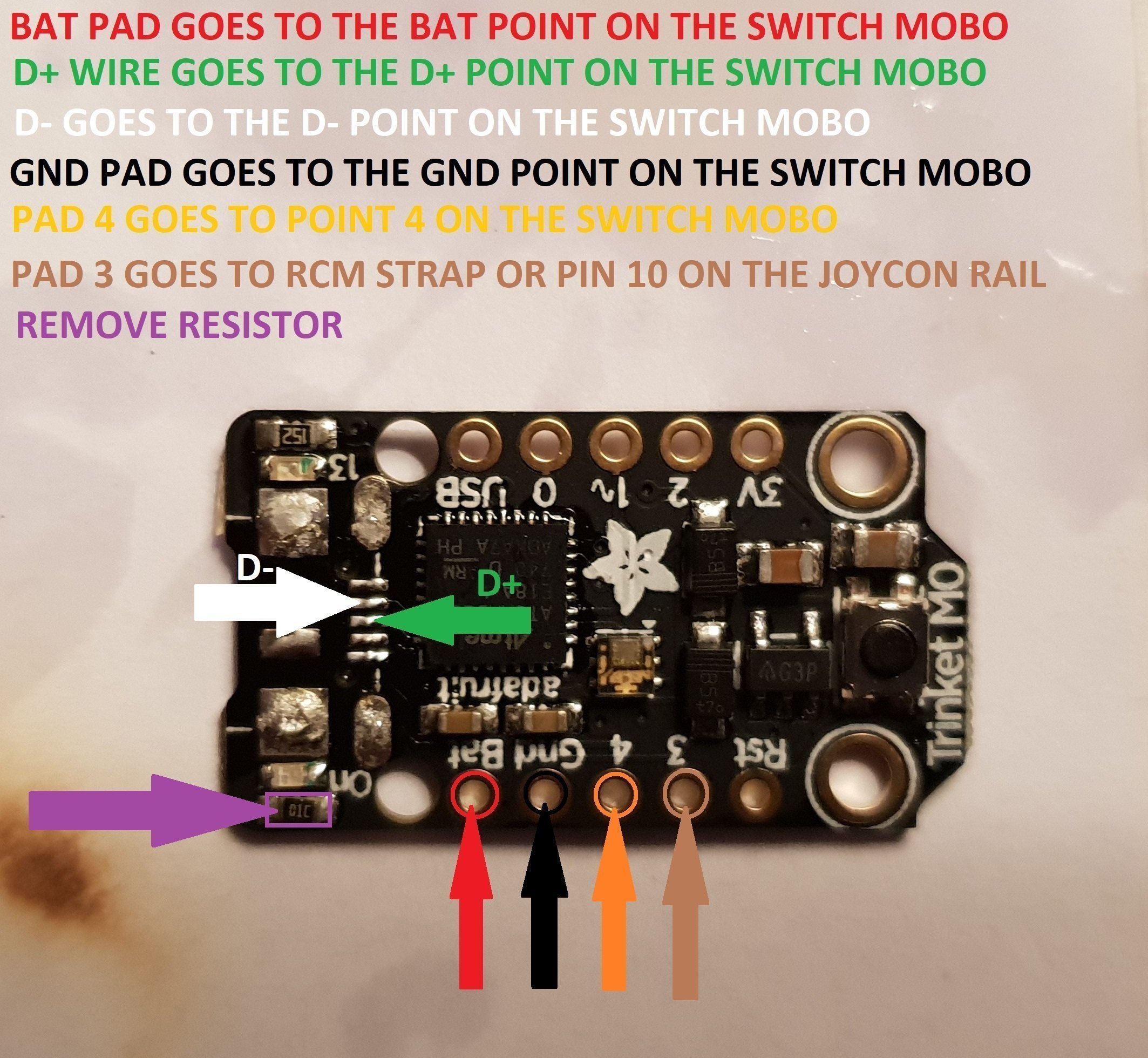
Trinket Points.jpg


When You Have The Trinket All Prepared, You Can Now Proceed To The Install To The Switch.
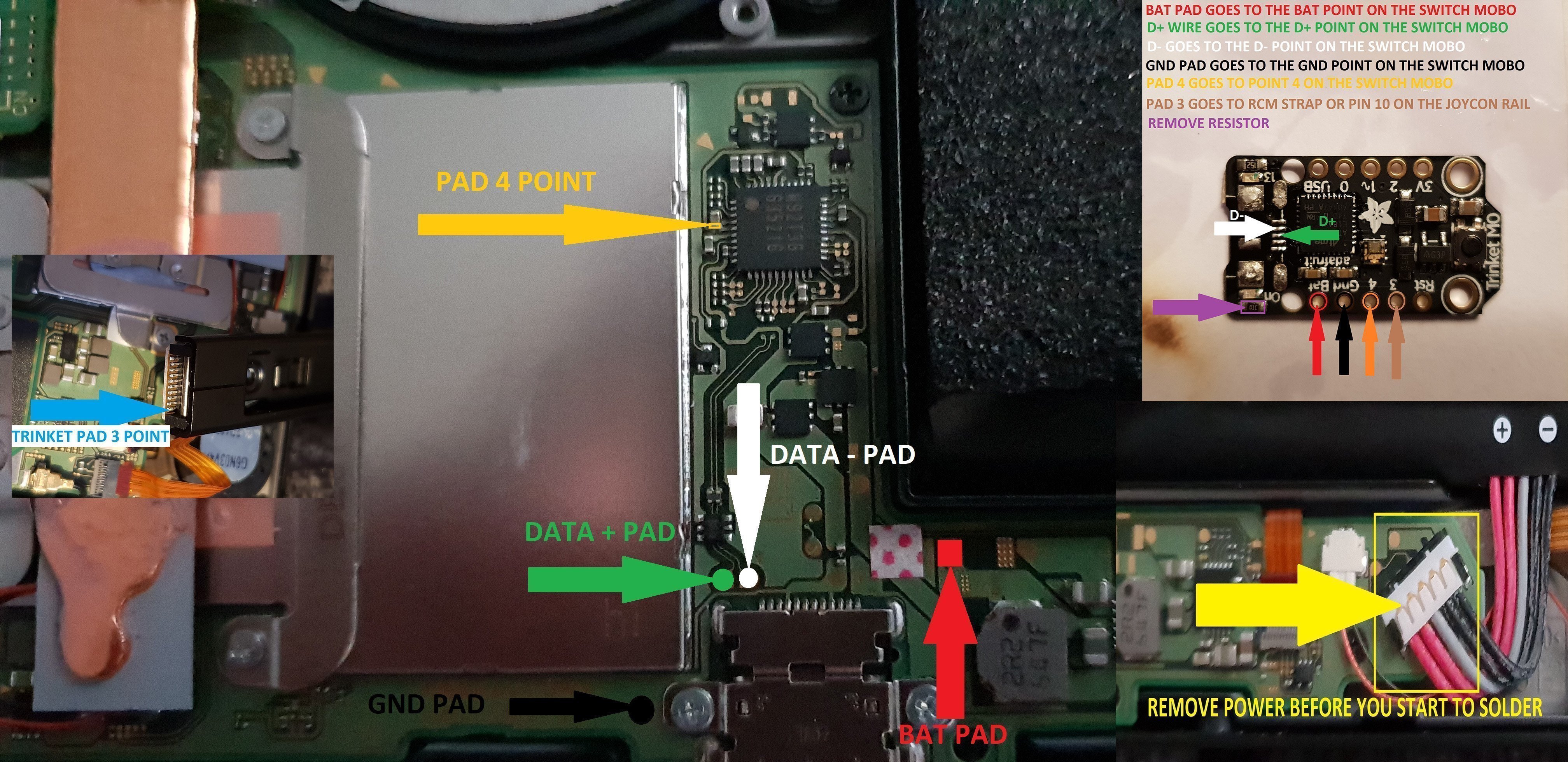
trinket install points.jpg


Once The Install Is Completely Done Then Clean Up The Points You Have Soldered To Using Isopropyl And Cotton Buds/Q-Tips.
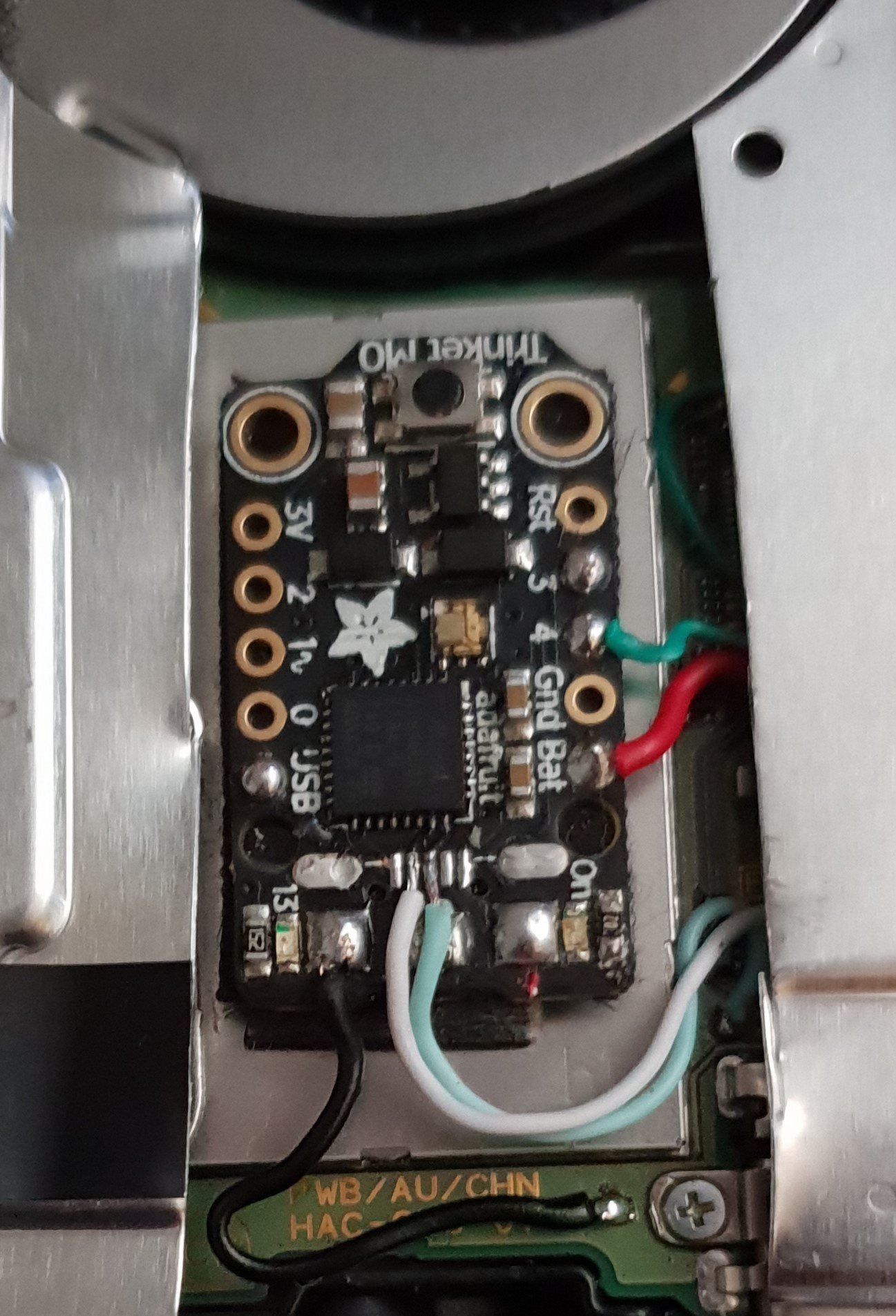
Finished.jpg


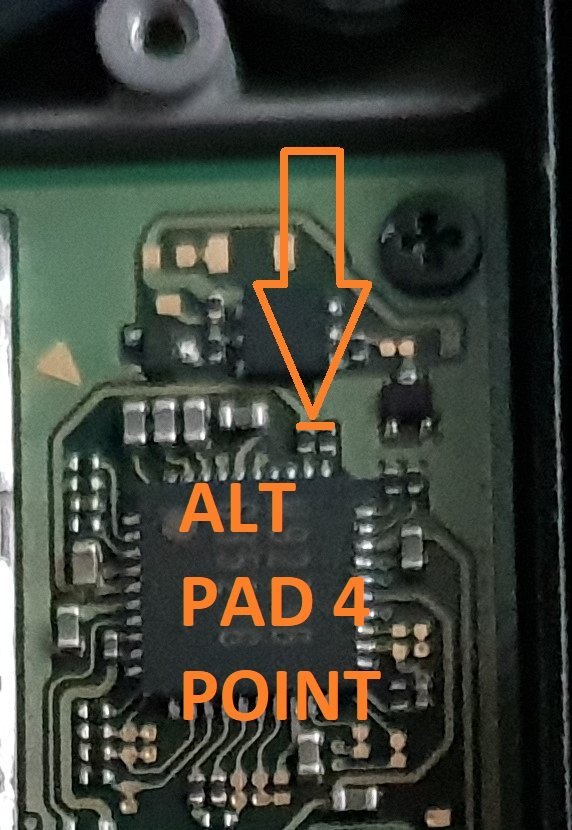
Alternative Point For Pad 4.

Altternative Pad 4 Point.jpg


Alternative Points For Joycon Rail Pin 10.

If You Decide On Using This Alternative Point Then Use Enamel Coated Jumper Wire 0.10mm.
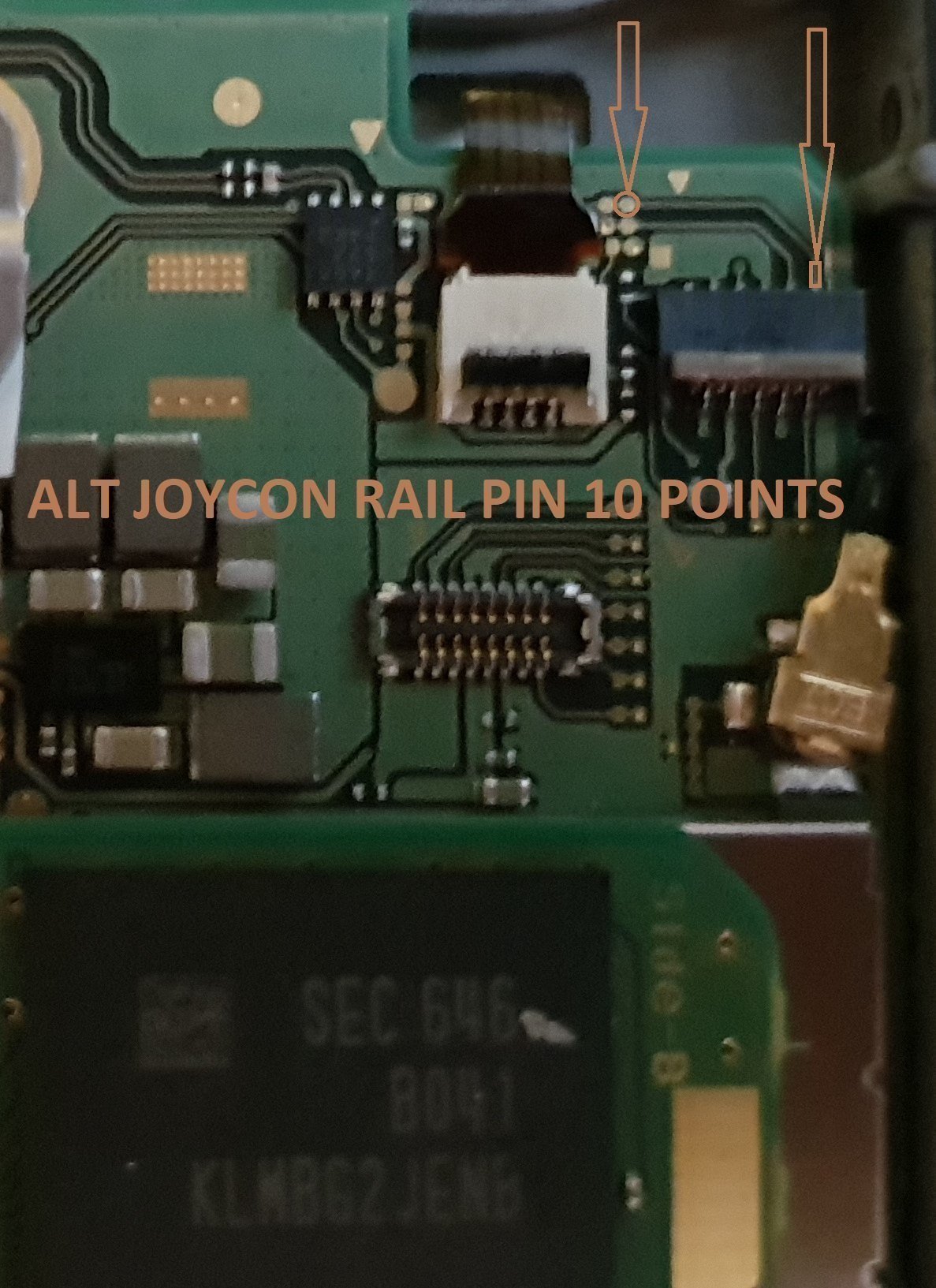
Alt Joycon Rail Pin 10 Point.jpg


Remember Take Your Time It's Not A Race lol. Rushing Can Lead To Mistakes.

Tools Required.

Kynar Wire 30 AWG.
Soldering Iron.
Hot Air Wand For Usb Port Removal(Optional)
Isopropyl.
Cotton Bud/Q-Tips.
Flux.
Solder.
Enamel Jumper Wire (Optional)


Thanks And Credit Goes To Xboxexpert For This Solution.

I Think That Covers Everything.

EDIT..

here's another method for the install of the trinket, this method does away with the pad 4, as some may find it tricky to solder to the cap used on the mobo.

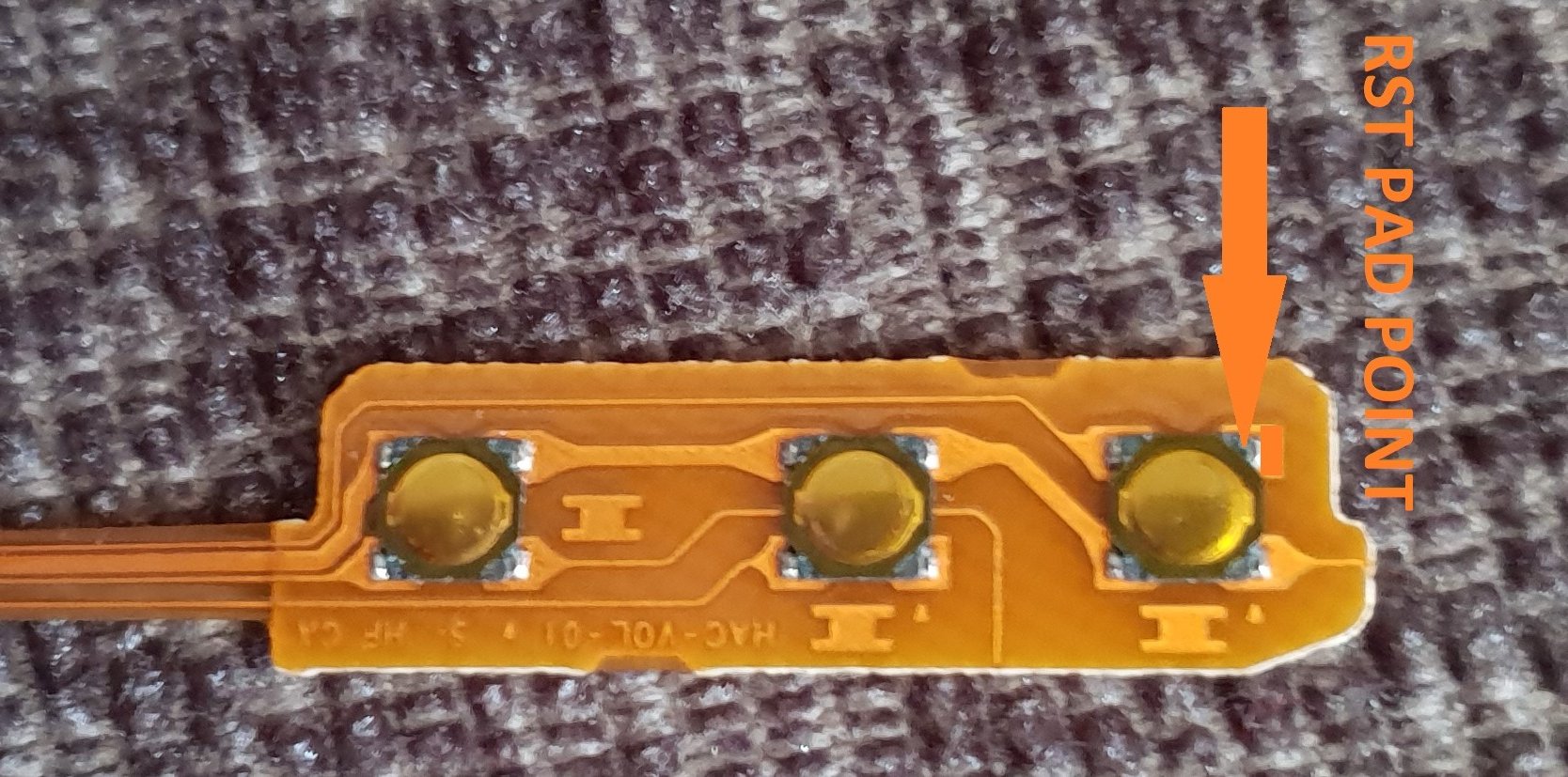
the rst pad is used instead and the wire is linked to the power button, Also this has a bonus that you can double press the power button to put the trinket into boot loader mode for uploading a new payload.

of course you don't have to use the rst pad at all, you can't just press power button and volume up button, then press reset button for rcm mode.

this method should be ok for the novices.

install at your own risk.
another install.jpg


the pad on the power button to use.

power button point.jpg


i have one more method to try but I really think this one is not to bad method.

the more methods the better I say, of course to try and make it as easy as possible for pros and novices.

EDIT...
another method for the install of the trinket.

this method is basically same as all other methods, just a different points uses for the bat pad and rst pad.

this install will allow you to have the trinket power off when you fully power off the switch.

double press the reset button on the trinket to get into boot loader mode, this may take a couple of attempts to do.

the payload that you use already will work with this method no need for new ones.

here's the diagram for method 3, you could possibly have this as a 4 wire install, if you install auto rcm mode, but as my sd card module port is buggerd I couldn't test that out.
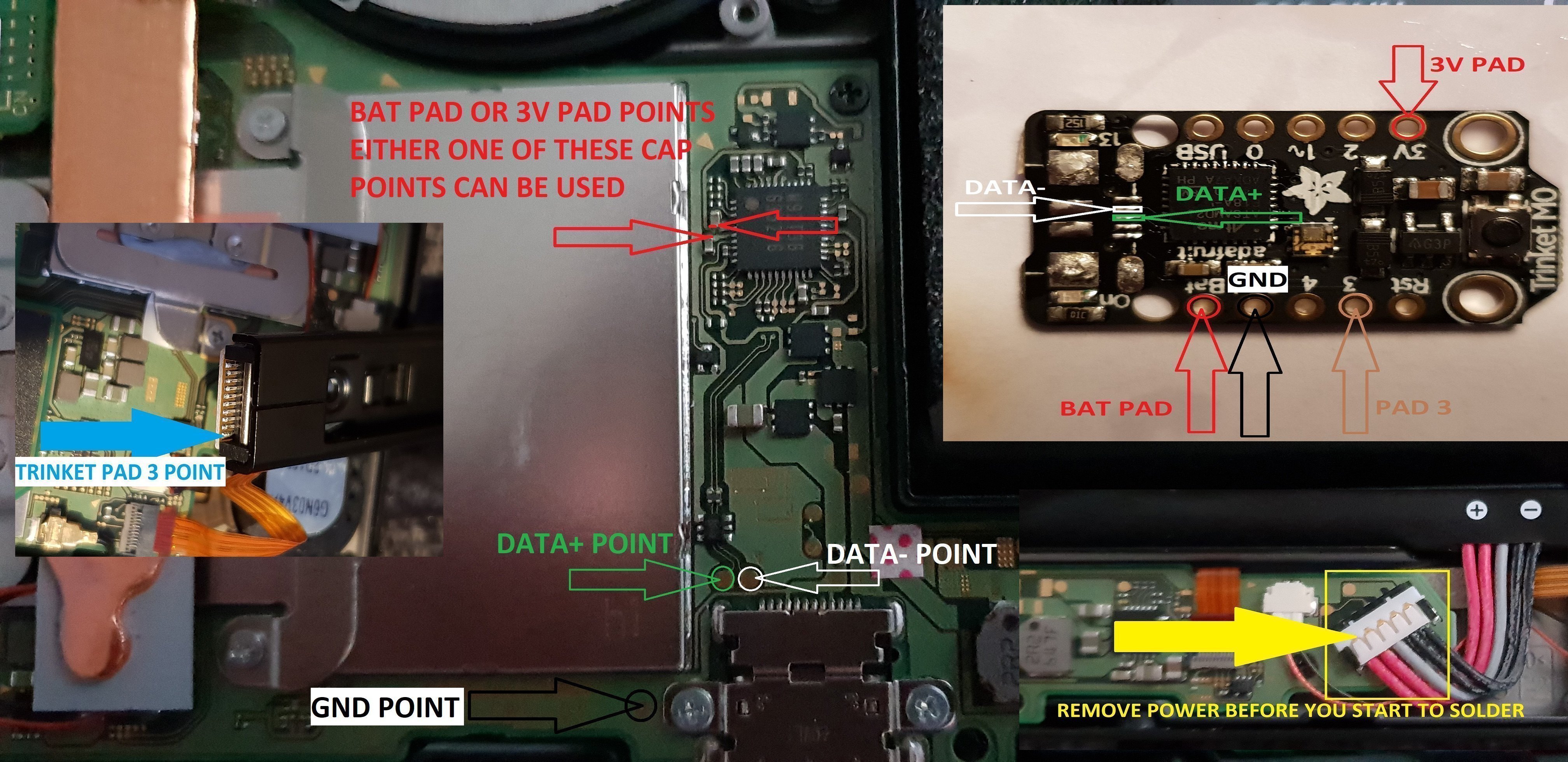
twinket power off.jpg


ok it seems method 3 needs auto rcm installed for it to work without the need to use the rst pad

so for them that don't want to use auto rcm mode then solder a wire from rst pad to the point on the power button, and use pad 3 to the pin 10 on the joycon rail or one of the alt points on mobo.

beware the alt points are small so use at your own risk.

ok anyone with changing issues test these 2 points, you should get 5v on the usb port side, and around 3.2v on the switch side.

if your getting the volts on the switch side that are fluctuating up & down then replace the part with the v on top it's a diode, you want one that fits so the actual size is either 0402 or 0603 in dimension (i'm using 0402/0603 as an example for size purpose only)

around page 16 has more info about this component..

dont come moaning if you damage your console doing this install, i'm not responsible for you opening or taking a soldering iron to your console.
you do this at your own risk any damage is down to yourself.
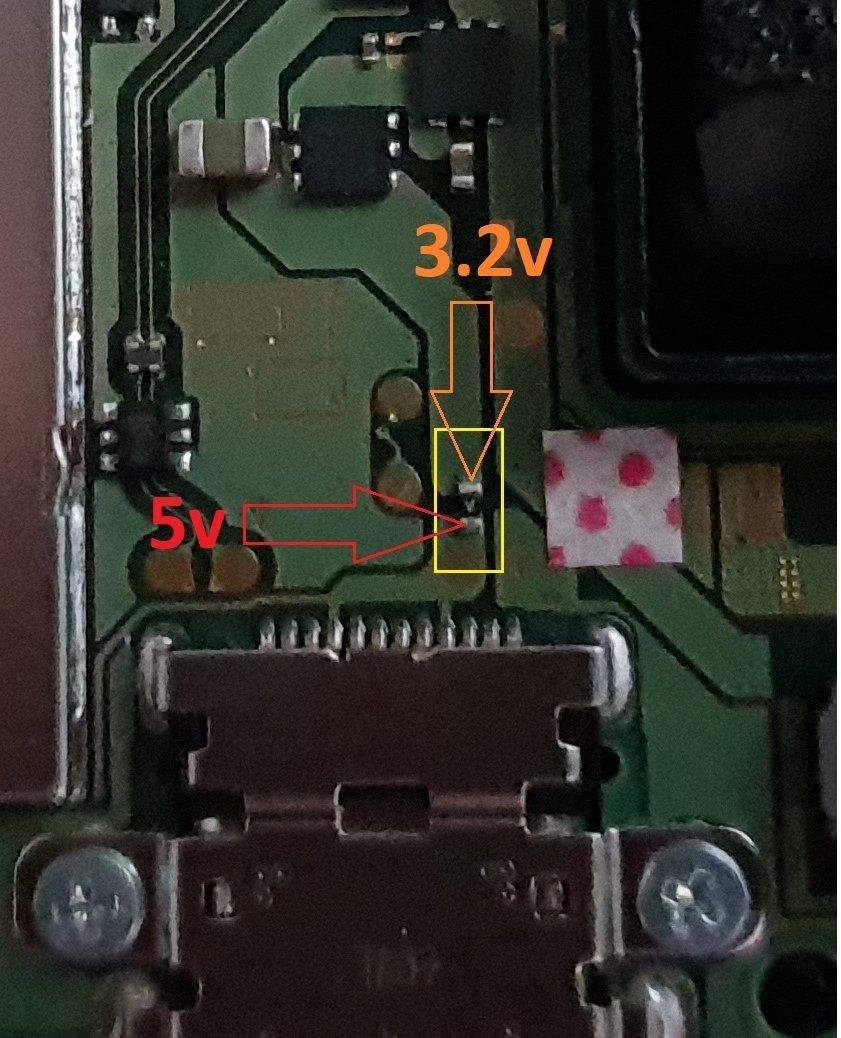

charger_issue_volts.jpg


another thing if your trinket starts to get very hot to the point you can't touch it, then the atmel ATSAMD21E18A-U ic is on it's way out, so you will need to replace the ic or just replace your trinket.

at some point it wont power up after this has happened.
1 = gets very hot.
2 = reset starts to become tempermental .
3 = dead
4 = fix replace the atmel ATSAMD21E18A-U ic

edit

added uf2 drag and drop files for r4 trinket gemma dongles or for a 4 wire internal install.

atmosphere
hekate 4.2
Sxos
rajnx
reinx
 

Attachments

Last edited by M-O-B, , Reason: added updated uf2 file.
Can't post links yet, post count too low

github(dot)com/Quantum-cross/sam-fusee-launcher-internal/blob/master/INSTALL.md

scroll down to optional vol+. There are two points. I used the on on the capacitor.

I tried the other point on the connector, but since I fucked up the resistor point, it won't work. I am going to try to add some more solder to get it to work again....

ok so is it the resistor that's gone the orange line, or the trace the blue line.

20180711_042008.png


would probably be best to actually take a photo of your mobo point as it has the damage to it.
 
ok so is it the resistor that's gone the orange line, or the trace the blue line.

View attachment 135297

would probably be best to actually take a photo of your mobo point as it has the damage to it.
The blue line is messed up. I actually think I bridged the resistor right next to the one with the blue line.

--------------------- MERGED ---------------------------

https://imgur.com/a/ITSjWyl

This is what my board actually looks like. I removed the connector for the power, vol+ and vol- due to a semi-unrelated incident. Plan was to manually solder points back. Which actually worked. But then both vol+ and vol- lowered volume. So I figure there is something going on at the resistor.

--------------------- MERGED ---------------------------

The blue line is messed up. I actually think I bridged the resistor right next to the one with the blue line.

--------------------- MERGED ---------------------------

https://imgur.com/a/ITSjWyl

This is what my board actually looks like. I removed the connector for the power, vol+ and vol- due to a semi-unrelated incident. Plan was to manually solder points back. Which actually worked. But then both vol+ and vol- lowered volume. So I figure there is something going on at the resistor.

I have been testing for now by just holding the wire to either side of the resistor and plugging in the battery. The trinket board flashes like it's looking and then blinks red. like it didn't find vol+ signal.

This was working totally fine before I ripped the wire off of the resistor and then attempted to resolder it. So I just need to find a point after the resistor that I can send the vol+ signal to.
 

Damn we could definitely make some custom mods with those buuuuut why you take so long to ship China :cry: I swear I have random parts showing up all year long for projects long gone because stuff takes forever to arrive :lol:

Can't post links yet, post count too low

github(dot)com/Quantum-cross/sam-fusee-launcher-internal/blob/master/INSTALL.md

scroll down to optional vol+. There are two points. I used the on on the capacitor.

I tried the other point on the connector, but since I fucked up the resistor point, it won't work. I am going to try to add some more solder to get it to work again....

The blue line is messed up. I actually think I bridged the resistor right next to the one with the blue line.

--------------------- MERGED ---------------------------

https://imgur.com/a/ITSjWyl

This is what my board actually looks like. I removed the connector for the power, vol+ and vol- due to a semi-unrelated incident. Plan was to manually solder points back. Which actually worked. But then both vol+ and vol- lowered volume. So I figure there is something going on at the resistor.

It's hard to tell but it doesn't look bridged, maybe the trace below tore a bit when it pulled away? If you have flux and desoldering braid try and cleanup those components a bit to make sure they are all isolated, then confirm the volume key works before redoing that point.

I actually soldered mine directly to the point @M-O-B has shown on the button flex board, so I'm not sure about those traces as I didn't need to go near them =/

Edit: If you have a decent multimeter you can check those points for continuity to see if they are working proper or if you need to clean them up more or repair the trace.
 
Last edited by ,
Damn we could definitely make some custom mods with those buuuuut why you take so long to ship China :cry: I swear I have random parts showing up all year long for projects long gone because stuff takes forever to arrive :lol:



It's hard to tell but it doesn't look bridged, maybe the trace below tore a bit when it pulled away? If you have flux and desoldering braid try and cleanup those components a bit to make sure they are all isolated, then confirm the volume key works before redoing that point.

I actually soldered mine directly to the point @M-O-B has shown on the button flex board, so I'm not sure about those traces as I didn't need to go near them =/

flux and braid will be here in a couple days. Have been using isopropyl alcohol and frayed wire to clean things up for now. Will leave it be until proper tools arrive.
 
  • Like
Reactions: Deleted User
flux and braid will be here in a couple days. Have been using isopropyl alcohol and frayed wire to clean things up for now. Will leave it be until proper tools arrive.

Yeah honestly likely your best bet, flux alone makes a massive difference and can help you isolate and slide surface mount parts back into place so much easier, and the braid of course will help you suck up places where too much has flowed. Keep us updated when it arrives and we'll try our best to help you through it.
 
  • Like
Reactions: M-O-B and starfox51
well finally got round to testing my new revamped slimmer dongle, now to dump the nand and everything I need.


flux and braid will be here in a couple days. Have been using isopropyl alcohol and frayed wire to clean things up for now. Will leave it be until proper tools arrive.

measure the value of that resistor, even if it's a 0 ohms one they can still pop.

replace it with the same value, it could be that the pad that you solder to has lost contact with the resistor itself.

20180711_045956.jpg


jump a wire from the resistor to the pad, that should fix any trace damage on the resistor side.

it's mist likely to have a airline crack in that resistor pad that even a multimeter doesn't pick up.
20180711_050348.jpg
 
ok anyone with changing issues test these 2 points, you should get 5v on the usb port side, and around 3.2v on the switch side.

if your getting the volts on the switch side that are fluctuating up & down then replace the part with the v on top, I'm not exactly sure what it is some kind of fuse or diode.

don't use the usb pad for the rst pad, although I've had no issues using this pad, just don't use it..

charger_issue_volts.jpg
 
ok anyone with changing issues test these 2 points, you should get 5v on the usb port side, and around 3.2v on the switch side.

if your getting the volts on the switch side that are fluctuating up & down then replace the part with the v on top, I'm not exactly sure what it is some kind of fuse or diode.

don't use the usb pad for the rst pad, although I've had no issues using this pad, just don't use it..

View attachment 135305

If it was a fuse, you'd have the same voltage on both sides - to check if it's a diode you try and do a test:

http://en-us.fluke.com/training/tra...o-test-diodes-using-a-digital-multimeter.html

It's most likely a diode, it would stop power from the switch from going in to the usb port of a laptop/charger - ie only allow current to flow in 1 direction. So power from the charger to the switch - but not the other way around.
 
If it was a fuse, you'd have the same voltage on both sides - to check if it's a diode you try and do a test:

http://en-us.fluke.com/training/tra...o-test-diodes-using-a-digital-multimeter.html

It's most likely a diode, it would stop power from the switch from going in to the usb port of a laptop/charger - ie only allow current to flow in 1 direction. So power from the charger to the switch - but not the other way around.

it's a diode just the v on top though me, but tests shows exactly what it is, I was just going from looking at it only.

you remove it and no charge, I replaced it with a faulty one and all I got on the screen was a pop up charging signal, then another pop up with an X next to the battery symbol, it kept changing between the 2 notification, and power on the orange 3.2v kept fluctuating 3 down low..
 
it's a diode just the v on top though me, but tests shows exactly what it is, I was just going from looking at it only.

you remove it and no charge, I replaced it with a faulty one and all I got on the screen was a pop up charging signal, then another pop up with an X next to the battery symbol, it kept changing between the 2 notification, and power on the orange 3.2v kept fluctuating 3 down low..

Nice one - you could probably use any smd diode as a replacement then. I bought 100 of those for about £1 on ebay a while back for another project - a nice cheap fix.

I've ordered these breakout boards:
https://www.ebay.co.uk/itm/10Pcs-SMD-QFN48-QFN44-0-5mm-to-DIP-48-44-2-54mm-Pitch-PCB-Adapter-Plate-Board/192342043634?ssPageName=STRK:MEBIDX:IT&_trksid=p2057872.m2749.l2649

I also ordered 10 chips to go with it:
http://uk.farnell.com/microchip/ats...-m0-48mhz-tqfp/dp/2409248?CMP=i-bf9f-00001000

£1.71 for 10 boards with free postage. Ten chips came to about £30 with the VAT added. I'll use them for a new board design with minimum parts, only a voltage regulator + 1 transitor + 1 diode and a couple of caps should be good. I won't be adding any leds. I'll program the bootloader with a raspberry pi. I guess with all the parts each board will cost just under £3.50 to make. They could be used in dongles or as modchips. Once I get all the bits and test I'll probably sell a couple if anyone is interested - it would save messing about removing usb ports and the reset switch + led resistor.
 
Last edited by mrdude,
Nice one - you could probably use any smd diode as a replacement then. I bought 100 of those for about £1 on ebay a while back for another project - a nice cheap fix.

I've ordered these breakout boards:
https://www.ebay.co.uk/itm/10Pcs-SMD-QFN48-QFN44-0-5mm-to-DIP-48-44-2-54mm-Pitch-PCB-Adapter-Plate-Board/192342043634?ssPageName=STRK:MEBIDX:IT&_trksid=p2057872.m2749.l2649

I also ordered 10 chips to go with it:
http://uk.farnell.com/microchip/ats...-m0-48mhz-tqfp/dp/2409248?CMP=i-bf9f-00001000

£1.71 for 10 boards with free postage. Ten chips came to about £30 with the VAT added. I'll use them for a new board design with minimum parts, only a voltage regulator + 1 transitor + 1 diode and a couple of caps should be good. I won't be adding any leds. I'll program the bootloader with a raspberry pi. I guess with all the parts each board will cost just under £3.50 to make. They could be used in dongles or as modchips. Once I get all the bits and test I'll probably sell a couple if anyone is interested - it would save messing about removing usb ports and the reset switch + led resistor.

yeah 0402 or 0603 smd diode will work just fine, 0805 will be a bit to big for the pads.

I don't have the time to build things like that any longer. but for some it be easier if no usb port had to be removed, that why that 15mmx15mm board would be perfect, but I can't seem to find them..
 
yeah 0402 or 0603 smd diode will work just fine, 0805 will be a bit to big for the pads.

I don't have the time to build things like that any longer. but for some it be easier if no usb port had to be removed, that why that 15mmx15mm board would be perfect, but I can't seem to find them..

Those diodes you mentioned are LEDS - diode height doesn't really matter too much as the metal cover will be able to clear it due to being next to the usb port. The power dock pops out about 2 amps, so you want a diode that can cope with that + over 5 volts.

This diode would work just fine as it can deal with 30v and 2amp - also the dimensions H 1.9mm x W 2.6mm x L 4.5mm
https://www.ebay.co.uk/itm/ROHM-RSX...984143?hash=item5d7ed7180f:g:hM0AAOSwWDRbNlO~

I had another look at the 15x15mm board - but it has parts underneath as well so might be a bit too thick to fit in the switch, that's why I'm going to do my own board design, even just basing on the adafruit design but removing some parts such as leds, usb diode + port(not required as),switch,transistors,leds. Even the 3.3v regulator can be removed if powering from a 3.6v (max) power point. Can even strip the code down as no need to run leds :-).
 
Last edited by mrdude,
Those diodes you mentioned are LEDS - diode height doesn't really matter too much as the metal cover will be able to clear it due to being next to the usb port. The power dock pops out about 2 amps, so you want a diode that can cope with that + over 5 volts.

This diode would work just fine as it can deal with 30v and 2amp - also the dimensions H 1.9mm x W 2.6mm x L 4.5mm
https://www.ebay.co.uk/itm/ROHM-RSX...984143?hash=item5d7ed7180f:g:hM0AAOSwWDRbNlO~

I had another look at the 15x15mm board - but it has parts underneath as well so might be a bit too thick to fit in the switch, that's why I'm going to do my own board design, even just basing on the adafruit design but removing some parts such as leds, usb diode + port(not required as),switch,transistors,leds. Even the 3.3v regulator can be removed if powering from a 3.6v (max) power point. Can even strip the code down as no need to run leds :-).

yeah I was using 0603 as example for size to reach the 2 pads to solder the replacement to.
 
  • Like
Reactions: mrdude
My idea of a custom trinket: (I call the microcontroller m0, meaning the ATSAM21....)
  • m0 is only powered if BOTH buttons, powerOn and Vol+ are pressed. (After that, circuit keeps itself powered as long as needed, so no need to press the buttons all the time)
  • Vol- button is used as reset pin of the m0, so double press of Vol- let m0 go into bootloader mode.
  • m0 can power itself off (not just going to sleep)
I think the following schematic should to this job:
SwiSam1.png

How it should work:
  • Powering the m0 on and off is achieved by the Enable pin of the voltage regulator. Normally it's tied to ground through pulldown resistor R4, and m0 is powered off.
  • Pressing the power-Button and the Vol+-Button of the switch, will tied the bases of Q1 and Q2 to ground, allowing current to flow from VCC (Bat+ of Switch) to charge C4 (not the explosive ;-D), which enables the voltage regulator and powers so the m0. To keep the circuit alive, m0 can configure PA02 as output and set it high. This way, Q3 allows C4 to be charged. When the output is set to low, C4 will slowly discharge itself over R4 and after a while, set Enable of voltage regulator to low and power off completely m0.
  • RCM pin could be used to be connected to Joyconpin 10, like D3 on the trinket would do.
  • Ground, 3V3, SWD and SWC are used to put the initial bootloader on the m0 (I think... have to doublecheck that)
  • Jumper J1 should not be needed at all, but who knows... :-)
Do you guys see some errors or some improvements? I would like to know!
 
@frep
Nice one, I've got some breakout boards - for the 48 pin version of this chip - more I/O pins and ordered some chips. I plan on making 2 boards:

1st board - contains the chip and nothing else - just easy solder points.
2nd board - contains the other electronics - which can be wired to board 1 and switch.

I like your idea though - why did you go for the 32 pin version of the chip though as the other one has more stuff and you can use it on other projects? The Bootloader is the same for both versions as far as I know. Also - why use pnp transistors on the switches instead of NPN?

SWD/SWC/GND/nRST/3.3v are use for programming the device bootloader from an external programmer such as a Raspberry PI/Ardiuno zero etc.

Excellent drawing though - and a far superior mod than the standard trinket.
 
Last edited by mrdude,
@frep
I like your idea though - why did you go for the 32 pin version of the chip though as the other one has more stuff and you can use it on other projects? The Bootloader is the same for both versions as far as I know. Also - why use pnp transistors on the switches instead of NPN?

Hey MrDude!
Honestly, I wasn't aware of the different packages (32pin and 48pin) of the microcontroller, just used same as the trinket. But I think since size matters, I'll keep the small version of the chip.
I use both types of transistors:
  • npn for Q3, so by outputting a high to the base of Q3 results so in a positive Vbe -> opening "CE-path"
  • for power-button and Vol+ button, I don't think that I can use npn's, since pressing these buttons gives a low signal to the bases of Q1 and Q2. With pnp's applying a low signal to the bases, will open the "CE-path"
Well, at least I hope so... I'm not that used to transistor-circuits. But I will give a try on a breadboard, once I have some needed parts ordered.
 
  • Like
Reactions: mrdude
Hey MrDude!
Honestly, I wasn't aware of the different packages (32pin and 48pin) of the microcontroller, just used same as the trinket. But I think since size matters, I'll keep the small version of the chip.
I use both types of transistors:
  • npn for Q3, so by outputting a high to the base of Q3 results so in a positive Vbe -> opening "CE-path"
  • for power-button and Vol+ button, I don't think that I can use npn's, since pressing these buttons gives a low signal to the bases of Q1 and Q2. With pnp's applying a low signal to the bases, will open the "CE-path"
Well, at least I hope so... I'm not that used to transistor-circuits. But I will give a try on a breadboard, once I have some needed parts ordered.

That's what I'm gonna do, test the electronics part on a breadboard.

I like your design though, that's a very good plan - I figured the 48pin version of the chip can go under the heat shield - and the power part with the electronics can go on top, that way you'd be splitting the board size and it would give you more options on where to locate the boards as 2 small boards will be better placed than 1 large board, don't you agree?

Do you see my post on the breakout board + chips I ordered - they were the smallest boards I could find and would easily go in the switch, just need to them make a custom board for the other parts.
 
  • Like
Reactions: frep
That's what I'm gonna do, test the electronics part on a breadboard.

I like your design though, that's a very good plan - I figured the 48pin version of the chip can go under the heat shield - and the power part with the electronics can go on top, that way you'd be splitting the board size and it would give you more options on where to locate the boards as 2 small boards will be better placed than 1 large board, don't you agree?

Do you see my post on the breakout board + chips I ordered - they were the smallest boards I could find and would easily go in the switch, just need to them make a custom board for the other parts.

Two smaller boards can be indeed a good idea, to keep things modular and changeable. A little power-circuit near the battery or so. On the other side, I think a single custom pcb with all the stuff on it will not get bigger than the actual trinket (fingers crossed), which seems manageable to place inside the switch.
 
  • Like
Reactions: mrdude
Two smaller boards can be indeed a good idea, to keep things modular and changeable. A little power-circuit near the battery or so. On the other side, I think a single custom pcb with all the stuff on it will not get bigger than the actual trinket (fingers crossed), which seems manageable to place inside the switch.

Once you've tested your design and it works are you going to get some custom boards made? You can sell them as a parts kit or on their own I guess, I'm sure people would much rather use your design as it's more functional (and safe) - and your battery won't get creamed and blow up as the trinket won't be constantly drawing power from it.
 
Last edited by mrdude,
Once you've tested your design and it works are you going to get some custom boards made?
Yeah, after breadboard, I want to get a pcb made and give it a try. But this will take quite some time... first I need some suitable transistors for my breadboard :-)
 
this is my install, hope it helps, The pin 3 is the hardest, hope soon there will be an alt point for it.
I used the solder iron to trim down the reset button on the M0 so the case could close all way down.
 

Attachments

  • Foto 11-07-18 17 47 15 (1).jpg
    Foto 11-07-18 17 47 15 (1).jpg
    2.3 MB · Views: 328
  • Foto 11-07-18 17 47 20 (1).jpg
    Foto 11-07-18 17 47 20 (1).jpg
    1.9 MB · Views: 324
  • Foto 11-07-18 17 47 24 (1).jpg
    Foto 11-07-18 17 47 24 (1).jpg
    1.8 MB · Views: 305
  • Foto 11-07-18 18 12 43 (2).jpg
    Foto 11-07-18 18 12 43 (2).jpg
    2.2 MB · Views: 294
  • Foto 11-07-18 18 12 47 (1).jpg
    Foto 11-07-18 18 12 47 (1).jpg
    2.1 MB · Views: 298
Last edited by taxco,

Site & Scene News

Popular threads in this forum