Tutorial  Updated

Trinket Internal Install.

Here's A Guide To Installing The Trinket M0 Into The Switch.

Program The Trinket Before You Remove The Usb Port, Saves You Doing It After You Complete The Install.

First Thing To Do Is Remove The Usb Port From The Trinket, If You Have A Hot Air Wand Then Use That To Remove The Port It Will Reduce The Risk Of Damage To The Pads.
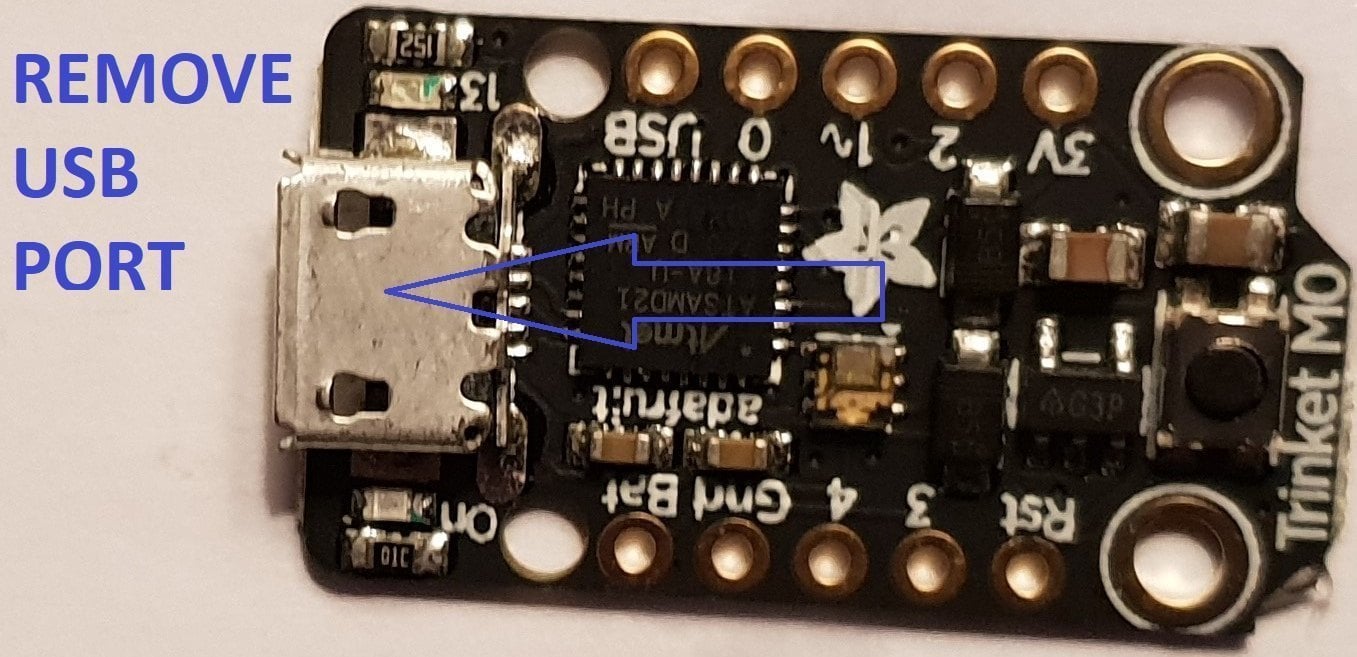
usb intact.jpg


Now That The Usb Port Has Been Removed You Want To Solder Wire To The Data Pads, White = Data- And Green Data+ In This Guide.

Now Solder Wire To The Bat Pad = Red, Gnd Pad = Black, Pad 4 = Orange & Pad 3 = Brown In This Guide.

Also Remove The Resistor Next To The Ppower Led Mark Out In Purple In This Guide.
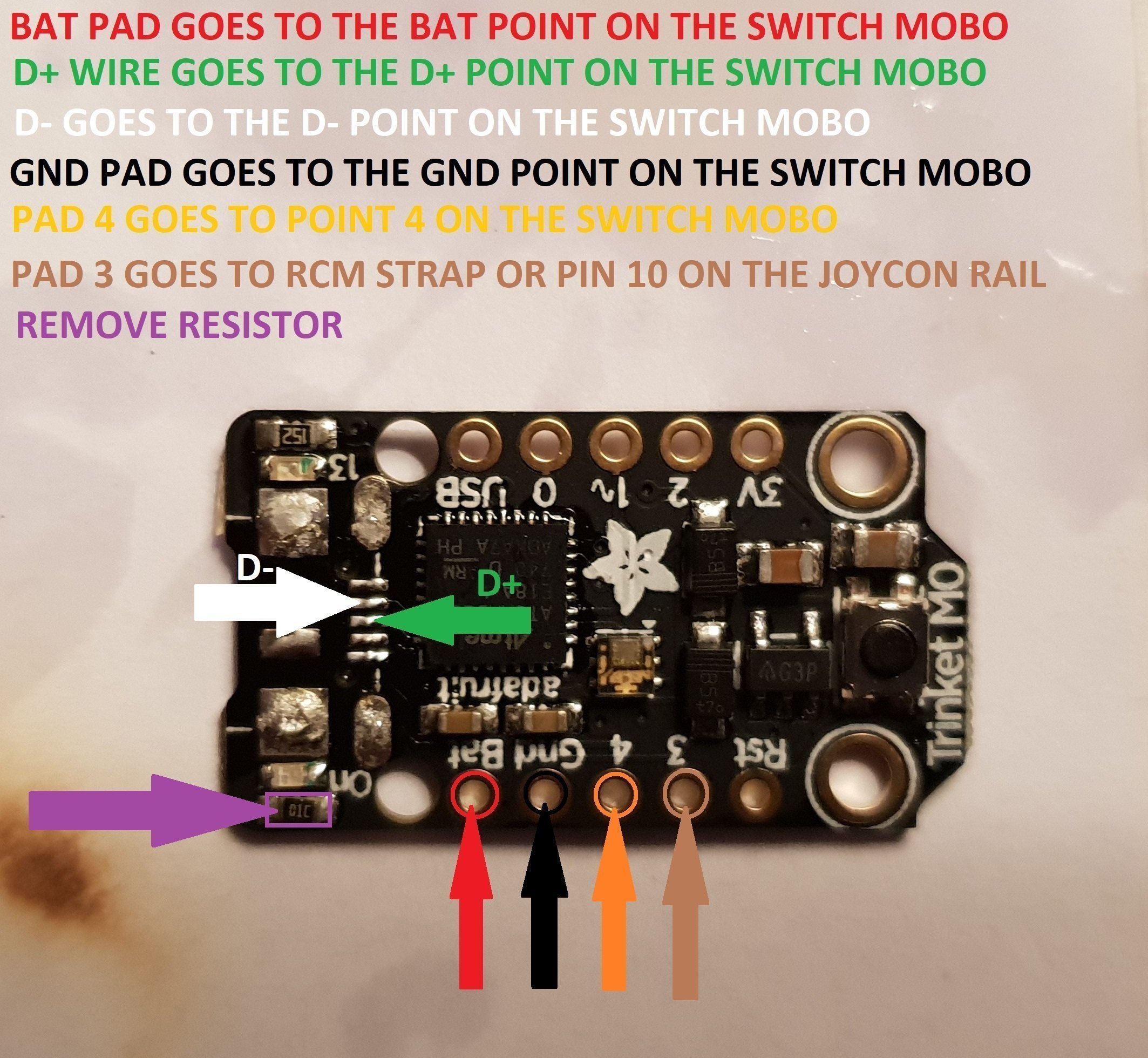
Trinket Points.jpg


When You Have The Trinket All Prepared, You Can Now Proceed To The Install To The Switch.
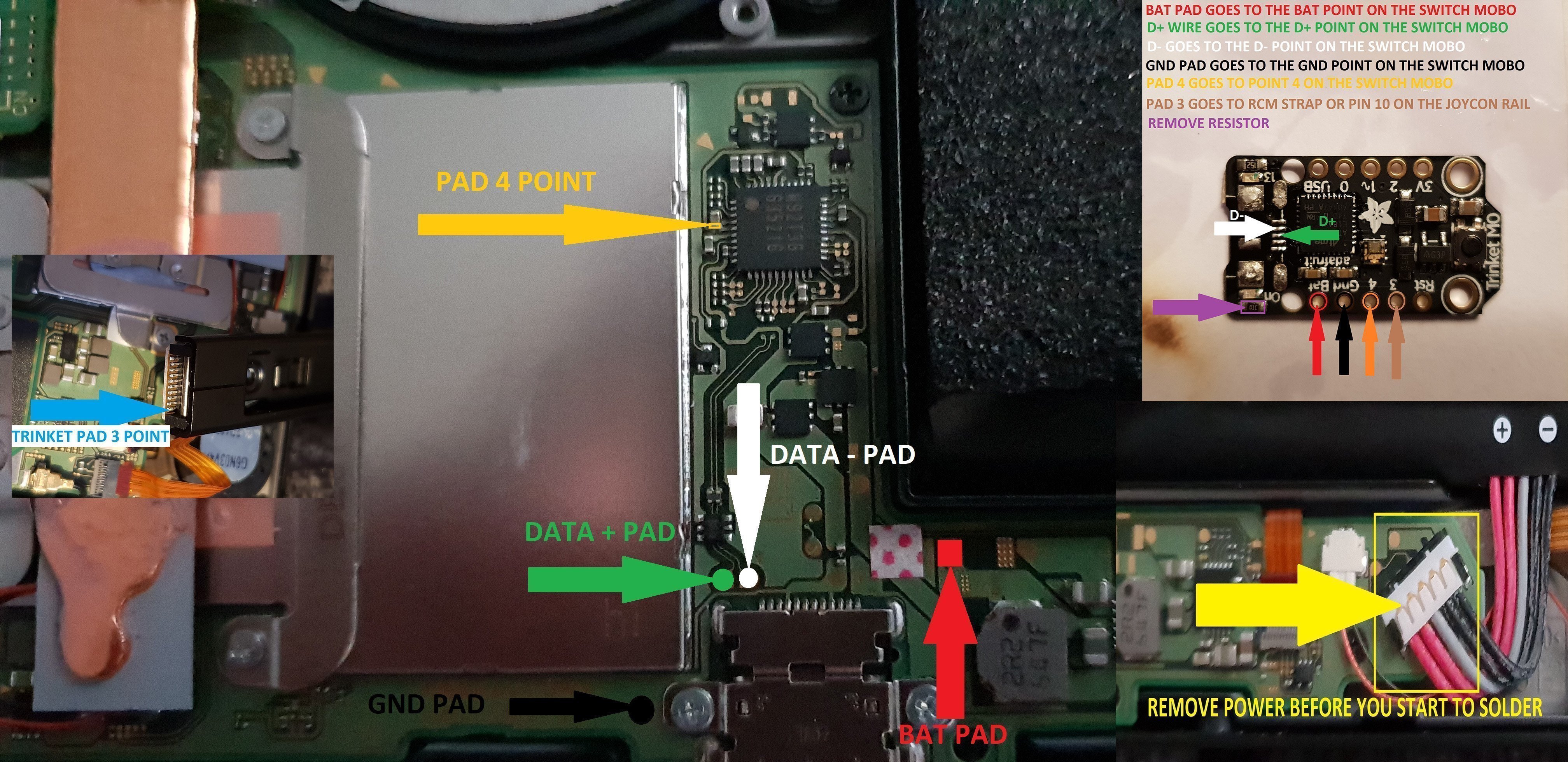
trinket install points.jpg


Once The Install Is Completely Done Then Clean Up The Points You Have Soldered To Using Isopropyl And Cotton Buds/Q-Tips.
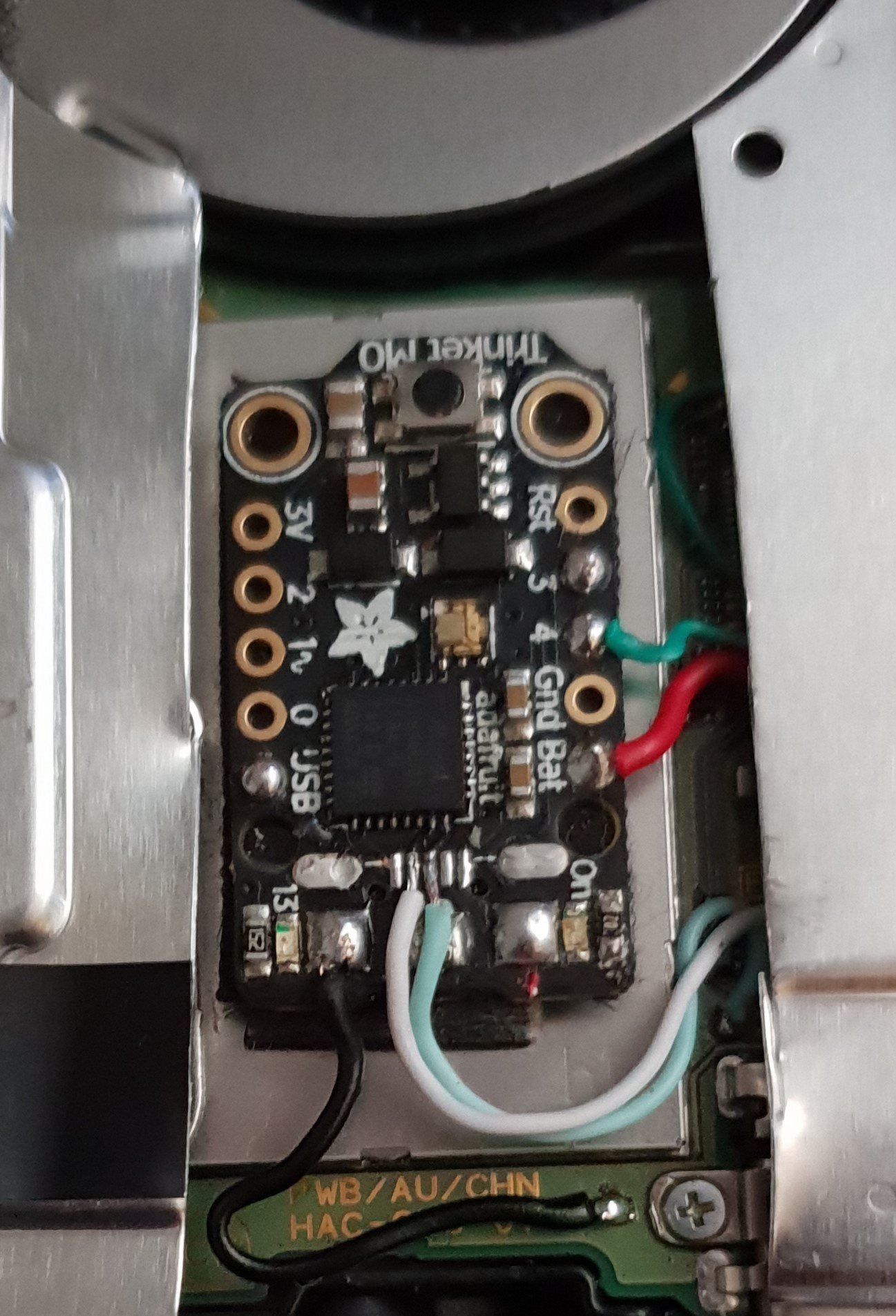
Finished.jpg


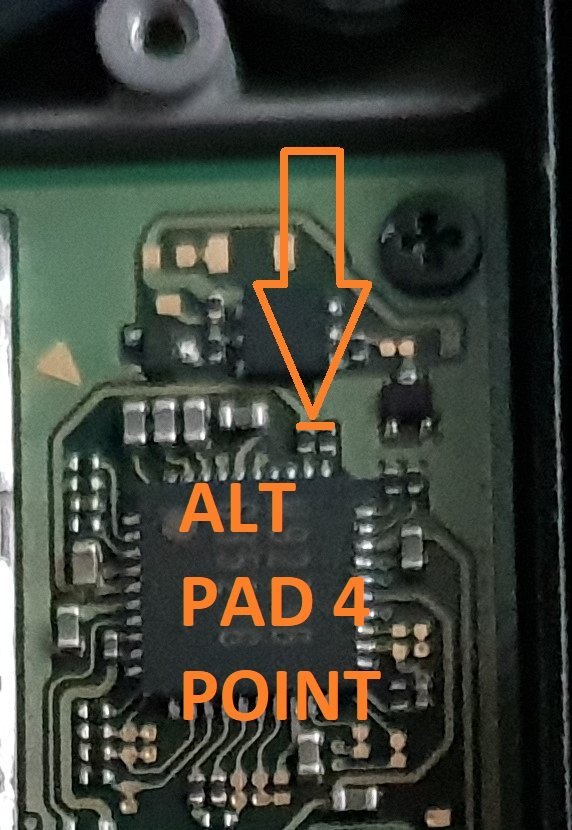
Alternative Point For Pad 4.

Altternative Pad 4 Point.jpg


Alternative Points For Joycon Rail Pin 10.

If You Decide On Using This Alternative Point Then Use Enamel Coated Jumper Wire 0.10mm.
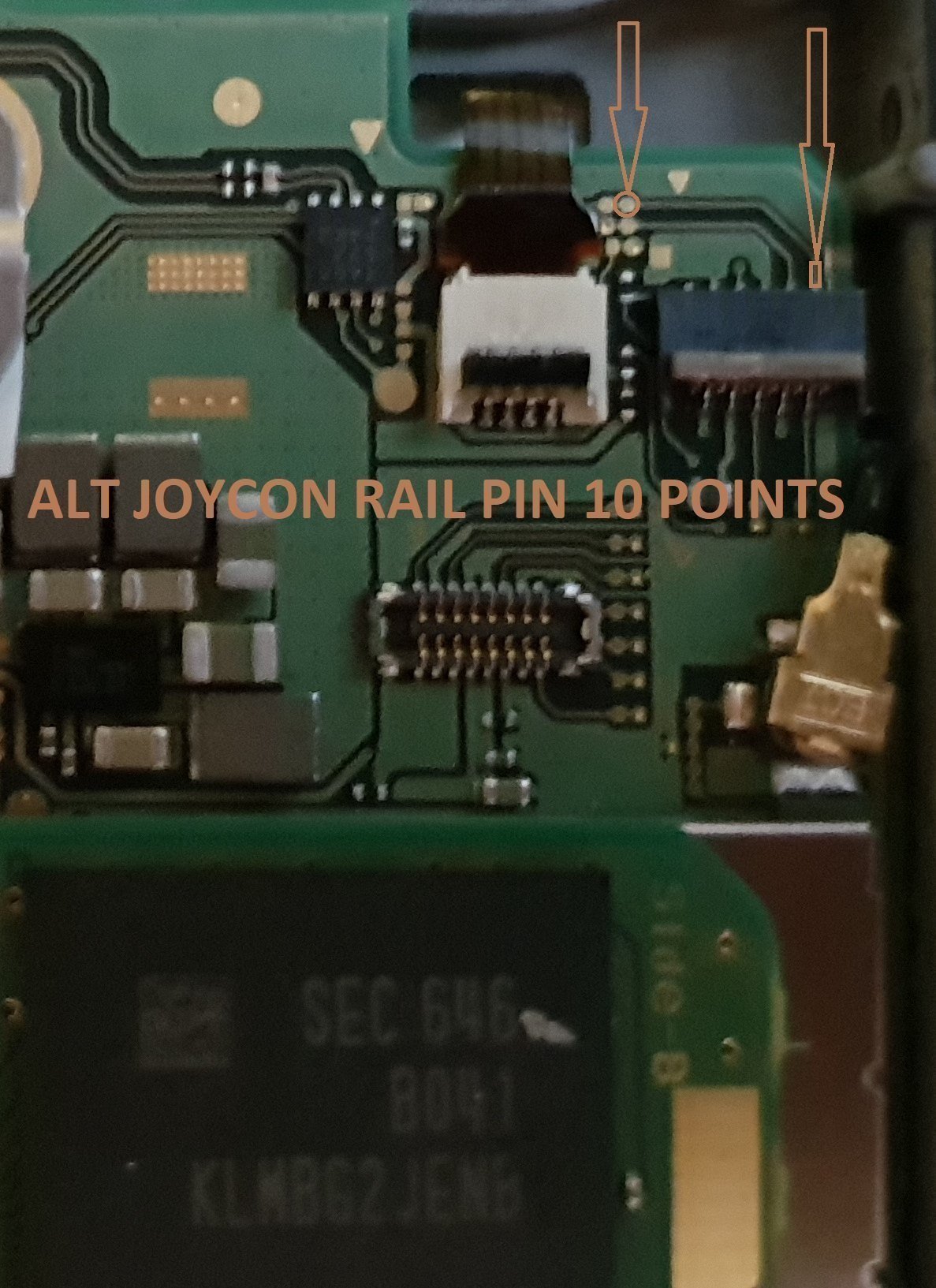
Alt Joycon Rail Pin 10 Point.jpg


Remember Take Your Time It's Not A Race lol. Rushing Can Lead To Mistakes.

Tools Required.

Kynar Wire 30 AWG.
Soldering Iron.
Hot Air Wand For Usb Port Removal(Optional)
Isopropyl.
Cotton Bud/Q-Tips.
Flux.
Solder.
Enamel Jumper Wire (Optional)


Thanks And Credit Goes To Xboxexpert For This Solution.

I Think That Covers Everything.

EDIT..

here's another method for the install of the trinket, this method does away with the pad 4, as some may find it tricky to solder to the cap used on the mobo.

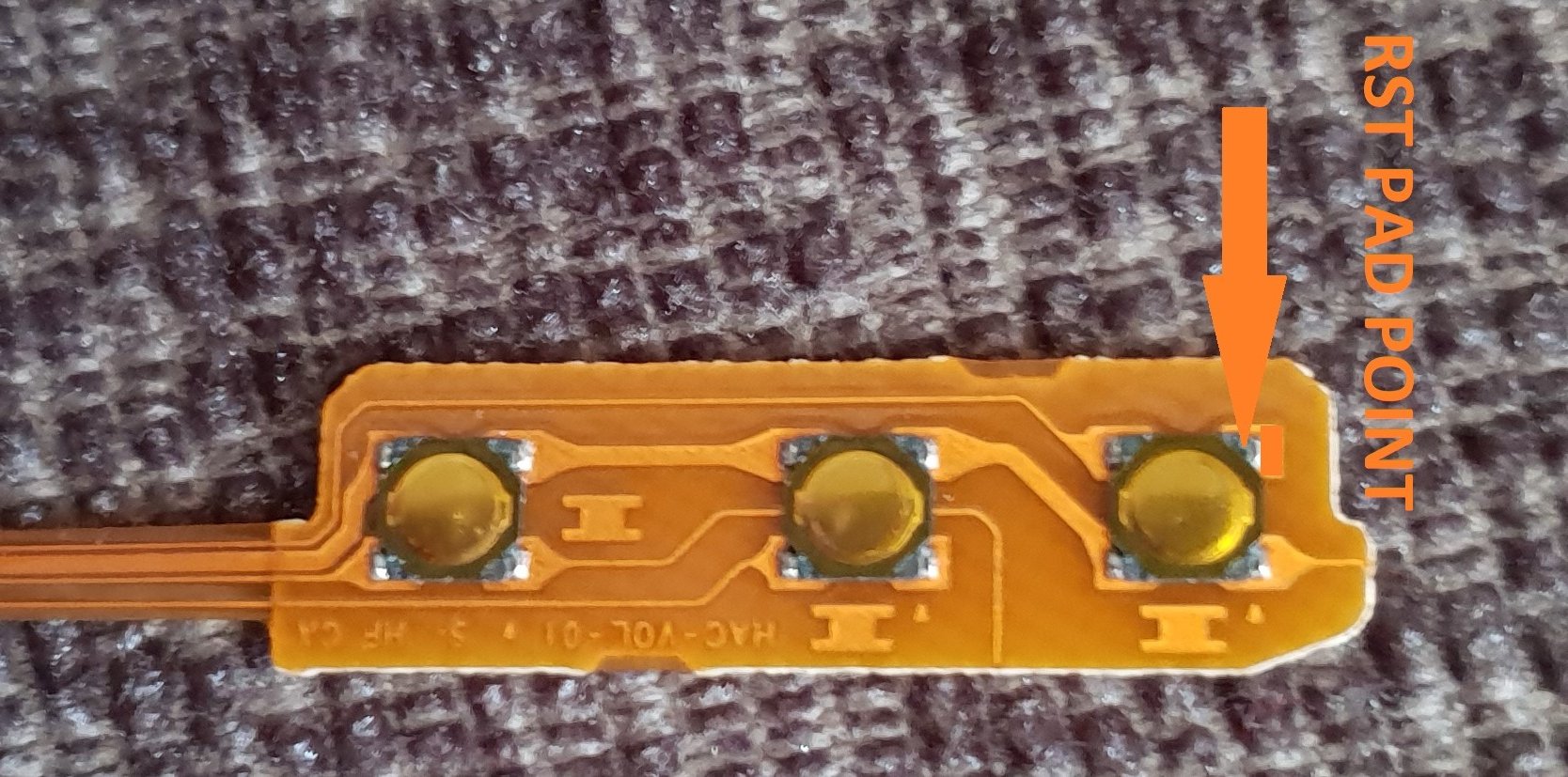
the rst pad is used instead and the wire is linked to the power button, Also this has a bonus that you can double press the power button to put the trinket into boot loader mode for uploading a new payload.

of course you don't have to use the rst pad at all, you can't just press power button and volume up button, then press reset button for rcm mode.

this method should be ok for the novices.

install at your own risk.
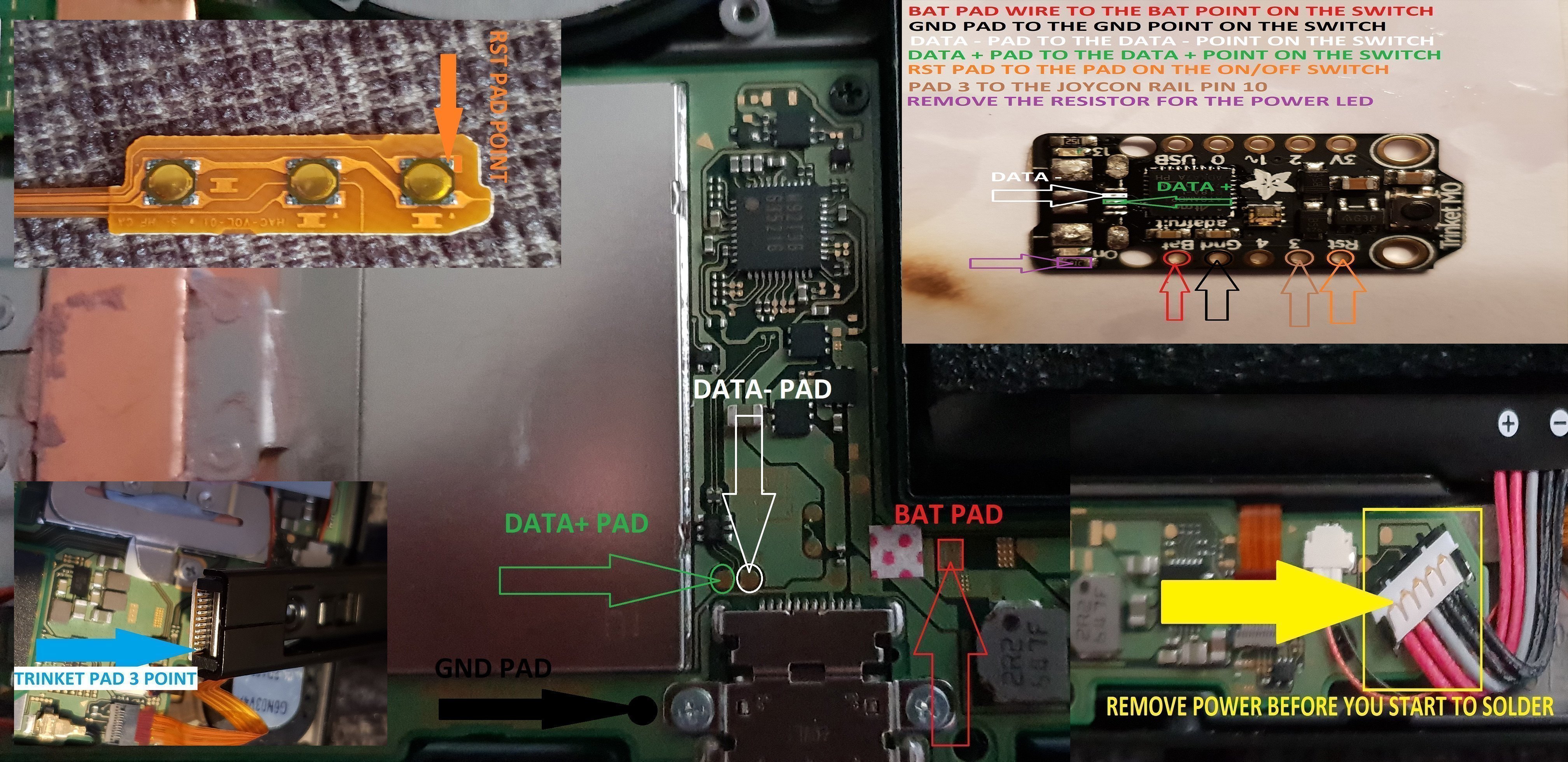
another install.jpg


the pad on the power button to use.

power button point.jpg


i have one more method to try but I really think this one is not to bad method.

the more methods the better I say, of course to try and make it as easy as possible for pros and novices.

EDIT...
another method for the install of the trinket.

this method is basically same as all other methods, just a different points uses for the bat pad and rst pad.

this install will allow you to have the trinket power off when you fully power off the switch.

double press the reset button on the trinket to get into boot loader mode, this may take a couple of attempts to do.

the payload that you use already will work with this method no need for new ones.

here's the diagram for method 3, you could possibly have this as a 4 wire install, if you install auto rcm mode, but as my sd card module port is buggerd I couldn't test that out.
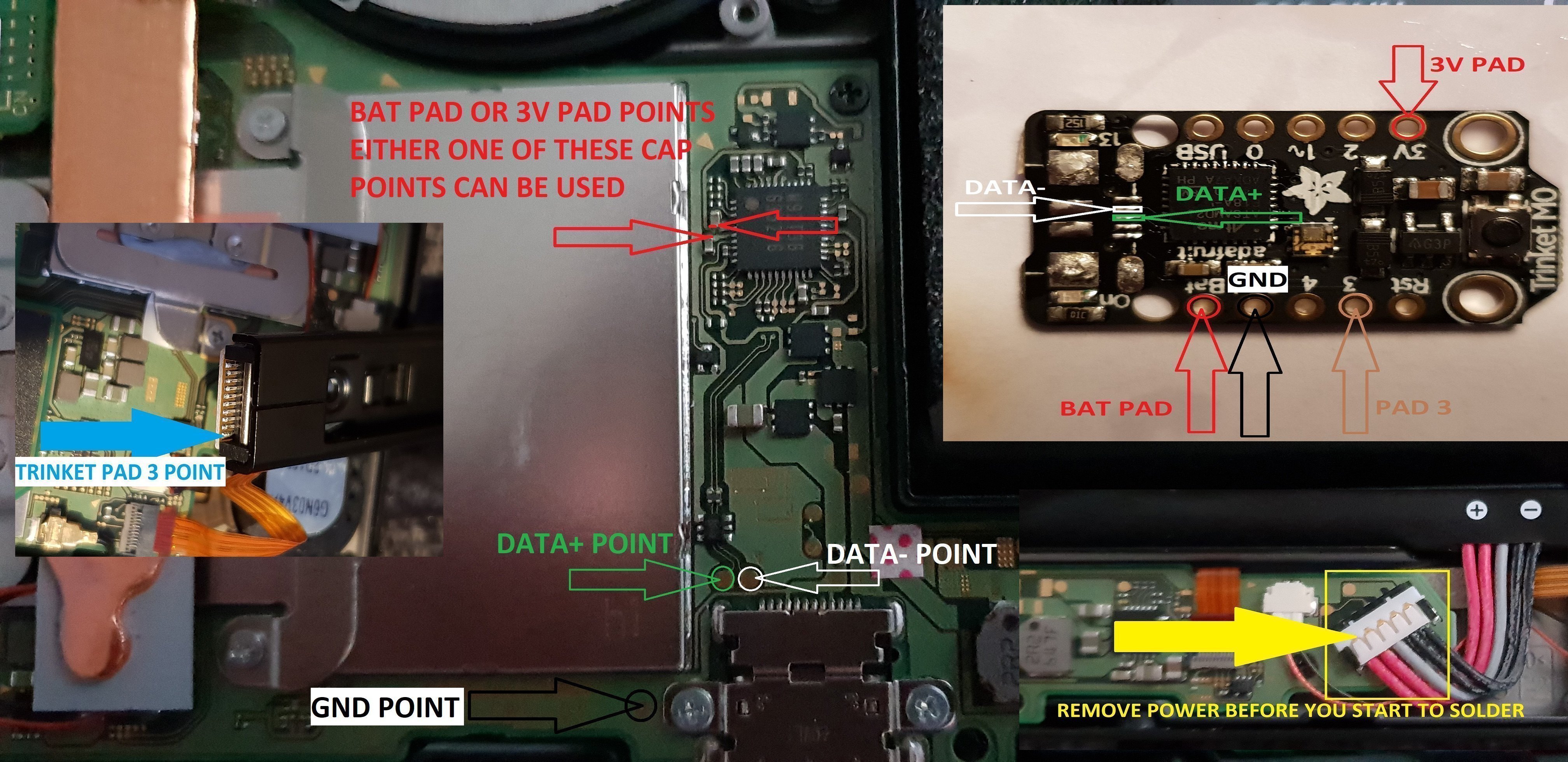
twinket power off.jpg


ok it seems method 3 needs auto rcm installed for it to work without the need to use the rst pad

so for them that don't want to use auto rcm mode then solder a wire from rst pad to the point on the power button, and use pad 3 to the pin 10 on the joycon rail or one of the alt points on mobo.

beware the alt points are small so use at your own risk.

ok anyone with changing issues test these 2 points, you should get 5v on the usb port side, and around 3.2v on the switch side.

if your getting the volts on the switch side that are fluctuating up & down then replace the part with the v on top it's a diode, you want one that fits so the actual size is either 0402 or 0603 in dimension (i'm using 0402/0603 as an example for size purpose only)

around page 16 has more info about this component..

dont come moaning if you damage your console doing this install, i'm not responsible for you opening or taking a soldering iron to your console.
you do this at your own risk any damage is down to yourself.
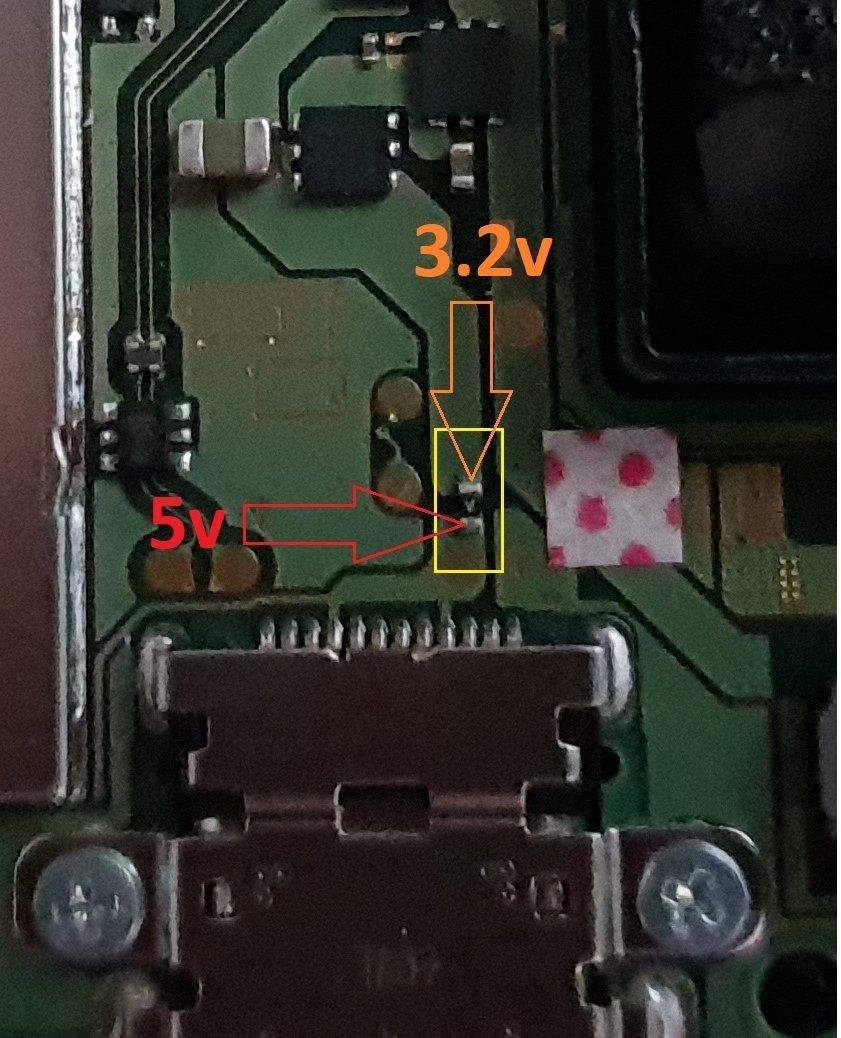

charger_issue_volts.jpg


another thing if your trinket starts to get very hot to the point you can't touch it, then the atmel ATSAMD21E18A-U ic is on it's way out, so you will need to replace the ic or just replace your trinket.

at some point it wont power up after this has happened.
1 = gets very hot.
2 = reset starts to become tempermental .
3 = dead
4 = fix replace the atmel ATSAMD21E18A-U ic

edit

added uf2 drag and drop files for r4 trinket gemma dongles or for a 4 wire internal install.

atmosphere
hekate 4.2
Sxos
rajnx
reinx
 

Attachments

  • Trinket All In One.jpg
    Trinket All In One.jpg
    123.9 KB · Views: 3,983
  • Trinket-R4-Gemma-D&D-Files.zip
    421.3 KB · Views: 534
Last edited by M-O-B, , Reason: added updated uf2 file.

M-O-B

Well-Known Member
OP
Member
Joined
Jun 23, 2018
Messages
281
Trophies
0
Age
53
XP
573
Country
United Kingdom
Mine has tx payload installed autorcm, on my sisters I used the no fuse blow tutorial from 3.0-4.1 and the tx one doesn't work so it has briccmiiv2 on it.

what's the battery drain like with both. I read it drains but then I read it fine so I'm confused by all that auto rcm.

and how you boot to ofw with it, I tried everything when I installed briccmii..
 

Maximize0987

Well-Known Member
Newcomer
Joined
Jun 24, 2018
Messages
46
Trophies
0
Age
43
XP
306
Country
United States
I haven't seen any extra battery drain yet. Last I checked in the thread people were saying it wasn't all the time, but once in awhile they would find the battery down. battery drain is only when the console was turned off, not in sleep mode. Im usually in sleep mode or docked.

I found with my sisters on TX autorcm I would have to hard reset after every shutdown, in order to boot again. I wonder if the battery drain is due to a shutdown or startup sequence failing or freezing (with screen off of course).
 

mrdude

Developer
Developer
Joined
Dec 11, 2015
Messages
2,483
Trophies
1
Age
55
XP
6,616
Well that's me just collected my switch today from PC world, It's got 4.1.0 firmware on it so I've not connected it to the net and put it in airplane mode. I got the game crash bandicoot with it so tried that, it works fine and didn't ask me to update. So if you buy a new game and it's something that requires a new firmware to play - I guess the update is on the cartridge or do you need to go online to download that? Also does it install automatically from a cartridge or do you get some sort of prompt?
 

Maximize0987

Well-Known Member
Newcomer
Joined
Jun 24, 2018
Messages
46
Trophies
0
Age
43
XP
306
Country
United States
Well that's me just collected my switch today from PC world, It's got 4.1.0 firmware on it so I've not connected it to the net and put it in airplane mode. I got the game crash bandicoot with it so tried that, it works fine and didn't ask me to update. So if you buy a new game and it's something that requires a new firmware to play - I guess the update is on the cartridge or do you need to go online to download that? Also does it install automatically from a cartridge or do you get some sort of prompt?

if game needs an update to play, it will be on the cart. and install from the cart
 
  • Like
Reactions: mrdude

Maximize0987

Well-Known Member
Newcomer
Joined
Jun 24, 2018
Messages
46
Trophies
0
Age
43
XP
306
Country
United States
you must mean while on SX OS? SX OS blocks it. I tried to run kirby on my 3.0 console and it would not load or prompt for update. any update you will get a prompt first. I don't think any game carts currently require higher than 4.1, but I could be wrong, and Im sure that will change soon.
 
  • Like
Reactions: mrdude

mrdude

Developer
Developer
Joined
Dec 11, 2015
Messages
2,483
Trophies
1
Age
55
XP
6,616
Ok thanks, that's the info I required. I've not downloaded sx os yet as I'm waiting for some transistors to turn up from china before I do any modding, although I could easily just use my mobile or a dongle to upload a payload if I needed to. Also I'm quite interested in waiting to see what Atmosphere has to offer, if it's going to have a backup loader I'll probably use that rather that pay for a license from TX.
 

Maximize0987

Well-Known Member
Newcomer
Joined
Jun 24, 2018
Messages
46
Trophies
0
Age
43
XP
306
Country
United States
Ok thanks, that's the info I required. I've not downloaded sx os yet as I'm waiting for some transistors to turn up from china before I do any modding, although I could easily just use my mobile or a dongle to upload a payload if I needed to. Also I'm quite interested in waiting to see what Atmosphere has to offer, if it's going to have a backup loader I'll probably use that rather that pay for a license from TX.


yeah I am hoping atmosphere will look original, and be polished before its released, and have separate menus for games, homebrew, emulators, etc
 

M-O-B

Well-Known Member
OP
Member
Joined
Jun 23, 2018
Messages
281
Trophies
0
Age
53
XP
573
Country
United Kingdom
well seems I can only use this file when switch has auto rcm installed, the file with blinking leds only boots to black screen I have to keep pressing the reset button for it to boot.


must need to change something in other code for boot strap or something, so will have to try figure that out now grrrr
 

Maximize0987

Well-Known Member
Newcomer
Joined
Jun 24, 2018
Messages
46
Trophies
0
Age
43
XP
306
Country
United States
I had an idea to put a switch maybe under the kickstand, that if it was closed the trinket would pull volume + and rcm strap when you powered on the console, if open the console would boot normally. booting OFW would be rare for me so a nearly always modified one button boot is the way to go for me.

--------------------- MERGED ---------------------------

I had an idea to put a switch maybe under the kickstand, that if it was closed the trinket would pull volume + and rcm strap when you powered on the console, if open the console would boot normally. booting OFW would be rare for me so a nearly always modified one button boot is the way to go for me.
this switch could basically be on the trinket power wire, and the trinket always pulls volume +
 

mrdude

Developer
Developer
Joined
Dec 11, 2015
Messages
2,483
Trophies
1
Age
55
XP
6,616
that got my nerves did that one, I prefer method 3 but it seems to not wanna work now, need to press reset to load payload, but my battery is only at 20% so will charge battery then try again.

just when it seemed to be fine.

You do know that using the untouched code - pin 4 on the trinket required some voltage to set the pin high when the switch turned on, so now it can't wake up (after it has gone in to sleep mode - unless you reboot the trinket).

Now you've wired the trinket differently, the trinket turns on and after the code runs once it goes to sleep pretty much straight away.

void loop()
{
sleep(1);
}

I'm not sure how much you know about coding arduinos etc - but the void loop is the function that continuously runs - the setup part runs only once when you first boot the trinket until it it gets to the loop code, then runs the code in there.

As you're telling the device to sleep and run the code in the loop forever you should comment out the line: sleep(1) as it's already being run at the end of the setup.

If you want to wake the trinket up again to run code - you need to set pin 4 high, so you can run the wake code - at the end of that code you can tell the trinket to sleep again after it's run the code.
 
Last edited by mrdude,
  • Like
Reactions: Deleted User
D

Deleted User

Guest
You do know that using the untouched code - pin 4 on the trinket required some voltage to set the pin high when the switch turned on, so now it can't wake up (after it has gone in to sleep mode - unless you reboot the trinket).

Now you've wired the trinket differently, the trinket turns on and after the code runs once it goes to sleep pretty much straight away.

void loop()
{
sleep(1);
}

I'm not sure how much you know about coding arduinos etc - but the void loop is the function that continuously runs - the setup part runs only once when you first boot the trinket until it it gets to the loop code, then runs the code in there.

As you're telling the device to sleep and run the code in the loop forever you should comment out the line: sleep(1) as it's already being run at the end of the setup.

If you want to wake the trinket up again to run code - you need to set pin 4 high, so you can run the wake code - at the end of that code you can tell the trinket to sleep again after it's run the code.

Yeah pin 4 is a wakeup pin triggered from the 3.3v when the switch is powered on, I am testing using the 1.8v point instead from the joycon rail as it's energized at the same time with or without joycons attached (and much safer for everyone to solder to) but I'm not sure 1.8v is enough to trigger the "high" state pin 4 is looking for.

Power button point is showing 4.1v we can't direct wire that unregulated. Vol down/up is fine they only post 1.8v. So reset pin could be routed to vol down, but NOT power as we had wired it before =/
 

M-O-B

Well-Known Member
OP
Member
Joined
Jun 23, 2018
Messages
281
Trophies
0
Age
53
XP
573
Country
United Kingdom
You do know that using the untouched code - pin 4 on the trinket required some voltage to set the pin high when the switch turned on, so now it can't wake up (after it has gone in to sleep mode - unless you reboot the trinket).

Now you've wired the trinket differently, the trinket turns on and after the code runs once it goes to sleep pretty much straight away.

void loop()
{
sleep(1);
}

I'm not sure how much you know about coding arduinos etc - but the void loop is the function that continuously runs - the setup part runs only once when you first boot the trinket until it it gets to the loop code, then runs the code in there.

As you're telling the device to sleep and run the code in the loop forever you should comment out the line: sleep(1) as it's already being run at the end of the setup.

If you want to wake the trinket up again to run code - you need to set pin 4 high, so you can run the wake code - at the end of that code you can tell the trinket to sleep again after it's run the code.

I know I have it wired different I know a small bit about this arduino code as I use it for teensys and arduino megas for led projects, so I know how it runs wake up/sleep, this is why the code with the leds stay on works coz it's not sent to bed.

anyway I have managed to get the code to work now when auto rcm is installed.

I will look at the code in depth a bit more now as the install is pretty much how I want it.

I can have it wired 2 different ways now so I don't need to bother with the install methods anymore.

so can look into spend time on the code.

it's runs now when auto rcm is installed.

a good sleep and time our helps clear the cobwebs out.

Yeah pin 4 is a wakeup pin triggered from the 3.3v when the switch is powered on, I am testing using the 1.8v point instead from the joycon rail as it's energized at the same time with or without joycons attached (and much safer for everyone to solder to) but I'm not sure 1.8v is enough to trigger the "high" state pin 4 is looking for.

Power button point is showing 4.1v we can't direct wire that unregulated. Vol down/up is fine they only post 1.8v. So reset pin could be routed to vol down, but NOT power as we had wired it before =/

the power button ain't needed but if people want to use it the it's simple to drop the volts to 3.2 going to the rst point from the power button.

the install methods are done with I don't need to bother with that side of things any longer.

i will probably clean up the op and just leave it with one method of the install.

as most only want the easiest way to have it fitted.

i only going to update now once everything is completely done, the idea is to have one code for all installs not one for this method that method and every other method.

the plan is to do away with the need for the rst wire when not using auto rcm.

edit
I have the volume button on rst pad at moment and down to 2.1v work fine, just seeing if I have anything that will actually keep the vol button at 1.8v and still work the reset.

the way I see it is you don't use the volume up button that much, so turning it into the reset and trying to keep it as 1 8 or as close to would be a bonus if it works out.
 
Last edited by M-O-B,
  • Like
Reactions: Deleted User
D

Deleted User

Guest
So after testing out the 1.8v joy-con rail point to trigger pin 4, sadly it's not viable, as it's energized too late in the boot order so it won't trigger the payload. I had to go back to using the capacitor 3.3v spot.

In the end I went with the original code's interpretation and wired pin 0 to the vol + button, left the reset button intact (if I really need it, I can easily pop open the back) and this way it acts like auto-rcm without the "accidentally leaving it on" bit.

I also tested the power draw with the green led resistor removed:

During operation (for like what 5s?) : 14.9mA
During sleep - Switch Powered ON: 1.45mA
During sleep - Switch Powered OFF: 1.24mA

Basically it's nothing worth worrying about, and would be a rounding error vs. original hardware draw.

Trouble is if we bypass the regulator and put the capacitor 3.3v to the 3v pin, It's again not fast enough to initialize and then do the payload. So this is likely the end of the Trinket M0 journey lol.

Not bad really.

When using SXOS and this method, you can have it do a hands free boot into SXOS, or if you hold Vol+ down during boot you can get into the SX Menu, which lets you choose Horizon OS, or .bin payloads from your SD card. I don't really see any point in further changing the code or wiring vs the original plan, they seem to have thought it out really well and opted for the most utility even if it means 7 wires.

I used Kapton tape under and over the trinket to keep it clean and isolated, then cut out the section of the metal shield above, then used aluminum tape to cover over it keeping airflow essentially the same as original aside from a few bumps. I also made a small hole in the aluminum tape to access the reset switch and see the leds, in the event you want to reprogram, it's all visible once you take off the back plate. The battery area was just a bit too cramped and I'd have needed to remove the reset switch and the larger capacitors and replace them with thinner ones.

I'm happy with it, and have 4 more lined up to be done this week =)
 
  • Like
Reactions: frep and M-O-B

M-O-B

Well-Known Member
OP
Member
Joined
Jun 23, 2018
Messages
281
Trophies
0
Age
53
XP
573
Country
United Kingdom
the moment you make a mistake and accidentally remove the ic when taking off the usb port grrr, forgot my tape over the damm thing.

20180710_132919.jpg


shit happens lol.

bit of luck it's ok it's doing everything it's supposed to, but won't find out till I put it on console.

20180710_140115.jpg
 
Last edited by M-O-B,
  • Like
Reactions: Deleted User

mrdude

Developer
Developer
Joined
Dec 11, 2015
Messages
2,483
Trophies
1
Age
55
XP
6,616
@Captain_Smek

We could always end up just making our own board with a push button (power on/off) latching circuit:

http://www.mosaic-industries.com/em...n-switch-turn-on/latching-toggle-power-switch

I've had pcb boards made before - they are very cheap to get produced. I got some made for PSVITA - ended up costing less that £20 for 50 boards (including shipping), just need to design a new circuit with eagle cad and then send the design away - you can even get the stencil for soldering with it for a bit extra (not expensive). I'm very busy from now until the end of summer - but unless TX or some other team made a new board, I might just make my own design which will be more suited for the switch. Probably make 100 or so and sell them on fleabay.

These were the boards I got made before:
2iqy05l.jpg
 
Last edited by mrdude,
  • Like
Reactions: Deleted User

M-O-B

Well-Known Member
OP
Member
Joined
Jun 23, 2018
Messages
281
Trophies
0
Age
53
XP
573
Country
United Kingdom

codes are in the op, they are the same as others use, nothing different.

or get it from the source and compile them yourself.

--------------------- MERGED ---------------------------

@Captain_Smek

We could always end up just making our own board with a push button (power on/off) latching circuit:

http://www.mosaic-industries.com/em...n-switch-turn-on/latching-toggle-power-switch

I've had pcb boards made before - they are very cheap to get produced. I got some made for PSVITA - ended up costing less that £20 for 50 boards (including shipping), just need to design a new circuit with eagle cad and then send the design away - you can even get the stencil for soldering with it for a bit extra (not expensive). I'm very busy from now until the end of summer - but unless TX or some other team made a new board, I might just make my own design which will be more suited for the switch. Probably make 100 or so and sell them on fleabay.

These were the boards I got made before:
2iqy05l.jpg

that's probably the best route to go, I had some dual nand boards made for the 360 a few years ago, was cheap than buying one of tx or matrix ones.
 
General chit-chat
Help Users
  • No one is chatting at the moment.
  • Skelletonike @ Skelletonike:
    3h left until work finishes, bah
  • Skelletonike @ Skelletonike:
    link doesn't work
    +2
  • Skelletonike @ Skelletonike:
    1H left, such a slow week.
  • Sonic Angel Knight @ Sonic Angel Knight:
    Okay, I had spaghetti :P
  • SylverReZ @ SylverReZ:
    Hope they made lots of spaget
  • K3N1 @ K3N1:
    Chill dog
  • SylverReZ @ SylverReZ:
    Chilli dog
  • Skelletonike @ Skelletonike:
    Damn, I'm loving the new zelda.
  • xtremegamer @ xtremegamer:
    loving the new zelda, i started a game, it was so fucking good, so i
    am waiting on my friend to get home so we can start a new one together
  • Skelletonike @ Skelletonike:
    I just dislike that they don't let me choose the voices before the game starts. Happened with botw as well, had to change to japanese and restart.
  • K3N1 @ K3N1:
    But the important question is can you choose gender
  • Skelletonike @ Skelletonike:
    Same way you can choose Gerald's gender.
  • Skelletonike @ Skelletonike:
    *Geralt, damn autocorrect.
  • Psionic Roshambo @ Psionic Roshambo:
    But can he be trans? Lol
  • K3N1 @ K3N1:
    Zelda transforms into link
  • Psionic Roshambo @ Psionic Roshambo:
    Link I'm not the princess your looking for.... *Pulls a crying game*
  • K3N1 @ K3N1:
    *skirt up* it's exactly what I always wanted
  • Skelletonike @ Skelletonike:
    Just scanned all my zelda amiibos, took a while but didn't get anything that cool, did get the lon lon ranch hylian fabrics though.
  • Skelletonike @ Skelletonike:
    It was pretty funny when I scanned wolf link and got a shit load of meat.
  • K3N1 @ K3N1:
    @Skelletonike, btw I ran that custom for mgs4 on the deck I'm amazed it got that far in game
  • K3N1 @ K3N1:
    Plug in*
    K3N1 @ K3N1: Plug in*