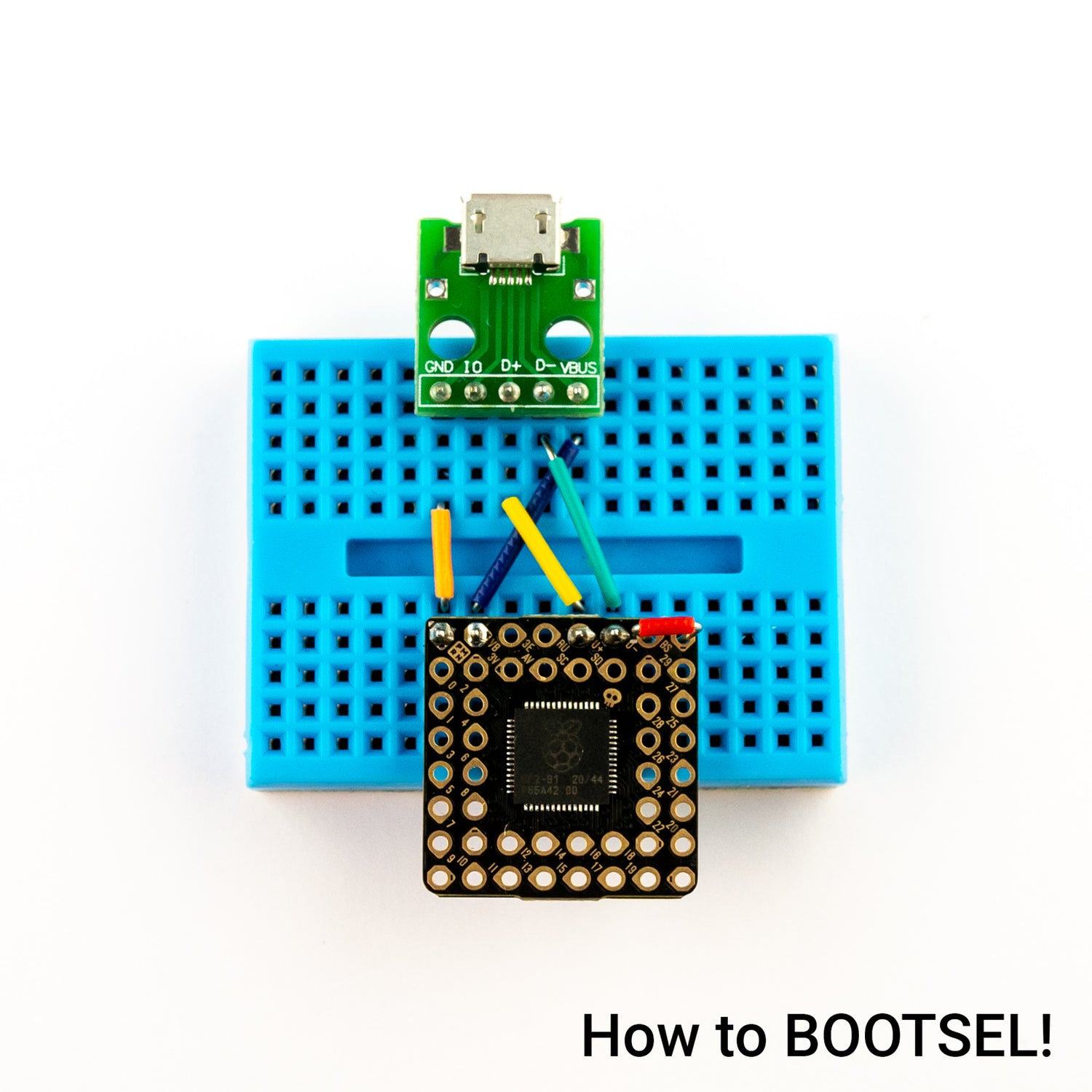
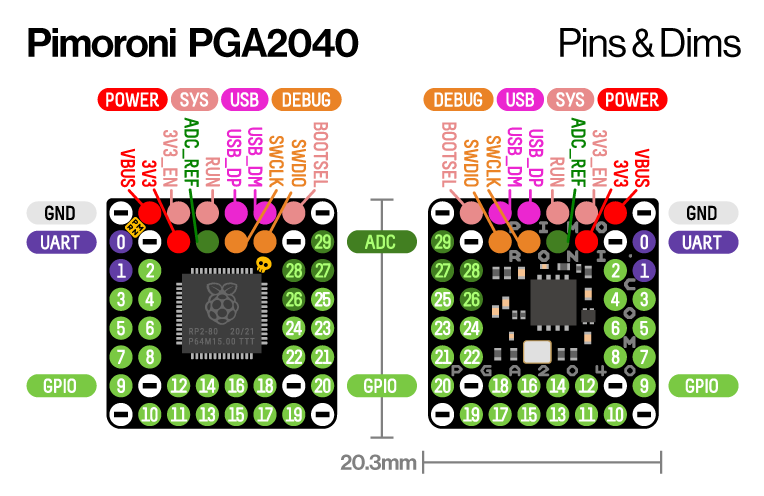
Man I know why I love modding switch’s now I just spent 4 hours trying to figure out why my wifi wasn’t working after getting preparations done for my rp2040 that arrives tomorrow I must have turned on my switch 30 times hoping for the Wi-Fi to work now I don’t know if replacing the caps near the apu or reflowing the Wi-Fi card fixed it but I’ll take it the joy you get when it works is so great
Man I know why I love modding switch’s now I just spent 4 hours trying to figure out why my wifi wasn’t working after getting preparations done for my rp2040 that arrives tomorrow I must have turned on my switch 30 times hoping for the Wi-Fi to work now I don’t know if replacing the caps near the apu or reflowing the Wi-Fi card fixed it but I’ll take it the joy you get when it works is so great
I once spent about an hour trying to figure out why my wifi wouldn't connect and the switch would crash trying to connect to my wifi, then I remembered I'd changed the DNS settings - doh!
Q: GREEN, but instant reset
A: Check your soldering, clean flux. If does not help = add 20K-30K to RST
Q: Do I really need 47 Ohm resistors?
A: You can skip them, however in this case you will have to use emuMMC due to the line interference, sysNAND would not boot.
Q: Does the firmware has learning? How to reset statistics
A: Short pin 0 to either 1 or GND during start for chip reset. The statistics is collected each boot. The more you start it - the better it boots.
Q: open source?
A: no
Q: why you made it?
A: to prove it possible!
Q: run Atmosphere?
A: no piracy
By using the Atmosphere unlock tool you agree to use it for homebrew only.
Way 1 (USB): flash the unlock.uf2 into chip by USB
Way 2 (no USB): run picofly_tb from Hekate, need unlock.bin on the SD card
Boot into Full Stock and perform a full system reset.
hello, if I have the flex cables of the hwfly for the V2, Lite or Oled, should I still solder "irfsh8342" and the resistors? thanks for the great job btw
Q: GREEN, but instant reset
A: Check your soldering, clean flux. If does not help = add 20K-30K to RST
Q: Do I really need 47 Ohm resistors?
A: You can skip them, however in this case you will have to use emuMMC due to the line interference, sysNAND would not boot.
Q: Does the firmware has learning? How to reset statistics
A: Short pin 0 to either 1 or GND during start for chip reset. The statistics is collected each boot. The more you start it - the better it boots.
Q: open source?
A: no
Q: why you made it?
A: to prove it possible!
Q: run Atmosphere?
A: no piracy
By using the Atmosphere unlock tool you agree to use it for homebrew only.
Way 1 (USB): flash the unlock.uf2 into chip by USB
Way 2 (no USB): run picofly_tb from Hekate, need unlock.bin on the SD card
Boot into Full Stock and perform a full system reset.
Thanks. I have everything ready only need to flash the files to rp2040. I have 3 UF2 Files. 2.5+Unlock.uf2 , FW2.5NW.uf2 and Unlock.uf2. I guess ill have to copy only 2.5+unlock.uf2 right?
I once spent about an hour trying to figure out why my wifi wouldn't connect and the switch would crash trying to connect to my wifi, then I remembered I'd changed the DNS settings - doh!
hello, if I have the flex cables of the hwfly for the V2, Lite or Oled, should I still solder "irfsh8342" and the resistors? thanks for the great job btw
Post automatically merged:
hello, if I have the flex cables of the hwfly for the V2, Lite or Oled, should I still solder "irfsh8342" and the resistors? Thanks for the great job
The MOSFETs are already present in the cable, you should be just good to go with it only.
The resistors are necessary for filtering signal interference and for booting into SYSMMC, more info just few pages ago.
has anyone seen seeed XIAO rp2040, is this chip also compatible? - Seems it’s hard to buy RP2040-Zero in UK unless anyone has any best places to buy from?
For the current fw, Xiao is not supported due to lack of pin out:
- Pin 25 for setting RGB/GRB led mode (important for debugging)
- Pin 15 for CPU data line (important for glitching)
Thanks. I have everything ready only need to flash the files to rp2040. I have 3 UF2 Files. 2.5+Unlock.uf2 , FW2.5NW.uf2 and Unlock.uf2. I guess ill have to copy only 2.5+unlock.uf2 right?
It's because the sweat and grease on your fingers is acidic and causes corrosion over time. You should wear latex gloves or finger cots really when dealing with electronics.
It's because the sweat and grease on your fingers is acidic and causes corrosion over time. You should wear latex gloves or finger cots really when dealing with electronics.
It’s about that time of year again where I check in with the community to see if we can get the front page aligned with what people are interested in knowing and what...
WiiCompiled is a new project that lets PC gamers play Mario Kart Wii natively on PC without emulation. Using static recompliation to convert the code into native PC...
After being announced last year, the fan-made remake Gamma Emerald has finally gotten its first early access release. A complete rebuild of fan-favourite Pokemon...
The long awaited Grand Theft Auto VI Extended Look gameplay trailer has finally dropped on YouTube. As you all know, it had dropped 6 hours earlier on Netflix, and...
Though we knew all the way back in May that this was coming, the exact numbers remained a mystery for prospective Nintendo gamers in the UK. If you happen to have...
Thanks to the recent decomplication efforts; The Minish Cap 3DS brings the Game Boy Advance classic Zelda title to your 3DS.
The port takes full advantage of the 3DS...
In the wake of Sony's shift to a digital-only ecosystem within the next year, Xbox have today announced a surprising scheme. Aiming to offer physical buyers the same...
After being announced last week, the first of two broadcasts is set to go live later today with a stark focus on The Legend of Zelda and its 40th anniversary...
It is with a heavy heart that I announce the departure of our beloved Chary from the position of Chief Editor. Chary took over early 2021 and has done a wonderful job...
To celebrate its 25th anniversary, XBOX has launched pre-orders for the XBOX 25th Anniversary Collection. For the occasion, the trailer below was aired.
This...
It’s about that time of year again where I check in with the community to see if we can get the front page aligned with what people are interested in knowing and what...
After being announced last week, the first of two broadcasts is set to go live later today with a stark focus on The Legend of Zelda and its 40th anniversary...
It's been something of a quiet week in the gaming space, with the deluge of big hitters trying to find their place before GTA 6 launches really kicking off next week...
In the wake of Sony's shift to a digital-only ecosystem within the next year, Xbox have today announced a surprising scheme. Aiming to offer physical buyers the same...
Though we knew all the way back in May that this was coming, the exact numbers remained a mystery for prospective Nintendo gamers in the UK. If you happen to have...
The long awaited Grand Theft Auto VI Extended Look gameplay trailer has finally dropped on YouTube. As you all know, it had dropped 6 hours earlier on Netflix, and...
It is with a heavy heart that I announce the departure of our beloved Chary from the position of Chief Editor. Chary took over early 2021 and has done a wonderful job...
The second of a two-part special, a more traditional Nintendo Direct is set to air today. Unlike the Zelda Direct the contents of this one is still relatively up in...
After being announced last year, the fan-made remake Gamma Emerald has finally gotten its first early access release. A complete rebuild of fan-favourite Pokemon...
A few days ago Chary stepped down as Chief Editor after 5 wonderful years, and everyone guessed the seat wouldn't stay empty for very long. Back in 2021 I proudly...




 we are happy and waiting