Hello everyone, I was about to update my Switch by following this self-made noobproof guide:
SWITCH UPDATE INSTRUCTIONS
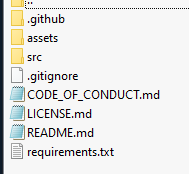
EDIT: I have already tried to download the Deepblue package, as advised from SDSetup, but what is inside the package is this (see image) and it's very different from what I got in the SDSetup packages, how am I supposed to use it?
SWITCH UPDATE INSTRUCTIONS
- Download the files from SDSetup: [LINK I AM NOT SURE I COULD POST].
- Delete the folders on the SD card instead of replacing them.
- Copy all the files to the SD card.
- Download the SWITCH firmware update from Darthsternie: [LINK I AM NOT SURE I COULD POST]
- Create a folder named "Firmware xxxx" in the root of the SD card and copy the firmware update files into it.
- Download the sigpatches from https://gbatemp.net/threads/sigpatches-for-atmosphere-hekate-fss0-fusee-package3.571543/.
- Copy the sigpatches to the indicated location.
- Update Hekate.
- Start the SWITCH as usual (power off while connected to the PC, insert the pin on the right, enter RCM mode by holding "+" and "Power", use Tegra to inject the payload).
- Launch the CFW.
- Launch Daybreak and install the firmware update.
- Everything should now be working correctly. If not, look for videos and/or ask for help on GBAtemp.
EDIT: I have already tried to download the Deepblue package, as advised from SDSetup, but what is inside the package is this (see image) and it's very different from what I got in the SDSetup packages, how am I supposed to use it?