Hm.. 2.64 shows an odd behavior on my patched Erista. When booting, after glitch succeeds (LED flashes green), the LCD screen turns grayish twice, sometimes thrice, before showing the switch logo. Doesn't show the atmosphere logo anymore either. Also, 2.61 glitches instantly (blue, green, within a second), while 2.64 keeps flashing blue/purple for at least 10 seconds before sometimes doing the gray screen thing and booting.
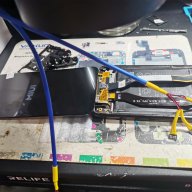
Alright. I'm about to start on the motherboard. I added pics of what i'm working with for reference.
Few questions:
1) Are the mosfets in my image correct? They say "irh83422tnk". I ordered them because of the "irh8342". I am not familiar with mosfets.
2) If mosfets are correct, should I double them up and follow the "Mariko Dual Mosfet Install Diagram"?
3) My resistors should be good. 47 ohm.
4) Should I be soldering directly to the DAT0, CLK, RST, CMD points on the hac-emmc board OR the ones off the main board? ie: "V1 Patched/V2 Points" diagram
any help is appreciated. i have all the tools and can microsolder pretty well but I am new to the switch.
tia
Hello, I created a 12 gb emmc partition on a 128 gb micro sd, and when I try to install some files on it, I get that sign, does anyone know what I should do?
Alright. I'm about to start on the motherboard. I added pics of what i'm working with for reference.
Few questions:
1) Are the mosfets in my image correct? They say "irh83422tnk". I ordered them because of the "irh8342". I am not familiar with mosfets.
2) If mosfets are correct, should I double them up and follow the "Mariko Dual Mosfet Install Diagram"?
3) My resistors should be good. 47 ohm.
4) Should I be soldering directly to the DAT0, CLK, RST, CMD points on the hac-emmc board OR the ones off the main board? ie: "V1 Patched/V2 Points" diagram
any help is appreciated. i have all the tools and can microsolder pretty well but I am new to the switch.
tia
1. yes
2. u can try with one if it doesnt work and u get blue then cyan use 2
3.yes
4. however u want i would get the pins on the board if u ever have to change the emmc
Hello, I created a 12 gb emmc partition on a 128 gb micro sd, and when I try to install some files on it, I get that sign, does anyone know what I should do?
1. yes
2. u can try with one if it doesnt work and u get blue then cyan use 2
3.yes
4. however u want i would get the pins on the board if u ever have to change the emmc
Post automatically merged:
first its not english and this is english forum .
second what files u want to put where?
my pc is in Spanish, I want to put the atmosph, but I don't know if it can be mentioned here, the problem is that when I create emmc in the console, then when I connect my micro sd the emmc partition appears plus the other one that is in fat32 but windows says it needs to be formatted
if you still can load Stock using hekate, I would suggest to apply the official 16.0.1 system update over WiFi.
If you already have 16.0.1 on a SysNAND, you can downgrade it with daybreak before doing that (never tested, but will do that just to ensure)
my pc is in Spanish, I want to put the atmosph, but I don't know if it can be mentioned here, the problem is that when I create emmc in the console, then when I connect my micro sd the emmc partition appears plus the other one that is in fat32 but windows says it needs to be formatted
if you still can load Stock using hekate, I would suggest to apply the official 16.0.1 system update over WiFi.
If you already have 16.0.1 on a SysNAND, you can downgrade it with daybreak before doing that (never tested, but will do that just to ensure)
Someone who would be so kind as to tell me what mosfet I need, Numbering or model to work the peak without processor cables, that is the only thing that is not clear to me since I already saw what the resistors are and the installation and connection points also already I have them, I only need the connection of the processor to the peak
Oook, I had everything tested but for some reason I decided to reflow everything and OF COURSE I bridges three small caps (those where you pick ground from).
But honestly, they just look like they're on the same trace and I would really love if I could avoid unbridging those little guys and leave everything as is.
Can anyone confirm me this and/or link some proper diagrams?
I'll attach pictures of my mobo and another one I found online with better resolution, for better trace checking
(They're both taken looking from the top of the Switch towards the bottom)
Hello, I created a 12 gb emmc partition on a 128 gb micro sd, and when I try to install some files on it, I get that sign, does anyone know what I should do?
It’s about that time of year again where I check in with the community to see if we can get the front page aligned with what people are interested in knowing and what...
WiiCompiled is a new project that lets PC gamers play Mario Kart Wii natively on PC without emulation. Using static recompliation to convert the code into native PC...
After being announced last year, the fan-made remake Gamma Emerald has finally gotten its first early access release. A complete rebuild of fan-favourite Pokemon...
The long awaited Grand Theft Auto VI Extended Look gameplay trailer has finally dropped on YouTube. As you all know, it had dropped 6 hours earlier on Netflix, and...
Though we knew all the way back in May that this was coming, the exact numbers remained a mystery for prospective Nintendo gamers in the UK. If you happen to have...
Thanks to the recent decomplication efforts; The Minish Cap 3DS brings the Game Boy Advance classic Zelda title to your 3DS.
The port takes full advantage of the 3DS...
In the wake of Sony's shift to a digital-only ecosystem within the next year, Xbox have today announced a surprising scheme. Aiming to offer physical buyers the same...
After being announced last week, the first of two broadcasts is set to go live later today with a stark focus on The Legend of Zelda and its 40th anniversary...
It is with a heavy heart that I announce the departure of our beloved Chary from the position of Chief Editor. Chary took over early 2021 and has done a wonderful job...
To celebrate its 25th anniversary, XBOX has launched pre-orders for the XBOX 25th Anniversary Collection. For the occasion, the trailer below was aired.
This...
It’s about that time of year again where I check in with the community to see if we can get the front page aligned with what people are interested in knowing and what...
After being announced last week, the first of two broadcasts is set to go live later today with a stark focus on The Legend of Zelda and its 40th anniversary...
It's been something of a quiet week in the gaming space, with the deluge of big hitters trying to find their place before GTA 6 launches really kicking off next week...
In the wake of Sony's shift to a digital-only ecosystem within the next year, Xbox have today announced a surprising scheme. Aiming to offer physical buyers the same...
Though we knew all the way back in May that this was coming, the exact numbers remained a mystery for prospective Nintendo gamers in the UK. If you happen to have...
The long awaited Grand Theft Auto VI Extended Look gameplay trailer has finally dropped on YouTube. As you all know, it had dropped 6 hours earlier on Netflix, and...
It is with a heavy heart that I announce the departure of our beloved Chary from the position of Chief Editor. Chary took over early 2021 and has done a wonderful job...
The second of a two-part special, a more traditional Nintendo Direct is set to air today. Unlike the Zelda Direct the contents of this one is still relatively up in...
After being announced last year, the fan-made remake Gamma Emerald has finally gotten its first early access release. A complete rebuild of fan-favourite Pokemon...
A few days ago Chary stepped down as Chief Editor after 5 wonderful years, and everyone guessed the seat wouldn't stay empty for very long. Back in 2021 I proudly...