Gaming Linux/Windows questions

  • Thread starter Thread starter prowler
  • Start date Start date
  • Views Views 2,060
  • Replies Replies 16

prowler

Sony
Member
Joined
Jul 14, 2009
Messages
9,475
Solutions
6
Reaction score
2,815
Trophies
3
Location
Ragol
XP
3,294
Country
Zimbabwe
I recently upgraded my mums PC to Windows 7 from Windows XP but her sound and two DVD drives don't work.
I've tried uninstalling drivers and re-installing, but nope still doesn't work.
All she basically uses the computer for is for Facebook games (lol, child neglect) and copying/burning DVD's.

I was thinking of burning Ubuntu and try Live CD to see if the DVD drives will work then but how good is flash on Linux distro's? She be lost without dem games.
Would Ubuntu be okay for copying legit DVD's and then burning them onto another DVD?
The last choice I would want is to give her Ubuntu anyway... Then my last, last choice would be downgrading to Windows XP.

The DVD drives my mum has is a BENQ DVD DD DW1650 and a Philips ED16DVDS.
Can't find information pages about them, probably because they are old.

Any help?
helptitanic.gif
 
Prowler485 said:
Crap, forgot to add in.
Windows 7 Ultimate 32-bit.
And you've searched for said device drivers?
If all else fails, I wouldn't really reccomend a Linux distro to be 'Mum-friendly' just stick her back on Vista or XP
 
So the driver version probably won't be the issue then...have you tried going to Devices and Printers and troubleshooting exactly what the issues are?
 
ProtoKun7 said:
So the driver version probably won't be the issue then...have you tried going to Devices and Printers and troubleshooting exactly what the issues are?

Yeah
It said it wasn't working properly, then I went to update and it said there wasn't anything.
The computer isn't turned on so I'm just trying to remember.
 
This DVD issue is really strange. I can't see how it could happen.

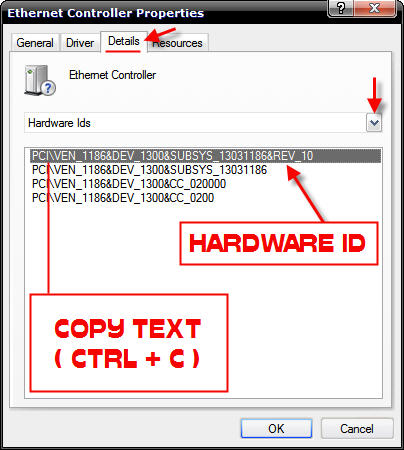
Tried to reinstall it? As for sound, just give me the DeviceID, and I'll find the driver for you.
 
When you say the DVD drives "don't work":

Do they show up in Windows?

If yes, when you put a disk in the drive, does it show that there is a disk in there, or just show up as empty?
 
First flash, for a standard 32bit linux they are passable at best (flash is already bad, flash on linux is worse) but the latest iteration is usually around (as in flash 10, subversions often lag a bit).
There is GNASH (a third party emulation of flash) but it is not quite production grade (adverts are one thing, video another and those games quite another).

LiveCD- brilliant hardware support these days (even wireless is pretty good) and well worth a try. I would sooner go linux mint than ubuntu for a full scale distro and if going lower end (still good though) I would look at puppy linux. LiveCD as the name says though is something that is forgotten when the computer is reset (OK stuff like puppy linux does have save options) so no need to worry. There is a windows one in bartpe if you wanted to go that route.

Also try pulling the drives and sticking them in a caddy (external drives are little more than a fancy caddy).

Original problem: Drives show up in device manager yet no letters are assigned?
You say upgraded- do you mean format and install or using an upgrade option? If the latter I would consider a format and reinstall (I have not seen an upgrade work well since the first windows 95).
Option 2, have you tried to manually assign a letter: http://www.itechtalk.com/thread3400.html

Sound- you should be able to find some generic drivers, try going to the sound website or a general computing site rather than your motherboard/vendor site (this is especially true of laptops).
 
FAST6191 said:
LiveCD- brilliant hardware support these days (even wireless is pretty good) and well worth a try. I would sooner go linux mint than ubuntu for a full scale distro and if going lower end (still good though) I would look at puppy linux. LiveCD as the name says though is something that is forgotten when the computer is reset (OK stuff like puppy linux does have save options) so no need to worry. There is a windows one in bartpe if you wanted to go that route.
I'll have a look at puppy linux, thanks.

FAST6191 said:
You say upgraded- do you mean format and install or using an upgrade option? If the latter I would consider a format and reinstall (I have not seen an upgrade work well since the first windows 95).
Full format
smile.gif

FAST6191 said:
Original problem: Drives show up in device manager yet no letters are assigned?
There is also a
excl.gif
icon showing on device manager though Windows can't find anything to fix the problem.
QUOTE(FAST6191 @ Feb 18 2010, 08:46 PM) Option 2, have you tried to manually assign a letter: http://www.itechtalk.com/thread3400.html
I'll try that out after thanks
smile.gif

QUOTE(FAST6191 @ Feb 18 2010, 08:46 PM)
Sound- you should be able to find some generic drivers, try going to the sound website or a general computing site rather than your motherboard/vendor site (this is especially true of laptops).
I've already tried Packard Bells website and other sites still doesn't work
 

Site & Scene News

Popular threads in this forum