Homebrew RELEASE kEx - a full-system NAND/SD browser

  • Thread starter Thread starter klock
  • Start date Start date
  • Views Views 14,060
  • Replies Replies 30
  • Likes Likes 33

klock

Well-Known Member
Newcomer
Joined
Dec 24, 2010
Messages
47
Reaction score
72
Trophies
0
XP
688
Country
United States
screenshot-v0.03_small.png

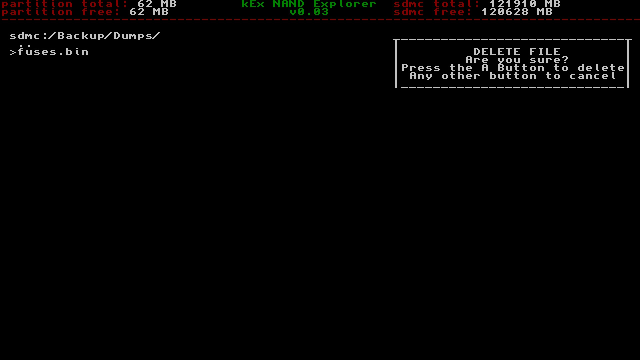
kEx is a full-system filebrowser for the Nintendo Switch, written in C++.

kEx can currently browse the SD card, USER, SYSTEM, and SAFE at the moment, traverse directories, and copy/delete files. This is a very early release and thus missing most major file management features, but I plan on adding them as quickly as I can (text wrapping for folders with too many entries planned for v0.04).

Copy the .nro to your Switch folder and load through the homebrew menu.

Use the A button to enter a partition/directory, B button to go back, and + to exit.

Press X to copy a file, and Y to paste the file either to the SD card, or the same partition (does not currently work across system partitions). There is currently no indicator during a copy, only after, so give large files some time to copy.

Press - to delete a file (press the A button to confirm deletion, any other button to cancel).

NOTE: This can be very dangerous, so use at your own risk! Definitely have a backup saved somewhere before using this!
This is also very early release at the moment, and there are bugs present - please be careful!

Changelog

v0.04 - 2018-07-31
Implemented text wrapping and button repetition.

v0.03 - 2018-07-27
Added file deletion.

v0.02 - 2018-07-27
Added file copying.

v0.01 - 2018-07-26
Initial release.


Source:

https://github.com/klockee/kEx


Release:

https://github.com/klockee/kEx/releases/latest
 
Last edited by klock,
This would be good if it eventually allowed moving installed games from SD to Nand & vice versa. (If the latest update hasn't already done this lol)

This is something that Nintendo has failed to add into the switch's native OS.
 
It would be nice to do it offline and not have to wait overnight if you have slow internet.
I feel ya.
When I bought my switch and SD card I made sure to read the manual first and do some googling and found that it will prioritize SD before internal. So fortunately, taking those few minutes to educate myself on my new product, saved me the hassle you are going through.
 
@Joel16 Something interesting has appeared.
I think this is something more like godmode9 than NX-Shell. NX-Shell aims to be more of a multi-media sort of thing. But yeah I do plan on supporting access to multiple partitions similar to how VITAShell does it.
 
What a nice little tool have we here?
I've been basically thinking about something like this recently.
Amazing! Keep up the good work!
Hopefully the delete function is not far off.
 
Last edited by Zumoly,
My files on the sd card are named too long and it seems to corrupt the other files? Can't select other folders in the same directory
 
Whoa, I hope there are lots of warnings and confirmation dialogs to go through first.

There are confirmations for deleting files, and to overwrite something you've got to have something to replace it with first (you can't copy a file within the same folder, though I'll add renaming in the future) - I'll add a file overwrite confirmation anyways, though. This is still pretty early.

Speaking of which, v0.03 with file deletion (and a confirmation prompt) added.

My files on the sd card are named too long and it seems to corrupt the other files? Can't select other folders in the same directory
If you mean that the entries wrap around to the top of the screen and you can't tell what you're selecting, yeah, that's the next major bug I need to fix - as fast as I can!

Does it have an icon? if not, can i make one? O:
It's fairly low priority and I have a few ideas for icons, but I am admittedly terrible at graphic design, so if I change my mind I'll be sure to let you know! Thanks!
 
Last edited by klock,
There are confirmations for deleting files, and to overwrite something you've got to have something to replace it with first (you can't copy a file within the same folder, though I'll add renaming in the future) - I'll add a file overwrite confirmation anyways, though. This is still pretty early.

Speaking of which, v0.03 with file deletion (and a confirmation prompt) added.


If you mean that the entries wrap around to the top of the screen and you can't tell what you're selecting, yeah, that's the next major bug I need to fix - as fast as I can!


It's fairly low priority and I have a few ideas for icons, but I am admittedly terrible at graphic design, so if I change my mind I'll be sure to let you know! Thanks!
Does the listing of system/save actually show the list properly? I went in to manually delete files ending a0/a1/d1 and when I deleted just one of them to test, a1, when I turned off and on it hung on boot and gave a system error.
 
Checked the OP and pleased to see you added delete function.
Sadly I can't like the post a second time.
Also on the github release page it says press + to delete while this causes the app to exit (I think this needs to be edited to -).
 

Site & Scene News

Popular threads in this forum