Team-Xecuter Presents SX OS v2.3 BETA

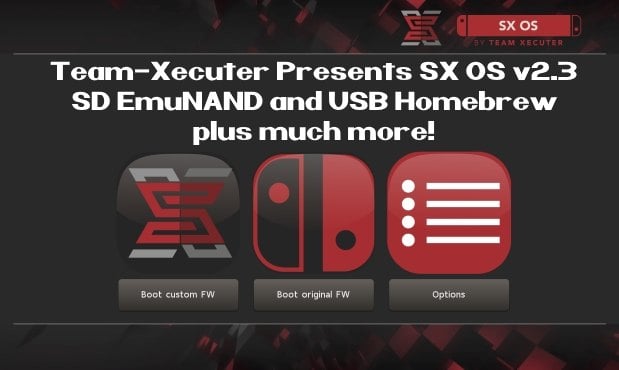
TX is on roll, release after release, and today's big release is brand-new SX OS v2.3 BETA
SX23.jpg

As you read thru TX's announcement below, you will quickly see that is jam-packed with all the features you have been requesting recently like SD EmuNAND and USB Homebrew, so check it out below:
Your favorite superheroes from Team Xecuter are back with another SX OS update.

In v2.3 beta of SX OS we have some exciting new functionality that you, the community, has been requesting a lot. As you know, we value your feedback and support.. so your wishes are our command!

Let's have a look at the changelog:
  • SD emuNAND support
    Since the introduction of our emuNAND feature we got a lot of comments about our initial decision to make the emuNAND data live on the actual system NAND. After lots of hard work we are happy to say we now have a workable solution for storing your emuNAND partition data on your microSD card. This has the upside of not using up any space on your Switch. In order to use the new microSD emuNAND system you will *not* have to format your microSD card. Simply enter the TX boot menu by holding Volume-+ while powering on your switch. Head into the options menu and select emuNAND on the left. Users of our existing emuNAND solution will see an option to migrate their existing emuNAND data. The migration process also cleans up the old emuNAND from the system NAND. Painless! We're interested in hearing your feedback about this exciting new functionality.
  • The 'Emutendo' folder
    In addition to the new microSD emuNAND system we also introduce the 'Emutendo' folder on your microSD card. As you've probably noticed, the Switch saves various data to a 'Nintendo' folder on your microSD card. To completely decouple this data between your Original Firmware and your EmuNAND enabled firmware we have made EmuNAND enabled systems use this differently named folder. If you want keep using your old SD card data with your emuNAND, simply copy/rename the 'Nintendo' folder to 'Emutendo'.
  • Added more directories to scan for content
    By popular demand we have added yet another list of subdirectories that will be scanned on your microSD card (or USB harddisk) for XCI/NSP/homebrew. The directories that have been added are:
    • – /sxos/updates
    • – /sxos/dlc
    • – /switch/updates
    • – /switch/dlc
  • Homebrew menu takeover of any title by holding R
    Homebrew is usually launched from either the TX menu or the Homebrew Launcher menu. Both of these applications run as an 'applet' on the Switch. Applets do not have access to all of the system's memory, and thus any homebrew apps or games launched from here are affected by this as well. The only way to allow full use of the system's memory was to build and install homebrew NSP files. But now we have added another way to give homebrew applications full memory access! You can now hold the (R) button while launching any regular title, and this will launch the Homebrew Launcher Menu. Any homebrew launched from here will run with the same capabilities as a regular Switch game/app. Enjoy!
  • Loading homebrew from USB
    More good news for homebrew lovers. You can now copy homebrew NRO files to your USB harddisk as well, and launch them directly from our SX OS menu.
  • Stability improvements
    Overall stability of many components has been improved. This includes LayeredFS and USB incompatibilities. We have also fixed a bug which would prevent people from launching more than 32 titles.
  • libusbfs update
    Last but not least a small update for developers. We've squashed a small bug in libusbfs pertaining the stat() function. If you had issues with this, grab an updated copy of libusbfs from our website!
The year 2018 is entering its final months. That does not mean we're taking a break from working on our beloved SX OS though. And yes, also those new 'unhackable' consoles are high up on the agenda. Don't worry, we will deliver.

Keep sending your feedback and ideas, they're very welcome.

See you all in the next update!

--< Team-Xecuter - Rocking the Switch in 2018 and beyond! >--

:arrow: Source: MaxConsole
 
Making more partitions on the sd card sounds to me like creating more variables for disaster. I think they would have tested this. Either way I'm on it now and will update everyone if anything goes wrong.
Kk. I don't see the problem with creating a partition. Because if it corrupted then the rest of the SD Card won't be effected. Anyway you're taking the risks, hope for the best and remember it's in beta stages.

--------------------- MERGED ---------------------------

theres a thing called backups you know
youre such a genius
Because everyone can backup 128GB of content. Most people don't have the patience/time for it.
 
OK so i just booted into Emunand without renaming the Nintendo folder to Emutendo and None of the NSPs are installed.

I actually renamed my Nintendo folder before booting into emuNAND, but my games still don't show up. Please keep us updated how it goes for you.
 
The people most concerned about exFAT corruption use other CFW and not SX OS, so they use NSPs, and would most likely have to reinstall 400GB worth of games if their SD card gets corrupted.

But a lot of the SX OS users probably use USB HDDs, where they have their XCIs loaded on, so the worst that could happen is that they lose installed NSP updates/DLCs (which I know a lot of XCI users don't bother with, and some use "bundled XCIs" with the updates/DLCs bundled in). Or they lose their emuNAND saves (but that's just the same risk even if emuNAND was on a separate SD card partition, since that entire partition would get corrupted).

So USB HDD XCI users wouldn't really care much about these "issues". These issues are just as bad as the "you're gonna burn out your USB port" issues when the USB HDD support was released.

Maybe Xecuter can implement a FAT32 SD card emuNAND (where it's divided into 4GB sized files), then there would be no more "issues" @garyopa
EDIT: I guess it actually already works on FAT32
 
Last edited by bundat,
  • Like
Reactions: thaikhoa
Kk. I don't see the problem with creating a partition. Because if it corrupted then the rest of the SD Card won't be effected. Anyway you're taking the risks, hope for the best and remember it's in beta stages.

--------------------- MERGED ---------------------------


Because everyone can backup 128GB of content. Most people don't have the patience/time for it.
all you need to backup are your saves and license files
everything else can be reinstalled
 
The people most concerned about exFAT corruption use other CFW and not SX OS, so they use NSPs, and would most likely have to reinstall 400GB worth of games if their SD card gets corrupted.

But a lot of the SX OS users probably use USB HDDs, where they have their XCIs loaded on, so the worst that could happen is that they lose installed NSP updates/DLCs (which I know a lot of XCI users don't bother with, and some use "bundled XCIs" with the updates/DLCs bundled in). Or they lose their emuNAND saves (but that's just the same risk even if emuNAND was on a separate SD card partition, since that entire partition would get corrupted).

So USB HDD XCI users wouldn't really care much about these "issues". These issues are just as bad as the "you're gonna burn out your USB port" issues when the USB HDD support was released.

Maybe Xecuter can implement a FAT32 SD card emuNAND (where it's divided into 4GB sized files), then there would be no more "issues" @garyopa
I use fat32. Emunand works perfectly.

It is split into 4gb chunks as you would expect. Yeah had to redo the emunand as there was a problem transferring the old one, but never mind
 
  • Like
Reactions: bundat
I'll wait a few weeks. If people say this emunand is secure and Nintendo doesn't ban because of just having it, I'll buy it only because of the effort (and my little and loved homebrew, at last).

And by secure, I mean being online with sysnand and 100% offline with emunand.
 
  • Like
Reactions: Bst22322
The people most concerned about exFAT corruption use other CFW and not SX OS, so they use NSPs, and would most likely have to reinstall 400GB worth of games if their SD card gets corrupted.

But a lot of the SX OS users probably use USB HDDs, where they have their XCIs loaded on, so the worst that could happen is that they lose installed NSP updates/DLCs (which I know a lot of XCI users don't bother with, and some use "bundled XCIs" with the updates/DLCs bundled in). Or they lose their emuNAND saves (but that's just the same risk even if emuNAND was on a separate SD card partition, since that entire partition would get corrupted).

So USB HDD XCI users wouldn't really care much about these "issues". These issues are just as bad as the "you're gonna burn out your USB port" issues when the USB HDD support was released.

Maybe Xecuter can implement a FAT32 SD card emuNAND (where it's divided into 4GB sized files), then there would be no more "issues" @garyopa
It's not just that though. Read my posts above than you'll see the problem.

--------------------- MERGED ---------------------------

all you need to backup are your saves and license files
everything else can be reinstalled
Yeah and that takes 5-6 hours alone with a 128GB SD Card with XCIs (if you were to redownload them). That still doesn't resolve the problem of taking ages to move from the SD Card and back to the SD Card.
 
You know what? I'm going to make a backup of my sd card now. I forgot I just bought a new laptop with a core i-7 8700. Just for the peace of mind.
My old desktop use to write or copy from sd card at about 5Mbps it would take like 9 hours to copy 200+Gbs. I'll update my new pc speed in a few mins.
 
Last edited by comput3rus3r,
  • Like
Reactions: Essasetic
all you need to backup are your saves and license files
everything else can be reinstalled
Yeah that still doesn't resolve the issue of moving stuff from and back to the SD Card. That takes a lot of time. Adding onto the time if you haven't kept a backup of the game on your HDD.
 
It's not just that though. Read my posts above than you'll see the problem.
Did you even read my post though?
Because you addressed none of my points.

My ONLY point is that most USB HDD XCI users lose NOTHING when the exFAT SD card is corrupted.

I've personally deleted my Nintendo folder more times than I can count. Never really cared, backing up everything with Checkpoint takes a couple of seconds anyway.

I use fat32. Emunand works perfectly.

It is split into 4gb chunks as you would expect. Yeah had to redo the emunand as there was a problem transferring the old one, but never mind
Oh, guess I was not fully informed about how it works.

Welp, there goes the exFAT fud.
 
Last edited by bundat,
I'll wait a few weeks. If people say this emunand is secure and Nintendo doesn't ban because of just having it, I'll buy it only because of the effort (and my little and loved homebrew, at last).

And by secure, I mean being online with sysnand and 100% offline with emunand.
Dude, I haven't even been using emunand and I'm not banned. I'm sure it works if you use it as intended.
 
Did you even read my post though?
Because you addressed none of my points.

My ONLY point is that most USB HDD XCI users lose NOTHING when the exFAT SD card is corrupted.

I've personally deleted my Nintendo folder more times than I can count. Never really cared, backing up everything with Checkpoint takes a couple of seconds anyway.


Oh, guess I was not fully informed about how it works.

Welp, there goes the exFAT fud.
Hahaha. You're forgetting:
The NSPs they installed, their licence and homebrew applications.
 
Maybe Xecuter can implement a FAT32 SD card emuNAND (where it's divided into 4GB sized files), then there would be no more "issues" @garyopa

Does noone look at the sd card afterwards. -- The emunand is already split into chunks for fat32 usage.
 
  • Like
Reactions: Subtle Demise
i would reinitialize the switch and start from scratch
ive had a switch for 4 months now that hasnt been banned

i ran everything offline of course...with stealth mode
By reinitialize you mean using the switch's built in system, restore function or by using a separate payload to clear out system files?

My plan was to back up my saves, disable autorcm, clean the system?, enable emunand on the sd card, re-nable autorcm and restore the saves.
 
Hahaha. You're forgetting:
The NSPs they installed, their licence and homebrew applications.
Are you even reading my posts?

the worst that could happen is that they lose installed NSP updates/DLCs (which I know a lot of XCI users don't bother with, and some use "bundled XCIs" with the updates/DLCs bundled in).
License can be regenerated, it's tied to the eMMC ID.
You can actually transfer an SX OS license by transferring the eMMC chip to another Switch:
a.png

And you didn't even address the second part of my post, that emuNAND works on FAT32.

Why are you cherrypicking?
 
Last edited by bundat,
Hahaha. You're forgetting:
The NSPs they installed, their licence and homebrew applications.

license is not an issue, you can re-generate it from sx payload or website, if you are dumb enough NOT to have backup your license.dat file

As for nsp's they installed, yes, it is pain in ass if it corrupts, but did you know you can install nsp's on fat32 card, even on original nintendo firmware, eshop is already designed to auto-split installed files to your fat32 sdcard, as nintendo themselves knows its buggy, one of reasons it was not included as default with first few firmwares and added later.

The best way to not have any corruption ever, and this is problem in any custom firmware, not just sx os, is to NEVER ever press the HOME button to exit an app, while it is writing stuff to your sdcard.
 
Last edited by garyopa,
Kk. I don't see the problem with creating a partition. Because if it corrupted then the rest of the SD Card won't be effected. Anyway you're taking the risks, hope for the best and remember it's in beta stages.

--------------------- MERGED ---------------------------


Because everyone can backup 128GB of content. Most people don't have the patience/time for it.
all you need to backup are your saves and license files
everything else can be reinstalled
 
license is not an issue, you can re-generate it from sx payload or website, if you are dumb enough to to have backup your license.dat file

As for nsp's they installed, yes, it is pain in ass if it corrupts, but did you know you can install nsp's on fat32 card, even on original nintendo firmware, eshop is already designed to auto-split installed files to your fat32 sdcard, as nintendo themselves knows its buggy, one of reasons it was not included as default with first few firmwares and added later.

The best way to not have any corruption ever, and this is problem in any custom firmware, not just sx os, is to NEVER ever press the HOME button to exit an app, while it is writing stuff to your sdcard.
Or you know. Make it so it splits into a partition so we can avoid all of this happening.
 
Setting up emunand for SD I see there's no option to choose it size as there was before. Is it always forced to be 32gb?
 
license is not an issue, you can re-generate it from sx payload or website, if you are dumb enough NOT to have backup your license.dat file

As for nsp's they installed, yes, it is pain in ass if it corrupts, but did you know you can install nsp's on fat32 card, even on original nintendo firmware, eshop is already designed to auto-split installed files to your fat32 sdcard, as nintendo themselves knows its buggy, one of reasons it was not included as default with first few firmwares and added later.

The best way to not have any corruption ever, and this is problem in any custom firmware, not just sx os, is to NEVER ever press the HOME button to exit an app, while it is writing stuff to your sdcard.
good to know. for a third time though does this protect you from malicious NSPs or XCIs?
 

Site & Scene News

Popular threads in this forum