Homebrew Need artist(s) for 3DS homebrew menu region free logo

  • Thread starter Thread starter smealum
  • Start date Start date
  • Views Views 262,249
  • Replies Replies 965
  • Likes Likes 38
Status
Not open for further replies.
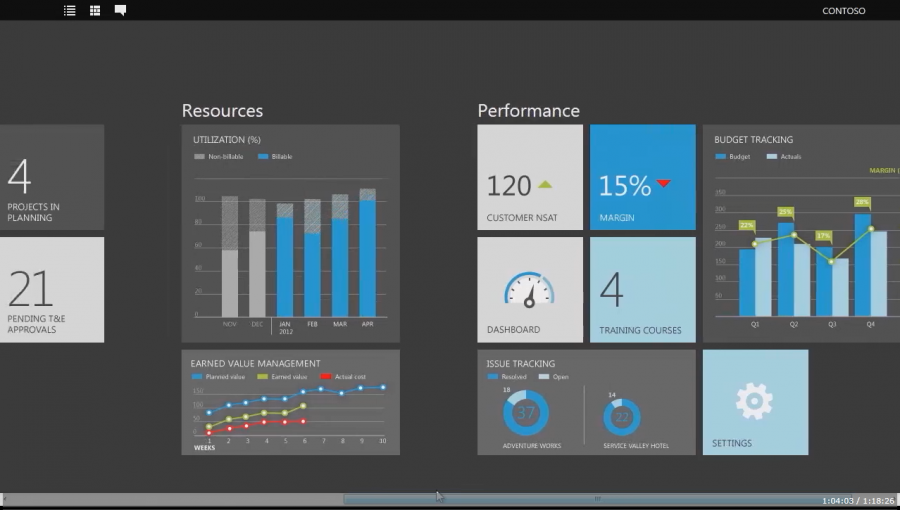
Something metro-like would be very easy on the gpu and touch-screen friendly.
Having the homebrew app screen setup similar to this would be pretty easy to program and implement.
Microsoft-Demoes-Prototype-Dynamics-App-for-Windows-8-s-Metro-UI-3.png

Conveys info quick and easy and organizes it well.
 
Well, I'm not much for graphic design, but I decided to try my hands out at Photoshop, since I don't have many reasons to use it at all. When I was designing this, I was trying for pure simplicity. Nothing too extravagant, nothing too over-the-top. I'm a simple person, and this is what I came up with:

0Q0PUfB.png


I actually really like how the background came out, especially with my really crappy (It sorta turned out... I may try improving them...) bubbles. It almost looks like it's actually underwater, and it's a nice little shoutout to Team Twiizers and their Homebrew Channel for the Wii, which seems to have settled itself in here nicely. I really doubt that it'll win, but it never hurts to participate.

Edit: Here's a 48x48 Main Menu icon as well, for completion's sake:
JF0xWZ1.png
or the lighter
MVlEAyE.png
This would look really cool if it could be animated :) Maybe with some faint fading lights (like christmas lights!) in the background, along with the bubbly movement?
 
Something metro-like would be very easy on the gpu and touch-screen friendly.
Having the homebrew app screen setup similar to this would be pretty easy to program and implement.
-image-
Conveys info quick and easy and organizes it well.


It's really just distilled to square icons. Something Metro-esque wouldn't work on such a low screen res.
 
  • Like
Reactions: some1ne
  • Like
Reactions: DragonFireXY
Hi guys, could you PLEASE avoid quoting entire posts filled with huge images in them?

They break up the site entirely for people which have got smaller resolution screens (like my laptop) and I can't imagine how badly they'd break up the thread when viewed on a smartphone.

If you really need to do that, please use the [spoilers] special tag when including the images and "close" it the with [/spoilers] special tag when finished.

Thanks!
 
Hi guys, could you PLEASE avoid quoting entire posts filled with huge images in them?

They break up the site entirely for people which have got smaller resolution screens (like my laptop) and I can't imagine how badly they'd break up the thread when viewed on a smartphone.

If you really need to do that, please use the [spoilers] special tag when including the images and "close" it the with [/spoilers] special tag when finished.

Thanks!
Sorry to have spammed the report box with a lot of reports on big images... =P But yes, I was experiencing the same issue.
 
  • Like
Reactions: raulpica
Out of curiosity... Why did you even make this in Minecraft to begin with?

I would guess the same reason I would jump into a CAD program if I needed a 3d modeller and one of the reasons machinima tends to be made in an existing game engine rather than doing the lot from scratch -- work with what you have and what you know.
 
Hey, just thought I'd drop in with a top screen layout I've been experimenting with (including a quick logo).
I've tried to make use of a very layered approach to the design so that it can take full advantage of the 3D feature we have. There's also a nice large info pane for information on the currently selected app.
I might work on a bottom screen layout sometime if people like this, but 10pm isn't really the time for that.

Anyway, here it is:
3DSHB.jpg
 
In my opinion for select the best logo for homebrew ,you don't need a week to choice one:) because we need only a simply and fuctional ui that is easy to use:) sorry my english i'm not a original english speaker.
 
Oh well, I had some time to spare, a quick 3DS icon I made a few months ago, so I wanted to give my two cents and submit a little concept. There are already lots of beautiful entries, but if this one can at least inspire some of you... ;)
3dshomebrew.png

I love it.
But I always thought it was awkward to have a 3DS logo displayed on a 3DS, but still awesome :D
 
I would guess the same reason I would jump into a CAD program if I needed a 3d modeller and one of the reasons machinima tends to be made in an existing game engine rather than doing the lot from scratch -- work with what you have and what you know.
Hm, but have you seen the results, though? In the end, it's just "pixel art" which could have been done much more easily with MS Paint or similar.
 
Something metro-like would be very easy on the gpu and touch-screen friendly.

I'd rather turn on me 360 then see a HB menu in the metro style.
Sorry but the Metro style just is impractical and ugly .-.

Personally, I think it should just be a simple design, similar to the Wii's HBC and the Wii Menu/ 3DS Menu.
To keep it similar to Nintys overall GUI approach.
 
Hey, just thought I'd drop in with a top screen layout I've been experimenting with (including a quick logo).
I've tried to make use of a very layered approach to the design so that it can take full advantage of the 3D feature we have. There's also a nice large info pane for information on the currently selected app.
I might work on a bottom screen layout sometime if people like this, but 10pm isn't really the time for that.

Anyway, here it is:
View attachment 9722

Really like this one, like the design and the color. More animations would be perfect, like bubbles.

Good job !
 
  • Like
Reactions: Adr990
Hm, but have you seen the results, though? In the end, it's just "pixel art" which could have been done much more easily with MS Paint or similar.

Even when cropped and scaled to res if you can knock out an image like that in paint in twice the time that probably took I will be impressed. I would probably have to think for a minute about doing something like that in a big boy image editor (tiled background, find a vaguely pixel/box font, arrange text, perspective change... I say having just done it).

Oh and Celice I was not sufficiently motivated to do enough base frames to make it properly (I went for a sort of blur and mix of what I had) but for animated water/bubbles maybe something like http://filetrip.net/view?FB7lR3xsEh
Granted that is probably closer to waves from above than underwater.

On a somewhat different note when did the blinds/erase every other row/combing/scanline effect come back in? It works quite well as is easy enough to do but I had not seen it for some time, give or take stuff like the COD logo.
 
Status
Not open for further replies.

Site & Scene News

Popular threads in this forum