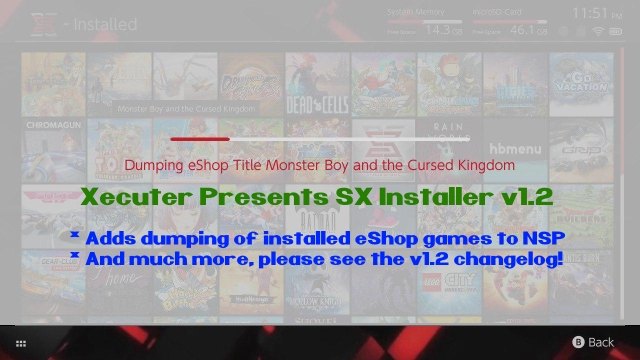
Xecuter Presents SX INSTALLER v1.2

TX is back again with another nice update to their 'SX Installer' app, check out all the v1.2 details below:
SX_APP_12.jpg

We are not even half-way thru first month of the New Year, and we have yet another release from Team-Xecuter, this time around its another big update to their SX Installer app, with v1.2 adding 'dumping of installed eShop games to NSP' and much more, check it out:
Your friends are Team-Xecuter are back today with SX Installer v1.2

This is a refined, polished version of the super tool all SX OS users love.

A lot of improvements and bug fixes in this version. Here is a short list of the change log:
  • Fixed save games not backing up sub directories
  • Fixed save game restore.
  • Fixed nut server installations.
  • Fixed touch screen on some screens.
  • Reduced memory consumption by ~30%.
  • Improved stability of nut USB installs.
  • Improved usbhdd stability.
  • Added hex viewer to file browser.
  • Added ability to dump installed eShop games to NSP (ftp, usbhdd, SD).
  • Please be mindful that games larger than 4GB cannot be dumped to fat32 file systems.
  • General system stability improvements to enhance the user's experience.
Enjoy!
—< Team-Xecuter - Rocking the Switch in 2019 and beyond! >—​

:arrow: Source: MaxConsole
 
Hello guys, I need some help here.
I can't install the xci file of the new Tales of Vesperia from the USB. Every time i tried i get this error: "could not open file". I can play directly from the usb launching the xci, so I think that the file is ok... What can I do? Thank you!!
 
SBM u can rename your xci or nsp any way u like :)
Gamename [I.D].xci gamename (Region) [I.D].nsp
Just go to settings and add it ..
Thanks you are right!
Still had to manually rename files though.
My files look like this now:
LPx50-59x2p FullBlast [01008d800ae4a000][v0][xcib]
LPxNometa3p Animal Rivals Switch [010065b009b3a000][v0][xcib]
SPx50-59 Hyperide VR [01000E200C8D4000]

Where in LP= local play followed by metacritic score, followed by possible players ^^
Makes it easier to figure out which games are best and start there, or which games are good when friends come over.
 
Hello community,
I just downloaded this nice piece of software.
Now my question, how do I configure HTTP acces from my switch to an external webserver?
I configured my nginx to list the directory content (same as it should be with apache directory listing).

When I add a new connection in "File browser" no content is shown.
I tried to add the exact relative webspace path.
I tried to add "http ://" in front of the url.
I tried to specify the port (80).
I tried to simply fill the server URL and nothing else.
I have no basic authentication in place - so no credentials needed.
Nothing worked so far, switching into the http-connection shows an empty folder.

I did not find any documentation regarding this feature.

Maybe someone can point me to the right direction?

Thanks
 
Hello community,
I just downloaded this nice piece of software.
Now my question, how do I configure HTTP acces from my switch to an external webserver?
I configured my nginx to list the directory content (same as it should be with apache directory listing).

When I add a new connection in "File browser" no content is shown.
I tried to add the exact relative webspace path.
I tried to add "http ://" in front of the url.
I tried to specify the port (80).
I tried to simply fill the server URL and nothing else.
I have no basic authentication in place - so no credentials needed.
Nothing worked so far, switching into the http-connection shows an empty folder.

I did not find any documentation regarding this feature.

Maybe someone can point me to the right direction?

Thanks

HTTP has no standard way to list files, so it basically scans links it finds in the html page. Have you verified the page works in your web browser on your pc? and that it is returning html links to the files?
 
  • Like
Reactions: gsmember
HTTP has no standard way to list files, so it basically scans links it finds in the html page. Have you verified the page works in your web browser on your pc? and that it is returning html links to the files?

Hello, Thank you.
I managed to get it working.
My mistake was that I split all the files into folders and the homebrew doesn't list folders like in FTP.
 
Just a suggestion for mods.. since there is a new thread for every incremental release related to SX, why not lock the older ones when a new one is made to help keep the forum better organised?
I Agree, or keep the incremental on 1 thread only.

Imagine if every developer created a new thread for each revision of his projects. can you imagine the wii scene with the USBLoaderGX revisions? or the PSP with Daedalus revisions?

Good for the people that use SX OS, but i mean each .1 incremental update its not worth the front page.
 
Have many people been banned for cfw on switch? Tempted to get one if I can get the games for free then spend what i would of done on games on the online that should be free
It does t really matter anymore since lan play and play that
 
when i start app i cant dump game i get msg "Could not read ticket,dumping NCA`s only! " after i go out and try to come back again in app i get error 2168-0002 and i need to restart switch...
 
I'm on 6.2, using latest SX OS, installed this and it just freezes after initialization, my SD card is ExFAT

EDIT: Tried reinstalling, same problem


EDIT 2: Freezes when I plug in USB cable to either PC or Mac....
 
Last edited by Dvdxploitr,
I'm on 6.2, using latest SX OS, installed this and it just freezes after initialization, my SD card is ExFAT

EDIT: Tried reinstalling, same problem


EDIT 2: Freezes when I plug in USB cable to either PC or Mac....

dont plug in the usb cable unnless you are running a USB nut server.
 

Site & Scene News

New Hot Discussed User Submitted