











Hacking WiiFlow - an open source GUI USB-Loader

  • Thread starter Thread starter zorglub07
  • Start date Start date
  • Views Views 3,101,292
  • Replies Replies 16,228
  • Likes Likes 6
When I select my wii games, the banner maximises and I can't see the back of the game box. Where do I adjust this setting? It's just my wii games, nothing else does it.
 
So what to say about this rev, hmm...
At first, I hope you can understand there was no release the past 3 weeks, we have alot of problems with memory and wii games/channels, thats why I was trying several things out, that took quite a long time.
However, I think I now found a really good and stable solution for those problems, thats also the first change from r615, alot of more stability in wii game and wii channel booting.
Also, WiiFlow is now using the new magicwords for priiloader 0.8 beta 4, so we have compatility to exit wiiflow to system menu with priiloader installed.
Booting wii games from disc also should work fine again, also if the drive is old enough backup discs should work. Wii games from sd card also should work again, games like black ops also should work again (also multiplayer), cheats for DIOS-MIOS should work again.
The cover cache should be ALOT of more stable now, also with over 1000 games it should be no problem to use wiiflow.
If you use Devolution in wiiflow, and then exit devolution, it should return to wiiflow and not to the homebrew channel anymore.
Also, some wrong effects are changed in the default theme, so all design things should be correct now.
The JPG support is heavly improved now, you can use every JPG picture size in wiiflow, no matter what it is, wiiflow will make it to a cover :P
Everyone who uses a usb gecko to get the debug prints now should get clean and correct ones, they should not be fucked up again.
Some more things lol, fixed banner keeps playing on delete game, made the cIOS checks ALOT of faster, also the neek2o boot is alot of faster, added banner sound support for avatar and maybe more games, added looping of banner wav sound files, added support for banners without existing sound and fixed wiiflow reboot crashes after new theme selection.
Download via google code or internal wiiflow update.
 
  • Like
Reactions: 6 people
So what to say about this rev, hmm...
At first, I hope you can understand there was no release the past 3 weeks, we have alot of problems with memory and wii games/channels, thats why I was trying several things out, that took quite a long time.
However, I think I now found a really good and stable solution for those problems, thats also the first change from r615, alot of more stability in wii game and wii channel booting.
Also, WiiFlow is now using the new magicwords for priiloader 0.8 beta 4, so we have compatility to exit wiiflow to system menu with priiloader installed.
Booting wii games from disc also should work fine again, also if the drive is old enough backup discs should work. Wii games from sd card also should work again, games like black ops also should work again (also multiplayer), cheats for DIOS-MIOS should work again.
The cover cache should be ALOT of more stable now, also with over 1000 games it should be no problem to use wiiflow.
If you use Devolution in wiiflow, and then exit devolution, it should return to wiiflow and not to the homebrew channel anymore.
Also, some wrong effects are changed in the default theme, so all design things should be correct now.
The JPG support is heavly improved now, you can use every JPG picture size in wiiflow, no matter what it is, wiiflow will make it to a cover :P
Everyone who uses a usb gecko to get the debug prints now should get clean and correct ones, they should not be fucked up again.
Some more things lol, fixed banner keeps playing on delete game, made the cIOS checks ALOT of faster, also the neek2o boot is alot of faster, added banner sound support for avatar and maybe more games, added looping of banner wav sound files, added support for banners without existing sound and fixed wiiflow reboot crashes after new theme selection.
Download via google code or internal wiiflow update.
Thanks for all your hard work on this latest and greatest release!

I will test out things this afternoon in-between other stuff at work.
 
Hi,
Im kinda new to wiiflow and have two of questions.
1) How to setup covers for roms in emulators. I have a gba rom and dont know how to set up a cover for it. Where to put it and what should be the name.
2) In lower right corner there is a button which can be used to switch between wii games nand emus and other stuff. Can I disable nand and others and leave only wii games and emus?
 
I wonder if the sd game loading improvments in the latest version will help with the sd nand not working, I will check this out as its the only big problem I have currently.

Anyway thanks for the update FIX94 sounds really good... :)
 
Hi,
Im kinda new to wiiflow and have two of questions.
1) How to setup covers for roms in emulators. I have a gba rom and dont know how to set up a cover for it. Where to put it and what should be the name.
2) In lower right corner there is a button which can be used to switch between wii games nand emus and other stuff. Can I disable nand and others and leave only wii games and emus?
1) There's a tutorial for general setup here and I think it includes that. http://gbatemp.net/topic/329590-wiiflow-31-mod-installation-and-setup/
2) There's a file in the /apps/wiiflow/ folder called wiiflow.ini there are sections in there for each one of those in brackets ([NAND] [GAMES] [DML] [HOMEBREW] [PLUGINS] if I remember correctly) under each of those sections there's a setting that says disable=no and you just have to change it to disable=yes to hide each one.
 
Hi,
Im kinda new to wiiflow and have two of questions.
1) How to setup covers for roms in emulators. I have a gba rom and dont know how to set up a cover for it. Where to put it and what should be the name.
2) In lower right corner there is a button which can be used to switch between wii games nand emus and other stuff. Can I disable nand and others and leave only wii games and emus?
There's also the wiiflow setup guide site that Fledge68 was working on too. Don't know if he's decided to continue to update the thread or the site but it's worth a look for sure.
 
Can you make a few pictures with this rev?
http://www.mediafire...i77kx0q0075cjgw
I made wii game booting verbose so you can see on the screen what happens on game boot.
Just made something else ready to test with wii games:
http://www.mediafire...jn7gbf6a7futcaq
That thing is different to every other test dol before, as you see they are two in the package. You need to place the boot.dol from the archive root on your sd card root. The one in the apps/wiiflow folder is the regular wiiflow one. The booter for wii games just got the main features inside, so setting video mode, language, booting game. No ocarina, no patches for new super mario bros wii, no prince of persia patch. You guys may try that out with some games which doesnt work with the current wiiflow rev, blackscreen or something like that. Also games which doesnt have problems should be tested with that
wink.png
Worked a bit more on that concept, now wiiflow got that second loader included, so no need to place some kinda extra dol somewhere:
http://www.mediafire...l1ha1jwza9zeo5v
Wiiflow will load wii games and channels using that second dol, please test wii games and real/emu nand channels with it, thanks.
I still haven't had much time to do any testing. I will try update to r646 when I get home and do some testing with that.

Just some clarifications about the above linked files:
- Is the on-screen verbose output mentioned for the first linked file also put into the SD log, USB Gecko, WiFi Gecko, etc? (I assume all three show the same information as eachother anyhow?)
- The second liked file says that the separate booting DOL file doesn't have new super mario bros wii or prince of persia patches so does that mean that with the third linked file (and therefore r646) those patches are applied before calling the "included" booting DOL? I'd assume they're still applied somewhere so the games still work.
 
In these last few revs I can use the Launch title with neek option to launch Castlevania Adventure WiiWare NTSC-U with no prob at all so long as I quit neek I keep in on the nand that I'm using for WiiFlow. (I have 3 different nands on the USB ) The NTSC-J versions of the Castlevania wad doesn't need that setting for some reason. hmmmm... It must be a Konami thing because My Castlevanina Judgement PAL Wii GAME won't boot with the WiiFlow via USB ( or any loader except disc channel, only real or back up disc) yet the JAP version boots with no prob form USB HD. The Jap version is mostly in English anyway. HA! I stole the banner from the PAL one from the /wiiflow/cache/banners and renamed it to the JAP game and now the PAL banner (in ENG) shows for the JAP game. That's cool. It's hard to tell that it's a JAP game now. I think that this Neek2o compatability is just awesome!

That WiiWare Castlevania game USA version has been a problem game for as long as I can remember. Now it's all good. :)

Oh b4 I forget, in the main "exit to" menu for WiiFlow, I can't use the exit to neek2o or it locks up.
However, if I exit to bootmii it gets me to neek anyway. I have bootmii as IOS 254 ( i think it was)
 
@ FIX94 - THX Budd Appreciate the Update....was on 631 and sum Wii games stopped loading for no reason(MW3,RE4,Kirby among others) and sum music issues

Gonna test out the new Rev :)
 
Hi,
Im kinda new to wiiflow and have two of questions.
1) How to setup covers for roms in emulators. I have a gba rom and dont know how to set up a cover for it. Where to put it and what should be the name.
2) In lower right corner there is a button which can be used to switch between wii games nand emus and other stuff. Can I disable nand and others and leave only wii games and emus?
There's also the wiiflow setup guide site that Fledge68 was working on too. Don't know if he's decided to continue to update the thread or the site but it's worth a look for sure.
Cool someone actually knows about the site. Maybe now that the kids are back in school I can get back to editing it. Thought about calling it 'The Unofficial Wiiflow Mod Wiki'.
 
  • Like
Reactions: 1 person
Also, WiiFlow is now using the new magicwords for priiloader 0.8 beta 4, so we have compatility to exit wiiflow to system menu with priiloader installed.
I take that priiloader 0.8b4 isn't a pre-requesite for this to work correct? I'm still using 0.7 and wondering if I should upgrade or not. Prii-loader in beta sounds risky lol. If it's as safe as the last one then I have no problem with it.
 
Also, WiiFlow is now using the new magicwords for priiloader 0.8 beta 4, so we have compatility to exit wiiflow to system menu with priiloader installed.
I take that priiloader 0.8b4 isn't a pre-requesite for this to work correct? I'm still using 0.7 and wondering if I should upgrade or not. Prii-loader in beta sounds risky lol.
I also have 0.7 installed and revs with that "feature" included have worked fine for me. I think the idea is just that later upgrading to 0.8 (when released) won't "break" WiiFlow.
 
Hello there. I've decided to try this loader and it's pretty sweet from what I gathered. Almost everything has worked, but I got some questions though.

1) Is there any way to go backin the differents modes, like in going back to Wii games from the DML mode. I get there's the source menu, but I wanted to know better.
2) I see that in homebrew flow, when apps are loaded,they use IOS 249 (or 250, if you go into options). Is there any way to use IOS 58? I tried to see the .ini file but maybe I missed something.
3) How do I use an emulated nand? I've used USB Loader Gx and postloader's nand emulation options, and they've worked, but here on wiiflow I've tried changing the nand path, using clean nands, using the nand extraction option, changing the wiiflow boot.dol to another device/partition... so far, this is the only feature I haven't got working.

Other than these, the music suddenly stopped working (an mp3 file, I'll try an ogg file later).
Sweet app, I've been impressed with it.Congratulations to the developers!
 
Hello there. I've decided to try this loader and it's pretty sweet from what I gathered. Almost everything has worked, but I got some questions though.

1) Is there any way to go backin the differents modes, like in going back to Wii games from the DML mode. I get there's the source menu, but I wanted to know better.
2) I see that in homebrew flow, when apps are loaded,they use IOS 249 (or 250, if you go into options). Is there any way to use IOS 58? I tried to see the .ini file but maybe I missed something.
3) How do I use an emulated nand? I've used USB Loader Gx and postloader's nand emulation options, and they've worked, but here on wiiflow I've tried changing the nand path, using clean nands, using the nand extraction option, changing the wiiflow boot.dol to another device/partition... so far, this is the only feature I haven't got working.

Other than these, the music suddenly stopped working (an mp3 file, I'll try an ogg file later).
Sweet app, I've been impressed with it.Congratulations to the developers!
1) In the /apps/wiiflow/ folder there's a file called wiiflow.ini and under the [GENERAL] section there's a setting to enable d-pad mode. Set it to yes and now when you point at the mode switching icon you can press the different d-pad directions to go directly to the different modes without having to switch through them all.
2) I think that's a feature that still needs to be added.
3) . . . maybe someone else can answer this one. :wink:
 
Hey, I was wondering how some of you guys have your hard drives partitioned? 1 FAT32/1 NTFS?
What the latest way?
 
3) How do I use an emulated nand? I've used USB Loader Gx and postloader's nand emulation options, and they've worked, but here on wiiflow I've tried changing the nand path, using clean nands, using the nand extraction option, changing the wiiflow boot.dol to another device/partition... so far, this is the only feature I haven't got working.
3) . . . maybe someone else can answer this one. :wink:
Have you pressed 'B' on the Gamecube/NAND/Homebrew etc. Icon on the main screen?
That will activate it. Works for me.

Hey, I was wondering how some of you guys have your hard drives partitioned? 1 FAT32/1 NTFS?
What the latest way?
2TB drive, 1st partition FAT32 300GB, 2nd partition NTFS 1.7TB
NAND and GC on FAT32, Wii on NTFS.
Not having a lot of luck with emu stuff on NTFS or FAT32, so running those from SD, but still have plenty of problems with N64 stuff. Not sure what I'm doing wrong there.
My NAND/Wii are set up like that from back some time when NAND didn't like being on the same partition as Wiiflow. There are probably better ways to do it, but nobody has come up with clear guidelines as yet. I don't do this NEEK thing either, yet.
 
  • Like
Reactions: 1 person
645 and 646 bug:
delete cache lists
go to all modes just fine the first time > go to homebrew mode a second time > black screen! (reproduceable using both official and home made dols)
I can make a screenshot but it's just black :)

Edit1: I can run a homebrew blindly by pressign A+B when the screen is black the homebrew loads fine and exits back WF just ok, so it looks it's only a display issue not a freeze.

Edit2: 639 has the same issue, 616 works fine however.
 
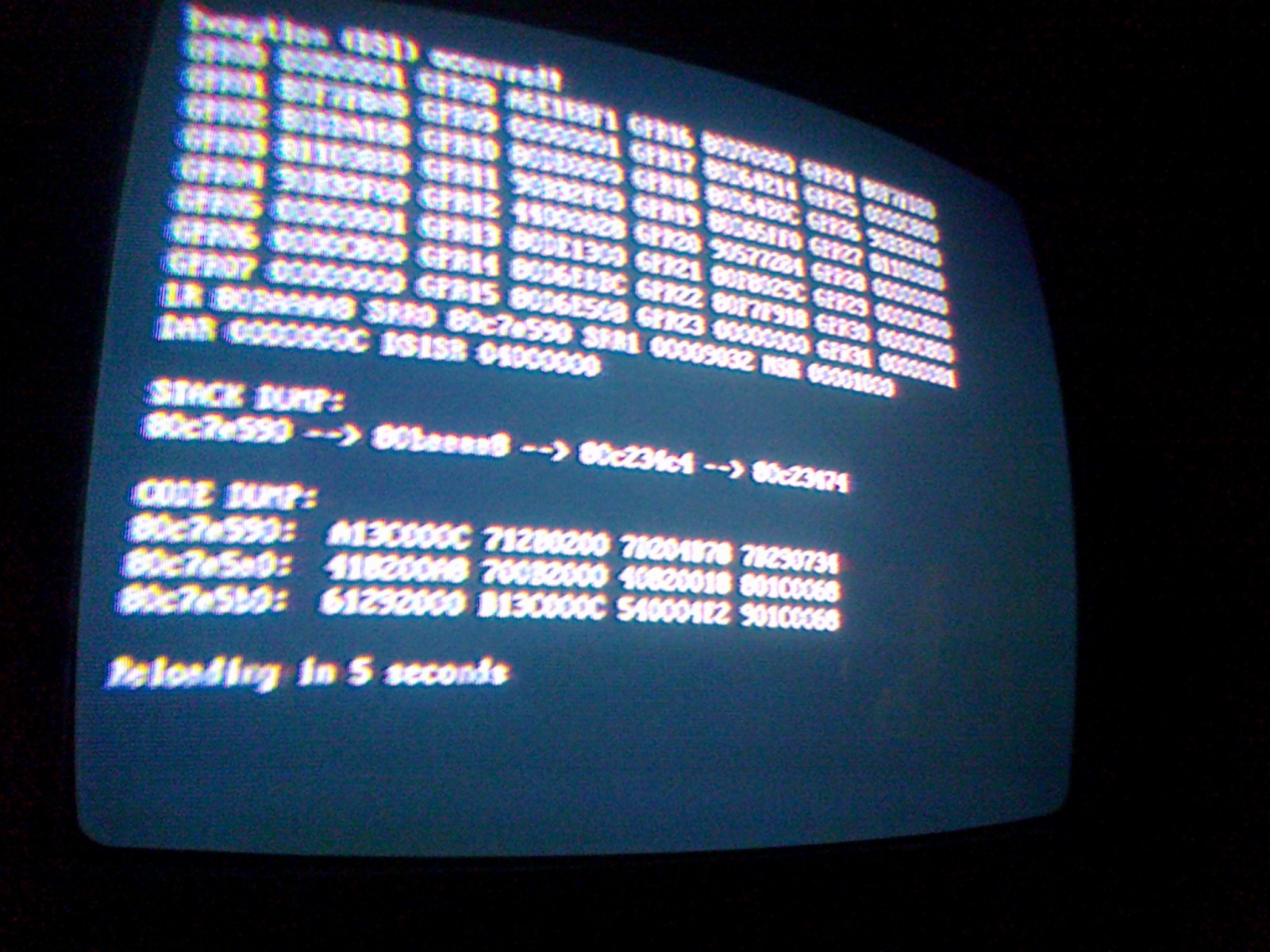
I had the code dump when using the internal update again, apparently when it tried to extract the update.zip file. This time I went back and redid it to get a shot of the dump


EDIT : I forgot to mention that this was updating from r637 if that helps interpret the dump
I seem to be the only one reporting this bug so it's not a big deal. Just curious if it's one of me settings or part of my configuration that's causing it or something.
 

Site & Scene News

Popular threads in this forum