Hacking WiiFlow - an open source GUI USB-Loader

Maxternal

Peanut Gallery Spokesman
Member
Joined
Nov 15, 2011
Messages
5,210
Trophies
0
Age
39
Location
Deep in GBAtemp addiction
Website
gbadev.googlecode.com
XP
1,698
Country
Here's the log file from trying to boot H.A.W.X.2
Welcome to WiiFlow (Mod 3.1-r646)!
This is the debug output.
Loading cIOS: 249
WiiFlow is in real nand mode
Reloading into IOS 249 from 249 (AHBPROT: 1)...
Going to show a wait message screen, delay: 5, # images: 8
D2X cIOS Base IOS56
SD Card found.
Changing USB port to port 0....
* * * * * * * * * * * *
* HDD Information
* Sectors: 976773167
* Size [Sector Size]: 465 GB [512]
* * * * * * * * * * * *
Wiiflow boot.dol Location: usb2:/apps/wiiflow
DIOS-MIOS is installed as MIOS
Loading cIOS map
Found cIOS in slot 222
Found cIOS in slot 223
Found cIOS in slot 224
Found cIOS in slot 225
Found d2x base 37 in slot 245
Found d2x base 38 in slot 246
Found d2x base 53 in slot 247
Found d2x base 55 in slot 248
Found d2x base 56 in slot 249
Found d2x base 57 in slot 250
Found d2x base 58 in slot 251
Data Directory: usb1:/wiiflow

Loading files containing .ogg|.mp3 in usb2:/wiiflow/themes/default/music
Loading music list from path: usb2:/wiiflow/themes/default/music
Calling list to update filelist

Loading files containing .ogg|.mp3 in usb2:/wiiflow/music
Loading music list from path: usb2:/wiiflow/music
Calling list to update filelist
SHND: Running sound thread
Trying to open 'usb2:/wiiflow/settings/wiitdb.xml'...failed
Loading items of usb view from usb2

Loading files containing .wbfs|.iso in usb2:/wbfs
Database file: usb2:/wiiflow/cache/lists/usb2_wbfs.db
update_games=0 update_homebrew=0 update_dml=0, update_emu=0
usb2:/wbfs

Welcome to WiiFlow (Mod 3.1-r646)!
This is the debug output.
Loading cIOS: 249
WiiFlow is in real nand mode
Reloading into IOS 249 from 58 (AHBPROT: 0)...
Going to show a wait message screen, delay: 5, # images: 8
D2X cIOS Base IOS56
SD Card found.
Changing USB port to port 0....
* * * * * * * * * * * *
* HDD Information
* Sectors: 976773167
* Size [Sector Size]: 465 GB [512]
* * * * * * * * * * * *
Wiiflow boot.dol Location: usb2:/apps/wiiflow
DIOS-MIOS is installed as MIOS
Loading cIOS map
Found cIOS in slot 222
Found cIOS in slot 223
Found cIOS in slot 224
Found cIOS in slot 225
Found d2x base 37 in slot 245
Found d2x base 38 in slot 246
Found d2x base 53 in slot 247
Found d2x base 55 in slot 248
Found d2x base 56 in slot 249
Found d2x base 57 in slot 250
Found d2x base 58 in slot 251
Data Directory: usb1:/wiiflow

Loading files containing .ogg|.mp3 in usb2:/wiiflow/themes/default/music
Loading music list from path: usb2:/wiiflow/themes/default/music
Calling list to update filelist

Loading files containing .ogg|.mp3 in usb2:/wiiflow/music
Loading music list from path: usb2:/wiiflow/music
Calling list to update filelist
SHND: Running sound thread
Trying to open 'usb2:/wiiflow/settings/wiitdb.xml'...failed
Loading items of usb view from usb2

Loading files containing .wbfs|.iso in usb2:/wbfs
Database file: usb2:/wiiflow/cache/lists/usb2_wbfs.db
update_games=0 update_homebrew=0 update_dml=0, update_emu=0
usb2:/wbfs
NET: Network init complete, enabled wifi_gecko: no
Games found: 196
Stop showing images
Coverflow started!
Coverflow stopped!
Now hide wait message
Exit WiiFlow called
Going to show a wait message screen, delay: 5, # images: 8
Launching game RTAE41
Ocarina: No codes found
MEM1_freesize(): 4296688
MEM2_freesize(): 14769280
SHND: Stopping sound thread
SHND: Stopped sound thread
At this point the wiimote loses sync with a black screen and won't connect and I have to do a force shutdown.

EDIT : It's the NTSC version. GX loads it fine so it's not a bad dump (at least not enough for it to just black screen like that. I haven't actually run the internal SHA-1 with WBM but I'll try to remember to do that soon.)

 

macia10

Well-Known Member
Member
Joined
Aug 13, 2012
Messages
124
Trophies
1
XP
774
Country
Poland
Hi,
Im kinda new to wiiflow and have two of questions.
1) How to setup covers for roms in emulators. I have a gba rom and dont know how to set up a cover for it. Where to put it and what should be the name.
2) In lower right corner there is a button which can be used to switch between wii games nand emus and other stuff. Can I disable nand and others and leave only wii games and emus?
1) There's a tutorial for general setup here and I think it includes that. http://gbatemp.net/t...tion-and-setup/
2) There's a file in the /apps/wiiflow/ folder called wiiflow.ini there are sections in there for each one of those in brackets ([NAND] [GAMES] [DML] [HOMEBREW] [PLUGINS] if I remember correctly) under each of those sections there's a setting that says disable=no and you just have to change it to disable=yes to hide each one.
Great that helped a lot. But how to disable the real nand tab. In wiflow.ini there is only nandemu under [NAND]
 

bostonBC

Well-Known Member
Member
Joined
Aug 17, 2011
Messages
1,292
Trophies
1
XP
1,353
Country
United States
Here's the log file from trying to boot H.A.W.X.2
Welcome to WiiFlow (Mod 3.1-r646)!
This is the debug output.
Loading cIOS: 249
WiiFlow is in real nand mode
Reloading into IOS 249 from 249 (AHBPROT: 1)...
Going to show a wait message screen, delay: 5, # images: 8
D2X cIOS Base IOS56
SD Card found.
Changing USB port to port 0....
* * * * * * * * * * * *
* HDD Information
* Sectors: 976773167
* Size [Sector Size]: 465 GB [512]
* * * * * * * * * * * *
Wiiflow boot.dol Location: usb2:/apps/wiiflow
DIOS-MIOS is installed as MIOS
Loading cIOS map
Found cIOS in slot 222
Found cIOS in slot 223
Found cIOS in slot 224
Found cIOS in slot 225
Found d2x base 37 in slot 245
Found d2x base 38 in slot 246
Found d2x base 53 in slot 247
Found d2x base 55 in slot 248
Found d2x base 56 in slot 249
Found d2x base 57 in slot 250
Found d2x base 58 in slot 251
Data Directory: usb1:/wiiflow

Loading files containing .ogg|.mp3 in usb2:/wiiflow/themes/default/music
Loading music list from path: usb2:/wiiflow/themes/default/music
Calling list to update filelist

Loading files containing .ogg|.mp3 in usb2:/wiiflow/music
Loading music list from path: usb2:/wiiflow/music
Calling list to update filelist
SHND: Running sound thread
Trying to open 'usb2:/wiiflow/settings/wiitdb.xml'...failed
Loading items of usb view from usb2

Loading files containing .wbfs|.iso in usb2:/wbfs
Database file: usb2:/wiiflow/cache/lists/usb2_wbfs.db
update_games=0 update_homebrew=0 update_dml=0, update_emu=0
usb2:/wbfs

Welcome to WiiFlow (Mod 3.1-r646)!
This is the debug output.
Loading cIOS: 249
WiiFlow is in real nand mode
Reloading into IOS 249 from 58 (AHBPROT: 0)...
Going to show a wait message screen, delay: 5, # images: 8
D2X cIOS Base IOS56
SD Card found.
Changing USB port to port 0....
* * * * * * * * * * * *
* HDD Information
* Sectors: 976773167
* Size [Sector Size]: 465 GB [512]
* * * * * * * * * * * *
Wiiflow boot.dol Location: usb2:/apps/wiiflow
DIOS-MIOS is installed as MIOS
Loading cIOS map
Found cIOS in slot 222
Found cIOS in slot 223
Found cIOS in slot 224
Found cIOS in slot 225
Found d2x base 37 in slot 245
Found d2x base 38 in slot 246
Found d2x base 53 in slot 247
Found d2x base 55 in slot 248
Found d2x base 56 in slot 249
Found d2x base 57 in slot 250
Found d2x base 58 in slot 251
Data Directory: usb1:/wiiflow

Loading files containing .ogg|.mp3 in usb2:/wiiflow/themes/default/music
Loading music list from path: usb2:/wiiflow/themes/default/music
Calling list to update filelist

Loading files containing .ogg|.mp3 in usb2:/wiiflow/music
Loading music list from path: usb2:/wiiflow/music
Calling list to update filelist
SHND: Running sound thread
Trying to open 'usb2:/wiiflow/settings/wiitdb.xml'...failed
Loading items of usb view from usb2

Loading files containing .wbfs|.iso in usb2:/wbfs
Database file: usb2:/wiiflow/cache/lists/usb2_wbfs.db
update_games=0 update_homebrew=0 update_dml=0, update_emu=0
usb2:/wbfs
NET: Network init complete, enabled wifi_gecko: no
Games found: 196
Stop showing images
Coverflow started!
Coverflow stopped!
Now hide wait message
Exit WiiFlow called
Going to show a wait message screen, delay: 5, # images: 8
Launching game RTAE41
Ocarina: No codes found
MEM1_freesize(): 4296688
MEM2_freesize(): 14769280
SHND: Stopping sound thread
SHND: Stopped sound thread
At this point the wiimote loses sync with a black screen and won't connect and I have to do a force shutdown.

EDIT : It's the NTSC version. GX loads it fine so it's not a bad dump (at least not enough for it to just black screen like that. I haven't actually run the internal SHA-1 with WBM but I'll try to remember to do that soon.)
I have the PAL version and it works fine w/o any changes in r643. Will try it in r646 and report back.

Edit - works fine in r646 too.

FWIW the game ID is RTAP41
 
  • Like
Reactions: 1 person

Etheboss

Official LULWUT supporter
Member
Joined
Feb 24, 2009
Messages
2,445
Trophies
0
Location
Around somewhere
XP
851
Country
Netherlands
645 and 646 bug:
delete cache lists
go to all modes just fine the first time > go to homebrew mode a second time > black screen! (reproduceable using both official and home made dols)
I can make a screenshot but it's just black :)

Edit1: I can run a homebrew blindly by pressign A+B when the screen is black the homebrew loads fine and exits back WF just ok, so it looks it's only a display issue not a freeze.

Edit2: 639 has the same issue, 616 works fine however.
I already reported this, i have the same issue, but it was prolly hard to reproduce untill now, thanx Abz..
Funny thing though, wiiflow won't crash, just blackscreens, i know because if i keep holding the wiimote in one place and push "A" again, the next flow DOES show up. But it is still happening random.
One positive note about this, wiiflow used to crash after a few black screens for me, but not anymore.
Not sure when i reported it before but i think it was even before rev 639.
 

Maxternal

Peanut Gallery Spokesman
Member
Joined
Nov 15, 2011
Messages
5,210
Trophies
0
Age
39
Location
Deep in GBAtemp addiction
Website
gbadev.googlecode.com
XP
1,698
Country
Here's the log file from trying to boot H.A.W.X.2
Welcome to WiiFlow (Mod 3.1-r646)!
This is the debug output.
Loading cIOS: 249
WiiFlow is in real nand mode
Reloading into IOS 249 from 249 (AHBPROT: 1)...
Going to show a wait message screen, delay: 5, # images: 8
D2X cIOS Base IOS56
SD Card found.
Changing USB port to port 0....
* * * * * * * * * * * *
* HDD Information
* Sectors: 976773167
* Size [Sector Size]: 465 GB [512]
* * * * * * * * * * * *
Wiiflow boot.dol Location: usb2:/apps/wiiflow
DIOS-MIOS is installed as MIOS
Loading cIOS map
Found cIOS in slot 222
Found cIOS in slot 223
Found cIOS in slot 224
Found cIOS in slot 225
Found d2x base 37 in slot 245
Found d2x base 38 in slot 246
Found d2x base 53 in slot 247
Found d2x base 55 in slot 248
Found d2x base 56 in slot 249
Found d2x base 57 in slot 250
Found d2x base 58 in slot 251
Data Directory: usb1:/wiiflow

Loading files containing .ogg|.mp3 in usb2:/wiiflow/themes/default/music
Loading music list from path: usb2:/wiiflow/themes/default/music
Calling list to update filelist

Loading files containing .ogg|.mp3 in usb2:/wiiflow/music
Loading music list from path: usb2:/wiiflow/music
Calling list to update filelist
SHND: Running sound thread
Trying to open 'usb2:/wiiflow/settings/wiitdb.xml'...failed
Loading items of usb view from usb2

Loading files containing .wbfs|.iso in usb2:/wbfs
Database file: usb2:/wiiflow/cache/lists/usb2_wbfs.db
update_games=0 update_homebrew=0 update_dml=0, update_emu=0
usb2:/wbfs

Welcome to WiiFlow (Mod 3.1-r646)!
This is the debug output.
Loading cIOS: 249
WiiFlow is in real nand mode
Reloading into IOS 249 from 58 (AHBPROT: 0)...
Going to show a wait message screen, delay: 5, # images: 8
D2X cIOS Base IOS56
SD Card found.
Changing USB port to port 0....
* * * * * * * * * * * *
* HDD Information
* Sectors: 976773167
* Size [Sector Size]: 465 GB [512]
* * * * * * * * * * * *
Wiiflow boot.dol Location: usb2:/apps/wiiflow
DIOS-MIOS is installed as MIOS
Loading cIOS map
Found cIOS in slot 222
Found cIOS in slot 223
Found cIOS in slot 224
Found cIOS in slot 225
Found d2x base 37 in slot 245
Found d2x base 38 in slot 246
Found d2x base 53 in slot 247
Found d2x base 55 in slot 248
Found d2x base 56 in slot 249
Found d2x base 57 in slot 250
Found d2x base 58 in slot 251
Data Directory: usb1:/wiiflow

Loading files containing .ogg|.mp3 in usb2:/wiiflow/themes/default/music
Loading music list from path: usb2:/wiiflow/themes/default/music
Calling list to update filelist

Loading files containing .ogg|.mp3 in usb2:/wiiflow/music
Loading music list from path: usb2:/wiiflow/music
Calling list to update filelist
SHND: Running sound thread
Trying to open 'usb2:/wiiflow/settings/wiitdb.xml'...failed
Loading items of usb view from usb2

Loading files containing .wbfs|.iso in usb2:/wbfs
Database file: usb2:/wiiflow/cache/lists/usb2_wbfs.db
update_games=0 update_homebrew=0 update_dml=0, update_emu=0
usb2:/wbfs
NET: Network init complete, enabled wifi_gecko: no
Games found: 196
Stop showing images
Coverflow started!
Coverflow stopped!
Now hide wait message
Exit WiiFlow called
Going to show a wait message screen, delay: 5, # images: 8
Launching game RTAE41
Ocarina: No codes found
MEM1_freesize(): 4296688
MEM2_freesize(): 14769280
SHND: Stopping sound thread
SHND: Stopped sound thread
At this point the wiimote loses sync with a black screen and won't connect and I have to do a force shutdown.

EDIT : It's the NTSC version. GX loads it fine so it's not a bad dump (at least not enough for it to just black screen like that. I haven't actually run the internal SHA-1 with WBM but I'll try to remember to do that soon.)
I have the PAL version and it works fine w/o any changes in r643. Will try it in r646 and report back.

Edit - works fine in r646 too.

FWIW the game ID is RTAP41
Ok, maybe I should play around with the settings a bit. Maybe the new boot method did fix it but the settings I changed to try to get it to work before have it broken now. Just for the record, is you're PAL version forced to NTSC? (I may also just try getting a hold of the PAL version myself if I can't get it to work with mine.)
 

bostonBC

Well-Known Member
Member
Joined
Aug 17, 2011
Messages
1,292
Trophies
1
XP
1,353
Country
United States
Here's the log file from trying to boot H.A.W.X.2
Welcome to WiiFlow (Mod 3.1-r646)!
This is the debug output.
Loading cIOS: 249
WiiFlow is in real nand mode
Reloading into IOS 249 from 249 (AHBPROT: 1)...
Going to show a wait message screen, delay: 5, # images: 8
D2X cIOS Base IOS56
SD Card found.
Changing USB port to port 0....
* * * * * * * * * * * *
* HDD Information
* Sectors: 976773167
* Size [Sector Size]: 465 GB [512]
* * * * * * * * * * * *
Wiiflow boot.dol Location: usb2:/apps/wiiflow
DIOS-MIOS is installed as MIOS
Loading cIOS map
Found cIOS in slot 222
Found cIOS in slot 223
Found cIOS in slot 224
Found cIOS in slot 225
Found d2x base 37 in slot 245
Found d2x base 38 in slot 246
Found d2x base 53 in slot 247
Found d2x base 55 in slot 248
Found d2x base 56 in slot 249
Found d2x base 57 in slot 250
Found d2x base 58 in slot 251
Data Directory: usb1:/wiiflow

Loading files containing .ogg|.mp3 in usb2:/wiiflow/themes/default/music
Loading music list from path: usb2:/wiiflow/themes/default/music
Calling list to update filelist

Loading files containing .ogg|.mp3 in usb2:/wiiflow/music
Loading music list from path: usb2:/wiiflow/music
Calling list to update filelist
SHND: Running sound thread
Trying to open 'usb2:/wiiflow/settings/wiitdb.xml'...failed
Loading items of usb view from usb2

Loading files containing .wbfs|.iso in usb2:/wbfs
Database file: usb2:/wiiflow/cache/lists/usb2_wbfs.db
update_games=0 update_homebrew=0 update_dml=0, update_emu=0
usb2:/wbfs

Welcome to WiiFlow (Mod 3.1-r646)!
This is the debug output.
Loading cIOS: 249
WiiFlow is in real nand mode
Reloading into IOS 249 from 58 (AHBPROT: 0)...
Going to show a wait message screen, delay: 5, # images: 8
D2X cIOS Base IOS56
SD Card found.
Changing USB port to port 0....
* * * * * * * * * * * *
* HDD Information
* Sectors: 976773167
* Size [Sector Size]: 465 GB [512]
* * * * * * * * * * * *
Wiiflow boot.dol Location: usb2:/apps/wiiflow
DIOS-MIOS is installed as MIOS
Loading cIOS map
Found cIOS in slot 222
Found cIOS in slot 223
Found cIOS in slot 224
Found cIOS in slot 225
Found d2x base 37 in slot 245
Found d2x base 38 in slot 246
Found d2x base 53 in slot 247
Found d2x base 55 in slot 248
Found d2x base 56 in slot 249
Found d2x base 57 in slot 250
Found d2x base 58 in slot 251
Data Directory: usb1:/wiiflow

Loading files containing .ogg|.mp3 in usb2:/wiiflow/themes/default/music
Loading music list from path: usb2:/wiiflow/themes/default/music
Calling list to update filelist

Loading files containing .ogg|.mp3 in usb2:/wiiflow/music
Loading music list from path: usb2:/wiiflow/music
Calling list to update filelist
SHND: Running sound thread
Trying to open 'usb2:/wiiflow/settings/wiitdb.xml'...failed
Loading items of usb view from usb2

Loading files containing .wbfs|.iso in usb2:/wbfs
Database file: usb2:/wiiflow/cache/lists/usb2_wbfs.db
update_games=0 update_homebrew=0 update_dml=0, update_emu=0
usb2:/wbfs
NET: Network init complete, enabled wifi_gecko: no
Games found: 196
Stop showing images
Coverflow started!
Coverflow stopped!
Now hide wait message
Exit WiiFlow called
Going to show a wait message screen, delay: 5, # images: 8
Launching game RTAE41
Ocarina: No codes found
MEM1_freesize(): 4296688
MEM2_freesize(): 14769280
SHND: Stopping sound thread
SHND: Stopped sound thread
At this point the wiimote loses sync with a black screen and won't connect and I have to do a force shutdown.

EDIT : It's the NTSC version. GX loads it fine so it's not a bad dump (at least not enough for it to just black screen like that. I haven't actually run the internal SHA-1 with WBM but I'll try to remember to do that soon.)

I have the PAL version and it works fine w/o any changes in r643. Will try it in r646 and report back.

Edit - works fine in r646 too.

FWIW the game ID is RTAP41
Ok, maybe I should play around with the settings a bit. Maybe the new boot method did fix it but the settings I changed to try to get it to work before have it broken now. Just for the record, is you're PAL version forced to NTSC? (I may also just try getting a hold of the PAL version myself if I can't get it to work with mine.)
 
  • Like
Reactions: 1 person

luck_gh0st

Well-Known Member
Member
Joined
Feb 21, 2009
Messages
174
Trophies
0
XP
132
Country
2TB drive, 1st partition FAT32 300GB, 2nd partition NTFS 1.7TB
NAND and GC on FAT32, Wii on NTFS.
Not having a lot of luck with emu stuff on NTFS or FAT32, so running those from SD, but still have plenty of problems with N64 stuff. Not sure what I'm doing wrong there.
My NAND/Wii are set up like that from back some time when NAND didn't like being on the same partition as Wiiflow. There are probably better ways to do it, but nobody has come up with clear guidelines as yet. I don't do this NEEK thing either, yet.
Yeah the guide said to partition that way (1 FAT32) (1 NTFS) So I did also it said to not have the nand and WiiFlow files in the same place. However I put source_menu and the wiiflow plugins on the FAT32 partition because The mplayer plugin does not work from NTFS. It took me a minute to figure that out too.(for me anyway)Now whenever I do a totally fresh install for wiiflow, I always have to setup my wiiflow.ini again because everything defaults to usb1. I was thinking of maybe just converting the NTFS to FAT32 but not sure if that's a good idea or not. For me NTFS sometimes has some data issues. Maybe it's my hard drive or something. But a few days ago my Genplusgx covers all disappeared (lucky that I keep backups) and last night my mplayerce covers did the same. Weird.

I have tried to put the nand in the same place with the wiiflow files and it either won't work, lock up or code dump. I don't think that neek is NTFS compatibale yet or if it even can be. I have my wiiflow.ini pointing to /nands/4.1U_Wiiflow and whenever I exit neek I have to make sure that it's on that one if I want to use a channel from the nand.
I've been using r92 of neek and it's mostly working well.
I have 3 nands set up inside of my /nands folder

/nands/
/4.1U_WiiFlow = for WiiFlow (Wiiware, VC, etc)
/4.2U = (testing)
/4.3U= Quadforce (Mario Kart Arcade games on SD Card being launched by forwarder channels)
 

Maxternal

Peanut Gallery Spokesman
Member
Joined
Nov 15, 2011
Messages
5,210
Trophies
0
Age
39
Location
Deep in GBAtemp addiction
Website
gbadev.googlecode.com
XP
1,698
Country
Yeah the guide said to partition that way (1 FAT32) (1 NTFS) So I did also it said to not have the nand and WiiFlow files in the same place. However I put source_menu and the wiiflow plugins on the FAT32 partition because The mplayer plugin does not work from NTFS. It took me a minute to figure that out too.(for me anyway)Now whenever I do a totally fresh install for wiiflow, I always have to setup my wiiflow.ini again because everything defaults to usb1. I was thinking of maybe just converting the NTFS to FAT32 but not sure if that's a good idea or not. For me NTFS sometimes has some data issues. Maybe it's my hard drive or something. But a few days ago my Genplusgx covers all disappeared (lucky that I keep backups) and last night my mplayerce covers did the same. Weird.
The place where a WiiFlow clean install defaults to is the first partition where it finds an existing /WiiFlow/ folder OR the partition where there's a /wbfs/ folder if no /wiiflow/ folder was found. If you wanted an easy fix for the clean installs, just temporarily rename or move the /wiiflow/ folder on USB1 where your plugins folder is and then just put it back when you've run wiiflow for the first time. Also, it's important to note that some of the plugins will not only require it to be FAT32 but will also require it to be the first partition (USB1, not USB2) so reformatting your NTFS partition might not help you much.
 
  • Like
Reactions: 1 person

luck_gh0st

Well-Known Member
Member
Joined
Feb 21, 2009
Messages
174
Trophies
0
XP
132
Country
Yeah the guide said to partition that way (1 FAT32) (1 NTFS) So I did also it said to not have the nand and WiiFlow files in the same place. However I put source_menu and the wiiflow plugins on the FAT32 partition because The mplayer plugin does not work from NTFS. It took me a minute to figure that out too.(for me anyway)Now whenever I do a totally fresh install for wiiflow, I always have to setup my wiiflow.ini again because everything defaults to usb1. I was thinking of maybe just converting the NTFS to FAT32 but not sure if that's a good idea or not. For me NTFS sometimes has some data issues. Maybe it's my hard drive or something. But a few days ago my Genplusgx covers all disappeared (lucky that I keep backups) and last night my mplayerce covers did the same. Weird.
The place where a WiiFlow clean install defaults to is the first partition where it finds an existing /WiiFlow/ folder OR the partition where there's a /wbfs/ folder if no /wiiflow/ folder was found. If you wanted an easy fix for the clean installs, just temporarily rename or move the /wiiflow/ folder on USB1 where your plugins folder is and then just put it back when you've run wiiflow for the first time. Also, it's important to note that some of the plugins will not only require it to be FAT32 but will also require it to be the first partition (USB1, not USB2) so reformatting your NTFS partition might not help you much.
I honestly didn't know that thanx! I wiIl do that next time figured that it just used usb1 FAT32 period. I kept having to go through the wiiflow.ini and change usb1 to usb2 for everythin except plugins and source_menu. Yeah the emus all seemed to work form NTFS except the mplayer and it was driving me nuts for a day or 2 at first. Same with the source_menu.


bostonBC

Well-Known Member
Member
Joined
Aug 17, 2011
Messages
1,292
Trophies
1
XP
1,353
Country
United States
Great that helped a lot. But how to disable the real nand tab. In wiflow.ini there is only nandemu under [NAND]
They actually use the same tab. It just turns NAND emulation on and off as needed.
Ok but I have disable=yes under [nand] and its still there? is it a bug? ;)
Yes, I reported it some time back. Can't remember if I did a format google code defect report though.
 

MassiveRican

GBATemp's Unofficial Vigilante
Member
Joined
Aug 2, 2011
Messages
2,453
Trophies
1
Location
Creeping in the Shadows
XP
1,178
Country
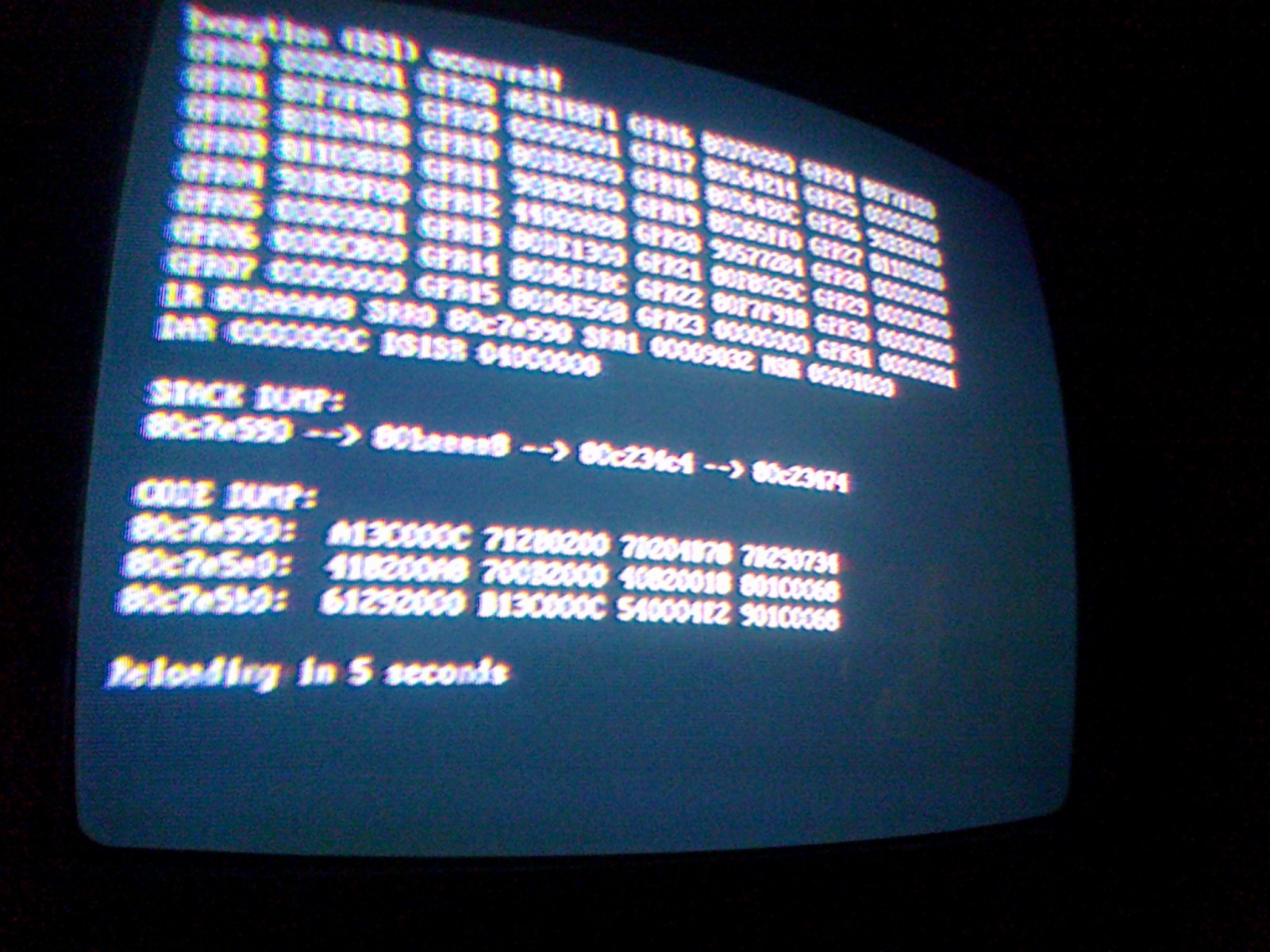
I had the code dump when using the internal update again, apparently when it tried to extract the update.zip file. This time I went back and redid it to get a shot of the dump


EDIT : I forgot to mention that this was updating from r637 if that helps interpret the dump
I seem to be the only one reporting this bug so it's not a big deal. Just curious if it's one of me settings or part of my configuration that's causing it or something.
I did a manual update and haven't tried an internal update yet, but I'll give it a shot and see.
Here's the log file from trying to boot H.A.W.X.2
Did any wiiflow version play the game? Please check that.
I just booted H.A.W.X. 2 with both "progressive" and "game" video modes, NTSC ver., no black screen.
 

bostonBC

Well-Known Member
Member
Joined
Aug 17, 2011
Messages
1,292
Trophies
1
XP
1,353
Country
United States
I had the code dump when using the internal update again, apparently when it tried to extract the update.zip file. This time I went back and redid it to get a shot of the dump


EDIT : I forgot to mention that this was updating from r637 if that helps interpret the dump
I seem to be the only one reporting this bug so it's not a big deal. Just curious if it's one of me settings or part of my configuration that's causing it or something.
I did a manual update and haven't tried an internal update yet, but I'll give it a shot and see.
Here's the log file from trying to boot H.A.W.X.2
Did any wiiflow version play the game? Please check that.
I just booted H.A.W.X. 2 with both "progressive" and "game" video modes, NTSC ver., no black screen.
Don't know why some games work with some video modes and others fail. I've found that almost all work when it is set to System but a few require the Game setting.
 

Maxternal

Peanut Gallery Spokesman
Member
Joined
Nov 15, 2011
Messages
5,210
Trophies
0
Age
39
Location
Deep in GBAtemp addiction
Website
gbadev.googlecode.com
XP
1,698
Country
I had the code dump when using the internal update again, apparently when it tried to extract the update.zip file. This time I went back and redid it to get a shot of the dump


EDIT : I forgot to mention that this was updating from r637 if that helps interpret the dump
I seem to be the only one reporting this bug so it's not a big deal. Just curious if it's one of me settings or part of my configuration that's causing it or something.
I did a manual update and haven't tried an internal update yet, but I'll give it a shot and see.
Here's the log file from trying to boot H.A.W.X.2
Did any wiiflow version play the game? Please check that.
I just booted H.A.W.X. 2 with both "progressive" and "game" video modes, NTSC ver., no black screen.
Don't know why some games work with some video modes and others fail. I've found that almost all work when it is set to System but a few require the Game setting.
I must have some setting wrong ... or a bad dump (that GX can use anyhow) I have to fiddle with it when I get some time.
 

drakorex

Well-Known Member
Member
Joined
Jan 19, 2011
Messages
1,882
Trophies
0
XP
1,052
Country
United States
I tried installing a wii game with 646 and it code dumped. Tried 3 times. But the dumps weren't static, the numbers were changing, like it was dumping 3 or 4 times in a row. weird...
 

Maxternal

Peanut Gallery Spokesman
Member
Joined
Nov 15, 2011
Messages
5,210
Trophies
0
Age
39
Location
Deep in GBAtemp addiction
Website
gbadev.googlecode.com
XP
1,698
Country
I tried installing a wii game with 646 and it code dumped. Tried 3 times. But the dumps weren't static, the numbers were changing, like it was dumping 3 or 4 times in a row. weird...
Hmm, I've had that kind of dump before, too. It was in WiiFlow but I don't remember what I was doing at the time. I kinda don't think it was installing a game, though, and it wasn't reproducible. Maybe a video? (since a photo won't suffice this time :P)
 

drakorex

Well-Known Member
Member
Joined
Jan 19, 2011
Messages
1,882
Trophies
0
XP
1,052
Country
United States
I tried installing a wii game with 646 and it code dumped. Tried 3 times. But the dumps weren't static, the numbers were changing, like it was dumping 3 or 4 times in a row. weird...
Hmm, I've had that kind of dump before, too. It was in WiiFlow but I don't remember what I was doing at the time. I kinda don't think it was installing a game, though, and it wasn't reproducible. Maybe a video? (since a photo won't suffice this time :P)
Might try. Was tryna install Bully, sent it back to gamefly already. only wii game I have is brawl. Hopefully it gets the same error.:/
 

Geren

Well-Known Member
Member
Joined
Aug 15, 2011
Messages
236
Trophies
0
Website
Visit site
XP
233
Country
Spain
3) How do I use an emulated nand? I've used USB Loader Gx and postloader's nand emulation options, and they've worked, but here on wiiflow I've tried changing the nand path, using clean nands, using the nand extraction option, changing the wiiflow boot.dol to another device/partition... so far, this is the only feature I haven't got working.
3) . . . maybe someone else can answer this one. :wink:
Have you pressed 'B' on the Gamecube/NAND/Homebrew etc. Icon on the main screen?
That will activate it. Works for me.

Yeah, I've tried that. If it doesn't code dump on me, I get the "I didn't find an emulated nand" screen. I'll keep trying anyways :)

On another hand, does anyone knows if it's possible to take the transparency out of the homebrew icons? They don't look... nice. I've searched in the adjust coverflow option but didn't find anything. Just a cosmetic change I want to make lol.
 
General chit-chat
Help Users
  • No one is chatting at the moment.
  • JuanMena @ JuanMena:
    Kissing random dudes choking in celery? Really? Need to study for that?
  • K3N1 @ K3N1:
    Yes it requires a degree
  • K3N1 @ K3N1:
    I could also yank out the rest of my teeth but theirs professionals for that
  • x65943 @ x65943:
    If your throat closes, putting oxygen in your mouth will not solve anything - as you will be introducing oxygen prior to the area of obstruction
  • JuanMena @ JuanMena:
    Just kiss me Kyle.
  • x65943 @ x65943:
    You either need to be intubated to bypass obstruction or create a stoma inferior to the the area of obstruction to survive
  • x65943 @ x65943:
    "Just kiss me Kyle." And I thought all the godreborn gay stuff was a smear campaign
  • JuanMena @ JuanMena:
    If I die, tell my momma I won't be carrying Baby Jesus this christmas :sad::cry:
  • K3N1 @ K3N1:
    Smear campaigns are in The political section now?
  • JuanMena @ JuanMena:
    Chary! Chary! Chary, Chary, Chary!
  • Sonic Angel Knight @ Sonic Angel Knight:
    Pork Provolone :P
  • Psionic Roshambo @ Psionic Roshambo:
    Sounds yummy
  • K3N1 @ K3N1:
    Sweet found my Wii u PSU right after I ordered a new one :tpi:
  • JuanMena @ JuanMena:
    It was waiting for you to order another one.
    Seems like, your PSU was waiting for a partner.
  • JuanMena @ JuanMena:
    Keep them both
    separated or you'll have more PSUs each year.
  • K3N1 @ K3N1:
    Well one you insert one PSU into the other one you get power
  • JuanMena @ JuanMena:
    It literally turns it on.
  • K3N1 @ K3N1:
    Yeah power supplies are filthy perverts
  • K3N1 @ K3N1:
    @Psionic Roshambo has a new friend
    +1
  • JuanMena @ JuanMena:
    It's Kyle, the guy that went to school to be a Certified man Kisser.
  • Psionic Roshambo @ Psionic Roshambo:
    Cartmans hand has taco flavored kisses
  • A @ abraarukuk:
    hi guys
  • Iron_Masuku @ Iron_Masuku:
    Hello
    Skelletonike @ Skelletonike: hmm