ROM Hack Tinke 0.7.2

  • Thread starter Thread starter pleonex
  • Start date Start date
  • Views Views 134,121
  • Replies Replies 367
  • Likes Likes 9
pleonex could you give me the code to convert sadl to waw because my father could try to do the reverse
If the audio is encoded with IMA-ADPCM is easy to do the reverse process becuase the encoding is already done, only you should have to write the new SADL file. The problem is with Procyon audio format, the encoding process is not done (and it wasn't easy do the decoding...).

Here is the SADL class: http://code.google.com/p/tinke/source/browse/trunk/Plugins/Sounds/Sounds/SADL.cs
and here is the Procyon decoding process: http://code.google.com/p/tinke/source/browse/trunk/Plugins/Sounds/Sounds/Compression/Procyon.cs
 
I'm not understood at all, but you know that after you insert again an unpacked file, you have to pack it again and only after to save the rom?
 
Thanks, I did try packing the file & the .pac file too before I saved it. I've probably done something else wrong!
 
Well i try to explain step.

- Find the file.

- Uncompress everything until you have your file.

- Change it, and PACK From last file and when you finished to pack, try to Save Rom.

If you did this step, well, i no know...
 
What is there new?

Look on the sourcecode Tinke site:
http://code.google.com/p/tinke/source/detail?r=148
http://code.google.com/p/tinke/source/detail?r=147
http://code.google.com/p/tinke/source/detail?r=146

I retain that overlay could be modified (and new rom useable), Subtitles and Items for Inazuma Eleven, and a lot of troubles with graph insertions corrected.
But this release r148 is a old one (it's the last from mid october).
Pleonex, we miss you !!
 
thank you ouioui2003
is it possible to do a version of tinke with an editor for 3d models or it's very difficult?
editor 3d models is useless and waste of time (3D is not same as 2D), better export import feature, and edit them on 3D Editor like blender or 3D Max, or other 3d editor.
 
Just curious if there is a plugin to convert DLS to SWAR+SWAV yet. I'd make one if I had the time and know-how, but I want to know if it's already been done or if it's in a beta build of some kind.
 
Long time since last message... I have been very busy with my studies buy everything is right now :)
I haven't got so much time to continue with Tinke, and the little time I had, I dedicated it to the Ninokuni translation project (now is near 60% translated).

editor 3d models is useless and waste of time (3D is not same as 2D), better export import feature, and edit them on 3D Editor like blender or 3D Max, or other 3d editor.
Thanks, andibad. A 3D editor isn't easy to do and it exists so good programs like Blender so no need to do one. I was planning to do a NSBMD <-> OBJ converter to be able to use such programs.

Just curious if there is a plugin to convert DLS to SWAR+SWAV yet. I'd make one if I had the time and know-how, but I want to know if it's already been done or if it's in a beta build of some kind.
No, it doesn't exist, it was in my todo list. If you want to do one you're welcome! It would be very useful. Let me know if you have any questions.
 
No, it doesn't exist, it was in my todo list. If you want to do one you're welcome! It would be very useful. Let me know if you have any questions.
I was mostly curious, I'd have a few months (give or take) of research ahead of me before I could start anything, so if you even have anything on it, you'd probably be better off than I.
 
Hello, I was wondering if perhaps more support could be added to 999. What I am asking for specifically is to be able to view all the DAT files in the BG folder in a similar way the sprites in the CHA folder can be viewed. In other words, if I click on a DAT file in the BG folder and click view, the picture should appear with its correct palette. Would it be difficult to implement this? I can help with finding the color palettes for the BG files if that is a problem. I know where palettes exist for (almost) every DAT file in the BG folder.
 
Hey guys, sorry for the Necrobump! I was told I could do so if I had a legitimate question and this is doing my damn head in!! Sorry this is long, but it's very specific :P


The program is great, easy enough to navigate etc I'm currently trying to change the Title Menu image of Mario Kart DS and I've got an issue when saving the ROM with the latest release on googlecode...

This is as far as I get.
  • I unpacked the Title_us.carc, found the .NCLR (Palette) and .NCGR (Graphic)
  • Saved the image as a .bmp
  • Opened the image in paint.NET
  • Edited it to how I want it
  • Saved it as a bitmap 8bit
  • Imported the image
  • the image and the palette show as correct!
Now here's the weird part... I save the ROM with the modified files imported but the game just crashes when attempting to load! When loaded on PC Emulator the original Title screen remains! When I open the ROM I saved in Tinke, the image and palette show up as the originals :S what am I doing wrong here hahaha

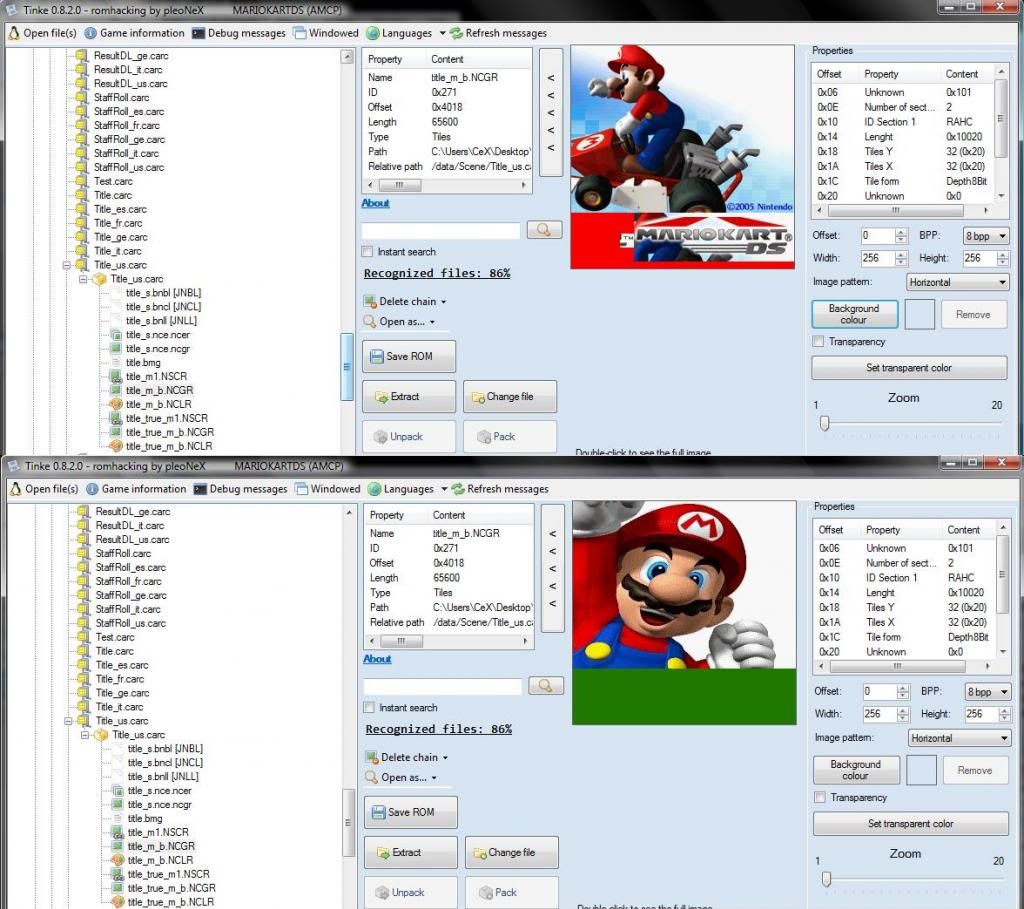
EDIT: I have read through EVERY comment in this entire thread and discovered that repacking the unpacked files is important, in the image below shown in the spoiler tag you can see the list of files that make up the Title Screen image of Mario Kart DS, when I click 'pack' on the one above those files, the debug message 'Path cannot be null. Parameter name: path' shows...
Even though that message appears, if I then click pack on the main parent of title_us.carc the message
'LZ10 - compressed C:\Users\x\Desktop\\Tinke\Temp0\oldPack_Title_us.carc to C:\Users\x\Desktop\\Tinke\Temp0\pack_Title_us.carc' appears.

I'm not sure whether it's because the program isn't packing that file right and that may be my issue :(


I tested all this using r153 which plenox mentioned on the google code page was stable, I do everything the same, but I can't set the transparent colour... So the ROM actually works and shows the image BUT it's soon covered over by that green colour you see on the modified image which I actually want to be transparent, whenever 'Set Transparent Colour' is selected it just bring up a message saying 'No Space In The Palette Found' :(

Any help would be appreciated! (Running the latest version as shown on the googlecode page)
Thanks guys!


In the spoiler tag below is exactly how it looks before I save the ROM on the latest version, everything seems to be right so I'm not sure what my problem is at all...
MKDSQuesion_zps4b1f4da6.jpg
EDIT2!! Using Rev153 I can set the transparent colour by making the very top right pixel the colour I want to make transparent! The ROM then works 100%, but still is inconvinient :(

Is there any way to use the latest rev to make it easier?! Thanks again :)

 

Site & Scene News

Popular threads in this forum