Hacking R4I sdhc 1.4.3 update, yaaay

  • Thread starter Thread starter tiggerlator
  • Start date Start date
  • Views Views 75,078
  • Replies Replies 96
any chance you could download then upload the .nds file for here?

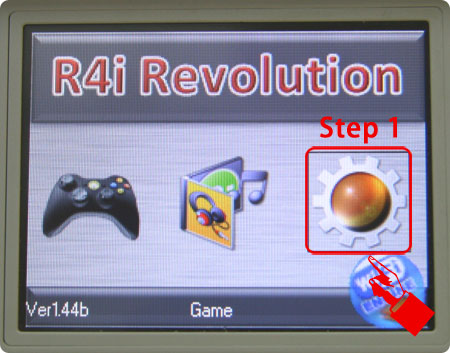
en01.jpg
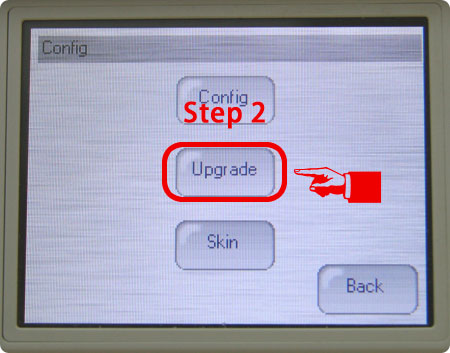
en02.jpg

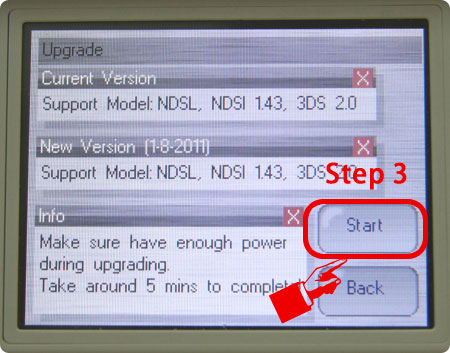
en03.jpg
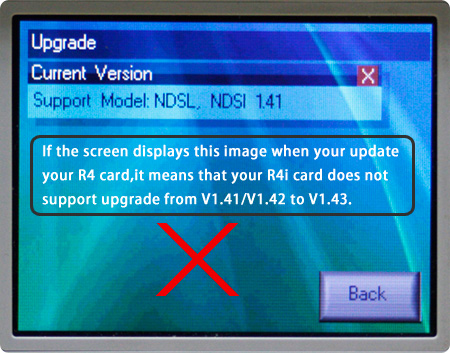
en_x.jpg
 
There is no need to, copy the 1.42b files onto your card and follow the above instructions, mine is doing the upgrade to support 1.4.3 now. The new game icon for the card has changed from spongebob to miami nights 3d.

There is a file in the R4iMenu folder called flash.r4i that could be the actual 1.4.3 upgrade for the card but i am not sure.
 
tiggerlator said:
There is no need to, copy the 1.42b files onto your card and follow the above instructions, mine is doing the upgrade to support 1.4.3 now.

ok, hopefully the upgrade nds file is left after update

if you could post it i might be able to fix a bricked card of mine
 
I cant see no upgrade nds file left over. Mine did the upgrade sucessfully though i have yet to upgrade my ndsi to 1.4.3 as i need to sort the wifi out. Hopefully you can sort out your bricked card. Incidently the 1.38 and 1.41 have no flash.r4i file in the R4iMenu folder, so that must be the firmware file.
 
Hi, i want to ask something.

i have a r4 card.

it has a big R4 logo on it, a " i " on right top of R4 logo.. V.1.4.1 in green star.. Revolution for DS .. it says r4i-gold.hk.. thats the card..

i had updated my nintendo dsi and wasnt able to play any games after that update. (1.4.3)

i read that 1.4.3 update is ok, i download the latest kernel to my r4 card, but nintendo still doesnt recognize the card.. what do i have to do?

thanks a lot
 
Unless your card looks like this one, which is the one i have, i dont know what you can do. I dont think the 1.42b update for this card which adds support for the 1.4.3e firmware will work on your card. You could always try it though.

Untitled.jpg
 
Try it melihkoray, copy the 1.41b firmware onto your card and if it boots, go into config/upgrade as in the pics above. you do not need wifi for the 1.4.3 supporting upgrade, it is in the 1.42b firmware package. it will either work or not.

Also i dont think not haveing upgrade on the card has anything to do with it being upgradeable or not.
 
Hi i got a r4i 1.41 card and my dsi is at version 1.4.3 and i downloaded the latest version on their website and i still get an error when i try to start it, and no new icon just the old "alex rider" icon, cant get into the firmware, i dunno if i have to format the memory card or something?
 
Hi you will have to borrow a ds lite and put your card in it, then follow the above instructions. your card will not work on 1.4.3 until you have done this. the card will not start on 1.4.3 until it has been upgraded to support it. Make sure you replace all the files on the card with the new 1.42b files from the link i posted, these contain the necessary file to upgrade your card to support 1.4.3. Hope this helps
 
tiggerlator, thanks for your great advice. But ıf you dont mind, i want to ask something to make things clear..

I had Firmware 1.4.2 (i think) on my nintendo dsi... and my card was working on that version..

if i hadn't update my dsi firmware, this card would boot with it, then when its open, i would update the card from cards software and update the card; then update the firmware...

But; i updated the firmware to 1.4.3 and this card is now "useless" for my nintendo dsi.. right???

is it like burning a dvd on pc and trying to run it on ps3 ???

i mean yes i updated to 1.4.3 , now the card is useless...

but when i download the newest files and put them into that card from pc... why doesnt it work? whats the main point there?

do i think right? can you please tell me a little more if you have info about that?

then ill try to find a ds lite and solve this.. thanks a lot by the way.. great help

 
i mean,

theres a "main boot area" in r4card.. which is prepared for 1.4.2 or less... 1.4.3 doesnt recognize this boot area.. its like cards memory..

and other part is the memory card on the r4.. it just have files on it.. But r4 doesnt first boot from these files.. it boots from its memory... and now this memory is not recognized by 1.4.3 nds..? so , i have to borrow a dsi, update that "main boot area" of r4card then it will be 1.4.3 ready, and ill use it with my dsi.. is this correct?
 
Yes you are correct, you need to borrow a dsi thats on 1.4.2 or 1.4.1

The problem is, the 1.42b firmware files need to update the card to support 1.4.3e, since you updated your dsi to 1.4.3e the card no longer supports it, so the 1.42b firmware cannot run the necessary files to update the card to support 1.4.3e. You understand
smile.gif
just find someone who has a dslite or dsi 1.4.1/1.4.2 to use, or even do it in a shop if you can.
 
is there a pause point on the update where you could change the cart in the slot?

as my bricked card wont boot but if i can change the card i can write the new update to it

just wondering if there is like a moment where it says "press A" like the last one?

looks like should be able to swap before i press the start button
happy.gif
 

Site & Scene News

Popular threads in this forum