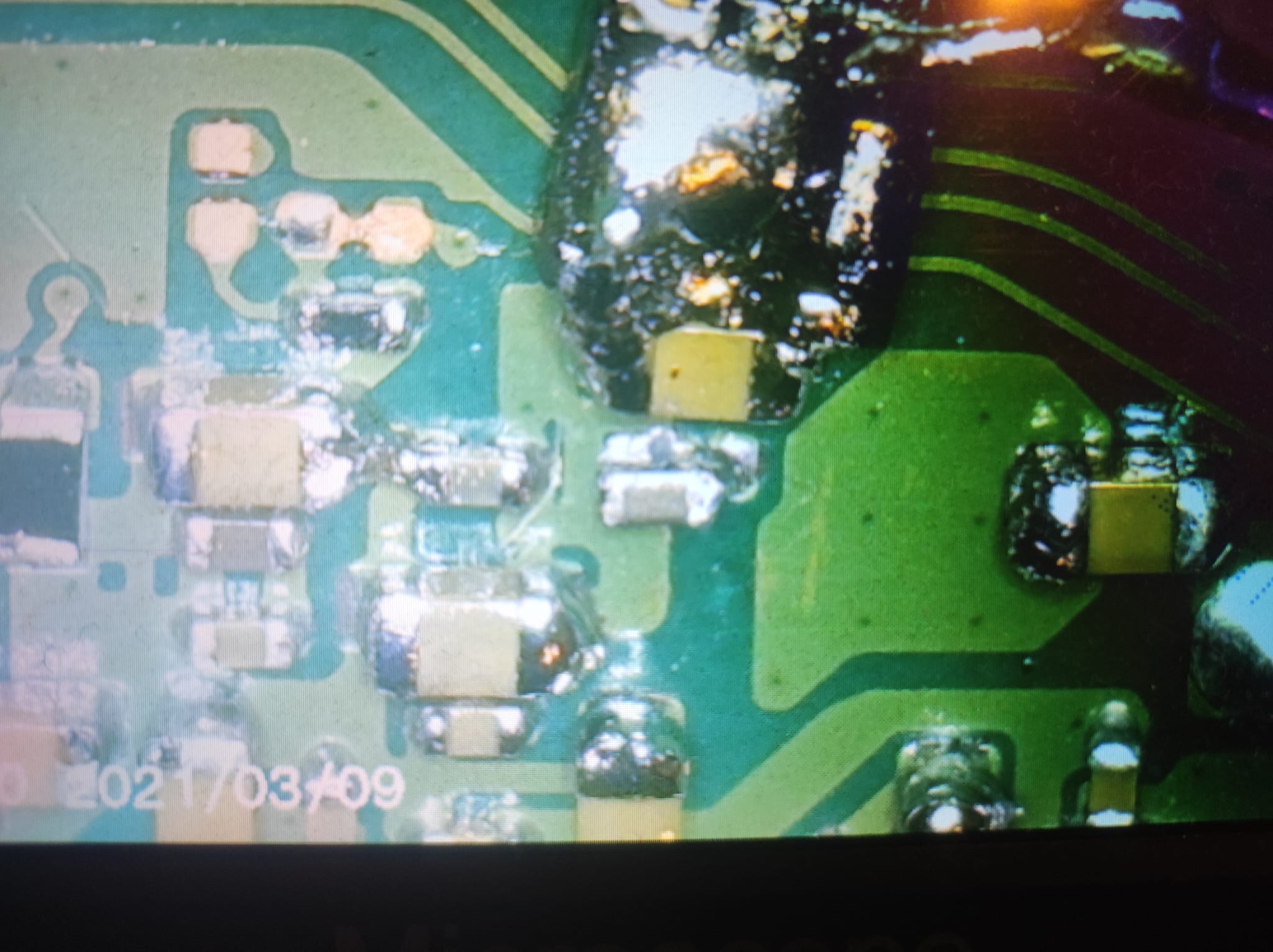
Hi! I tried to do the @abal1000x method and, unfortunately, screwed things up... Does anyone know what the value of this resistor is? Thank you in advance!
Hi! I tried to do the @abal1000x method and, unfortunately, screwed things up... Does anyone know what the value of this resistor is? Thank you in advance!
Hello there! First of all, thank you for your reply!
My switch is a V2, the resistor I'm referring to is the small black one right next to the cap. My friend, who made my first post, is afk for a while so I'm trying to give a quick reply. However, he sent me this photo from the net which should indicate the exact resistor.
Again, thank you! If needed, I'll update you as soon as he replies to my message.
Hey there! I appreciate the answer, thank you! I mean it.
I have a better photo here to indicate which one it is.
By the way, the chip wasn't working on his first try, does anyone know why the soldered point on top wasn't working for the chip?
Again, I appreciate it!
I have a Switch V2. While trying to install a Picofly chip I bought on Amazon, I accidentally burned two capacitors — SP2 and the one to its right. I replaced them with identical capacitors from another motherboard and installed the chip.
After that, I started experiencing a strange issue… Sometimes everything works fine, but after less than a minute, the touchscreen stops responding. And when the touchscreen works, the display glitches after a few seconds — image fades, reboots, etc. Sometimes I only get the backlight; I can hear the sound when I touch the screen, but see nothing…
Do you have any idea what might be going on?
To summarize: if I leave the Switch alone for several hours and turn it on again, it boots, works for a few seconds or a minute, then the screen goes black, although I can still hear sounds. Then, if I try to turn it off and on again, I get nothing at all.
hello, modded my switch lite recently. pressing volume up does not work, but pressing down on the dpad makes the volume go up (the power and volume down work fine). i've removed the mod chip (just the board, not the solderd bits), still dose the same thing. the thing is i don't no if this was a problem before modding.has anyone faced such a weird issue.
To summarize: if I leave the Switch alone for several hours and turn it on again, it boots, works for a few seconds or a minute, then the screen goes black, although I can still hear sounds. Then, if I try to turn it off and on again, I get nothing at all.
My guess is that the issue with the capacitors is unrelated to the other issues you are experiencing.
My first check would be the lcd connector.
Check that is has no bent/missing pins and check that that ribbon cable is seated correctly.
hello, modded my switch lite recently. pressing volume up does not work, but pressing down on the dpad makes the volume go up (the power and volume down work fine). i've removed the mod chip (just the board, not the solderd bits), still dose the same thing. the thing is i don't no if this was a problem before modding.has anyone faced such a weird issue.
My guess is that the issue with the capacitors is unrelated to the other issues you are experiencing.
My first check would be the lcd connector.
Check that is has no bent/missing pins and check that that ribbon cable is seated correctly.
I checked, even though the Switch is new and I didn’t touch the LCD and touch panel, and I still checked... What's strange is that when I leave it turned off for some time, the image appears and after a few seconds or minutes everything goes black, only the sound works and often the touch stops responding... Even after removing the chip it's the same (besides, the problem appeared while preparing the solder points for the chip).
Copied pico toolbox into payload folder and copies the two update files into root of sdcard. When starting pico toolbox through hekate everything goes black. What could cause this?
Edit: flashed directly the picofly from my computer to 2.8. picofly_toolbox is working now.
I encoutered 3 blue screen of the death recently while installing picofly on v1/v2 units.
Did someone had issues like that ? (I am used to make a lot of units and these days i do not know why but i have bad success rate)...
Is there something with the firmware or something like that ?
Copied pico toolbox into payload folder and copies the two update files into root of sdcard. When starting pico toolbox through hekate everything goes black. What could cause this?
Edit: flashed directly the picofly from my computer to 2.8. picofly_toolbox is working now.
I have just installed picofly with the tiny board on a switch lite. I have the following issue: it boots onto hekate but when trying to enter to ofw or cfw it goes black after showing the nintendo logo (when trying to enter OFW) or after the atmosphere logo (when trying to enter cfw). I have never had this issue. Any suggestions what can be causing this??
of course there are improvements. rehius reverted some changes related to overclocking, since it caused some stability issues. he also fixed the low-power/power-saving mode of the chip during normal operations. you should definitely use the latest version, or at least 2.75. Abal1000x also has compiled a version with his fixes for low-power mode, if you preffer using that.
I encoutered 3 blue screen of the death recently while installing picofly on v1/v2 units.
Did someone had issues like that ? (I am used to make a lot of units and these days i do not know why but i have bad success rate)...
Is there something with the firmware or something like that ?
Seems like a software problem on the switch. From what I could find you can use vol+ vol- and power on to enter recovery and do a factory reset without deleting save data. this should fix the blue screen. I am not sure of the cause, but the fix looks easy enough. Please let us know if that fixes it.
of course there are improvements. rehius reverted some changes related to overclocking, since it caused some stability issues. he also fixed the low-power/power-saving mode of the chip during normal operations. you should definitely use the latest version, or at least 2.75. Abal1000x also has compiled a version with his fixes for low-power mode, if you preffer using that.
Post automatically merged:
Seems like a software problem on the switch. From what I could find you can use vol+ vol- and power on to enter recovery and do a factory reset without deleting save data. this should fix the blue screen. I am not sure of the cause, but the fix looks easy enough. Please let us know if that fixes it.
Thank you for your answer. I put the update.bin file in the root directory, and then successfully updated to version 2.8 using the PicoFly Toolbox. In Picofly Toolbox there is the possibility to update the SD Loader. Do I have to update the SD Loader too?
After being announced last week, the first of two broadcasts is set to go live later today with a stark focus on The Legend of Zelda and its 40th anniversary...
It's that time again folks, an update for the Switch and Switch 2, and a surprisingly big one at that! At lease for folks on the Switch 2. The most notable feature...
It is with a heavy heart that I announce the departure of our beloved Chary from the position of Chief Editor. Chary took over early 2021 and has done a wonderful job...
The second of a two-part special, a more traditional Nintendo Direct is set to air today. Unlike the Zelda Direct the contents of this one is still relatively up in...
Over the weekend a number of Switch and Switch 2 related subreddits came alive with people reporting bans on their Switch 2 consoles out of nowhere. The error code...
After an accidental leaking of their review video from Linus Tech Tips last week, we somewhat knew that news on Steam's latest VR venture was imminent. Today the...
After more than a year, Mario Kart 8 Deluxe has gotten a fresh update with a focus on the Switch 2, and it's surprisingly meaty. For those Switch 2 players, they'll...
Announced a few days ago, Nintendo of America have today launched their Customer Appreciation Sale. Featuring 30% discounts across a wide range of popular first-party...
It's been something of a quiet week in the gaming space, with the deluge of big hitters trying to find their place before GTA 6 launches really kicking off next week...
A few days ago Chary stepped down as Chief Editor after 5 wonderful years, and everyone guessed the seat wouldn't stay empty for very long. Back in 2021 I proudly...
After being announced last week, the first of two broadcasts is set to go live later today with a stark focus on The Legend of Zelda and its 40th anniversary...
It's been something of a quiet week in the gaming space, with the deluge of big hitters trying to find their place before GTA 6 launches really kicking off next week...
It is with a heavy heart that I announce the departure of our beloved Chary from the position of Chief Editor. Chary took over early 2021 and has done a wonderful job...
The second of a two-part special, a more traditional Nintendo Direct is set to air today. Unlike the Zelda Direct the contents of this one is still relatively up in...
After an accidental leaking of their review video from Linus Tech Tips last week, we somewhat knew that news on Steam's latest VR venture was imminent. Today the...
Announced a few days ago, Nintendo of America have today launched their Customer Appreciation Sale. Featuring 30% discounts across a wide range of popular first-party...
A few days ago Chary stepped down as Chief Editor after 5 wonderful years, and everyone guessed the seat wouldn't stay empty for very long. Back in 2021 I proudly...
From my post earlier this week you probably already know which game I'm talking about. Fire Emblem released yesterday to some pretty rave reviews. Looking at...
A court has ordered Reddit r/SwitchPirates moderator James Williams (of ArchBox fame) must pay Nintendo $4.5 million in a default judgment for copyright infringement...
Over the weekend a number of Switch and Switch 2 related subreddits came alive with people reporting bans on their Switch 2 consoles out of nowhere. The error code...