Hacking Official Xbox One Retroarch Thread

  • Thread starter Thread starter ploggy
  • Start date Start date
  • Views Views 524,739
  • Replies Replies 1,721
  • Likes Likes 29
I had to increase the dev storage size so both my retroarch and file Explorer gone after reboot.

Installed both back however when I try to add folder to the File-Explorer to be able to copy in retroarch system folder i can;t see the packages , i have done it nearly 100 time exactly as the video :wtf::cry:


It worked the first time with absolutely no issue ,it's very straight fwd but this time i can't see packages after I add xbox to my library (Pls check the screenshot below after i added the folder, it doesn't see any package , just sees the Myfile Explorer app content)

This is what I meant to see when i add the folder but i don't see local/packages , Any idea pls? Is it a permission issue? :(:sad:

upload_2020-5-11_11-12-18.png


I have remvoed and installed myfile explorer few times but same , i still can't see the packages , below is after i add the xbox to my library
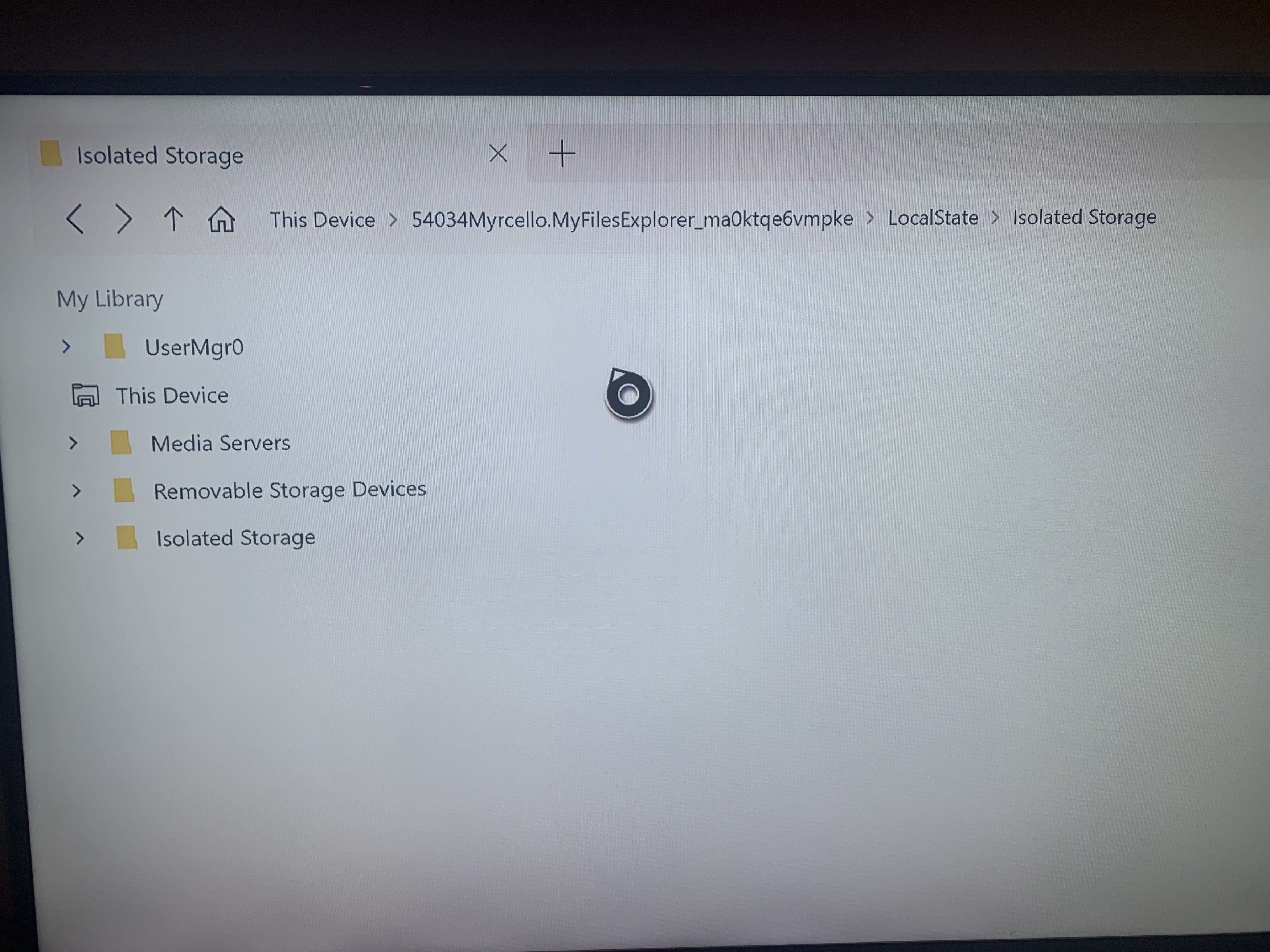
IMG_1766.jpg
 
Last edited by SamyKn,
I had to increase the dev storage size so both my retroarch and file Explorer gone after reboot.

Installed both back however when I try to add folder to the File-Explorer to be able to copy in retroarch system folder i can;t see the packages , i have done it nearly 100 time exactly as the video :wtf::cry:


It worked the first time with absolutely no issue ,it's very straight fwd but this time i can't see packages after I add xbox to my library (Pls check the screenshot below after i added the folder, it doesn't see any package , just sees the Myfile Explorer app content)

This is what I meant to see when i add the folder but i don't see local/packages , Any idea pls? Is it a permission issue? :(:sad:
View attachment 208467


I have remvoed and installed myfile explorer few times but same , i still can't see the packages , below is after i add the xbox to my library

View attachment 208425

the tool now doesnt work and has been patched

if you had it working it still does but if you reinstall or something its gone
 
the tool now doesnt work and has been patched

if you had it working it still does but if you reinstall or something its gone

I re-installed again after the size increase and doesn;t work anymore.:sad: :cry::cry::cry:

Is there any other option to access and copy files(directories) to retroarch system folder apart from this method?
 
Last edited by SamyKn,
I re-installed again after the size increase and doesn;t work anymore.:sad: :cry::cry::cry:

Is there any other option to access and copy files(directories) to retroarch system folder apart from this method?
not directly but you can move the bios to the appx install directory then redirect ra to find it

 
I have increased the Dev storage size to 12GB, also running all my Roms from a USB connected HDD.

When i run anything larger than few hundrd MB , irrespective of platform , it prompts error reading from source although rom has no issue. Understand when you run from external HDD , it copies to Xbox internal storage first but when there is enough space why does it fail? At the same time i can see the copied image to xbox under download folder is 0 bytes (in the web interface)

one more thing , i have also converted retroarch to run as game (rather than app) to be able to run larger than 2GB roms.

Is there any way to rectify this issue? :unsure::huh:
 
Last edited by SamyKn,
I have increased the Dev storage size to 12GB, also running all my Roms from a USB connected HDD.

When i run anything larger than few hundrd MB , irrespective of platform , it prompts error reading from source although rom has no issue. Understand when you run from external HDD , it copies to Xbox internal storage first but when there is enough space why does it fail? At the same time i can see the copied image to xbox under download folder is 0 bytes (in the web interface)

one more thing , i have also converted retroarch to run as game (rather than app) to be able to run larger than 2GB roms.

Is there any way to rectify this issue? :unsure::huh:
all apps on dev mode have a 2gb limit regardless all you can do is move the roms to the q drive and load your games from there
 
  • Like
Reactions: SamyKn
all apps on dev mode have a 2gb limit regardless all you can do is move the roms to the q drive and load your games from there

ohk , got it. So in essence, there is no point running discovery and downloading thumbnails on Xbox due to dev app 2GB size limit.
If there is zillion games/platforms like mine , they all chew in the 2GB limit. Is it a fair assumption?:unsure:

What's the difference between running on Q Drive? doesn't it follow same 2GB app size?:blink:
\_At the moment they are running on external drive E:\ for example , what would the difference be if I run from Q:\?

Sry if i ask alot of question :bow:
 
Last edited by SamyKn,

ohk , got it. So in essence, there is no point running discovery and downloading thumbnails on Xbox due to dev app 2GB size limit.
If there is zillion games/platforms like mine , they all chew in the 2GB limit. Is it a fair assumption?:unsure:

What's the difference between running on Q Drive? doesn't it follow same 2GB app size?:blink:
\_At the moment they are running on external drive E:\ for example , what would the difference be if I run from Q:\?

Sry if i ask alot of question :bow:
the q drive has the same limit you gave dev mode instead of where ra is installed cuz it doesnt have the same limit cuz its not an app
 
  • Like
Reactions: SamyKn
Last edited by SamyKn,
Quick question ,
considering Xbox is a modified/customized win10 (based on my understanding) , is there any specific reason RA xbox version cannot emulate some of the platforms like 3DS or PS2? Is it software or hardware limitation?:unsure:

Thx
because they dont support d3d11 or 12 and only opengl

the xbox one doesnt support opengl and cores are made for opengl
 
  • Like
Reactions: SamyKn
That's great man , thanks :grog::hrth:

The only sad part is because of D3D/OpenGL issue you explained in my previous post, we can't have other cores supported :sad: but I'm still happy with it :toot:

Does that mean we cant have awesome shaders like you can on a PC making psx games look HD quality for example? I think it was the beetle plugin with Vulkan to make games look better.
 

Site & Scene News

Popular threads in this forum