Hacking Nintendont

  • Thread starter Thread starter sabykos
  • Start date Start date
  • Views Views 10,172,089
  • Replies Replies 42,894
  • Likes Likes 194
I recently started using Nintendont on my wii u for the first time. Install worked fine, the app locates the games on my usb drive no problem, and games load with no issues.

However, for whatever reason, after loading a game, my wii remote switches from synched controller #1 to #4 and no controller inputs seem to work after that. No matter what I press, none of the buttons do anything (not even home or power buttons) and I have to manually press the power button on the wii u to reset the console.

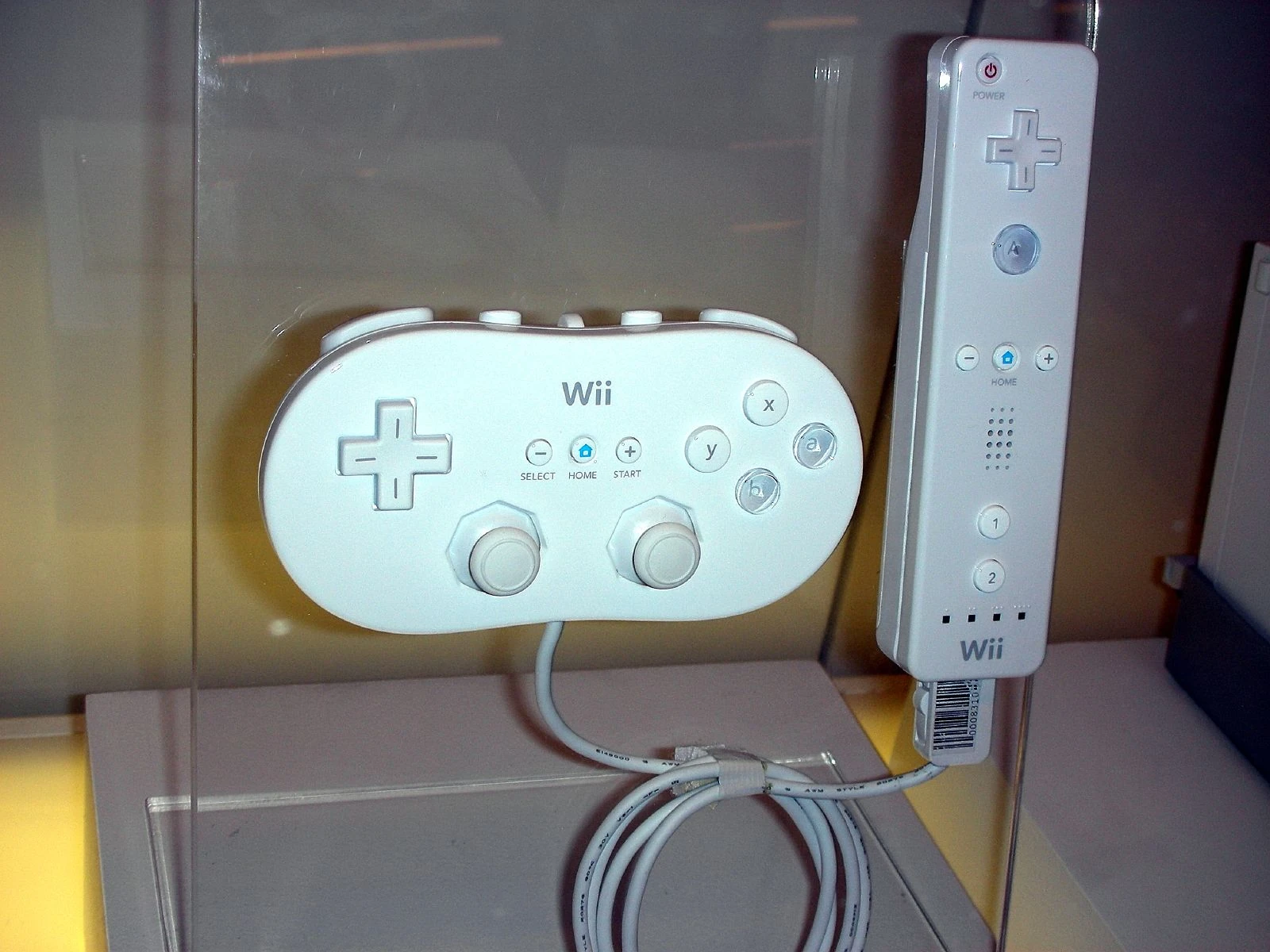
I have tried numerous times with the same results. Even when trying to connect two wiimotes at once, they both become synched as #4 which is something ive never seen before. I am trying to play gc games with the wii remote with the classic controller attachment, but everything ive tried seems to result in no response from the button presses. I have tried every different controller configuration; wiimote alone, wiimote + nunchuck, and wiimote + classic controller, as well as the wii u gamepad (which doesn't work in vwii mode).

As I said , the wiimote works fine while navigating the wii menu, loading hbc, starting nintendont, and even accessing the options menu and loading games. However once a game is loaded, the wiimote switches from #1 to #4 and becomes unresponsive.

I have tried downloading controllers.zip from the options menu, and tried playing with native controls on And off to no avail.

Is there some simple step I'm missing here? I just want to play gc games on my wii u but it seems the controller configuration process is a bit complicated. :P

Any help, advice, or replies are greatly appreciated.

[Edit] So from what I read in another thread, third party wii remotes tend to be incompatible with nintendont. So apparently, the only way to play gc games using nintendont is by using an official Nintendo brand wiimote? Is that the reason why my wiimotes are unresponsive while trying to play games using nintendont?I hope not as I would hate to have to blow another 30-60$ on controllers
 
Last edited by KnucklesOwnsGC,

I recently started using Nintendont on my wii u for the first time. Install worked fine, the app locates the games on my usb drive no problem, and games load with no issues.

However, for whatever reason, after loading a game, my wii remote switches from synched controller #1 to #4 and no controller inputs seem to work after that. No matter what I press, none of the buttons do anything (not even home or power buttons) and I have to manually press the power button on the wii u to reset the console.

I have tried numerous times with the same results. Even when trying to connect two wiimotes at once, they both become synched as #4 which is something ive never seen before. I am trying to play gc games with the wii remote with the classic controller attachment, but everything ive tried seems to result in no response from the button presses. I have tried every different controller configuration; wiimote alone, wiimote + nunchuck, and wiimote + classic controller, as well as the wii u gamepad (which doesn't work in vwii mode).

As I said , the wiimote works fine while navigating the wii menu, loading hbc, starting nintendont, and even accessing the options menu and loading games. However once a game is loaded, the wiimote switches from #1 to #4 and becomes unresponsive.

I have tried downloading controllers.zip from the options menu, and tried playing with native controls on And off to no avail.

Is there some simple step I'm missing here? I just want to play gc games on my wii u but it seems the controller configuration process is a bit complicated. :P

Any help, advice, or replies are greatly appreciated.

[Edit] So from what I read in another thread, third party wii remotes tend to be incompatible with nintendont. So apparently, the only way to play gc games using nintendont is by using an official Nintendo brand wiimote? Is that the reason why my wiimotes are unresponsive while trying to play games using nintendont?I hope not as I would hate to have to blow another 30-60$ on controllers
yup fake(3rd party wiimotes rarely work with nintendont its not nintendont faults that fake wiimotes send signals like crazy and dont follow the normal procedures, nintendont needs a very triimed down bt code since normal code doesnt fit on it so it has a custom based lib for bt controllers wich uses all the normal way controllers interact, fake ones and some third partys just do whatever they want.

to play gc games even on wiiu you should use a wiiupro, wiiu gamepad(wiivc inject) or buy the wiiu gc adapter and a gc controller.
 
i saw a lot of requests for homemenu.
Not going into detail would it not be possable to
Read Home Button->Halt GC Execution->Render homemenu->Loop till ether return to loader is pressed or resume.
there is no global "home menu" on the wii, every game runs on bare metal, so every game has its own implementation of the home menu, the GUI assets etc are provided by the official nintendo wii sdk that the game was compiled with which we obviously cant use. Thats why the home menu on older games sometimes looks and works a bit different from newer games.
i would like to see Texture packs being a thing. if we are doing a wine like execution make use of the advantages. ofc we cant do dolphin x128/x256 textures but we should be able to set a directory for nintendont to load and replace the textures as they are loaded and called. we should be able to reskin sunshine with galaxy at best.
Well, for execution to be fast and reliable its best to use a single .iso file, that way only one file handle gets loaded and cached helping out performance immensely and on top of that, the game gives disc read commands by disc offset and length, so you only need to do a file seek and then a file read command to give the game that data. There is the FST format that makes it possible to more easily replace files as all files are extracted from that .iso but to be honest it is rather slow because then nintendont does a ton of directory reads, opening and closing file handles constantly and decrypting the disc read commands back into file locations by going through the disc file table every time.
if nintendonts source code can support a breakpoint. it can halt the execution of the GC thread.
that bit of code is part of the cheats handler debugger via a usb gecko and doesnt reliably freeze every game, certain games still can do background executions, often times you get graphic corruptions from doing it too and on every freeze the audio just does a "beep" sound until you unfreeze. That handler also only gets used when cheats or debugging get enabled, by default it is not patched in.
 
  • Like
Reactions: DarthDub
Hi everybody, i installed Nintendont in my Wii u, i installed a forwared, so all its fine.

I have a problem with my wiiu pro controller, when i start Nintendont, asked me if i want to play with the tablet controller or the Wiimote, i havent Wiimote so, i have choose the tablet controller.

In the menú of Nintendont, my wiiu pro controller works fine, but when the Game start the Only controller that works is the tablet.

How can i play games with my wiiu pro controller??

Thanks a lot And sorry for muy poor english.
 
Hi everybody, i installed Nintendont in my Wii u, i installed a forwared, so all its fine.

I have a problem with my wiiu pro controller, when i start Nintendont, asked me if i want to play with the tablet controller or the Wiimote, i havent Wiimote so, i have choose the tablet controller.

In the menú of Nintendont, my wiiu pro controller works fine, but when the Game start the Only controller that works is the tablet.

How can i play games with my wiiu pro controller??

Thanks a lot And sorry for muy poor english.

Instead of using a VC Inject, try using HBL2HBC and add WWND to the txt file.

no idea how you managed to hack the vwii and install the nintendont channel on vwii wihtout a wiimote though :D
 
Last edited by Nomelas,
Hi everybody, i installed Nintendont in my Wii u, i installed a forwared, so all its fine.

I have a problem with my wiiu pro controller, when i start Nintendont, asked me if i want to play with the tablet controller or the Wiimote, i havent Wiimote so, i have choose the tablet controller.

In the menú of Nintendont, my wiiu pro controller works fine, but when the Game start the Only controller that works is the tablet.

How can i play games with my wiiu pro controller??

Thanks a lot And sorry for muy poor english.
is it fake(3rd party wiiupro? also if you use the gamepad the wiiupro will alayws be slot 2 so any game that isnt multiplayer wont let you use the second slot controller to controll the game.

Instead of using a VC Inject, try using HBL2HBC and add WWND to the txt file.

no idea how you managed to hack the vwii and install the nintendont channel on vwii wihtout a wiimote though :D
you dont even need a vwii hack

nintendont on wiivc is its own thing what you have on vwii doesnt do anything since it runs on wiivc inject directly.
 
Wii classic controller is listed under "Bluetooth controllers," so is a dongle required?
no it conects to the wiimote wich is wireless, seriously you own a wii or wiiu and never saw a Classic controller connected?

to use Classic controllers you need a wiimote, wiimote is wireless and CC is connected to it.
latest
 
no it conects to the wiimote wich is wireless, seriously you own a wii or wiiu and never saw a Classic controller connected?

to use Classic controllers you need a wiimote, wiimote is wireless and CC is connected to it.
latest
Just wanna make sure. I'm covered, then. Thanks, @pedro702 !
 
Last edited by NANASHI89,
It's the Wii U Pro Controller that's Bluetooth and supported. I think it just acts like a Wii remote with a CC attached.
 
It's the Wii U Pro Controller that's Bluetooth and supported. I think it just acts like a Wii remote with a CC attached.
not it doesnt... it has its own codding and calls and eveything it doesnt use anything from wiimote+cc at all.
 
You sure about that? Like can you back it up?
yes lol, fix made that code it has its own lib, what you are talking about is wiiu gamepad on wiivc injects it has the code of being a wiimote+cc, but wiiu pro has its own code and id and everything it is not an extension at all.
 
Last edited by libertyernie,
  • Like
Reactions: cvskid and VinsCool
yes lol, fix made that code it has its own lib, what you are talking about is wiiu gamepad on wiivc injects it has the code of being a wiimote+cc, but wiiu pro has its own code and id and everything it is not an extension at all.

I'm just asking because the only code to the official libogc/wiisuse library is the ID of the "extension" and it being registered as a CCPro. The WUPC is a Wii Remote without the motion controls and a CCPro built in whether you think it is or not. Stick to Nintendont support, perhaps.
 
  • Like
Reactions: David B.
Would really appreciate any help.
I have nintendont installed on my wii u and I had downloaded the controllers zip via the nintendont channel on vwii.
I cannot however get a ps3 controller and wii u pro controller to be recognized by nintendont when I launch a wii/gamecube game. These both get recognized and work fine on my wii u.

I checked the root of my sd card and see a controllers folder that was probably downloaded by the nintendont app but no controller.ini, let me know what I can do to get both these controllers recognized thanks!
 

Site & Scene News

Popular threads in this forum