
can you customize cd audio from multi disc into one blank cd-R and play it on modern cd player?

Derekchan

Active Member
Newcomer
Joined
Jul 16, 2025
Messages
40
Reaction score
0
Trophies
0
Age
46
XP
168
Country
Bahrain
i plan to buy a exposure cd player to read a custom illegal cd-r blank disc burning with legal copy from legal cd audio retail discs

i open up file explorer on win11 reading a legal copy of cd disc,here is the file structure
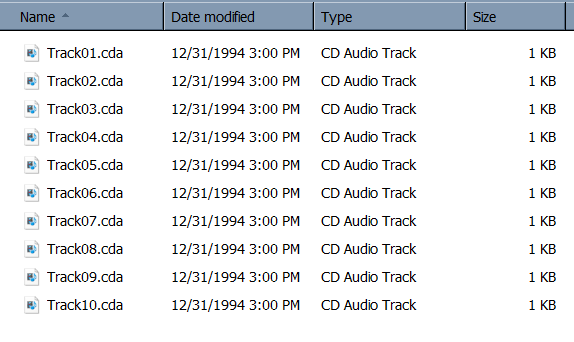
1789379597471.png

is there any method to 100% copy a certain track from multiple legal cd disc on original cd format like .cda
then combine my favourite track from multi disc and burn these .cda track into a single cd-r blank disc?

because this cd player only can read the original file format of cd disc,no support for .wav
only can handle a physical cd disc with og cd audio format

does the laser optical damage when reading a illegal copy cd disc but not a legal copy ?
 
no support for .wav
Because CD Audio (Red Book) has no file system, it has tracks. Don't let MP3 CDs fool you :)

Pretty much any software under the sun and any CD player you can imagine, vintage or modern, should be able to support this. It looks like "CDA" is just some file convention made up by Windows which seems not to serve any purpose but confuse the user.

Seeing as though you're using Windows, you should be able to do what you need using ripping software like Exact Audio Copy (proprietary) and then burn using something like ImgBurn (proprietary, used to be adware...). I think others will be able to give better software suggestions, I don't even use Windows nowadays.

It should go without saying you shouldn't cross the minute mark on your CD-R while creating your mix. I don't think most players support 80+ minute CD-Rs for that matter.
 
It should go without saying you shouldn't cross the minute mark on your CD-R while creating your mix. I don't think most players support 80+ minute CD-Rs for that matter.
HIgh quality CD players generally perform quite well with narrower track pitch in 90min and 99/100min CD-R.
Some devices crash when going beyond 89:59.74, some more at 94.59.74 and most players go nuts crossing 99.59.74 (overflow to zero). The theoretical physical boundaries of the CD technology allow much more than common hardware implemented.

Safe length for any working CD-DA player is 80 minutes. Almost all CD-R that are still available new are 80min/700MB.
====

Creating CD-DA can be fun although the format is limited. Most burning software will include an option for audio CD authoring. Exact Audio Copy is an excellent application for ripping and for burning, but not beginner friendly.
Burning any audio file (WAV, WMA, MP3, OGG....) as a normal data disc (MODE 1) will not work on old CD players.


does the laser optical damage when reading a illegal copy cd disc but not a legal copy ?
An optical drive is not able to tell the difference between "legal" and "illegal". The reflective characteristics of CD-R are very similar ot pressed discs; this is why burned discs work find even on players predating CD-R.
The rewritable (CD-RW) counterparts are more tricky. Their signal is by far weaker and will just give a sad "No Disc" on old players. It doesn't cause any damage though.
 

Site & Scene News

Popular threads in this forum
