
(optional to read v)
I've tried doing it several times, I've googled it and clicked on all of the links on page one, I've tried to post two questions on Yahoo! Answers, I've went to tons of different sites, now I'm coming here. I didn't want to post a topic here because I just did a few hours ago, but here we go again...
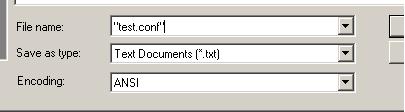
I'm trying to backup my DS savs with an alternate method than the one posted on here, and I need to make a .conf file containing my IP address and port number.. But it doesn't specify how to do it in the tute. I tried going to notepad and clicking "Save As" and typing in "filename.conf" but it comes out as "filename.conf.txt"
So, how do I create a .conf file with text inside??
If someone could create a blank .conf file with the name "savesender" and the ext ".conf" and upload it, I would be extremely grateful. Or if someone just posted how to do it here.
Thank you so much.
I've tried doing it several times, I've googled it and clicked on all of the links on page one, I've tried to post two questions on Yahoo! Answers, I've went to tons of different sites, now I'm coming here. I didn't want to post a topic here because I just did a few hours ago, but here we go again...
I'm trying to backup my DS savs with an alternate method than the one posted on here, and I need to make a .conf file containing my IP address and port number.. But it doesn't specify how to do it in the tute. I tried going to notepad and clicking "Save As" and typing in "filename.conf" but it comes out as "filename.conf.txt"
So, how do I create a .conf file with text inside??
If someone could create a blank .conf file with the name "savesender" and the ext ".conf" and upload it, I would be extremely grateful. Or if someone just posted how to do it here.
Thank you so much.