

I’ll be keeping this first post updated with all the important info on what has been found so far on the Wii U VC emulator for the N64. I will still post new messages when I find some new things, but I will mainly update this message for any small or big updates. With that said, here's a quick summary of what's been found so far:
If you want to take a look at Nintendo's official decrypted Switch's .dtz files, here are the links for the USA and JPN regions:
USA: Google Drive
JPN: Google Drive
If you want to check out the Switch's Compatibility List for some extra settings hidden in some .dtz files, here's the link. You will need to use CaVE Database Manager to decrypt those .dtz files.
Aside from working and researching on the Wii U's N64 emulator, I also do some Custom TV Boot Screens for Wii U VC injections, here are the files if you are interested:
Version 1.2
Version 1.1
Version 1.0
If you want to create your own Custom Boot Screens, you can download the template from here. Keep in mind that you need to have the Rodin NTLG Pro (Bold) font installed in your computer and you also need to have Adobe Photoshop.
[RomOption]
RomType: Switches between 64 cartridge to 64DD floppy disk. *Make sure to read [64DD on Wii U VC]*.
UseTimer: Can help with fixing games that only have sound.
n64PIF_TPak_Read: Unknown. Sets file path for Game Boy (Color) ROMs? Can only be found on the .rpx of Donkey Kong 64 (USA) and The Legend of Zelda: Ocarina of Time (USA).
n64PIF_TPak_Write: Unknown. Sets file path for Game Boy (Color) saves? Can only be found on the .rpx of Donkey Kong 64 (USA) and The Legend of Zelda: Ocarina of Time (USA).
MemPak: Enabling this can sometimes cause graphical issues or prevents progress in some games.
RetraceByVsync: If there is audio stuttering, try disabling this setting.
[Render]
CopyMiddleBuffer: Enable Frame Buffer emulation. If a game has flickering on some textures or on the black borders of the screen, try enabling this setting. Otherwise, if the game doesn't use FB effects and it stutters, try disabling this setting.
CopyDepthBuffer: Disabling this can sometimes get rid of slowdown in some games. Interestingly, enabling this setting has fixed a crash in Pokémon Stadium when viewing photos, but the game still freezes (at least you can restart the game from the Virtual Console menu, instead of needing to shut down the system every time).
CopyAlphaForceOne: Still unclear what it does exactly, but it fixes some missing shadows in Pokémon Stadium's menus.

ZClip: Setting it to 0 can fix incorrect Z-Clipping in some games.


DepthCompareLess: Moves 2D assets closer on the Z-Axis(?)
InitPerspectiveMode: Fixes how textures are rendered in chunks.

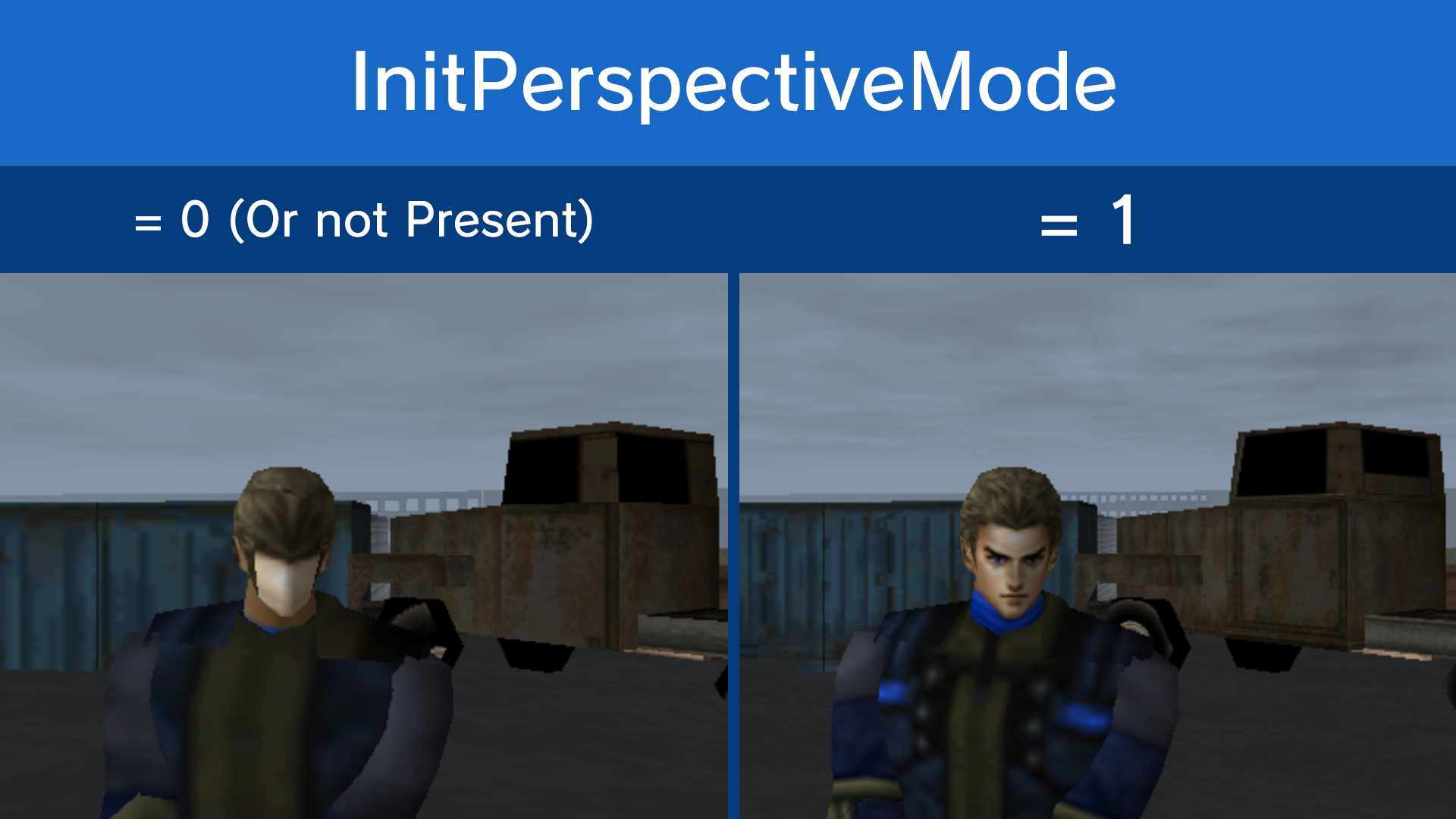
TexEdgeAlpha = Similar to "InitPerspectiveMode," it can be used to fix small 2D texture seams.

NeedTileSizeCheck: Can be used to fix some 3D textures.

ForceRectFilterPoint: Disables bilinear filtering for 2D assets, can also affect backgrounds.
[Input]
StickLimit: Can be set to any range. Official .ini settings have this set to 80 or 90, but you can set it to lower values like 30.
[RSPG]
Skip: Disables video rendering.
RIntAfterGTask: Frame skips.
RDPInt: Not sure about what it does specifically. In Blast Dozer, the game softlocks on certain spots like when loading a save or playing the demo. The game freezes, yet the music keeps playing normally, for some reason. When this setting gets activated in Blast Dozer, the softlocks get fixed.
[CMP]
BlockSize: Sets the size of data to read in chunks? Blast Dozer has this set to 1C00, which transformed from hexadecimal to decimal equals 7168 (~7 KB).
[Idle]
;Handles Idle instructions (duh). Can sometimes fix softlocks or crashing in some games. Template is as follows:
Count = X
AddressX = 0xXXXXXXXX
InstX = 0xXXXXXXXX
TypeX = 1
;A true Idle address usually has 0x1000FFFF as the instruction. If you want to look for these addresses, launch the game on Project64, go to Debugger -> Memory -> Search and set the following:
Hex = Enabled
Type = Int32
Value = 0x1000FFFF
;You will see a list of addresses the game uses (if it uses any), note these addresses on the .ini file, following the template.
;There are also Psuedo Idle addresses that don't have 0x1000FFFF as the value but it's unclear how to look for them without using Nemu64 (I hate you, Nemu64). The Switch's configuration files sometimes have a mix of true and Psuedo addresses.
[BreakBlockInst]
;Redirects a specific address in RAM to another one, template is as follows:
Count = X
AddressX = 0xXXXXXXXX ;Target address
InstX = 0xXXXXXXXX ;Instruction
JmpPCX = 0xXXXXXXXX ;Address to redirect to
TypeX = 1
[SpecialInst]
;Not sure at the moment. Template is as follows:
Count = X
AddressX = 0xXXXXXXXX
InstX = 0xXXXXXXXX
TypeX = X ;Has 4 different values: 1, 2, 3, and 4
RomType: Switches between 64 cartridge to 64DD floppy disk. *Make sure to read [64DD on Wii U VC]*.
UseTimer: Can help with fixing games that only have sound.
n64PIF_TPak_Read: Unknown. Sets file path for Game Boy (Color) ROMs? Can only be found on the .rpx of Donkey Kong 64 (USA) and The Legend of Zelda: Ocarina of Time (USA).
n64PIF_TPak_Write: Unknown. Sets file path for Game Boy (Color) saves? Can only be found on the .rpx of Donkey Kong 64 (USA) and The Legend of Zelda: Ocarina of Time (USA).
MemPak: Enabling this can sometimes cause graphical issues or prevents progress in some games.
RetraceByVsync: If there is audio stuttering, try disabling this setting.
[Render]
CopyMiddleBuffer: Enable Frame Buffer emulation. If a game has flickering on some textures or on the black borders of the screen, try enabling this setting. Otherwise, if the game doesn't use FB effects and it stutters, try disabling this setting.
CopyDepthBuffer: Disabling this can sometimes get rid of slowdown in some games. Interestingly, enabling this setting has fixed a crash in Pokémon Stadium when viewing photos, but the game still freezes (at least you can restart the game from the Virtual Console menu, instead of needing to shut down the system every time).
CopyAlphaForceOne: Still unclear what it does exactly, but it fixes some missing shadows in Pokémon Stadium's menus.
ZClip: Setting it to 0 can fix incorrect Z-Clipping in some games.
DepthCompareLess: Moves 2D assets closer on the Z-Axis(?)
InitPerspectiveMode: Fixes how textures are rendered in chunks.
TexEdgeAlpha = Similar to "InitPerspectiveMode," it can be used to fix small 2D texture seams.
NeedTileSizeCheck: Can be used to fix some 3D textures.
ForceRectFilterPoint: Disables bilinear filtering for 2D assets, can also affect backgrounds.
[Input]
StickLimit: Can be set to any range. Official .ini settings have this set to 80 or 90, but you can set it to lower values like 30.
[RSPG]
Skip: Disables video rendering.
RIntAfterGTask: Frame skips.
RDPInt: Not sure about what it does specifically. In Blast Dozer, the game softlocks on certain spots like when loading a save or playing the demo. The game freezes, yet the music keeps playing normally, for some reason. When this setting gets activated in Blast Dozer, the softlocks get fixed.
[CMP]
BlockSize: Sets the size of data to read in chunks? Blast Dozer has this set to 1C00, which transformed from hexadecimal to decimal equals 7168 (~7 KB).
[Idle]
;Handles Idle instructions (duh). Can sometimes fix softlocks or crashing in some games. Template is as follows:
Count = X
AddressX = 0xXXXXXXXX
InstX = 0xXXXXXXXX
TypeX = 1
;A true Idle address usually has 0x1000FFFF as the instruction. If you want to look for these addresses, launch the game on Project64, go to Debugger -> Memory -> Search and set the following:
Hex = Enabled
Type = Int32
Value = 0x1000FFFF
;You will see a list of addresses the game uses (if it uses any), note these addresses on the .ini file, following the template.
;There are also Psuedo Idle addresses that don't have 0x1000FFFF as the value but it's unclear how to look for them without using Nemu64 (I hate you, Nemu64). The Switch's configuration files sometimes have a mix of true and Psuedo addresses.
[BreakBlockInst]
;Redirects a specific address in RAM to another one, template is as follows:
Count = X
AddressX = 0xXXXXXXXX ;Target address
InstX = 0xXXXXXXXX ;Instruction
JmpPCX = 0xXXXXXXXX ;Address to redirect to
TypeX = 1
[SpecialInst]
;Not sure at the moment. Template is as follows:
Count = X
AddressX = 0xXXXXXXXX
InstX = 0xXXXXXXXX
TypeX = X ;Has 4 different values: 1, 2, 3, and 4
Since both the Wii U and Switch's N64 emulator were both developed by iQue (the Wii U emulator first ported into Super Mario 3D All-Stars, then to Nintendo 64 - Nintendo Switch Online/Nintendo Classics), we can take advantage of more Nintendo's official settings for games that weren't released on the Wii U VC lineup. Though it isn't straightforward; it requires some conversion for the settings to work correctly.
By extracting the .dtz file of the Switch's emulator (located in \romfs\titles\ROMID\ROMID.dtz) with CaVE Database Manager, we get the following extracted files:
.meta: The game's meta file. It lists things like the game tile, description, etc.
.cfg: The configuration file. The format is slightly different to the N64's .ini file, but it's basically the same.
.pcb: Not sure, doesn't seem important.
.nro: Not sure, not important.
.lua: Lua hacks for the ROM. It has more settings that aren't listed in the .cfg file like Cheats, RomPatch, FrameHackTicks, InsertIdleInst, etc. The values are written in decimal format, so you have to convert them back to hexadecimal.
.spv: Not important.
.rpt: Texture hacks. They are in the same format as the Wii U's texture patches, but loading them from the Wii U emulator can sometimes cause graphical glitches or crashing, so it's basically useless.
To decompress the .lua files, you can go to Decompiler to see what's in there. Keep in mind that there are some .lua hacks that can't be decompiled (Pretty sure starting with Paper Mario and Jet Force Gemini and then new releases), this is because Nintendo is using their own method of compiling the .lua hacks and unfortunately, nothing can be done about it.
Converting the settings from the Switch back to the Wii U is still unclear how to do so exactly. Here are some ways I tried converting the Switch settings back to the Wii U emulator:
By extracting the .dtz file of the Switch's emulator (located in \romfs\titles\ROMID\ROMID.dtz) with CaVE Database Manager, we get the following extracted files:
.meta: The game's meta file. It lists things like the game tile, description, etc.
.cfg: The configuration file. The format is slightly different to the N64's .ini file, but it's basically the same.
.pcb: Not sure, doesn't seem important.
.nro: Not sure, not important.
.lua: Lua hacks for the ROM. It has more settings that aren't listed in the .cfg file like Cheats, RomPatch, FrameHackTicks, InsertIdleInst, etc. The values are written in decimal format, so you have to convert them back to hexadecimal.
.spv: Not important.
.rpt: Texture hacks. They are in the same format as the Wii U's texture patches, but loading them from the Wii U emulator can sometimes cause graphical glitches or crashing, so it's basically useless.
To decompress the .lua files, you can go to Decompiler to see what's in there. Keep in mind that there are some .lua hacks that can't be decompiled (Pretty sure starting with Paper Mario and Jet Force Gemini and then new releases), this is because Nintendo is using their own method of compiling the .lua hacks and unfortunately, nothing can be done about it.
Converting the settings from the Switch back to the Wii U is still unclear how to do so exactly. Here are some ways I tried converting the Switch settings back to the Wii U emulator:
Example from Super Mario 64's .cfg file.
Code:
;Switch
"VertexCount" : 15,
"VertexAddress" : "0x000ff108",
"TextureAddress" : "0x001c6000",
"FirstVertex" :
{
"x" : "0x045d",
"y" : "0x0e00",
"z" : "0xf5b1",
},
"ReplaceVertex" :
[
{
"index" : "0x0003",
"x" : "0x1002
"y" : "0x0200
"z" : "0x1000
},
{
"index" : "0x0006",
"x" : "0x1002
"y" : "0x0100
"z" : "0x1000
Code:
;Wii U
[VertexHack]
Count = 1
;Stays the same between each configuration file
VertexCount0 = 15
;I only removed the 1st two numbers since they are empty
VertexAddress0 = 0xff108
;I only removed the 1st two numbers since they are empty
TextureAddress0 = 0x1c6000
;This part is the "FirstVertex" part. "a6" tells the emulator how many bytes to read
FirstVertex0 = a6:04 5d 0e 00 f5 b1
;a# shows how many lines to read along with the 2 bytes (Example: 1 Line = a10:00 01, 2 Lines = a18:00 02, 3 Lines = a26:00 03, 4 Lines = a34:00 04, and so on...)
Value0 = a18:00 02
;First line of bytes from "ReplaceVertex". First 2 bytes are the "index", rest is "x", "y", and "z"
00 03 10 02 02 00 10 10
;Second line of bytes from "ReplaceVertex". First 2 bytes are the "index", rest is "x", "y", and "z"
00 06 10 02 01 00 10 00@YakiNeen mentioned the following for ExciteBike 64's type settings in the .cfg file:
However, when I looked at Pokémon Snap's .cfg file and compared it to the Wii U's .ini file, I found that "TypeX = 3" was translated to the Switch as "Lua_AfterInst: 1", instead of "Type: Lua_BeforeInst", so the "Type" setting remains unclear.
------------------------
After looking carefully at the [SpecialInst] part of the Switch settings, I realized that the [SpecialInst] actually just refers to any hacks that are written on the .lua file of the Switch emulator.
For example, Extreme-G has this instruction:
What this instruction does is recall the .lua file to see what the emulator has to do when said address and instruction matches the script and virtual memory. The "type" part on the Switch settings file probably just means WHEN the code is executed (which is irrelevant to the Wii U's "Type" setting, but I'll explain that later).
And that special instruction recalls this code on the .lua script (the addresses and instructions are A0_5 and A1_6 respectively in decimal form):
Now, I'm kind of theorizing on how the "Type" part can be translated for the Wii U, so stay with me on this one.
I was looking up 3DS homebrew stuff online out of curiosity, and I found out about this thread that details Game Boy link cable patches for the Pokémon Virtual Console games and how they work. I was reading through the documentation this deleted user wrote and I noticed that the layout of the configuration file is a lot similar to that of the Wii U's N64 emulator. I don't have a confirmed source on this, but I think I saw somewhere that most of the 3DS and Wii U VC emulators were developed by the same company, except for the GBA and DS emulators, which were developed by M2 and NERD respectively, so that leads me to believe that the "Type" setting might work the same way on the Wii U's N64 emulator.
For example, in Pokémon Gold Edition has this instruction:
According to this deleted user's notes, this is what "Type = 33" should do:
This leads me to believe that there might be more than just 4 "Type" settings in the Wii U emulator and that some types are game specific and others are for broader use. Though that leads to 2 questions: "How many type settings are and what does each of them do?"
But that's just a theory. A GAM-
Code:
Comparing Excitebike 64's official .ini between Wii U/Switch, I noticed this:

(Wii U)
[SpecialInst]
Count = 2
Address0 = 0x8000123C
Inst0 = 0x3C03800C
Type0 = 3
Address1 = 0x8007dc88
Inst1 = 0xA5240048
Type1 = 3


(Switch)
"SpecialInst": [
{
"Addr": "0x8007dc88",
"Inst": "0xA5240048",
"Type": "Lua_BeforeInst",
"Comment": ""
},
{
"Addr": "0x8000123C",
"Inst": "0x3C03800C",
"Type": "Lua_BeforeInst",
"Comment": ""
},


So, "Lua_BeforeInst" is "TypeX = 3". And "BreakLoop" is "TypeX = 1".
Probably "Lua_AfterInst" is type 2?------------------------
After looking carefully at the [SpecialInst] part of the Switch settings, I realized that the [SpecialInst] actually just refers to any hacks that are written on the .lua file of the Switch emulator.
For example, Extreme-G has this instruction:
Code:
      "Addr": "0x80073CAC",
      "Inst": "0x3C028009",
      "Type": "Lua_AfterInst",
      "Comment": ""
What this instruction does is recall the .lua file to see what the emulator has to do when said address and instruction matches the script and virtual memory. The "type" part on the Switch settings file probably just means WHEN the code is executed (which is irrelevant to the Wii U's "Type" setting, but I'll explain that later).
And that special instruction recalls this code on the .lua script (the addresses and instructions are A0_5 and A1_6 respectively in decimal form):
Code:
function L0_0(A0_5, A1_6)
  local L2_7

...

  elseif A0_5 == 2147957932 and A1_6 == 1006796809 then
    L2_7 = n64MemWrite32
    L2_7(2148103840, 901)
Now, I'm kind of theorizing on how the "Type" part can be translated for the Wii U, so stay with me on this one.
I was looking up 3DS homebrew stuff online out of curiosity, and I found out about this thread that details Game Boy link cable patches for the Pokémon Virtual Console games and how they work. I was reading through the documentation this deleted user wrote and I noticed that the layout of the configuration file is a lot similar to that of the Wii U's N64 emulator. I don't have a confirmed source on this, but I think I saw somewhere that most of the 3DS and Wii U VC emulators were developed by the same company, except for the GBA and DS emulators, which were developed by M2 and NERD respectively, so that leads me to believe that the "Type" setting might work the same way on the Wii U's N64 emulator.
For example, in Pokémon Gold Edition has this instruction:
Code:
[send_dummy]
Mode = 2
Address = 0x3E73F
Type = 33
According to this deleted user's notes, this is what "Type = 33" should do:
Code:
"* send_dummy *
Identified as Type 33.
This is taken into affect when the is sending zero bytes.
Set its Address to the beginning of the loop that is syncing sending zero bytes.
This leads me to believe that there might be more than just 4 "Type" settings in the Wii U emulator and that some types are game specific and others are for broader use. Though that leads to 2 questions: "How many type settings are and what does each of them do?"
But that's just a theory. A GAM-
Just a first glance at the setting already shows that this is going to be a tricky one. I still haven't figured out how I would translate this one, but my best guess would be to translate it to [RomHack] on the Wii U's .ini file. Here's how I would translate it:
Example from Dr. MARIO 64's .cfg file.
I still haven't had any luck with these, but it's still something.
Example from Dr. MARIO 64's .cfg file.
Code:
;Switch
"ModifyCC_Count": 3,
        "ModifyCC_0":{
            "DetectFlag": "1111010000",
            "Value4": "0x0c184240",
            "Value6": "0x011f1f1f",
            "Value7": "0x001f1f1f",
            "Value8": "0x01070707",
            "Value9": "0x01070707",
            "ModifyFlag": "1100000000",
            "NewValue8": "0x02070707",
            "NewValue9": "0x00070707"
        },
        "ModifyCC_1":{
            "DetectFlag": "1111000000",
            "Value6": "0x011f1f1f",
            "Value7": "0x00050003",
            "Value8": "0x01070707",
            "Value9": "0x00070707",
            "ModifyFlag": "110000000000",
            "NewValue10": "0x6",
            "NewValue11": "0x1"
        },
        "ModifyCC_2":{
            "DetectFlag": "1111000000",
            "Value6": "0x041f1f1f",
            "Value7": "0x00050003",
            "Value8": "0x07040701",
            "Value9": "0x00070707",
            "ModifyFlag": "110000000000",
            "NewValue10": "0x7",
            "NewValue11": "0x1"
Code:
;Wii U
;Before I start, note that the "DetectFlag" and "ModifyFlag" values are written in binary, so you need to convert them back to hexadecimal.
[RomHack]
Count = 3
Address0 = 0xF4300
;Address is both DetectFlag and ModifyFlag together (In this case, 11110100001100000000)
Type0 = 4
Value0 = a24:
;"Value5" is missing, so I added 4 extra blank bytes
0c 18 42 40 00 00 00 00 01 1f 1f 1f 00 1f 1f 1f
02 07 07 07 00 07 07 07
Address1 = 0x3C0C00
Type1 = 4
Value1 = a24:
;NewValue10 & 11 are added as if it was written as "NewValue10": "0x00000006" for example,
01 1f 1f 1f 00 05 00 03 01 07 07 07 00 07 07 07
00 00 00 06 00 00 00 01
Address2 = 0x3C0C00
Type2 = 4
Value2 = a24:
04 1f 1f 1f 00 05 00 03 07 04 07 01 00 07 07 07
00 00 00 07 00 00 00 01From Shadow Man's .lua hack.
(Focus only on the "n64InsertIdle" part and the "if, then" sections)
Code:
;Switch
BeforeVIFrameEnd = L0_0
function L0_0(A0_3, A1_4)
  local L2_5, L3_6, L4_7
  if A0_3 == 1161760 and A1_4 == 8392737 then
    L2_5 = n64GPRRead32
    L3_6 = 4
    L2_5 = L2_5(L3_6)
    L3_6 = n64GPRRead32
    L4_7 = 5
    L3_6 = L3_6(L4_7)
    L4_7 = n64GPRRead32
    L4_7 = L4_7(6)
    if L2_5 == 2150694912 and L3_6 == 0 and (L4_7 == 691200 or L4_7 == 307200) then
      n64InsertIdle(20, 1161760)
HookFunc_BeforeInst = L0_0
function L0_0(A0_8, A1_9)
  if A0_8 == 2992536 and A1_9 == 878941823 then
    n64InsertIdle(10, 2992536)
    n64GPRWrite32(3, 0)
Code:
;Wii U
[InsertIdleInst]
Count = 2
Address0 = 0x0011B0A0
;Maybe address needs to be offset to RDRAM? Or maybe not...
;2nd value from the parentheses, "n64InsertIdle(20, 1161760)"
Inst0 = 0x00BFC6A1
;From "if A0_3 == 1161760 (Address) and A1_4 == 8392737 (Instruction) then
Type0 = 1
Value0 = 20
;1st value from the parentheses, "n64InsertIdle(20, 1161760)"
Address1 = 0x802DA998
Inst1 = 0x345F92DF
;From "if A0_8 == 2992536 and A1_9 == 878941823 then"
Type1 = 1
Value1 = 10
Type2 = 1From Shadow Man's .lua hack.
(Only focus on the "FrameTicks" parts)
Code:
;Switch
  n64ResetParameter("FrameTicks")
  if 2974528 == n64MemRead32(2147821432) then
    if n64MemRead32(n64MemRead32(2147991384) + 0) == 1313035008 and n64MemRead32(n64MemRead32(2147991384) + 4) == 916 and n64MemRead32(n64MemRead32(2147991384) + 8) == 13208 and n64MemRead32(n64MemRead32(2147991384) + 12) == 922 then
      n64SetParameter("FrameTicks", 783250)
    elseif n64MemRead32(n64MemRead32(2147991384) + 0) == 1313035008 and n64MemRead32(n64MemRead32(2147991384) + 4) == 4294967295 and n64MemRead32(n64MemRead32(2147991384) + 8) == 0 and n64MemRead32(n64MemRead32(2147991384) + 12) == 443 then
      n64SetParameter("FrameTicks", 783250)
    elseif n64MemRead32(n64MemRead32(2147991384) + 0) == 1313035008 and n64MemRead32(n64MemRead32(2147991384) + 4) == 367 and n64MemRead32(n64MemRead32(2147991384) + 8) == 5348 and n64MemRead32(n64MemRead32(2147991384) + 12) == 381 then
      n64SetParameter("FrameTicks", 783250)
    elseif n64MemRead32(n64MemRead32(2147991384) + 0) == 1313035008 and n64MemRead32(n64MemRead32(2147991384) + 4) == 372 and n64MemRead32(n64MemRead32(2147991384) + 8) == 5392 and n64MemRead32(n64MemRead32(2147991384) + 12) == 383 then
      n64SetParameter("FrameTicks", 783250)
    elseif n64MemRead32(n64MemRead32(2147991384) + 0) == 1313035008 and n64MemRead32(n64MemRead32(2147991384) + 4) == 378 and n64MemRead32(n64MemRead32(2147991384) + 8) == 5624 and n64MemRead32(n64MemRead32(2147991384) + 12) == 387 then
      n64SetParameter("FrameTicks", 783250)
Code:
;Wii U
[FrameTickHack]
Hack0 = 783250
Hack1 = 783250
Hack2 = 783250
Hack3 = 783250
Hack4 = 783250This list is kind of outdated, so if you want to check the updated list, go to the Wii U N64 VC Compatibility List website. Also, some of the .ini files here have an updated version with updated notes on the Compatibility List.
Banjo-Kazooie: Runs pretty much perfect. Configuration file here.
Banjo-Tooie: Still runs slow, but there are two things I noticed: 1. The game doesn't crash randomly that much as it used to before. 2. Maybe "RSPMultiCoreInt = 1" can improve slightly FPS with "RSPMultiCore"? The lag seems to be fixable, but it looks like it's somewhere in the "SpecialInst" section of the Switch configuration, as someone from the Switch Compatibility list posted a .dtz file before the game released on NSO and they had the same issues. Configuration file here.
Blast-Corps: Still refuses to boot. Not sure what it needs. Configuration file here.
CastleVania: The game runs fine. Some textures like scrolls have color rendered incorrectly and character portraits are black. Tried to mess with "TicksPerFrame" to fix intro's overclock but doesn't do anything. Maybe requires adding lag through [SpecialInst] or [RomOption]? Configuration file here.
Conker's Bad Fur Day: The game boots to a blue screen (Meaning the game did boot). However, nothing happens. Maybe something has to be done with the [RSPG] section. Configuration file here.
Doubutsu no Mori: Game runs almost flawless. However, frame buffer effects lack colors. Unfortunately, English translation by Zoinkity doesn't work as it's most likely that the ROM size is bigger than the original. Configuration file here.
Dr. Mario 64: Same issues as before. Mega vitamins don't render when falling. Something interesting to note is that on the demo, the Mega Vitamins DO render, as it most likely points out the emulator does have the ability to render those effects. The issue is most likely because the emulator fails to render the frame buffer as texture. Configuration file here.
Extreme-G: Works fine, though there is minor rendering issues at the intro. Configuration file here.
GoldenEye 007: Game runs choppy and slow. Character textures are loaded correctly, but other textures (Such as buildings) are not rendered/are invisible. Only ground textures are render if the player is near. May randomly crash. Configuration file here.
Iggy's Reckin' Balls: Seems to work fine. Doesn't seem to crash randomly anymore. Configuration file here.
Jet Force Gemini: Game boots but only shows Rareware logo and main menu textures are rendered incorrectly. May needs something in [RSPG] and/or [SpecialInst]? Configuration file here.
Mario Party: Works almost flawlesly. The camera seems to be misplaced a little back further when entering the bank, blocking the view of the stored items. Interestingly enough, the emulator fixes the issue if the ID is left as CLBE, but there is graphical glitches in the board's intro and the characters flicker when moving in between spaces. It seems that the emulator is forcing a setting if the ID gets changed to NMWE. Configuration file here.
Mario Party 3: Works perfect. Only needs to change ID to NMWE for the game to boot. Configuration file here.
Paperboy: Background is missing on copyright info and High Voltage Software (Giving a weird effect). With the Psuedo Idle address from the Switch's comaptibility thread, the game gets past level select (Wait a little) but runs slow like Banjo-Tooie. Configuration file here.
PilotWings 64: Doesn't boot. Tried changing the ID to the JPN version, still doesn't work. Configuration file here.
PilotWings 64 (JPN): Game boots. There is a weird effect in the whole game that makes it look like kind of like the intro of TLoZ: MM. There is major lag in file select screen and vehicle select. Game runs almost slow on most areas when playing. There is a strobe light effect when viewing photos that may cause seizure to some people (too bad Nintendo's dark filter can't fix that, can it?). Configuration file here.
Pokémon Puzzle League: Game works almost flawlessly. Character's boards are rendered incorrectly and background disappears, leaving garbage effects on screen. Unlike the PAL version, the game doesn't suffer from any audio nor speed issues. Configuration file here.
Pokémon Stadium: Game works mostly. The first caution screen is displayed incorrectly (may require [RomHack] to get fixed), viewing a picture in the gallery crashes the game (may require [SpecialInst]?). If you use a restore point on some areas (like selecting Pokémon before battling), some effects will be broken (like background missing). Configuration file here.
Pokémon Stadium 2: Works almost flawlessly. Only issue is that there is a weird graphical issue in character's dialog boxes and HP bars. Configuration file here.
Puyo Puyo Sun 64: Works fine. Use F-Zero X and "ForceFilterPoint" to remove black grid on screen. Configuration file here.
Rayman 2: The Great Escape: Game works with Psuedo Idle address, but there is severe graphical glitches. Specifically, character's polygons are not cropped correctly. Configuration file here.
Resident Evil 2: Still refuses to boot, even with new [Idle] addresses. Configuration file here.
Shadow Man: Still refuses to boot. Configuration file here.
SimCity 64 (64DD) (JPN): Refuses to boot. Requires a Bios in /content/DDROM/iplrom.n64. ROM needs to be a floppy disk format and not cartridge port. Configuration file here (and yes, I wrote those [Idle] addresses manually).
Snowboard Kids: Works almost flawlesly. With [Idle] address, you can sort of quit the shop but when actually purchasing something and quitting, game crashes. Most likely requires a Psuedo Idle address (Damn you, Nemu64). Configuration file here.
Star Twins (JPN): Same issues as USA version. Configuration file here.
Turok: Dinosaur Hunter: Game boots but there are some slight graphical glitches in the intro. Game randomly crashes. Configuration file here.
Turok 2: Seeds of Evil: Still refuses to boot. Configuration file here.
Win Back: Covert Operations: Game works almost flawlessly. Only slight issue is that there is a weird gray box flying around screen. Configuration file here.
Banjo-Kazooie: Runs pretty much perfect. Configuration file here.
Banjo-Tooie: Still runs slow, but there are two things I noticed: 1. The game doesn't crash randomly that much as it used to before. 2. Maybe "RSPMultiCoreInt = 1" can improve slightly FPS with "RSPMultiCore"? The lag seems to be fixable, but it looks like it's somewhere in the "SpecialInst" section of the Switch configuration, as someone from the Switch Compatibility list posted a .dtz file before the game released on NSO and they had the same issues. Configuration file here.
Blast-Corps: Still refuses to boot. Not sure what it needs. Configuration file here.
CastleVania: The game runs fine. Some textures like scrolls have color rendered incorrectly and character portraits are black. Tried to mess with "TicksPerFrame" to fix intro's overclock but doesn't do anything. Maybe requires adding lag through [SpecialInst] or [RomOption]? Configuration file here.
Conker's Bad Fur Day: The game boots to a blue screen (Meaning the game did boot). However, nothing happens. Maybe something has to be done with the [RSPG] section. Configuration file here.
Doubutsu no Mori: Game runs almost flawless. However, frame buffer effects lack colors. Unfortunately, English translation by Zoinkity doesn't work as it's most likely that the ROM size is bigger than the original. Configuration file here.
Dr. Mario 64: Same issues as before. Mega vitamins don't render when falling. Something interesting to note is that on the demo, the Mega Vitamins DO render, as it most likely points out the emulator does have the ability to render those effects. The issue is most likely because the emulator fails to render the frame buffer as texture. Configuration file here.
Extreme-G: Works fine, though there is minor rendering issues at the intro. Configuration file here.
GoldenEye 007: Game runs choppy and slow. Character textures are loaded correctly, but other textures (Such as buildings) are not rendered/are invisible. Only ground textures are render if the player is near. May randomly crash. Configuration file here.
Iggy's Reckin' Balls: Seems to work fine. Doesn't seem to crash randomly anymore. Configuration file here.
Jet Force Gemini: Game boots but only shows Rareware logo and main menu textures are rendered incorrectly. May needs something in [RSPG] and/or [SpecialInst]? Configuration file here.
Mario Party: Works almost flawlesly. The camera seems to be misplaced a little back further when entering the bank, blocking the view of the stored items. Interestingly enough, the emulator fixes the issue if the ID is left as CLBE, but there is graphical glitches in the board's intro and the characters flicker when moving in between spaces. It seems that the emulator is forcing a setting if the ID gets changed to NMWE. Configuration file here.
Mario Party 3: Works perfect. Only needs to change ID to NMWE for the game to boot. Configuration file here.
Paperboy: Background is missing on copyright info and High Voltage Software (Giving a weird effect). With the Psuedo Idle address from the Switch's comaptibility thread, the game gets past level select (Wait a little) but runs slow like Banjo-Tooie. Configuration file here.
PilotWings 64: Doesn't boot. Tried changing the ID to the JPN version, still doesn't work. Configuration file here.
PilotWings 64 (JPN): Game boots. There is a weird effect in the whole game that makes it look like kind of like the intro of TLoZ: MM. There is major lag in file select screen and vehicle select. Game runs almost slow on most areas when playing. There is a strobe light effect when viewing photos that may cause seizure to some people (too bad Nintendo's dark filter can't fix that, can it?). Configuration file here.
Pokémon Puzzle League: Game works almost flawlessly. Character's boards are rendered incorrectly and background disappears, leaving garbage effects on screen. Unlike the PAL version, the game doesn't suffer from any audio nor speed issues. Configuration file here.
Pokémon Stadium: Game works mostly. The first caution screen is displayed incorrectly (may require [RomHack] to get fixed), viewing a picture in the gallery crashes the game (may require [SpecialInst]?). If you use a restore point on some areas (like selecting Pokémon before battling), some effects will be broken (like background missing). Configuration file here.
Pokémon Stadium 2: Works almost flawlessly. Only issue is that there is a weird graphical issue in character's dialog boxes and HP bars. Configuration file here.
Puyo Puyo Sun 64: Works fine. Use F-Zero X and "ForceFilterPoint" to remove black grid on screen. Configuration file here.
Rayman 2: The Great Escape: Game works with Psuedo Idle address, but there is severe graphical glitches. Specifically, character's polygons are not cropped correctly. Configuration file here.
Resident Evil 2: Still refuses to boot, even with new [Idle] addresses. Configuration file here.
Shadow Man: Still refuses to boot. Configuration file here.
SimCity 64 (64DD) (JPN): Refuses to boot. Requires a Bios in /content/DDROM/iplrom.n64. ROM needs to be a floppy disk format and not cartridge port. Configuration file here (and yes, I wrote those [Idle] addresses manually).
Snowboard Kids: Works almost flawlesly. With [Idle] address, you can sort of quit the shop but when actually purchasing something and quitting, game crashes. Most likely requires a Psuedo Idle address (Damn you, Nemu64). Configuration file here.
Star Twins (JPN): Same issues as USA version. Configuration file here.
Turok: Dinosaur Hunter: Game boots but there are some slight graphical glitches in the intro. Game randomly crashes. Configuration file here.
Turok 2: Seeds of Evil: Still refuses to boot. Configuration file here.
Win Back: Covert Operations: Game works almost flawlessly. Only slight issue is that there is a weird gray box flying around screen. Configuration file here.
The Wii U VC emulator has incomplete 64DD code, so don't get your hopes up for this one. Apparently, @LuigiBlood was the first one to find some traces of 64DD code on the Wii U VC emulator. If you want to test it out yourself, here's how you can set up 64DD injects in Ultimate Wii U Virtual Console Injection (UWUVCI):
If you want, you can check out LuigiBlood's forum here. Again, the VC emulator has incomplete 64DD code, so there might be a chance that games won't work properly or even boot at all.1. Create an injection containing:
a. A random N64 cartridge
b. The .ini file for the 64DD game
c. The base VC game being Mario Kart 64 (you can also try a newer base like F-Zero X)
2. Click "Inject" BUT DON'T CLICK "WUP Installable" OR "Loadiine" YET!
3. Go to the folder directory you have UWUVCI installed and navigate to the temporary folder of the game you are injecting (Something/UWUVCI AIO/bin/temp/baserom).
4. Create a folder named "DDROM" inside "content" and make sure the bios is named "iplrom.n64" (or .z64, I guess?).
5. Replace the ROM inside "content/rom" with the N64DD game (Floppy Disk format, not Cartridge port).
a. Make sure the name of the 64DD ROM matches the name of the cartridge's name (in this case, "Unkte0.024" for Mario Kart 64 or "Ucfze0.242" for F-Zero X).
6. Go back to UWUVCI and then click "WUP Installable" or "Loadiine".
If you want to take a look at Nintendo's official decrypted Switch's .dtz files, here are the links for the USA and JPN regions:
USA: Google Drive
JPN: Google Drive
If you want to check out the Switch's Compatibility List for some extra settings hidden in some .dtz files, here's the link. You will need to use CaVE Database Manager to decrypt those .dtz files.
Aside from working and researching on the Wii U's N64 emulator, I also do some Custom TV Boot Screens for Wii U VC injections, here are the files if you are interested:
Version 1.2
Version 1.1
Version 1.0
If you want to create your own Custom Boot Screens, you can download the template from here. Keep in mind that you need to have the Rodin NTLG Pro (Bold) font installed in your computer and you also need to have Adobe Photoshop.
Last edited by Memes1921,