Homebrew Custom Theme Thread

Mauste

Well-Known Member
Newcomer
Joined
Aug 1, 2015
Messages
89
Trophies
0
XP
159
Country
yes I use ninhax 2.0 and load my custom themes using 3ds_homemenu_extdadatool but I have no idea on how do I could keep multiple themes. everytime I want to change a theme im replacing the files in this app folder..

Okay, in that case download Custom Home Menu Manager

1. Extract the .zip to the "3ds" directory of your microSD card. It should look like this "Your SD Card/3ds/CHMM/"

2. Create a "Themes" directory to the root of your microSD Card. It should look like this "your SD Card/Themes/"

3. In the "Themes" directory, create a new directory for all your themes and place the .bin and .bcstm and .png files for that theme in it. For example "Your SD Card/Themes/MyTheme1/"

Now the Custom Home Menu Manager will remember that theme forever and if you want to create a new theme, just create a new directory (for example "MyTheme2").

4. To install and switch between themes, open Ninjhax homebrew launcher and choose CHMM!

5. Pick the theme you want and press install, wait a while and press start and shutdown Ninjhax.

6. Enjoy your new theme!

 

kbmarinha

Life sucks...
Member
Joined
May 21, 2009
Messages
756
Trophies
1
XP
882
Country
Brazil
Okay, in that case download Custom Home Menu Manager

1. Extract the .zip to the "3ds" directory of your microSD card. It should look like this "Your SD Card/3ds/CHMM/"

2. Create a "Themes" directory to the root of your microSD Card. It should look like this "your SD Card/Themes/"

3. In the "Themes" directory, create a new directory for all your themes and place the .bin and .bcstm and .png files for that theme in it. For example "Your SD Card/Themes/MyTheme1/"

Now the Custom Home Menu Manager will remember that theme forever and if you want to create a new theme, just create a new directory (for example "MyTheme2").

4. To install and switch between themes, open Ninjhax homebrew launcher and choose CHMM!

5. Pick the theme you want and press install, wait a while and press start and shutdown Ninjhax.

6. Enjoy your new theme!

I dont lnow why but I cant see this app on ninjhax homebrew :(

edit: nvm now it is working, thank you :)
 
Last edited by kbmarinha,

Mauste

Well-Known Member
Newcomer
Joined
Aug 1, 2015
Messages
89
Trophies
0
XP
159
Country
Heh, I was about to post you screenshots of how things should look :P

If you get an error when installing a theme with CHMM, you must relaunch Ninjhax and try again. If this error happens often for you, change your theme to "Default"/"No theme" before installing your custom theme.
 

olshrimpeyes

Your question is bad and you should feel bad
Member
Joined
Jul 30, 2015
Messages
454
Trophies
0
Location
GNU/Somewhere
XP
302
Country
United States
Here's an adventure time theme I made for reddit user /u/anoxy!
It plays the ending theme music, sorry but there aren't custom sfx because i didn't know enough about the show to know what to use.

preview.png

It can be found on 3ds Themes: http://www.3dsthemes.com/Search/adventure time
 

rlink247

Active Member
Newcomer
Joined
Aug 6, 2015
Messages
29
Trophies
0
Age
28
XP
73
Country
Brazil
Last edited by rlink247,

justinbug2

Well-Known Member
Member
Joined
Jun 9, 2015
Messages
578
Trophies
0
XP
990
Country
United States
hello i speak good english just tired 4 am in ohio can some one pm me easy tools and steps to make themes i already tried how to make a theme from scratch yata+ just pm me noob steps and links please thx

added some themes to www.3dsthemes.com
 
Last edited by tj_cool,

Mauste

Well-Known Member
Newcomer
Joined
Aug 1, 2015
Messages
89
Trophies
0
XP
159
Country
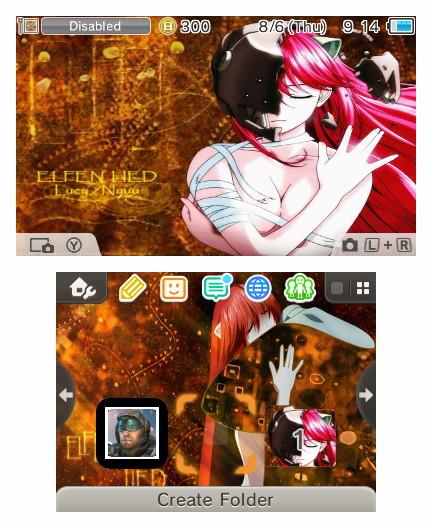
How do you guys/gals get the preview of the bottom screen with the buttons, folders, etc? All I get is a plain screen with "simulate" on Yata Plus and "create preview" only shows the top screen.
 
General chit-chat
Help Users
    K3N1 @ K3N1: https://finance.yahoo.com/news/just-helping-youtube-biggest-star-110950643.html?ncid=facebook_yah...