Hacking Custom _DS_MENU.DATs

  • Thread starter Thread starter D-Trogh
  • Start date Start date
  • Views Views 53,643
  • Replies Replies 121
Status
Not open for further replies.
I got a request.. would it be possible to just remove the "delete" function when a user presses the X button on the menu?

I got some small kids who love their DS but often end up deleting games accidentally by pressing the X button
rolleyes.gif
So just getting rid of that function would be awesome
smile.gif


To be honest I dont know why they put that there in the first place.. making it it too easy to accidentally delete roms.
wacko.gif
 
go point especially with kids, oh and the

answerer they added it to make the r4

more like a pda, instead of just a media and

games player, to add that feel and structure to it,

why they would want to do that god only knows

lols
biggrin.gif
 
I got a request.. would it be possible to just remove the "delete" function when a user presses the X button on the menu?

I got some small kids who love their DS but often end up deleting games accidentally by pressing the X button
rolleyes.gif
 So just getting rid of that function would be awesome
smile.gif


To be honest I dont know why they put that there in the first place.. making it it too easy to accidentally delete roms.Â
wacko.gif

the easiest way would probably be to revert to before 1.07 (i think thats the version...). it didnt have delete function back then.
 
That's fine by me... thanks for the info! I'm off to look for the 1.07 fw.

..unless anyone knows where it's still available offhand?
smile.gif
 
I did a small to dutch translation but its anoying as it must be the same length else you overwrite the .(SpecialChars) and then the R4 Wont function
So, it it maybe possible some how to make longer words like File to Bestand
 
Can somebody please upload fw 1.9 without Reset/Brightness/Cheat icons?

bckgrd_2.bmp(or whatever its called) with custom reset/brightness/cheat icons will still be recoginisable, right? even though icons will have been deleted from the fw.

Thanks in advance
 
Someone named 'case' over at the R4DS Forums made a small but SUPAH HANDY tool to edit the images in the _DS_MENU.DAT (Kernel v1.09) !
Download it here..
(Well.. copy the link in IE, because his site doesn't support FF)
How to use:
- Scrolwheel: Change picture to edit
- Left mouse button: Import a picture (PNG/BMP/JPG) (Auto-Resize when to big)
- Right mouse button: Save the _DS_MENU.DAT to a chosen location

You wil need to decrypt the _DS_MENU.DAT file first with R4Crypt and encrypt it back with R4Crypt too..

I hope we will hear something from case here..
smile.gif
 
Someone named 'case' over at the R4DS Forums made a small but SUPAH HANDY tool to edit the images in the _DS_MENU.DAT (Kernel v1.09) !
Download it here..
(Well.. copy the link in IE, because his site doesn't support FF)
How to use:
- Scrolwheel: Change picture to edit
- Left mouse button: Import a picture (PNG/BMP/JPG) (Auto-Resize when to big)
- Right mouse button: Save the _DS_MENU.DAT to a chosen location

You wil need to decrypt the _DS_MENU.DAT file first with R4Crypt and encrypt it back with R4Crypt too..

I hope we will hear something from case here..
smile.gif
http://home.comcast.net/~SpikeyGCPS2/injektor.zip
For the people not feeling like to work around and use IE, there's a mirror.

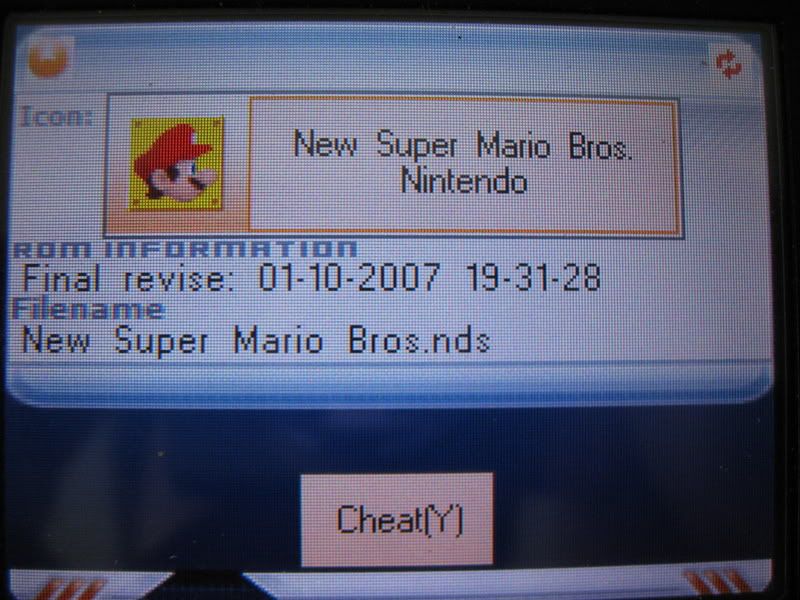
EDIT: Was messing around with the program and it works quite well, however, I can't figure out how to import images and give them transparency. And also, the cheat box graphic is the same as the game box one that displays the name as can be seen in the following image.
IMG_1735.jpg
 
Nice found for the cheatbox !
There is a new version btw..
- Nicer look; more user friendly
- String support
- Transparency..
Download it here.
The string editor is a nice addition, and so is the transparency. However, being able to set transparency only pixel by pixel takes a while. It needs like a bucket fill tool or something and that would improve it lots.
 
You can just use the color magenta (#FF00FF) as a transparency mask in the original image.
 
I was wondering if it was possible for someone to make a custom R4 _DS_menue.dat that would use a diffrent set of buttons for soft-reset. I ask this because my shoulder button's are broken and I just bought a 3in1 and I read you need the soft reset. sooooo.... is it possible?
 
Magenta is definitely the color for transparency that Injektor uses, but I think the transparency might only work on the icons, and not in the actual box containing the icon and name for the game (where transparency would show as black).
 
Magenta is definitely the color for transparency that Injektor uses, but I think the transparency might only work on the icons, and not in the actual box containing the icon and name for the game (where transparency would show as black).

hi
smile.gif


i'm the author of injektor, it takes some times to register with this forum as the confirmation mail never arrived on my mailbox, so i had to register with another mail...

transparency actualy seem to work also with the 'box containing icon and name' as injektor just set a bit to 1 or 0 for transparency in the data of the picture but the real picture is still here,if transparency was not used by the ds you can just see the original unmodified picture

if this is black it's just because of the R4 software drawing a blackbox prior to draw the panel with icon and name.
so you can see it trough the transparent area you defined.

i don't know if it is possible to modify the kernel to not allow it drawing this black box and still show the bg picture in place


i'm continue working on this tool and expect more updates soon
smile.gif
 
Magenta is definitely the color for transparency that Injektor uses, but I think the transparency might only work on the icons, and not in the actual box containing the icon and name for the game (where transparency would show as black).


hi
smile.gif


i'm the author of injektor, it takes some times to register with this forum as the confirmation mail never arrived on my mailbox, so i had to register with another mail...

transparency actualy seem to work also with the 'box containing icon and name' as injektor just set a bit to 1 or 0 for transparency in the data of the picture but the real picture is still here,if transparency was not used by the ds you can just see the original unmodified picture

if this is black it's just because of the R4 software drawing a blackbox prior to draw the panel with icon and name.
so you can see it trough the transparent area you defined.

i don't know if it is possible to modify the kernel to not allow it drawing this black box and still show the bg picture in place


i'm continue working on this tool and expect more updates soon
smile.gif
Nice to hear from the author of the tool. Any way that my suggestion could be put in the next version? Bucket fill tool for the transparency would be nice and fast.
smile.gif
Spend less time going pixel for pixel around the icons to make it transparent. Anyways, nice tool, and thanks.
bow.gif
 
This tool is awesome zorgrage, many thanks for creating it.

I have a feature request if you're taking them: I'd love to be able to change the default color of the loading bar. That thing has been annoying me since I first got the R4.
 
Status
Not open for further replies.

Site & Scene News

Popular threads in this forum