Homebrew Cannot install homebrew : "this installer can NOT continue!"

  • Thread starter Thread starter bgtimide
  • Start date Start date
  • Views Views 5,458
  • Replies Replies 16

bgtimide

Member
Newcomer
Joined
Dec 29, 2022
Messages
7
Reaction score
0
Trophies
0
Age
27
XP
48
Country
France
Hello, today is was trying to install homebrew on my Wii ; this is a old Wii that was sold used.
It is in version 4.3E, I have done all the update and I formatted it.

But when I launch the program with letterbomb it write me this error :
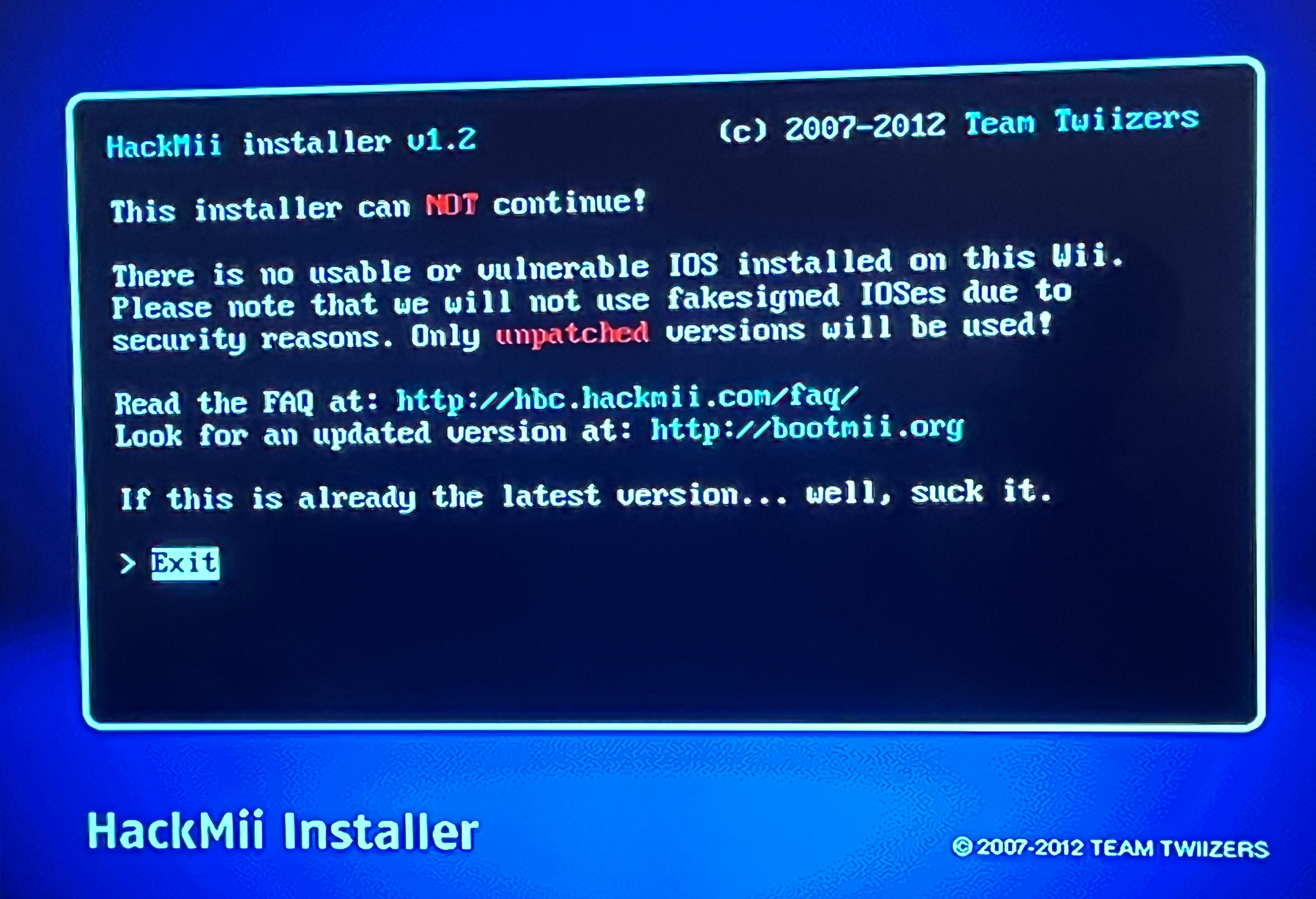
hackmii.png


I've followed this guide :

After that I tried to change wad and ios without sucess either.

Please what I need to do for make it work ? I have never touched this wii before but It seems that the previous owner did

 
Ok I was able to find, I just had to install it in a folder on my desktop and not directly on the sd card, but now I have an other problem.

When I launch the program with letterbomb on my Wii my Wiimote instant disconnect and I can't reconnect it, someone have a solution please ?
Post automatically merged:


Post automatically merged:

Help please
 
Last edited by bgtimide,
Ok I was able to find, I just had to install it in a folder on my desktop and not directly on the sd card, but now I have an other problem.

When I launch the program with letterbomb on my Wii my Wiimote instant disconnect and I can't reconnect it, someone have a solution please ?
Post automatically merged:

View attachment 344923
Post automatically merged:

Help please
Hello,

try another wads installer (Yet another wad manager , wiimod lite or others )

wii mod lite ==>https://wii.guide/wiimodlite.html

YAWMM ==>> https://oscwii.org/library/app/some-yawmm-mod
 
Last edited by jeannotte,
But I don't have homebrew channel on my Wii, Wii mod lite and YAWMM require it no ?
Post automatically merged:

I am lost, all my attemps end in error
 
Last edited by jeannotte,
You can replace the Hackmii installer boot.dol with YAWMM's boot.dol and use letterbomb to boot into YAWMM and installed the clean IOSes downloaded from Modmii
 
Already done with this method, it give me this :

hackmii.png

Post automatically merged:

My Wiimote don't have the motion plus
Post automatically merged:

Thanks for all your answer I will try with YAWMM boot.dol
 
Use Modmii's hackmii solutions wizard. The avoid the known bug depicted above, use modmii classic instead of modmii skin. Or if u really prefer modmii skin, just use the default sd card directory setting instead of the root of a device.
Post automatically merged:

U should be able to select any ios in yawmm to install ios58
 
  • Like
Reactions: jeannotte
I tried today with Modmii's hackmii solutions wizard, and this give me the same first error

I see that you are trying to copy to the SD card when using ModMii. The best thing as others as said is to start new so that it is consistent and others can help.

1. Do the ModMii "H" option to create the files and the guide, choosing to install to "COPY_TO_SD"
2. Format a SD card to FAT32 and then copy everything in the folder "COPY_TO_SD" to SD card. To reduce potential issue with SD compatibility, try to use card size of 2GB, avoid SDHC.
3. Folow the instructions in the "ModMii_HackMii_Solutions_Guide.html" in the "COPY_TO_SD"

Report back what you encounter, then others can help.

Cheers!
 
  • Like
Reactions: jeannotte

Site & Scene News

Popular threads in this forum