Homebrew BAGPlug (SCDS2 Entry)

  • Thread starter Thread starter BassAceGold
  • Start date Start date
  • Views Views 148,722
  • Replies Replies 584
  • Likes Likes 4
Release 3 - 4 is out now. Not a whole lot of changes this time around, just some more polishing.

Change log:

Includes fixes 3 - 1
-fixed copy/cut & paste corruption

Includes fixes 3 - 2
-fixed boot song not loading
-fixed a stylus input error in nzip manager
-fixed unzipped files not being added to unzipped.txt
-slightly optimized nds icon loading

3-4 changes:
-_bagui folder can now be placed anywhere on the SD card, as long as the DSTwo.nds file from this release is used for loading
-improved failsafe launching in DSTwo.nds
-updated manual.txt

*Notes*
Make sure to update all the required file paths when moving the _bagui folder (boot.ini, *.arg files, skin.ini files, etc)

 
Great update, its good to move the _bagui folder somewhere else.
But how about removing those coverart.ini files and use a global cover folder for all folders? Like the custom icons folder works now.
 
I just happen to notice some glitching while launching SuperBatPuncher.nes (nesds 0.51a) from my favorites menu on r3-4 (it also happens from my NES folder) that I hadnt seen before.
So, to test, since BAGplug was the last thing Id updated on my card, I regressed to the dstwo.plg from 3-3fix2, and the graphical glitching stopped. I put the 3-4 one back on, and it glitches again. I dunno if anything else is affected (or if its just me =P), but I thought it was worth a mention.

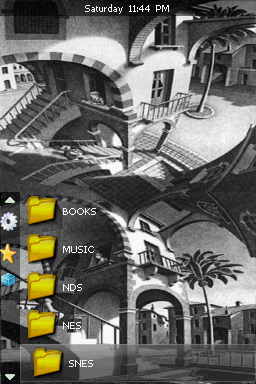
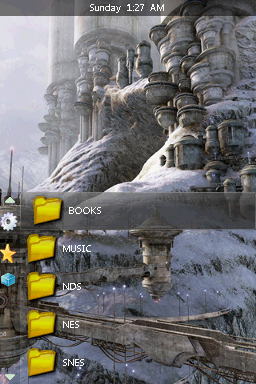
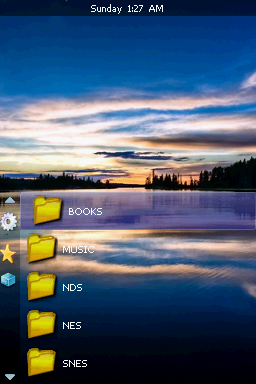
edit: here's a few skins for BAGplug ive been meaning to upload to filetrip. They're all wips, and could prolly use a lil tender lovin tweakin, but they're in decent enough condition to share, i theenk =)

25331-Escher1.png
__
25332-SciFi.png
__
25333-Sunset.png

download.gif
Escher__
download.gif
SciFi____
download.gif
Sunset
 
Does this only work for DSTWO?
Cus i read something about working on R4 also, or could it also work on DSONE?

Also, you should make a homebrew containing all the rom releases with the infomation and boxart and yes i know this is made but it would be awesome cus if you make it like compactible with BAG then you can use it as an input to take out all the boxarts and info from it.
 
VatoLoco said:
I just happen to notice some glitching while launching SuperBatPuncher.nes (nesds 0.51a) from my favorites menu on r3-4 (it also happens from my NES folder) that I hadnt seen before.
So, to test, since BAGplug was the last thing Id updated on my card, I regressed to the dstwo.plg from 3-3fix2, and the graphical glitching stopped. I put the 3-4 one back on, and it glitches again. I dunno if anything else is affected (or if its just me =P), but I thought it was worth a mention.

edit: here's a few skins for BAGplug ive been meaning to upload to filetrip. They're all wips, and could prolly use a lil tender lovin tweakin, but they're in decent enough condition to share, i theenk =)

[tn=100]http://filetrip.net/i/25331-Escher1.png[/tn]__[tn=100]http://filetrip.net/i/25332-SciFi.png[/tn]__[tn=100]http://filetrip.net/i/25333-Sunset.png[/tn]
download.gif
Escher__
download.gif
SciFi____
download.gif
Sunset

Just a short question, did you use the 3-3fix2 version to make the screenshots? Because i just noticed with 3-4 it won't capture the topscreen on my dslite. It only shows me the loading text:
MMC: clock= 400000 Hz is_sd=0
and so on.
 
2-bias said:
Just a short question, did you use the 3-3fix2 version to make the screenshots? Because i just noticed with 3-4 it won't capture the topscreen on my dslite. It only shows me the loading text:
MMC: clock= 400000 Hz is_sd=0
and so on.

Yep, i did use 3-3f2,.. and forgot to mention that the top screen does that on 3-4 for me, too.
 
VatoLoco said:
I just happen to notice some glitching while launching SuperBatPuncher.nes (nesds 0.51a) from my favorites menu on r3-4 (it also happens from my NES folder) that I hadnt seen before.
So, to test, since BAGplug was the last thing Id updated on my card, I regressed to the dstwo.plg from 3-3fix2, and the graphical glitching stopped. I put the 3-4 one back on, and it glitches again. I dunno if anything else is affected (or if its just me =P), but I thought it was worth a mention.

Which screen did the glitching happen on and what does it look like? Does it happen with just that one game or does it do it for all the games? Does that just happen with nesDS 0.51a? Also the screenshot function seems to be working fine. I can't seem to find anything wrong on my end.
 
top screen pixelation where it's usually is black, right before the title intro, then also theres some glitching when your character drops at the beginning of the game. That's as far as i got. I'll test some more games out, and also do a format on my 8gig ( it gets used and abused pretty hard =P) and see if that helps.

Here's the game that i noticed it on, if you wanna see if it does the same for you.
http://filetrip.net/file.php?id=25307

edit: im not trying to be nit-picky, i just happen to see it =)
 
BassAceGold said:
Also the screenshot function seems to be working fine. I can't seem to find anything wrong on my end.

Strange. I just set up a fresh 2gb microSD with latest EOS and bagplug and i still got this:
1165213341.jpg
 
M'kay, i did a format and its still happening with that SuperBatPuncher game on my 8gig. I also put a copy of BAGplug on a 2gigger (usually used for my Sudokuhax) and there was no glitching stuff. Also, it's the only game that ive seen it do this this on so far, so...meh =P
I too am getting the same screenshots as 2-bias on 3-4, after the format.

@ lex luthor, i sometimes get that too on my 3DS - it's kinda hit and miss if it does the double image thingy.

Here's a crappy shot of the weirdness, from my 3ds camera at my dsixl screen =P

[tn=150]http://pix.gbatemp.net/113027/HNI_0090.JPG[/tn]

(the pic looks kinda ominous, like HAL9000 or something LOL.)
 
2-bias said:
BassAceGold said:
Also the screenshot function seems to be working fine. I can't seem to find anything wrong on my end.

Strange. I just set up a fresh 2gb microSD with latest EOS and bagplug and i still got this:
1165213341.jpg


Alright, well I've improved the screen shot feature, you should be able to test it out next release.

QUOTE(lex luthor @ Jun 5 2011, 01:00 PM)
My problem is that every time I boot into bagplug my screen looks like this:

dno7zq.jpg

You are running on a 3DS, that is a known bug which is out of my area of influence. If you try other plugins, they all do the same thing. You'll have to turn off the screen scaling to fix it.
 
The screen scaling is a 3ds option or a bagplug option?

Thanks in advance

Another thing I need help with is that I select a game from a folder in example z.gba then it opens the emulator and then I select a game to play (file -> open emu -> then I have to select game again). Is there a way to click the game and start playing right away?
 
the gba emu doesnt have the arg support. There's a list of links at the OP of all the homebrews that can direct launch files.

Screen scaling is a 3DS option, hold select or start while booting up yer card. The scaled mode is too tiny for my liking though.
 
Release 3 - 5 is out:
-top screen is now force updated when taking screen shots
-screen shots are now saved in */_bagui/screen shots/
-screens are now turned off, then on again when taking screen shots (screen shot feedback)
-new screen shot naming scheme
-improved coverart.ini organization

BAGplug now supports a global CoverArt.ini where you can add all your cover entries. This file must be in /_bagui/user files/CoverArt.ini and entries must follow the format of the examples below:

CODE
[nds]
#path to folder with covers
folder = /_bagui/cover art/nds
#image type
type = png

[nzip]
#path to folder with covers
folder = /_bagui/cover art/nds
#image type
type = png

[nes]
#path to folder with covers
folder = /_bagui/cover art/nes
#image type
type = png

[snes]
folder = /_bagui/cover art/snes
type = png

[a26]
#path to folder with covers
folder = /_bagui/cover art/atari 2600
#image type
type = png


CoverArt.ini files in the game directory will still work but with modification. The [Cover Art] header must be changed to the file extension of the media files in that folder. If a local CoverArt.ini file is found in a directory, that will take priority over the global one which then won't be used in that directory.
 
A Gay Little Catboy said:
A little off topic, but is there any possible way to make NitroZip work on any other flashcard like the acekard?

A separate homebrew could be made to unzip them. Would take a bit longer than on the Supercard though.
 
BassAceGold said:
A Gay Little Catboy said:
A little off topic, but is there any possible way to make NitroZip work on any other flashcard like the acekard?

A separate homebrew could be made to unzip them. Would take a bit longer than on the Supercard though.
I never used Nitrozip (because I have multiple cards running on the same microSd card) so how long does it take to do that on the Supercard two already?
 

Site & Scene News

Popular threads in this forum