

Anybody tried making a controller with a I-PAC2?

  • Thread starter Thread starter BigOnYa
  • Start date Start date
  • Views Views 1,771
  • Replies Replies 11

BigOnYa

Has A Very Big
Member
Joined
Jan 11, 2021
Messages
5,221
Solutions
3
Reaction score
15,605
Trophies
4
Age
52
XP
13,030
Country
United States
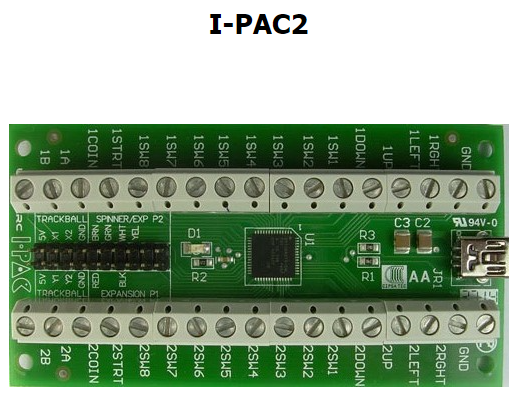
I've searched the web galore and can't find any answers, so wondering if anyone here has tried it yet on the Switch, maybe for a fighting stick or something else? I want to make a pinball controller with arcade buttons (flippers) on the sides and maybe a few buttons in the front for plunger, table select, etc. I own one already in a older PC pinball cabinet, but gonna upgrade it with something newer, and wondering if it will work on the Switch USB port. Thanks for reading!
Screenshot 2024-01-04 234513.png

-Update- I-Pac does not work, but I made code for an Arduino Uno to work on the Switch for my project. - https://gbatemp.net/threads/anybody-tried-making-a-controller-with-a-i-pac2.645709/post-10354203
 
Last edited by BigOnYa,

I've searched the web galore and can't find any answers, so wondering if anyone here has tried it yet on the Switch, maybe for a fighting stick or something else? I want to make a pinball controller with arcade buttons (flippers) on the sides and maybe a few buttons in the front for plunger, table select, etc. I own one already in a older PC pinball cabinet, but gonna upgrade it with something newer, and wondering if it will work on the Switch USB port. Thanks for reading!
View attachment 412061
https://www.arcadeworlduk.com/pages/IPAC-2-Code-Table.html
 
  • Like
Reactions: BigOnYa
I've searched the web galore and can't find any answers, so wondering if anyone here has tried it yet on the Switch, maybe for a fighting stick or something else? I want to make a pinball controller with arcade buttons (flippers) on the sides and maybe a few buttons in the front for plunger, table select, etc. I own one already in a older PC pinball cabinet, but gonna upgrade it with something newer, and wondering if it will work on the Switch USB port. Thanks for reading!
View attachment 412061
It's just a keyboard emulator, no? I'm not aware of any Switch games that support keyboard.
On a side note, I think I have an I-PAC (not 2) in that homemade arcade stick I made years ago.
 
  • Like
Reactions: BigOnYa
It's just a keyboard emulator, no? I'm not aware of any Switch games that support keyboard.
On a side note, I think I have an I-PAC (not 2) in that homemade arcade stick I made years ago.
Its actually the same thing as that I-PAC OG but a newer version. (2015+) The data sheet on it says its ps/2 and USB interface and will work with both, so that's why I was curious to try it on Switch usb, even possibly with homebrew sys-con/ mission-control. l'm gonna start tearing apart my old pinball cabinet tomorrow and yank it out and will try for the hell of it and report back.
Post automatically merged:

As expected, the Switch does not reconize the I-PAC2. Oh well. Guess I could try that NX Magic thingy, but think I'll give up on this board. I did find a cheap $15 wired controller that works on switch, so I may just rip it apart and solder wires to the motherboard inside the controller, and wire out to my arcade buttons. Or maybe try this : https://github.com/VinDuv/switch-arduino-controller Cheers!
 
Last edited by BigOnYa,
I've searched the web galore and can't find any answers, so wondering if anyone here has tried it yet on the Switch, maybe for a fighting stick or something else? I want to make a pinball controller with arcade buttons (flippers) on the sides and maybe a few buttons in the front for plunger, table select, etc. I own one already in a older PC pinball cabinet, but gonna upgrade it with something newer, and wondering if it will work on the Switch USB port. Thanks for reading!
View attachment 412061
IMO your best method to do this is to use one of the few arduino and esp32 libraries for turning those into a switch controller

You can do quite a bit with them if you know how. I was able to adapt the arduino ones to control my switch via my Twitch channel
 
  • Like
Reactions: BigOnYa
IMO your best method to do this is to use one of the few arduino and esp32 libraries for turning those into a switch controller

You can do quite a bit with them if you know how. I was able to adapt the arduino ones to control my switch via my Twitch channel
Yep I already figured it out with just 1 Arduino Uno. I made it for a pinball arcade controller with flipper buttons. The code is simple.
 

Attachments

  • Like
Reactions: TheStonedModder
Yep I already figured it out with just 1 arduino. I made it for a pinball arcade controller with flipper buttons. The code is simple.
That’s sick great job! You should consider uploading it to github. There aren’t many examples of in use code with those libraries for people to learn from

But I’m also dense and learn by example ha
 
  • Like
Reactions: BigOnYa
That’s sick great job! You should consider uploading it to github. There aren’t many examples of in use code with those libraries for people to learn from

But I’m also dense and learn by example ha
I thought about it, but not many Switch players want to make they own controller nowdays. I just wanted to Sim an arcade pinball setup, and it works great for Pinball FX3/FX/M. I turn a 32" tv sideways and play it "Tate" mode, is fun. You can upload it to GitHub though if you want, I don't need any credit.
 
  • Like
Reactions: TheStonedModder
I thought about it, but not many Switch players want to make they own controller nowdays. I just wanted to Sim an arcade pinball setup, and it works great for Pinball FX3/FX/M. I turn a 32" tv sideways and play it "Tate" mode, is fun. You can upload it to GitHub though if you want, I don't need any credit.
I never considered putting a 32 inch tv sideways that’s a sick idea!

Do you have a picture? How is the tv standing/supported unless it’s flat?
 
I never considered putting a 32 inch tv sideways that’s a sick idea!

Do you have a picture? How is the tv standing/supported unless it’s flat?
Don't have any pics, but will try take some later. I made a wood stand and mounted TV to it sideways, but you could also buy a wall mount kit. Not pretty but it works. Example:
TvMount.png
 

Site & Scene News

Popular threads in this forum
