Hacking Acekard Skin Editor

  • Thread starter Thread starter Swip
  • Start date Start date
  • Views Views 70,473
  • Replies Replies 48
  • Likes Likes 2
GIMP is still "free photoshop" which is way over most people's heads: not that people can't learn it, it can just be overwhelming with so many options in the software. ifranview should be fine for most people's needs.

I like your mario/link/yoshi designs, sarah. nice clean design very well executed, GJ
smile.gif
 
ravagekd said:
GIMP is still "free photoshop" which is way over most people's heads: not that people can't learn it, it can just be overwhelming with so many options in the software. ifranview should be fine for most people's needs.

I like your mario/link/yoshi designs, sarah. nice clean design very well executed, GJ
smile.gif


Thanks, I do have a degree in design though!
 
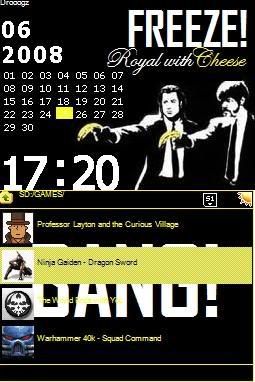
Im using the new Dan Taylor AK edit and for some reason when I try to load my custom skin onto my DS it showed up but the image is all distorted and funky. I think it may be a problem that the file size of my upper and lower screen are 144kb and for all of the other custom skins they are 96kb. I used Irfranview to change the image...here is a picture of the skin I made. The DS recognizes it but when I load it up the image gets all retarded.

Rylcheese.jpg
 
Destructobot said:
Drooogz said:
I think it may be a problem that the file size of my upper and lower screen are 144kb and for all of the other custom skins they are 96kb.
Sounds like the bitmaps need to be 16 bit color depth instead of 24 bit.
Just tried it. No good. When I did that it did show smaller distorted pictures of the upper and lower screens...but still the same.
 
Destructobot said:
Drooogz said:
I think it may be a problem that the file size of my upper and lower screen are 144kb and for all of the other custom skins they are 96kb.
Sounds like the bitmaps need to be 16 bit color depth instead of 24 bit.
Sounds right to me (just tried it out too):

24 bit = 144 KB
16 bit = 97 KB

EDIT: Just noticed you said "Just tried it. No good. When I did that it did show smaller distorted pictures...but still the same."
Changing the color depth should not affect image size. What app are you using for the backgrounds?
 
gratefulbuddy said:
Destructobot said:
Drooogz said:
I think it may be a problem that the file size of my upper and lower screen are 144kb and for all of the other custom skins they are 96kb.
Sounds like the bitmaps need to be 16 bit color depth instead of 24 bit.
Sounds right to me (just tried it out too):

24 bit = 144 KB
16 bit = 97 KB

EDIT: Just noticed you said "Just tried it. No good. When I did that it did show smaller distorted pictures...but still the same."
Changing the color depth should not affect image size. What app are you using for the backgrounds?

I used paint to make the background than Irfran to size them and edit them some more. I used the Dan Taylor AK editor and I am loading onto my NDS lite with the original AK 2 firmware.
 
I don't know how to change the color depth with irfanview. I spent a while trying once and ending up using photoshop to do it. But if you open the background image in irfanview and go to Image -> Information. Look at current/original colors, yours will read "16,7 Millions (24 BitsPerPixel)". You need "65536 (16 BitsPerPixel)" Compare with some other AK skins and you'll see what I mean.
 
Hi, I just got finished creating my first skin with this program... While it was "easier" the process was still tedious...

I had to run it as administrator to get it to work at first, and for some reason selecting the start menu options caused the program to crash...

But needless to say, my first skin is done, and to those who would like to check it out, here is my new skin!

The Ak2 Skin of Haruhi Suzumiya
 
gratefulbuddy said:
I don't know how to change the color depth with irfanview. I spent a while trying once and ending up using photoshop to do it. But if you open the background image in irfanview and go to Image -> Information. Look at current/original colors, yours will read "16,7 Millions (24 BitsPerPixel)". You need "65536 (16 BitsPerPixel)" Compare with some other AK skins and you'll see what I mean.

THANKS for your help! Finally said screw it with Irfran and Downloaded GIMP, which worked just right. My skin will be on the acekard skin site.
 
yeah sorry ive used irfranview for resizing etc for a while due to its simplicity but had never needed to change bit depths until now.
Was using photoshop for more complex stuff (but its a struggle) so never noticed
smile.gif
 
does anybody noe how to make a preview of a skin?
cuz when I try putting my custom skin to skin acekard.com it says yu need a preview.
Thanks in Advance!

-hiroki360
yaynds.gif
 
I just take a screen grab then crop it in photoshop.

If your on a PC there is print screen button on your keyboard. That will do the whole screen

Mac- you can get a cross-hair one and drap over the part of the screen you want Apple- Shift - 4
 
Does anyone no how to get the help file to show up in english?? I seem to get a load of weird characters show up and i can't read it. I need this to help me understand how to create a skin properly; because at the moment I can get the background images on the program but i dont no how to change anything else like the progress loading bar.
 
Bri said:
There are now two skin editors on the Acekard site: http://www.acekard.com/index.php?page_id=4

Anyone know what the differences are and which one is better?

-Bri

bri: i just made my first skin using a combination of paint.net and ak edit by dan taylor. dan's app is very basic and about a 95% true representation of what you will see on the flash kit. the differences are that some of the text does not line up the way they does on hardware (mostly menus), colors can be a bit brighter than how they will look on the nds as well. his app is very nice because it will set .bmp files to 16bits (required for acekard skins -- at least in akaio). it does no resizing like theme creator alice does for the r4, so i started with my template in paint.net already sized and worked with it zoomed. after saving out and opening the bmp it is all set for the acekard. then ak edit allows you to tweak the outlines, background solid colors, position of the clock, start menu position, etc.

as for the other editor i can't speak on it, i've not used it. at this point i personally don't see a need for it.

-another world
 
I used the standard editor for the skin I made(it's on the AK site, game section). 2 problems I have with it-

1) I set the calendar date square color to red, DS displays it as blue.

2) many of the buttons have a purple band at the bottom, ignoring the BMP construction. Likely another BMP is leaking into them somehow. Can't seem to fix this.
 

Site & Scene News

Popular threads in this forum