Tutorial  Updated

Region changing a DSi on NAND

1710713351804.png

(iQue cover photo since DS iQue firmwares are kinda my "thing" now lol)

This guide will walk you through region changing your DSi. You're essentially "cloning" the firmware and all files from another NAND. :!: This is a very dangerous operation :!: and I do not recommend for most people to try it. If you do not have a way to recover from a brick (eg. ntrboot), DO NOT FOLLOW THIS GUIDE

Note - you will not be able to remove unlaunch while having the region change

Prerequisites:
- SafeNANDManager to dump your NAND​
- ninfs to read NANDs​
- OSFMount to edit NANDs​
- ntrboot compatible flashcart in case you brick​
- A donor NAND backup for the region you want to install (archive.org is your friend)​
- Be an adrenaline junkie (idiot) with no concern for your DSi or the consequences of editing NAND​

Dumping your NAND:
- You will need a hacked DSi. If your DSi isn't hacked already, follow this guide.​
- Run SafeNANDManager and back up your NAND​
- Save your NAND on your computer, cloud storage, and some thumb drives. You will regret not having backups

Editing your NAND:
- Open the target DSi's NAND and delete every folder​
To open your NAND: mount your nand.bin in ninfs, then open the resulting twl_main.img with OSFMount. Make sure you enable write access for both tools.
- Open the donor NAND and copy everything to the target NAND. **You will no longer need the donor NAND**​
- Locate your launcher (somewhere in the NAND:/title/00030017/ folder)​
- Mark the launcher app as read only​
- Copy the attached unlaunch TMD to NAND:/title/00030017/484e4141/content/title.tmd
- Mark the unlaunch TMD as read only​
- Delete NAND:/Shared1/TWLCFG0.dat and TWLCFG1.dat
- Unmount twl_main.img from OSFMount, then nand.bin from ninfs​

Flashing the NAND:
- Copy your edited nand.bin to your SD card and overwrite your first backup
- Calculate the SHA1 hash of your nand.bin
- Open nand.bin.sha1 in a hex editor.​
- Replace the contents of nand.bin.sha1 with the SHA1 hash you just calculated​
- Save your edited nand.bin.sha1 and copy it back to the SD​
- Run SafeNANDManager again, but this time please select "NAND restore"​
- When complete, reboot and you're done!​


Common issues:
- My DSi worked the first time, but now I get a black screen!
You did not set the unlaunch TMD as read only. You will need to fix that or flash your original NAND backup with ntrboot
- I can't find the home menu!
You did not set the launcher as read only. You'll need to install a new copy with NTM
- I can't do updates or connect to the DSi Shop!
This is normal. You will have to restore your original NAND backup to use those again.
- Unlaunch gives me the following error: Cannot load WiFi Firmware
Your WiFi board is not compatible with the installed WiFi firmware. You'll need to update your WiFi firmware (located at NAND:/title/0003000f/484e4341/) with a version from a newer NAND.​

How it works:

The console region is defined in a file called HWINFO_S.dat. This file is console specific (contains the serial) and is signed with an unleaked key. Changing any contents will break the signature and stop your console from working.

Normally when you turn on your DSi the stage2 bootloader will check HWInfo for the Title ID of the launcher. Stage2 has trouble reading modified or different HWInfos and will fail to get the launcher TID. Thankfully stage2 was programmed to load a "backup" launcher (HNAA/484e4141) if the first one fails. This is a leftover feature from factory/prototype firmware.

Placing an unlaunch TMD in the location of the backup launcher means that stage2 will always be able to boot unlaunch, even if HWInfo is completely broken. From there unlaunch will patch the launcher to fix any HWInfo checks and allow booting another DSi's HWInfo.

It's pretty simple!


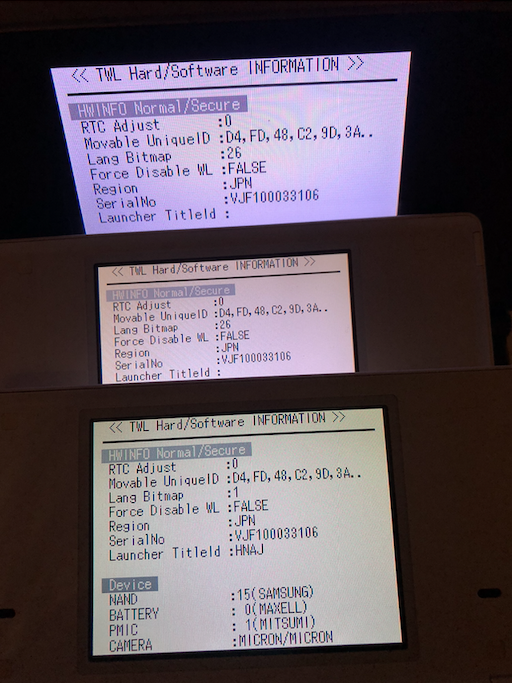
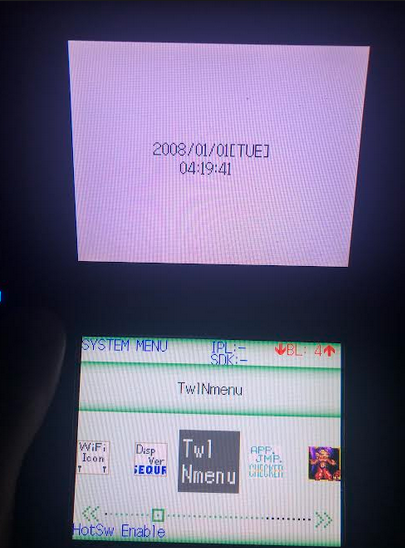
You can actually "clone" a DSi with this guide. I've cloned my dev DSi NAND to a couple other DSis. It works pretty well! (obviously no real dev support, but nice to see all the apps not getting deleted on boot like is normal for retail)

Also kinda weird having 3 consoles with the exact same serial...
1710713611438.png
1710713710428.png

Thank you for testing!
- @Dionicio3
- ArcheyChen
- stl25
 

Attachments

Last edited by rvtr,
I don't quite understand what you want to do.
Don't you want to: uninstall Unlaunch, update system, access DSi shop?
You cannot achieve these 3 things through this tutorial(Region changing a DSi on NAND).
.
You need:
Uninstall Unlaunch: restore NAND backup first. Then you can use 'safe' Unlaunch to uninstall/install Unlaunch.
Update system, and access DSi shop: you can use the DSi Language Patcher. It can use system update and DSi shop while you change the language.
 
Hello,
Thank you for your reply.
To clarify my request, my goal is to follow the tutorial in order to change the region of my Nintendo DSi from its original Japanese version to a European version, by carefully following all the steps described.
Once all the steps are completed and the modified NAND is restored, I would like to obtain a fully functional console in French, without any error messages in the Internet settings, with normal access to the Nintendo Shop as well as system updates.
However, some points are still unclear to me. I would like to know if, once I have extracted the European donor NAND onto my computer from my French console, there are any files within the TWL folder of that NAND that need to be modified or deleted so that, after applying the tutorial modifications and restoring the NAND to the Japanese console, the Internet updates and access to the Nintendo Shop work the same way as on my original French console.
Finally, if possible, could you please explain the correct method to follow, with the proper step-by-step process, in order to obtain, at the end, a console set to the European region (which I have already managed to do), but fully functional, including online services such as Internet updates and access to the Nintendo Shop?
Thank you in advance for your help.
 
Hello,
Thank you for your reply.
To clarify my request, my goal is to follow the tutorial in order to change the region of my Nintendo DSi from its original Japanese version to a European version, by carefully following all the steps described.
Once all the steps are completed and the modified NAND is restored, I would like to obtain a fully functional console in French, without any error messages in the Internet settings, with normal access to the Nintendo Shop as well as system updates.
However, some points are still unclear to me. I would like to know if, once I have extracted the European donor NAND onto my computer from my French console, there are any files within the TWL folder of that NAND that need to be modified or deleted so that, after applying the tutorial modifications and restoring the NAND to the Japanese console, the Internet updates and access to the Nintendo Shop work the same way as on my original French console.
Finally, if possible, could you please explain the correct method to follow, with the proper step-by-step process, in order to obtain, at the end, a console set to the European region (which I have already managed to do), but fully functional, including online services such as Internet updates and access to the Nintendo Shop?
Thank you in advance for your help.
You cannot use this tutorial(Region changing a DSi on NAND) to "completely change the region", if you read the tutorial carefully.
.
As far as I know, there is currently no method to "completely change the region" of a retail DSi.
'Region changing a DSi on NAND' and 'DSi Language Patcher' both depend on Unlaunch.
'Region changing a DSi on NAND' can't update system and access DSi shop.
 
Last edited by k66,
You cannot use this tutorial(Region changing a DSi on NAND) to "completely change the region", if you read the tutorial carefully.
.
As far as I know, there is currently no method to "completely change the region" of a retail DSi.
'Region changing a DSi on NAND' and 'DSi Language Patcher' both depend on Unlaunch.
'Region changing a DSi on NAND' can't update system and access DSi shop.
Hello,I have understood your message and I did carefully read the guide. When you mentioned the three possible issues, especially the fact that access to the DSi Shop would no longer work and that this was normal with the need to restore the NAND, I initially thought you meant this only applied at the end of the process. I believed that once the console was fully restored, access to the Shop and system updates would work again. I did not understand that it meant having to restore the original NAND every single time in order to access the Shop, which seems impractical to me. However, there is something I still do not understand. On some original Japanese consoles, I have successfully updated them to a European version. I first hacked them using Unlaunch, then installed the DSi Language Patcher, and performed the system update before launching Unlaunch. In those cases, the update works, for example from version 1.4J to 1.4.5E. The console remains Japanese, but with a fully functional European system version. However, when I follow the tutorial that involves modifying the NAND with TWL files, it does not work at all. This is why I am quite surprised, because it suggests that such a modification should be possible. Otherwise, how can an original Japanese console successfully update to version 1.4.5E in certain situations? Thank you in advance for your clarification. Kind regards.
 
Hello,I have understood your message and I did carefully read the guide. When you mentioned the three possible issues, especially the fact that access to the DSi Shop would no longer work and that this was normal with the need to restore the NAND, I initially thought you meant this only applied at the end of the process. I believed that once the console was fully restored, access to the Shop and system updates would work again. I did not understand that it meant having to restore the original NAND every single time in order to access the Shop, which seems impractical to me. However, there is something I still do not understand. On some original Japanese consoles, I have successfully updated them to a European version. I first hacked them using Unlaunch, then installed the DSi Language Patcher, and performed the system update before launching Unlaunch. In those cases, the update works, for example from version 1.4J to 1.4.5E. The console remains Japanese, but with a fully functional European system version. However, when I follow the tutorial that involves modifying the NAND with TWL files, it does not work at all. This is why I am quite surprised, because it suggests that such a modification should be possible. Otherwise, how can an original Japanese console successfully update to version 1.4.5E in certain situations? Thank you in advance for your clarification. Kind regards.
You have already gotten the answer...Unable to do what you ask.
There is currently no method to "completely change the region" of a retail DSi.
'Region changing a DSi on NAND' and 'DSi Language Patcher' use two different technologies to change the region and language.
:creep:For details, you can ask @rvtr.
 

Site & Scene News

Popular threads in this forum