Gaming Using R4 DS, Kernel 1.18 or YsMenu?

  • Thread starter Thread starter outgum
  • Start date Start date
  • Views Views 13,055
  • Replies Replies 25

outgum

Pokemanz Master
Member
Joined
Sep 22, 2009
Messages
1,993
Reaction score
27
Trophies
1
Age
34
Location
Hamilton, New Zealand
XP
349
Country
New Zealand
I have an R4 DS card, and ive heard i should update to YSMenu?
Ive heard this is what you should do if you have a clone, but mine ISNT a clone, so what should i do? is it safe to update?
Will my roms and saves still all work? Ive heard alot of people say when they updated to get Mario and Luigi working, there kingdom hearts didnt work? Whats this case? SHOULD i bother updating? and how DO i update?

Any help would be appriciated!
 
outgum said:
I have an R4 DS card, and ive heard i should update to YSMenu?
Ive heard this is what you should do if you have a clone, but mine ISNT a clone, so what should i do? is it safe to update?
Will my roms and saves still all work? Ive heard alot of people say when they updated to get Mario and Luigi working, there kingdom hearts didnt work? Whats this case? SHOULD i bother updating? and how DO i update?

Any help would be appriciated!

I also have an R4DS, along with YSMenu installed. It's what got Bowser's Story working, and Kingdom Hearts also works. I'd say backup everything in your R4, then try doing what you're saying.
 
1) Delete all the R4 firmware files from your SD card

2) Download this - http://www.mediafire.com/download.php?e2mfndlinzw

3) Unzip it to a folder

4) Download YSMenu0903270000 from this site - http://home.usay.jp/pc/etc/nds/
Unfortunately I can't give you a download link so you'll have to find it yourself. Search for 2009/03/27 00:00?EZ3in1+ NOR

5) Put the YSMenu zip file into the previously unzipped folder. Do not unzip the YSMenu file

6) Run the R4.bat file

7) choose these options -

en
r4
- press a key -
yes
en
1
- press any key -

8) You now have a file named R4_Custom_English.zip which will automatically open

9) Drag the _DS_MENU.dat and the TTMenu folder onto the root of you SD card and that's it

YSMenu users the USRCHEAT.dat which is available from here - http://cheats.gbatemp.net/, though this build already contains the latest cheat file.

This YSMenu build will play ML:BiS and KH 358/2 as clean (unpatched) ROMs. The people having trouble were trying to play versions they patched to work with older firmware.

P.S. Formatting your SD card with the Panasonic SD Formatter wouldn't hurt either. It has been know to fix YSMenu read errors.
 
Depravo said:
1) Delete all the R4 firmware files from your SD card

2) Download this - http://www.mediafire.com/download.php?e2mfndlinzw

3) Unzip it to a folder

4) Download YSMenu0903270000 from this site - http://home.usay.jp/pc/etc/nds/
Unfortunately I can't give you a download link so you'll have to find it yourself. Search for 2009/03/27 00:00?EZ3in1+ NOR

5) Put the YSMenu zip file into the previously unzipped folder. Do not unzip the YSMenu file

6) Run the R4.bat file

7) choose these options -

en
r4
- press a key -
yes
en
1
- press any key -

8) You now have a file named R4_Custom_English.zip which will automatically open

9) Drag the _DS_MENU.dat and the TTMenu folder onto the root of you SD card and that's it

YSMenu users the USRCHEAT.dat which is available from here - http://cheats.gbatemp.net/, though this build already contains the latest cheat file.

This YSMenu build will play ML:BiS and KH 358/2 as clean (unpatched) ROMs. The people having trouble were trying to play versions they patched to work with older firmware.

P.S. Formatting your SD card with the Panasonic SD Formatter wouldn't hurt either. It has been know to fix YSMenu read errors.
Wow, awesome. I just performed this, step by step, and it seems to be a nice looking skinnable YSMenu, unlike the one I had to rely on before. Thanks.
 
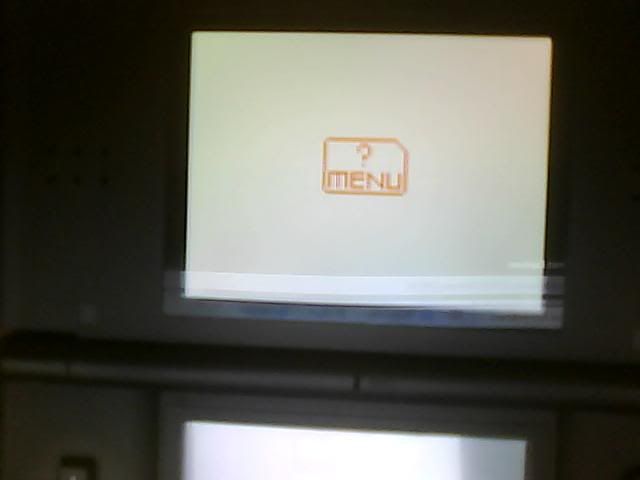
"how did you get it to work? Mine comes up in red text "? Menu"

EDIT: Forget it then, I might as well stay on Kernel 1.18, Atleast i can get that one to work
 
Does it look like this?

ttds-3.jpg


QUOTE said:
Wow, awesome. I just performed this, step by step, and it seems to be a nice looking skinnable YSMenu, unlike the one I had to rely on before. Thanks.

No worries, Mikey.
 
help mine doesnt even load. i have the TTmenu and _DS_MENU.DAT in the root of my micro Sd and then i put it in my R4 SdHC and it is suck at loading
 
I just followed those steps Depravo listed and got YSMENU installed perfectly. Now playing the new Maori and Luigi RPG finally
yaynds.gif
Better for cheats too!
 
newice212 said:
help mine doesnt even load. i have the TTmenu and _DS_MENU.DAT in the root of my micro Sd and then i put it in my R4 SdHC and it is suck at loading
The R4 SDHC is a fake/clone/knock off/counterfeit flashcard. Refer to this thread when dealing with YSMenu on R4 clones - http://gbatemp.net/index.php?showtopic=164359

EverlastingFire said:
I just followed those steps Depravo listed and got YSMENU installed perfectly. Now playing the new Maori and Luigi RPG finally
yaynds.gif
Better for cheats too!
Happy to help.
smile.gif


QUOTE(outgum @ Sep 29 2009, 11:05 PM)
i looks similar, it the same sorta format though...
Ummm Ill post a webcam shot

Picture0003.jpg
Hmmm, you may have a clone. My picture shows a DSTT with the wrong (or missing) firmware and as you say, yours look similar. A real R4 with the same problem would get stuck with a black screen and the word 'Loading' in white letters.

The good news is that if your card is a DSTT-based R4 clone then you can almost certainly get the DSTT v1.17a07 working in one form or another. The bad news is that I don't know how to do it.
 
Any answer to my problem? XD

EDIT:
Hmmm, i see, Well... All i have on my R4 Card Atm is the DS_Menu.Dat and the TT folder (All contents inside the folder is still in the folder) thingy plus Games and saves, am i missing something?
 
According to him, i guess so, i MIGHT be in the same boat as you, so yeah,
Also Depravo, if the screen come up with the picture YOU posted with the Menu?, What would i do to fix that? Maybe its the same thing but they changed the animation?
 
newice212 said:
ok thanks. so basically according to this guide since i have R4 SDHC YS menu will never work right?
Unfortunately that's the case. This guide will only work on genuine R4 cards.

QUOTE(outgum @ Sep 29 2009, 11:25 PM) According to him, i guess so, i MIGHT be in the same boat as you, so yeah,
Also Depravo, if the screen come up with the picture YOU posted with the Menu?, What would i do to fix that? Maybe its the same thing but they changed the animation?
First you would need to find exactly what type of clone you have then refer to the other guide I linked to. I'm afraid I only have experience with genuine R4 cards.
 
I have the r4 revolution and installed the entire ysmenu folder into the root without removing any r4 files and placed unedited versions of both kingdom hearts and mario and luigi bowsers's inside story roms into the rom file and both work perfectly. Supposedly the ysmenu also allows you to import gba roms as well, but I have not had any success.
 
im not sure about "importing"the game,but supposedly with a slot 2 device and games in slot 1 should play
 

Site & Scene News

Popular threads in this forum