Official MediCat USB - A Multiboot Linux USB for PC Repair

  • Thread starter Thread starter Jayro
  • Start date Start date
  • Views Views 9,003,848
  • Replies Replies 4,087
  • Likes Likes 284
I've never had that happen before. And MiniTool Partition Wizard is definitely the way to go.

--------------------- MERGED ---------------------------


I knew I forgot something.

My bad, it did work...I think the machine I was using to test needed to be totally powered off and booted from cold to register the drive change properly. Odd I know but when I booted back into Windows 10 everything worked fine, thanks for your quick reply!
 
  • Like
Reactions: Jayro
That's great, esp. the ransomware section. Jayro, can you please also update the "Update only" on your Google Drive? It's still state August 3rd. That would be awesome.
Yes, that's next on my to-do list. Just haven't been feeling well lately. Fibro-mialgia is a bitch to live with.
 
Hi, thanks for v20.09. I want to download uptdate, but i can't in Google. Quota exceed. Is it possible to download by another way please ?
 
Yes, that's next on my to-do list. Just haven't been feeling well lately. Fibro-mialgia is a bitch to live with.
oh, so sorry to hear that. From what I've read about fibromialgia it sure isn't .. :( I hope you get along w/o too much pain medication. It speaks for you and is to your credit that nevertheless you are mastering this advanced project with such sophistication - even more KUDOS now than before! Hope you success in leaving f-m behind one fine day for good.
 
  • Like
Reactions: neofita and Jayro
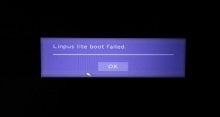
When I try to boot medicat 20.09 through uefi with security boot disabled I am getting "linpus lite boot failed" message.
MediCat 20.06.1 worked fine.
 
hi Jay
Every time I download medicat the BIN file is not there I attach a screenshot to you I am lost save me
 

Attachments

  • Capture.PNG
    Capture.PNG
    18 KB · Views: 288
  • Capture2.PNG
    Capture2.PNG
    11.3 KB · Views: 279
hi Jay
Every time I download medicat the BIN file is not there I attach a screenshot to you I am lost save me
Install 7-zip onto your computer (or use a portable version of it).

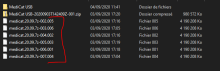
You have all 7 of the files, like this:

medicat.20.09.7z.001
medicat.20.09.7z.002
medicat.20.09.7z.003
medicat.20.09.7z.004
medicat.20.09.7z.005
medicat.20.09.7z.006
medicat.20.09.7z.007

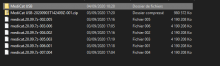
Right-click on medicat.20.09.7z.001, and navigate to 7-Zip > Extract Here as pictured:

7-zipped.jpg


After that, you will have the medicat.20.09.img

(You only have to do the .001 file, because it will do the rest by itself.)

Hope this helps you.
 
Last edited by Jayro,
  • Like
Reactions: vnpt0409
Thank you for your answer. But I can't find the .001 file that I need to extract. :cry:
Maybe I'm stupid too:rofl:
 

Attachments

  • Capture.PNG
    Capture.PNG
    19.3 KB · Views: 348
Okay, sorry it's so late, but the Update Only files are ready, for those who just want to update from the old version:

View attachment 223691
Awesome, thank you. Again:
Download from Google Drive despite of "quote exceeded":

1. Right click -> Make a copy
2. Go to "My Drive"
3. Right click -> Download
4. Once the download has finished:
either: right click -> Remove
or publically share with others if you feel like it
 
Have you tried it using MEMDISK? (Push F1)
I'm just getting this message and F1 do nothing

I also installed ventoy-1.0.20 to this pendrive and it worked without any problems
 

Attachments

  • linpusfailed.jpg
    linpusfailed.jpg
    275.2 KB · Views: 333
  • Like
Reactions: Jayro
Thank you for your answer. But I can't find the .001 file that I need to extract. :cry:
Maybe I'm stupid too:rofl:
It looks like you downloaded the files from a site that wasn't uploaded by me. Only download MediCat from the links on page 1. Those files look tampered with, and I wouldn't trust them.
 
  • Like
Reactions: BuxB and neofita
@Jayro a little suggestion for "Update instructions.txt":

1) If you use a 32GB USB flash drive, first remove "Boot_an_Operating_System/[UEFI]_PlopLinux-19.4-x86_64.iso" to make space for the update. Next Use 7-zip....

Also, which are the "Needless files for Memtest86 v8.3 that got left behind"? I figure these are only small size and the removal is purely cosmetic?
 

Site & Scene News

Popular threads in this forum