Homebrew RELEASE N64 dynarec is out as beta release

  • Thread starter Thread starter Keylogger
  • Start date Start date
  • Views Views 320,929
  • Replies Replies 1,432
  • Likes Likes 20
Switch crashes when trying to launch a n64 game

seems to be an issue with running this without full ram access (i.e. album -> retroarch.nro)

but even with a nro2nsp forwarder, while I get games to run, I'm only approaching fullspeed with max overclock (used the settings from page 26 and those from 2-3 pages ago), maybe there's a driver setting I'm missing??
also, the switch crashes when quitting retroarch after starting a game (at least for n64 and psx) :/

using latest kosmos package, latest retroarch nightly (and the mupen next core linked in some posts here), firmware 6.2
 
Last edited by Clydefrosch,
Today i switched from sx OS to atmosphere 0.85

I installed everything and ran the latest mupen64 core via retroarch.

Roms seem to work fine (and really fast :-) but my problem now ist that in mupen64 there dont works any controller input. On sx OS the framerate was lower, but controller input worked fine!

In retroarch controls work fine. But when i start a rom i cannot use any button (except of home button and Screenshot Button.) when i use psx emu on retroarch controllers also work fine!

So now i dont have an idea what to try. Maybe someone had a similar issue?

Edit: I am on firmware 4.1
 
Last edited by Spunky247,
seems to be an issue with running this without full ram access (i.e. album -> retroarch.nro)

but even with a nro2nsp forwarder, while I get games to run, I'm only approaching fullspeed with max overclock (used the settings from page 26 and those from 2-3 pages ago), maybe there's a driver setting I'm missing??
also, the switch crashes when quitting retroarch after starting a game (at least for n64 and psx) :/

using latest kosmos package, latest retroarch nightly (and the mupen next core linked in some posts here), firmware 6.2

You've definitely got something wrong going on. I've been able to hit 60 FPS playing LoZ - OOT using only Powersave Mode 3 (714 MHz)! So it's definitely NOT impossible to do with everything that's available right now.

Make absolutely sure you're using THIS Mupen64Plus (SVC Build) that m4xw posted.

Also, make sure that you have Framebuffer Emulation: False set under Options.


Switch crashes when trying to launch a n64 game

You need to either use Nro2Nsp - or- Title Redirection to get Full RAM Access when using N64.
 
Is there a known issue with Conkers? I've tested the rom on my PC and it runs just fine, but it crashes Retroarch with either of the Mupen cores.
 
You've definitely got something wrong going on. I've been able to hit 60 FPS playing LoZ - OOT using only Powersave Mode 3 (714 MHz)! So it's definitely NOT impossible to do with everything that's available right now.

Make absolutely sure you're using THIS Mupen64Plus (SVC Build) that m4xw posted.

Also, make sure that you have Framebuffer Emulation: False set under Options.


You need to either use Nro2Nsp - or- Title Redirection to get Full RAM Access when using N64.
Framebuffer is needed for a lot of games to display correctly, the Banjo series being 2 of them... Your better off turning framebuffer on, color buffer to RDRAM and Depth buffer to RDRAM off, that config has been pretty good so far! And remember to turn off frame duplication...
 
Framebuffer is needed for a lot of games to display correctly, the Banjo series being 2 of them... Your better off turning framebuffer on, color buffer to RDRAM and Depth buffer to RDRAM off, that config has been pretty good so far! And remember to turn off frame duplication...

I seen few configs posted up where they had Color Buffer to RDRAM and Depth Buffer to RDRAM set to OFF. But then they also had Framebuffer Emulation set to OFF which didn't make sense seeing as how the Color Buffer and Depth Buffer are only relevant when Framebuffer Emulation is turned ON. But setting it up like you suggested makes more sense.

I just tested LoZ - OOT with the settings you suggested and it seems to be working fine. Performance neither improved or got worse, but like you said it really just comes down to there being an issue with certain games. I will have to leave it set like that for now and see how it goes.

Thanks for the info. B-)
 
  • Like
Reactions: eldavo2090
I seen few configs posted up where they had Color Buffer to RDRAM and Depth Buffer to RDRAM set to OFF. But then they also had Framebuffer Emulation set to OFF which didn't make sense seeing as how the Color Buffer and Depth Buffer are only relevant when Framebuffer Emulation is turned ON. But setting it up like you suggested makes more sense.

I just tested LoZ - OOT with the settings you suggested and it seems to be working fine. Performance neither improved or got worse, but like you said it really just comes down to there being an issue with certain games. I will have to leave it set like that for now and see how it goes.

Thanks for the info. B-)

Happy to help!
 
  • Like
Reactions: FanboyKilla
You've definitely got something wrong going on. I've been able to hit 60 FPS playing LoZ - OOT using only Powersave Mode 3 (714 MHz)! So it's definitely NOT impossible to do with everything that's available right now.

Make absolutely sure you're using THIS Mupen64Plus (SVC Build) that m4xw posted.

Also, make sure that you have Framebuffer Emulation: False set under Options.


You need to either use Nro2Nsp - or- Title Redirection to get Full RAM Access when using N64.

Could I bother you for your config file so I can compare?


And does anyone know how i get rid of those two black bars in what I think is widescreen? they werent there last night but now i cant get rid of them all of a sudden.

Edit: Ok, I got rid of them. Took a while to realize that those options would only apply if you restarted retroarch. which also explains why most fiddling didn't really do anything.
Still not really at a point where underclocking leads to perfect playability at all, but I'm ok for now.

All that's left to plague me is those damn solid shadows in Pilot Wings (and I fear others too)
From what I remember, the shadow should only display on the ground, but for some reason, I'm getting a solid black obelisk between the character and the ground that sometimes disappears, but most of the time doesnt.
https://github.com/mupen64plus/mupen64plus-core/issues/262 basically that.
Apparently, vehicles shadows in Pilot Wings are not properly emulated by graphics plugins with hardware rendering.
 
Last edited by Clydefrosch,
I started using texture packs and the results are awesome!

However i am having issues with one pack in particular, the font is coming out like this
Glide64_STARFOX64_02.png


I have had the same issue on PC but i am able to fix it by using " Alternative CRC calculations" but i can't seem to find that option on retroarch. Any suggestions?
 
Could I bother you for your config file so I can compare?


And does anyone know how i get rid of those two black bars in what I think is widescreen? they werent there last night but now i cant get rid of them all of a sudden.

Edit: Ok, I got rid of them. Took a while to realize that those options would only apply if you restarted retroarch. which also explains why most fiddling didn't really do anything.
Still not really at a point where underclocking leads to perfect playability at all, but I'm ok for now.

All that's left to plague me is those damn solid shadows in Pilot Wings (and I fear others too)
From what I remember, the shadow should only display on the ground, but for some reason, I'm getting a solid black obelisk between the character and the ground that sometimes disappears, but most of the time doesnt.
https://github.com/mupen64plus/mupen64plus-core/issues/262 basically that.
Apparently, vehicles shadows in Pilot Wings are not properly emulated by graphics plugins with hardware rendering.

Honestly bro, I wouldn't get all worked up about getting perfect playability while being underclocked. Some games will play with lower clock speeds than others. I would try to aim for "Stock Performance" but even then you still might find that some games need a little extra "Boost" in CPU speeds than others. I try to aim for the lowest clock speed that still has good playability, because then I will get longer battery life.

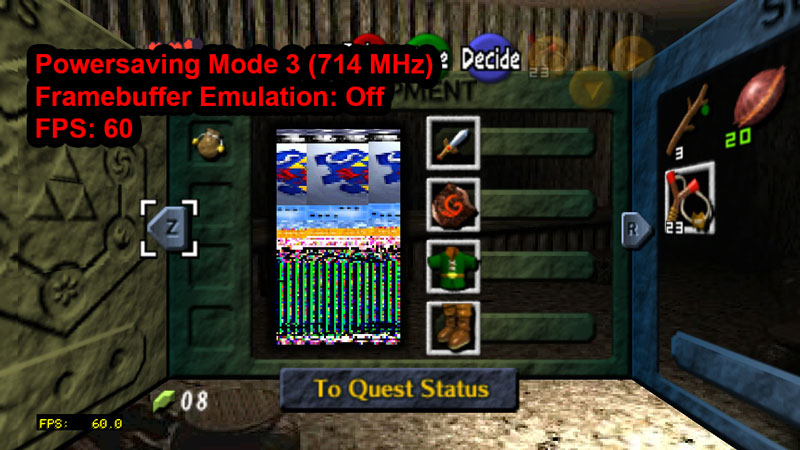
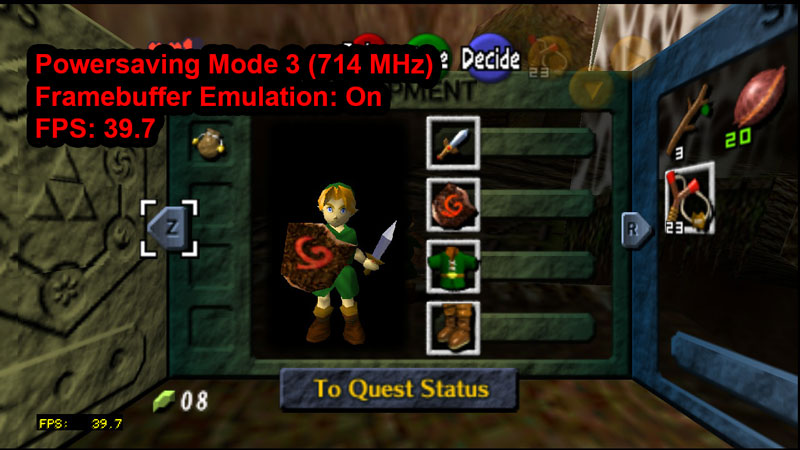
I was only able to get decent playability in LoZ - OOT using Powersaving Mode 3 (714 MHz) by setting "Framebuffer Emulation = Off". BUT, the trade-off was that it caused image distortion (see first pic) in the game menu. But then when Framebuffer Emulation is ON, I get audio crackling while flipping thru the screens in the game menu. So performance wise, having Framebuffer Emulation set to OFF works the best, but there seems to be some graphical issues here and there.

OOT-03-11-2019-17-52-25.jpg


OOT-03-11-2019-17-52-27.jpg
 
Last edited by FanboyKilla,
  • Like
Reactions: Broduskii
I have the latest core and your config file from twitter/reddit but Mupen64PLUS Next doesn’t show up as a option for core association on switch even though it does on PC; even if I load the core from the “load core” option, it doesn’t seem to act any different then Mupen64 plus so I’m under the impression it’s not working for me atm? HD textures also don’t seem to load on switch but do on PC, anyone have any ideas as to what I’m doing wrong?
 
Not really, a little worse background detail actually. But it’s a novelty so I’ll be playing through it!
 
I've only played the PSX version. Is there much of a difference?
New costumes, new additional files called EX Files to tie into the then in development RE Zero and RE1, violence settings, blood colour, no disk switching, new optional control scheme called 1st person controls (no tank controls) and an item randomizer of sorts.
3D models are also higher quality, but FMVs and audio suffer from compression.

It's my fav RE2 port, close to the Dreamcast/PC one.
 

Site & Scene News

Popular threads in this forum