
Hardware Help with HDMI to VGA connection

  • Thread starter Thread starter Deleted User
  • Start date Start date
  • Views Views 2,189
  • Replies Replies 21
D

Deleted User

Guest
Hello... I used (used) to be a member here... a
nd now I've created yet another account, beggin you for help.
So...
I have this HP Laptop X360 with a female HDMI port.
And I have one Samsung SyncMaster933 monitor with a female VGA port.

About an hour ago, I bought a male-to-male HDMI-VGA cable. And I've just connected my lap to my monitor, and my monitor displays:
"Check Sygnal Cable"

Ok... browsing through the Windows 10 configurations, I found that I have to click on "Detect" in order for Windows to detect this old piece of tech.
So I did, but nothing happened.
So I clicked on "Look for drivers on-line" or something like that (translating from Spanish) and Windows couldn't find the needed driver.

So, I just thought... Ok, maybe I should use Google. So I did. And I thought that I needed the driver for the monitor installed on my laptop.
Went to Samsung's site, and actually found the driver for this specific monitor.
I've already downloaded the driver and installed it on my Intel's HD Graphics Card. After installating the driver, going to the details of Intel's Graphics Card, it shows that my lap is connected to a Samsung SyncMaster Monitor, but still the display won't show on my VGA Monitor.

By now, I'm running out of Ideas.
I mean... It can't be the cable, can't it? Otherwise... It wouldn't show this... right?
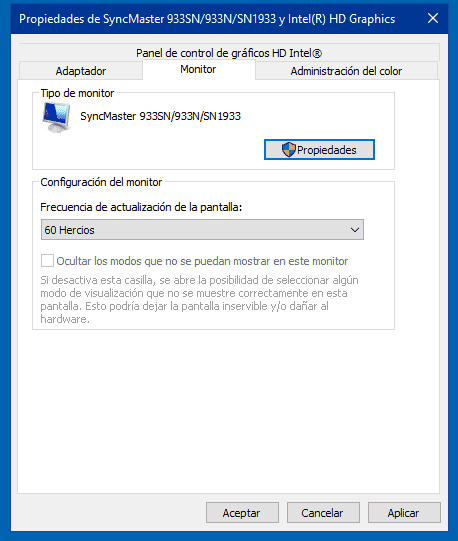
1.PNG


I mean, there's proof that a communication between the HDMI to VGA is already happening.

But WHY can't I see my desktop on my monitor?
How can I solve this?

 
try windows key+P
Hey... I will.
Do I have to have everything plugged in and turned on?
Right now, googling found a post with the same problem, but it's from a spanish site called Taringa!
And the person posting the problem said that she "downloaded a certain update" and it fixed the problem.

I will test the Win + P once I install the Samsung Firmware update.
 
First, monitor drivers rarely do much more than adding the name and maybe a default color calibration

Looking at the pinout of an HDMI cable http://www.veritlabs.com/itresources/diagrams/hdmi_pinout.gif, it is possible to directly connect the DDC (EDID) data lines without any conversion: this is enough to get the monitor identified...

...but it is impossible to convert HDMI/DVI-D video to VGA/DVI-A, at least without active electronics which your cable may or may not have (and most active converters without a separate power input are in flagrant violation of the HDMI specs, by using more than the official maximum of 50 mA)

So you will need to determine if what you have is indeed a converter, or a passive adapter that's only designed with off-standard devices designed especially for it!
 
Hey... I will.
Do I have to have everything plugged in and turned on?
Right now, googling found a post with the same problem, but it's from a spanish site called Taringa!
And the person posting the problem said that she "downloaded a certain update" and it fixed the problem.

I will test the Win + P once I install the Samsung Firmware update.
you are very likely overlooking your problem
can you show the cable you bought? you need a converter...
 
Where did you get the cable? As far as I know you can't get from HDMI to VGA without a converter of some kind as HDMI is digital and VGA is analog.
 
Last edited by spectral,
you are very likely overlooking your problem
can you show the cable you bought? you need a converter...
Yes, maybe you're right... I was just asking because before I joined GBATemp (for the second time) I looked at HP's official site and I read that I needed to connect everything while turned off and then turn on everything and it should work.

Err... I will try to post a picture... I do not have a good camera though.
But before anything... what was I expecting for a second hand cable that I got in the flea market for two bucks?

--------------------- MERGED ---------------------------

How did you make the cable? As far as I know you can't just splice the 2 together. HDMI is a digital signal and VGA isn't. You'd need some sort of analog to digital converter present.
I didn't made the cable, I bought it on the flea market around the place where I live.

--------------------- MERGED ---------------------------

First, monitor drivers rarely do much more than adding the name and maybe a default color calibration

Looking at the pinout of an HDMI cable , it is possible to directly connect the DDC (EDID) data lines without any conversion: this is enough to get the monitor identified...

...but it is impossible to convert HDMI/DVI-D video to VGA/DVI-A, at least without active electronics which your cable may or may not have (and most active converters without a separate power input are in flagrant violation of the HDMI specs, by using more than the official maximum of 50 mA)

So you will need to determine if what you have is indeed a converter, or a passive adapter that's only designed with off-standard devices designed especially for it!

I am aware of that.
I'm just thinking that, if the problem is comming from the cable, then my HD Intel's Graphic Card wouldn't detect that a monitor has been plugged... no?

Buying a separate converter is actually a plan B.
They're not cheap in México, and I saw this cable laying on the ground and thought: Why not? It is cheap and it might work.

--------------------- MERGED ---------------------------

Ok, will take a picture of the cable, but I promise you it's not going to be a very good photo.
 
Yes, maybe you're right... I was just asking because before I joined GBATemp (for the second time) I looked at HP's official site and I read that I needed to connect everything while turned off and then turn on everything and it should work.

Err... I will try to post a picture... I do not have a good camera though.
But before anything... what was I expecting for a second hand cable that I got in the flea market for two bucks?

--------------------- MERGED ---------------------------


I didn't made the cable, I bought it on the flea market around the place where I live.

Yeah I re-read and editted my post. Does it have any kind of box on it? I dont think you can just have VGA to HDMI, not even sure why that cable would exist.
 
I'm just thinking that, if the problem is comming from the cable, then my HD Intel's Graphic Card wouldn't detect that a monitor has been plugged... no?
With the DDC signal not needing conversion, and most likely a "fake" hotplug signal, it may actually be possible!
 
But before anything... what was I expecting for a second hand cable that I got in the flea market for two bucks?
you need something like this: http://amzn.eu/9QFPB7z
i actually have one myself and well it works...
thats an example, you need something that converts the hdmi signal into vga, a simple cable won't do, that's why i am asking what kind of cable, if your cable is just a cable and doesn't have any electronics in it to convert the signal that won't work

the reason the monitor shows in your adapter settings is because you forced it by installing the drivers, the drivers are usually just color config...
you never need the drivers for a monitor to make it work except in very very rare cases
check in device manager if 2 monitors show up

check your bios, some bios has a setting to disable the external monitor
 
  • Like
Reactions: Ryccardo
Ok everyone.
Here it is... in all it's 5MP glory.
2018-06-10 14.16.35.jpg
 

Attachments

  • 2018-06-10 14.17.42.jpg
    2018-06-10 14.17.42.jpg
    754.7 KB · Views: 222
you need something like this:
i actually have one myself and well it works...
thats an example, you need something that converts the hdmi signal into vga, a simple cable won't do, that's why i am asking what kind of cable, if your cable is just a cable and doesn't have any electronics in it to convert the signal that won't work

the reason the monitor shows in your adapter settings is because you forced it by installing the drivers, the drivers are usually just color config...
you never need the drivers for a monitor to make it work except in very very rare cases
check in device manager if 2 monitors show up

check your bios, some bios has a setting to disable the external monitor

Ah... I get it now.
Ok, will try to update the Samsung Drivers and then I'll try the Win + P thing.
I am aware that I need that kind of converter... they just aren't cheap around here... or common.
I've been looking for one for the past two years with no success.
That's why I bought the cable.
 
Ah... I get it now.
Ok, will try to update the Samsung Drivers and then I'll try the Win + P thing.
I am aware that I need that kind of converter... they just aren't cheap around here... or common.
they should.. i got mine for 6 or 8 bucks and thats their standard price but yeah.. i understand..
well at least its way cheaper than a new monitor, you can't order from amazon or something like that?
 
That cable is never going to work. The VGA input on the monitor has no idea what to do with the digital HDMI signal.
 
I know you're not expecting anything from this post. But just letting you know that I'll be off for a while, so If I do not respond your suggestion, please forgive me for now, as I will try to do the suggested options.

I'll let you know if it worked, if not, do not spend your time here, as I'll leave this post as "un-resolved"
:rofl2:

Lol, It's good to be back on GBATemp... I will not treat and adming this time so I won't get banned from here.

--------------------- MERGED ---------------------------

they should.. i got mine for 6 or 8 bucks and thats their standard price but yeah.. i understand..
well at least its way cheaper than a new monitor, you can't order from amazon or something like that?
Of course. I just got desperate this time.
I mean... my hand is almost as big as my laptop screen, and my Samsung monitor is thrice my hand... I really hate to work on a small display.
 
can someone answer what that cable above is actually for?
Non-standard devices which can actually force input or output TDMI (hdmi/dvi/displayport digital signal) over a VGA port: there are also large numbers of VGA to component, VGA to s-video, MHL microUSB-B to HDMI, SlimPort microUSB-B to HDMI, USB-C to Thunderbolt (this one is actually standard but not supported by all or even most USB-C devices), the USB to PS/2 that's bundled with most keyboards...


... or you can use 2 such cables + a VGA cable to make your own HDMI extension cord :D
 
:rofl2:

OK, at least the guy who selled this cable, said "It's guaranteed, If it doesn't work, I'll give your money back" :rolleyes:
 
Had a quick look and that cable might work for a HDMI laptop port and a monitor VGA port, but not the other way around. Laptop HDMI ports are usually capable of taking either digital or analogue ports (via adaptors), where as laptop VGA ports need an active converter to convert the signal to analogue.
 

Site & Scene News

Popular threads in this forum
