

D
Deleted User
Guest
Hello... I used (used) to be a member here... a
nd now I've created yet another account, beggin you for help.
So...
I have this HP Laptop X360 with a female HDMI port.
And I have one Samsung SyncMaster933 monitor with a female VGA port.
About an hour ago, I bought a male-to-male HDMI-VGA cable. And I've just connected my lap to my monitor, and my monitor displays:
"Check Sygnal Cable"
Ok... browsing through the Windows 10 configurations, I found that I have to click on "Detect" in order for Windows to detect this old piece of tech.
So I did, but nothing happened.
So I clicked on "Look for drivers on-line" or something like that (translating from Spanish) and Windows couldn't find the needed driver.
So, I just thought... Ok, maybe I should use Google. So I did. And I thought that I needed the driver for the monitor installed on my laptop.
Went to Samsung's site, and actually found the driver for this specific monitor.
I've already downloaded the driver and installed it on my Intel's HD Graphics Card. After installating the driver, going to the details of Intel's Graphics Card, it shows that my lap is connected to a Samsung SyncMaster Monitor, but still the display won't show on my VGA Monitor.
By now, I'm running out of Ideas.
I mean... It can't be the cable, can't it? Otherwise... It wouldn't show this... right?
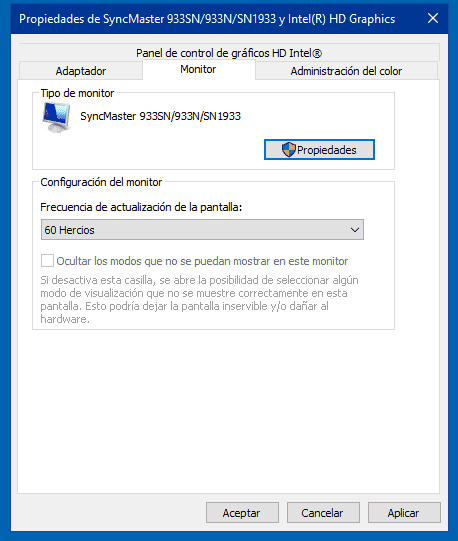
I mean, there's proof that a communication between the HDMI to VGA is already happening.
But WHY can't I see my desktop on my monitor?
How can I solve this?
nd now I've created yet another account, beggin you for help.
So...
I have this HP Laptop X360 with a female HDMI port.
And I have one Samsung SyncMaster933 monitor with a female VGA port.
About an hour ago, I bought a male-to-male HDMI-VGA cable. And I've just connected my lap to my monitor, and my monitor displays:
"Check Sygnal Cable"
Ok... browsing through the Windows 10 configurations, I found that I have to click on "Detect" in order for Windows to detect this old piece of tech.
So I did, but nothing happened.
So I clicked on "Look for drivers on-line" or something like that (translating from Spanish) and Windows couldn't find the needed driver.
So, I just thought... Ok, maybe I should use Google. So I did. And I thought that I needed the driver for the monitor installed on my laptop.
Went to Samsung's site, and actually found the driver for this specific monitor.
I've already downloaded the driver and installed it on my Intel's HD Graphics Card. After installating the driver, going to the details of Intel's Graphics Card, it shows that my lap is connected to a Samsung SyncMaster Monitor, but still the display won't show on my VGA Monitor.
By now, I'm running out of Ideas.
I mean... It can't be the cable, can't it? Otherwise... It wouldn't show this... right?
I mean, there's proof that a communication between the HDMI to VGA is already happening.
But WHY can't I see my desktop on my monitor?
How can I solve this?





