Hacking WiiFlow Lite

  • Thread starter Thread starter fledge68
  • Start date Start date
  • Views Views 1,032,526
  • Replies Replies 4,833
  • Likes Likes 66
Hey, been away a while, but I've meaning to get to the bottom of my loader issues. I took your advice and changed the settings, it seemed to work so I thought it was fixed. But then the problem came back. Again, other games and apps load fine, but wbfs titles, in particular Mario Kart, freezes up the Wii before the loading graphic appears on the bottom (white line that scrolls from left to right).

I did notice something interesting, however: If I go into something and then exit back to WiiFlow Lite (for example, play a SNES title or watch a video on WiiMC), then upon returning to the loader, Mario Kart loads up fine if selected. If I try to access it upon initial boot, however, that's where I run into issues. I'm wondering, is something happening right after boot that would keep certain resources from being "ready"?
I've actually noticed a few times that the controllers wouldn't connect right away after boot if my kids pressed them too fast after booting up. I'm booting straight into it from Priiloader, if that makes a difference. If they wait until the loading screen finishes, and THEN press a button to connect, it works fine. If they try to connect too early though, sometimes it won't connect after that. None of the controllers will, so we have to turn it off and back on again. It doesn't happen often enough that I'm concerned about it being a major bug, but perhaps it is related to the wbfs loading issues?
If you don't use Priiloader to autoboot WiiFlow Lite and you launch it using the WiiFlow Lite Forwarder on the system menu screen does this still happen? If not, it's because your Priiloader WiiFlow .dol needs to be one that launches the WiiFlow Lite Forwarder channel (and not the boot.dol in in rhe apps folder).
Like:
Priiloader >> WiiFlow Lite Forwarder >> WiiFlow Lite

I had similar issues until @fledge set me straight. (Thanks Fledge :) )
 
Last edited by WesMods,
Hey, been away a while, but I've meaning to get to the bottom of my loader issues. I took your advice and changed the settings, it seemed to work so I thought it was fixed. But then the problem came back. Again, other games and apps load fine, but wbfs titles, in particular Mario Kart, freezes up the Wii before the loading graphic appears on the bottom (white line that scrolls from left to right).

I did notice something interesting, however: If I go into something and then exit back to WiiFlow Lite (for example, play a SNES title or watch a video on WiiMC), then upon returning to the loader, Mario Kart loads up fine if selected. If I try to access it upon initial boot, however, that's where I run into issues. I'm wondering, is something happening right after boot that would keep certain resources from being "ready"?
I've actually noticed a few times that the controllers wouldn't connect right away after boot if my kids pressed them too fast after booting up. I'm booting straight into it from Priiloader, if that makes a difference. If they wait until the loading screen finishes, and THEN press a button to connect, it works fine. If they try to connect too early though, sometimes it won't connect after that. None of the controllers will, so we have to turn it off and back on again. It doesn't happen often enough that I'm concerned about it being a major bug, but perhaps it is related to the wbfs loading issues?
what version of priiloader are you using? I've heard certain versions of priiloader do not patch AHBProt. i believe you need v0.8.
also if using wiiflow lite with priiloader you need to use a special dol file that I posted back on page 43
here's the link - http://www.mediafire.com/file/fnypqoe222ghlrg/wfl_priiloader_boot.dol/file
my logical guess is the reason it works after playing a snes game is because it returns to wiiflow (lite) via the forwarder channel.
so try priiloader v0.8 or higher and place the dol on the root of your device and set priiloader to use it.
 
  • Like
Reactions: WesMods
what version of priiloader are you using? I've heard certain versions of priiloader do not patch AHBProt. i believe you need v0.8.
also if using wiiflow lite with priiloader you need to use a special dol file that I posted back on page 43
here's the link - http://www.mediafire.com/file/fnypqoe222ghlrg/wfl_priiloader_boot.dol/file
my logical guess is the reason it works after playing a snes game is because it returns to wiiflow (lite) via the forwarder channel.
so try priiloader v0.8 or higher and place the dol on the root of your device and set priiloader to use it.
You're correct @fledge68 that's what was messing me up before I used your new Priiloader .dol
 
Have a question about ocarina codes. My understanding is that wiiflow, unlike USB loader, is unable to load more than 256 lines of ocarina codes for a single game (see this reddit post) This means that mods for super smash bros brawl (such as project m - which rely on more than 256 lines of ocarina codes via hooktype to change features in the game) and perhaps even some other mods that change the button controls via extensively long ocarina lists are unable to load through wiiflow and wiiflow lite but can do so in USB loader.

I wondered if the reasons why the inability to load more than 256 lines was obvious in viewing the coding. It seems likely that wiiflow base never was able to do so based on the way ocarina was built in. I have wondered about the semantics for some time and thought I'd ask.
 
I dont know about 256 lines of code. But it does limit the number of cheats to 100. In cheats/gct.h maxcheats=100. Not sure why.
 
  • Like
Reactions: Jochte
I've tried the Rhapsody theme and an older Monster High theme and with both I have the same issue. The button that cycles from wii to gc to plug-ins and then channels disappears. It's only there when I switch back to default. Anyone familiar with this?
 
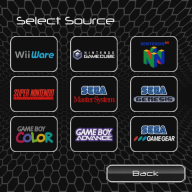
I have a method to add more menu tiers to wiiflow. A menu item that reloads the sourcemenu with a new, specified, sourcemenu.ini - one containing the [Button]s for the next tier down
For example - hitting the Snes sourcemenu item doesn't immediately open a coverflow of all the snes titles - it reloads the source menu using a new snesmenu ini.
This snesmenu.ini contains, for example, buttons for Jap US and PAL titles, which in turn open the coverflow - and a line specifiying the location of original sourcemenu.ini, to load when moving back up a tier.
By using the existing sourcemenu functionality and reloading with alternate sourcemenu.inis, it should be possible to build folder structures of any depth, based on anything wiiflow can define.
-------------------------------------------------------------------------------------------------------------------------------------------------------------------
@fledge68 This is related so i thought it useful to say now - there used to be a plugin that loaded game discs from a sourcemenu item - I think it pointed to a homebrew dol.
The ubiquitous disk icon becomes uneccessary clutter when you can launch that function from a source menu item - that is where you find all the other sources.
Would you consider a source menu item that boots a disk?
I hazard a guess that plenty of people will be happy to provide the art for a disk source menu item, I nominate @Hakaisha
 
Last edited by kaisersozeh,
  • Like
Reactions: Hakaisha
I have a method to add more menu tiers to wiiflow. A menu item that reloads the sourcemenu with a new, specified, sourcemenu.ini - one containing the [Button]s for the next tier down
For example - hitting the Snes sourcemenu item doesn't immediately open a coverflow of all the snes titles - it reloads the source menu using a new snesmenu ini.
This snesmenu.ini contains, for example, buttons for Jap US and PAL titles, which in turn open the coverflow - and a line specifiying the location of original sourcemenu.ini, to load when moving back up a tier.
By using the existing sourcemenu functionality and reloading with alternate sourcemenu.inis, it should be possible to build folder structures of any depth, based on anything wiiflow can define.
-------------------------------------------------------------------------------------------------------------------------------------------------------------------
@fledge68 This is related so i thought it useful to say now - there used to be a plugin that loaded game discs from a sourcemenu item - I think it pointed to a homebrew dol.
The ubiquitous disk icon becomes uneccessary clutter when you can launch that function from a source menu item - that is where you find all the other sources.
Would you consider a source menu item that boots a disk?
I hazard a guess that plenty of people will be happy to provide the art for a disk source menu item, I nominate @Hakaisha
your 'tier' source menu sounds interesting. shouldn't be too hard to code. ie.. if the source btn source = new_source then the magic = title of new source menu.ini

as for the disc source btn . i may remember it somewhere. i believe it uses autoboot function of a source btn that fix94 added. can't remember where.
but no i'm not going to remove the disc icon button.
 
your 'tier' source menu sounds interesting. shouldn't be too hard to code. ie.. if the source btn source = new_source then the magic = title of new source menu.ini

as for the disc source btn . i may remember it somewhere. i believe it uses autoboot function of a source btn that fix94 added. can't remember where.
but no i'm not going to remove the disc icon button.
Cool!
If you could point me on where/how to set up that disc source button..?
It might be worth considering giving the users the option to hide/show - only as it's available by other means - obviously set 'show' as the default. Maybe ask around, see how users feel?
and thanks man
EDIT - The "categories" functionality is crying out for that space - just an opinion ;)
EDIT2 - I realised you just have the "up" menu.ini as the menu loaded by the first button - no extra shenanigans needed.
 
Last edited by kaisersozeh,
Cool!
If you could point me on where/how to set up that disc source button..?
It might be worth considering giving the users the option to hide/show - only as it's available by other means - obviously set 'show' as the default. Maybe ask around, see how users feel?
and thanks man
EDIT - The "catagories" functionality is crying out for that space - just an opinion ;)
EDIT2 - I realised you just have the "up" menu.ini as the menu loaded by the first button - no extra shenanigans needed.
i dont understand edit2?
 
i dont understand edit2?
I said in my outline that the loaded menu.ini would require an "up" menu.ini defined in there - to invoke when users return to the previous menu.
Actually, the first BUTTON could define that "up" menu within the setup you described, no special "up" menu definition required.
I suppose the "B" button needs to open the "up" menu.ini too...
EDIT - Thinking on it - this requires the button ordering to work, and it doesn't - it's alphabetical. You could define a special case and call it BUTTON UP - having a seperatly defined value maybe helpful if you are using "B" to invoke it?
 
Last edited by kaisersozeh,
I said in my outline that the loaded menu.ini would require an "up" menu.ini defined in there - to invoke when users return to the previous menu.
Actually, the first BUTTON could define that "up" menu within the setup you described, no special "up" menu definition required.
I suppose the "B" button needs to open the "up" menu.ini too...
EDIT - Thinking on it - this requires the button ordering to work, and it doesn't - it's alphabetical. You could define a special case and call it BUTTON UP - having a seperatly defined value maybe helpful if you are using "B" to invoke it?
ummm there's a big catch to all this. i dont feel like coding it. sorry. seeing as how you've got into coding you could always fork wiiflow lite on github and add this to your fork.
 
I am deffo looking forward to learning my way wiiflow, and I'd like to thank you again for the work you've put in notating the code.
In the not too distant I am going to get round to working on the wiiflow lite skin for use with the Quake plugin - so I will be tapping you up for info!
If you're not arsed - that's fair enough - I'd hope if you liked what I did you'd consider it for the main deal. I'd like to have a go, but it's way down on a long list of things I am already up to my neck in.
If it was specialised to the skin I would have spoken to you and asked for your help, I mention it here because it strikes me as very useful to wiiflow.
It wasn't my idea, it was @Hakaisha's most recently, I just thought of way of doing it.
You really don't see this being useful - you have a two tier menu, you don't see the use in more tiers?
I have to say I am surprised.
Perhaps someone else could describe the usefulness of a folder tree to @fledge68?
Would anyone like the option?
 
@kaisersozeh , if you or @fledge68 can find out how to autoboot discs from a Source Menu selection, it would be easy enough for me to pump out an alternate Rhapsodii skin that removes the Disc button to accommodate. I also wouldn't mind making some Disc button artwork for the Source Menu/Source Flow. ;)

If I may state the case, Tiered Source Menus is certainly a dream feature I've always wanted in WiiFlow; as it would resolve a lot of problems when organizing large and varied collections under a single console.

Different regions often call for different box sizes, thus needing a separate CoverFlow unto itself and taking up more room on the main Source Menu. It would also enhance WiiFlow's WiiMC compatibility. Media collections of TV shows could be organized by seasons, then episodes, so on and so forth.

I am certain it would be a monumental task, so I totally get why fledge68 wouldn't feel up to it. Einstein expressed some interest in it, but I haven't heard from him in quite some time.

I've recently been looking at some old themes on the WiiFlow wiki, and am currently considering maybe updating some of those to work with WiiFlow Lite, if anyone is interested in that.
 
  • Like
Reactions: kaisersozeh
From what fledge has said, the wiiflow end of things isn't too much work, at least at first glance, the work is in setting up the array of menus, and at least that can be divided amongst a few people. Once you have a template users can customise to their own collections and share...I'll help (famous last words!). Collections could even be automatable from an OS's filesystem folder structure. This is a lot of inis, mind.
I am very interested in the old themes!!!
edit: If it's not a biggie @einsteinx2 might do it in a jiffy, what ho!
@Hakaisha -Thinking on it -
1 This will need art for categories - I nominate you! Although, there are loads of digital artists about, spread the love....
2 Am I right in thinking uou have done stuff on applying meta info from pc emulator databases, and applying that to your wii emu collection - if you could redo that process with this implementation, how would you do it differently?
- I'd hope reading your thoughts on that might get people excited about doing it and sharing the result - I would certainly be.
 
Last edited by kaisersozeh,
  • Like
Reactions: Hakaisha
It could be useful :
- Regions/Hacks/Public domain/Commercial games.
- By formats : Disk/tapes for computers.
- By accessory : Nes Zapper, Super Scope. Retroarch(no lightguns support) vs GX emulators.
- Arcade : sort by system/company, CPS, konami, Cave etc.

Not sure how you'll code this in a clear and simple way though. And yes you'll always have to keep track of the last loaded source's name or id #(?).

Moreover, there are about 100 .inis in the Masterpiece pack. It could be a bit of work to make all inis and artworks.
Basing on categories would be more flexible and doesn't require a specific folder structure. You can use existing databases for this and use scripts to sort games etc.
What I don't like with this tree view idea is that you can't start a game directly anymore(Click Machine->Region->Game vs Machine->Game). The menus have already a bit of delay and loading the plugin is not instant.
 
@Hakaisha @kaisersozeh
try this wiiflow lite boot.dol - http://www.mediafire.com/file/x18c3j52z66scr8/tier_boot.dol/file

how it works:
1. put all your source_menu.ini 's in sd:/wiiflow/source_menu/. name them what you want except the base one must always be source_menu.ini
2. to link a source button to another source menu ini set 'source=new_source' and set 'magic=title_of_new.ini'. replace title_of_new.ini with your title of course.

as for the back or up option. wiiflow lite does not remember the previous source menu ini's so you will have to create a up button in step 2 above and its up to you to assign the previous source menu ini title to it. you could even make one that goes directly back to the base source_menu.ini so as to keep from selecting up all the time.

this should work with using the regular source menu as well as sourceflow. i have not tested it. giving it to you guys to test. but you got alot of work to do. making and editing source menu ini's as well as all the images for all the source buttons. I agree with @Wiimpathy - using categories would be much easier. and i don't know if you know but there are the catpage= and category= options that you can add to source menu buttons.

for example you could put all your star wars movies in a single category and then make source button with the category= option set to that category so when you click on it the wiimc movie files will be shown but only the star wars movies that are in that category. its like selecting wiimc plugin as a source and auto selecting that category.

edit: just thought of a better way to do this - i could add source button option 'src_folder=#' that you would add to each and every source button. #=0 for the base source menu folder. and add source button option 'source=folder' and 'folder=#'. example:
when you click a source button with 'source=folder' and 'folder=3' then the source menu/flow will be filtered to only show buttons with 'src_folder=3'. for up or back create a button with 'src_folder=3' and 'source=folder' and 'folder=2' or to go back to base menu 'folder=0'.
 
Last edited by fledge68,
  • Like
Reactions: Hakaisha
Hey guys, just popping in to say I really like what I'm seeing- the multi-tiered thing has sort of been the holy grail I was chasing when I first set out to do my carputer project with the wii hardware. I gave up and just made it work with a single source flow, but it would be super cool to organize the movies and TV shows on my storage card in tiers. For example, all episodes of a show be in their own tier, because now its tedious scrolling through every video.

@fledge68, I love that you said no then couldn't resist trying to figure it out. This is why Wiiflow Lite is amazing! Nothing really to add to the conversation, just expressing some appreciation and respect to you, good sir!
 
ok for those interested. try this boot.dol - http://www.mediafire.com/file/9q9i1c01f9tt7sd/srcfolders_boot.dol/file

here's how its supposed to work:
edit your source_menu.ini
1. for each button add src_folder=# to set the virtual folder this button belongs in. for compatibilty with older source menu's and those that dont need subfolders - if src_folder is not found it defaults to 0. src_folder= is only needed for those who wish to use the subfolders option.
2. to make a folder button set source=folder
3. then add folder=# to set the virtual subfolder you are using.

back buttons would just be a folder button with folder=# set to a previous subfolder # or 0 for the base source menu.

again this should work with sourceflow and regular source menu.
 

Site & Scene News

Popular threads in this forum