Wii U GamePad: Region + Language

  • Thread starter Thread starter core2lee91
  • Start date Start date
  • Views Views 7,138
  • Replies Replies 19

core2lee91

Well-Known Member
Newcomer
Joined
Jan 17, 2022
Messages
51
Reaction score
76
Trophies
0
Age
35
XP
316
Country
United Kingdom
Feel I may be asking in the wrong place for this type of advice...

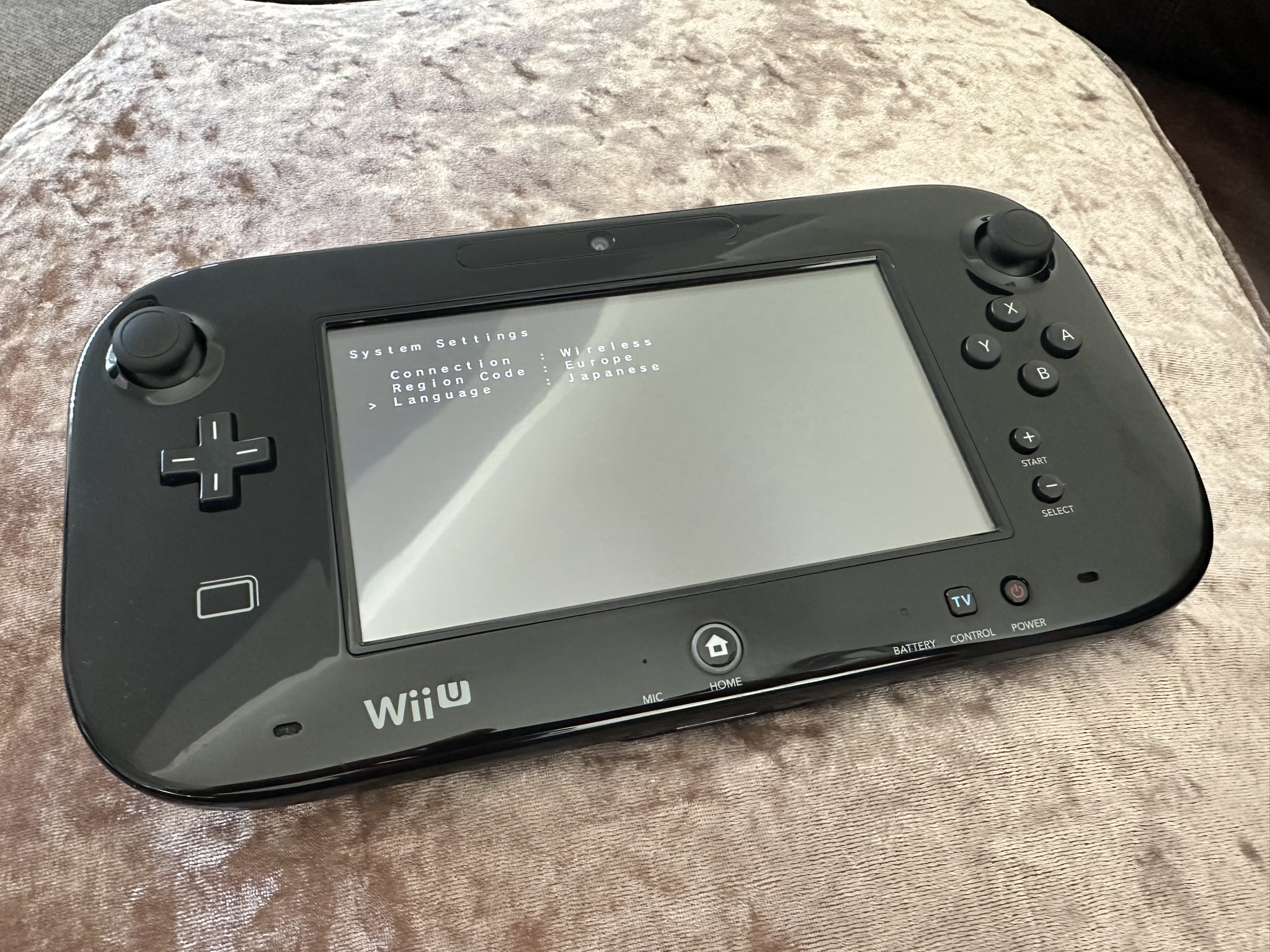
I've patched / flashed the EUR [0005001010043100] firmware to my JPN region GamePad using DRXUtil. This all went fine, and was able to change the region to EUR and also enabled the DK Menu. The question is, how would I go about changing the language?
,
I thought the language would have been part of the DRC_fw blob, i've checked and it was 100% the EUR version I've flashed but when I go into the DK Menu, whilst I can change the region the only option for language is Japanese.


Why would I want to do this, considering its now matching the region of the console anyway? Honestly because the TV remote feature is actually pretty cool / snappy on my Smart TV... but not so great when you cannot read Japanese.

Any help appreciated :)


IMG_2238.JPEG
IMG_2241.JPEG
 
Thank you for your help!! Turns out I was already 99% of the way there, because I'd already region changed this console with EUR firmware it meant I already had the English firmware for the DRC and also the EUR tv remote texture atlas title as well.

All I actually needed to do was go to SCT, and although it already said "English" when I selected it again it then gave me the option to set DRC0 language, after a few minutes the language is set.

Thanks for the help! (response to PM incoming).

IMG_2249.JPEG
IMG_2250.JPEG
 
Can you make written tutorial how to change region using DRXUtil?
What's happened here was a full region change of a Japanese Wii U and GamePad to European (but could have been USA) firmware.

I agree it would be good to write an end-to-end tutorial for this like there is for the 3DS, but most of the information is already out there.

There's already tutorials for...
Changing the console region
Using vWii Decaffeinator to rebuild the vWii from NUS for the consoles region

Once you change the console to your region (I imagine JAP => USA being most common) you then need 2 tools to change the region and/or language of the GamePad.

System Config Tool ("system-config-tool-for-sysnand"): Used to change the language of the Wii U GameController (amongst other things). I cannot share this, I believe the reason why is due to it using some proprietary Nintendo source code. You can find this with a quick Google search and the usual places.

If all you want to do is change the language of the GamePad, this is all you actually need. DRXUtil is only for changing the region in this context - optional thanks to the Aroma DRC Region Free Plugin.

Once the console was region changed, all I needed to do was select "English" again in sysconfigtool and it prompted me to update the DRC0 (gamepad) language as well.

If the console hasn't been region changed, but you want to change the language of the controller (so JAP region, but want English/other language on gamepad), then you can follow these instructions.

DRXUtil / drc-fw-patches: Again, I cannot share this publicly and I could not find a pre-built version either. Creating the environment isn't massively difficult and actually quite well documented, but in any case does require *some* pre-req knowledge of building software in Linux.

Where to find drc_fw.bin
devkitPro (Pacman) Setup
Additional pointers / advice


DRXUtil can then be used to:
  • Flash (patched) firmware
  • Change the region
  • Enable the "DK Menu" - Hold ZL + L when turning on the controller for a debug menu where you can change GamePad region at any time, along with various stats / info.

First you need to compile the utility, then you need to build the patched firmware using the same environment and your original drc_fw.bin file stored on MLC.
 
Last edited by core2lee91,
I've just followed the great step by step to fully change the region of the Wii U, it worked great (JAP to EUR).
Now I came there to fix the last thing by changing the language of the wii U Gamepad and it worked also great with System Config Tool.

My question is: When System Config Tool change the langage of the Gamepad, what does it did exactly ? It's permanent or do I need to do that each time I pair with a new wii ? Does it does something with the firmware ?
 
Did you try to just change the language on the console and then change it back?
 
I've just followed the great step by step to fully change the region of the Wii U, it worked great (JAP to EUR).
Now I came there to fix the last thing by changing the language of the wii U Gamepad and it worked also great with System Config Tool.

My question is: When System Config Tool change the langage of the Gamepad, what does it did exactly ? It's permanent or do I need to do that each time I pair with a new wii ? Does it does something with the firmware ?
Permnent. It upload the language file to pad memory.
This is different from region changing the pad, it can still be paired with other non-aroma consoles from the same region. Tried it myself.
 
  • Like
Reactions: Beber666
What's happened here was a full region change of a Japanese Wii U and GamePad to European (but could have been USA) firmware.

I agree it would be good to write an end-to-end tutorial for this like there is for the 3DS, but most of the information is already out there.

There's already tutorials for...
Changing the console region
Using vWii Decaffeinator to rebuild the vWii from NUS for the consoles region

Once you change the console to your region (I imagine JAP => USA being most common) you then need 2 tools to change the region and/or language of the GamePad.

System Config Tool ("system-config-tool-for-sysnand"): Used to change the language of the Wii U GameController (amongst other things). I cannot share this, I believe the reason why is due to it using some proprietary Nintendo source code. You can find this with a quick Google search and the usual places.

If all you want to do is change the language of the GamePad, this is all you actually need. DRXUtil is only for changing the region in this context - optional thanks to the Aroma DRC Region Free Plugin.

Once the console was region changed, all I needed to do was select "English" again in sysconfigtool and it prompted me to update the DRC0 (gamepad) language as well.

If the console hasn't been region changed, but you want to change the language of the controller (so JAP region, but want English/other language on gamepad), then you can follow these instructions.

DRXUtil / drc-fw-patches: Again, I cannot share this publicly and I could not find a pre-built version either. Creating the environment isn't massively difficult and actually quite well documented, but in any case does require *some* pre-req knowledge of building software in Linux.

Where to find drc_fw.bin
devkitPro (Pacman) Setup
Additional pointers / advice


DRXUtil can then be used to:
  • Flash (patched) firmware
  • Change the region
  • Enable the "DK Menu" - Hold ZL + L when turning on the controller for a debug menu where you can change GamePad region at any time, along with various stats / info.

First you need to compile the utility, then you need to build the patched firmware using the same environment and your original drc_fw.bin file stored on MLC.
I bought a Japanese Wii U which had already been region changed to EUR by the seller but not the Gamepad as He use the old method with UDPIH, So to change the gamepad region I guess I can get the European drc_fw.bin in my console, but how can I get the Japanese drc_fw (to restore it in the future) if my console isn't under Japanese firmware anymore ? Is it possible by any chance to extract the drc_fw currently in the actual gamepad ?
 
The firmware is the same, it's just some flag. Use Aroma, which will allow paring the out o region gamepad. Then you can change the region of the gamepad with DRXUtil
 
The firmware is the same, it's just some flag. Use Aroma, which will allow paring the out o region gamepad. Then you can change the region of the gamepad with DRXUtil
So changing the region via drxutil doesn't require to patch the drc ?
 
Drxutil will flash CA custom firmware which than allows changing the region
 
I meant a custom firmware. With the CF you can change the region however you like. DRXUtil should be everything you need.
 
I meant a custom firmware. With the CF you can change the region however you like. DRXUtil should be everything you need.
Thanks you. Yes I have Aroma. One more question though, if I want to delete the TV remote "memory" for the gamepad make like he isn't linked to any tv yet, how can I do this ? This was the question which made me know drxutil in a first place
 

Site & Scene News

Popular threads in this forum