For people who are having trouble with the game, erasing their save file.
(This currently works for my R4ds pro using Acekard 2 firmware, please reply if it doesn't work/work) (Don't you just hate all these new games with new save files, Geez! GTA, Avalon Code...)
TUTORIAL:
This tutorial will show you how to arm7 patch Valkyrie Profile, using dslazy and an arm7.bin.
Files you will need are:
Arm7.bin File
DSLazy Pack
1: First up, extract the files from dslazy.zip
2: Browse for your NDS rom using the "..."button on the left hand side of the application.
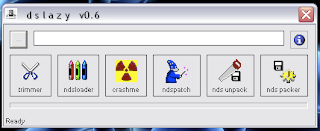 This image taken from aLe(xX)anDro
3: Click on the "NDS Unpack" button.
4: After it has unpacked, the folder "NDS_UNPACK" will open.
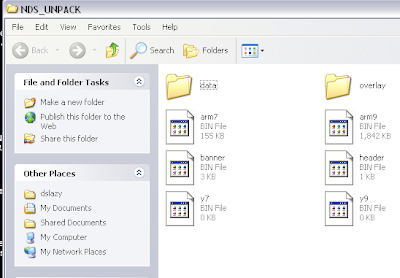
5: Locate the arm7.bin file downloaded and use it to replace the file in the "NDS_UNPACK" folder
6: Now close the folder and click the "NDS Packer" button to "Pack" it all back into the Valkyrie Profile: CotP Rom, I recommend you keep the file separate from the original in case of problems.
7: And then your done! Copy it to your Micro SD card or whatever and play!
8: If your game shows up with a black screen, mine started working after i turned all the (patch) options on my acekard on. But I think it was the auto run. I then went back to my menu and played without autorun.
Hope I helped. This is the right place to put the topic in right??!
(This currently works for my R4ds pro using Acekard 2 firmware, please reply if it doesn't work/work) (Don't you just hate all these new games with new save files, Geez! GTA, Avalon Code...)
TUTORIAL:
This tutorial will show you how to arm7 patch Valkyrie Profile, using dslazy and an arm7.bin.
Files you will need are:
Arm7.bin File
DSLazy Pack
1: First up, extract the files from dslazy.zip
2: Browse for your NDS rom using the "..."button on the left hand side of the application.
3: Click on the "NDS Unpack" button.
4: After it has unpacked, the folder "NDS_UNPACK" will open.
5: Locate the arm7.bin file downloaded and use it to replace the file in the "NDS_UNPACK" folder
6: Now close the folder and click the "NDS Packer" button to "Pack" it all back into the Valkyrie Profile: CotP Rom, I recommend you keep the file separate from the original in case of problems.
7: And then your done! Copy it to your Micro SD card or whatever and play!
8: If your game shows up with a black screen, mine started working after i turned all the (patch) options on my acekard on. But I think it was the auto run. I then went back to my menu and played without autorun.
Hope I helped. This is the right place to put the topic in right??!