Homebrew Update to Sysnand toVer. 9.2.0

  • Thread starter Thread starter toby1978
  • Start date Start date
  • Views Views 9,368
  • Replies Replies 138

toby1978

Well-Known Member
Member
Joined
Jan 31, 2016
Messages
133
Reaction score
8
Trophies
0
Age
48
XP
190
Country
United States
How can I go about doing this without a game! I am having issues with some cfw stuff it seems because I am not on Ver 9 or up! My main problem is that I am trying to get ctrbootmanager to work so my 5 year old can turn on my 3ds and just play the games I have. I am getting Error:Couldnt Load arm9 payload. Can someone please help me with this? thanks
 
How can I go about doing this without a game! I am having issues with some cfw stuff it seems because I am not on Ver 9 or up! My main problem is that I am trying to get ctrbootmanager to work so my 5 year old can turn on my 3ds and just play the games I have. I am getting Error:Couldnt Load arm9 payload. Can someone please help me with this? thanks
What version are you at? Ctrbootmanager only works for 9.0+ (since it needs menuhax and themes were introduced in 9.0)
If you don't want to use a game and have access to homebrew, you can use rxtools to install sysupdater cia on your sysnand and then use sysnand to update to 9.2
 
Last edited by escequi,
I am on ver 7.2.0 right now! How do I get what you are talking about? I need to update and do not have any games that have it!
 
Then get sysupdater and update your system with it. It's the same process as you see listed in all the downgrade guides, except that once in the app you press A to upgrade instead of Y to downgrade.
 
Do I need something other than the sysupdater? I have that already downloaded.

Hopefully I didn't come too late

DONT DO THAT! YOU'LL BRICK YOUR SYSTEM

follow the steps here: (taken from This Thread)

How to Update your 3DS/2DS to 9.0 or 9.2
If you want to boot rxTools as soon as you turn on your 3DS, then you need to set-up Menuhax; and to use Menuhax, you need to be on 9.0 - 9.2 firmware.
Warning: This can brick your 3DS if done incorrectly! Be sure that you follow the instructions carefully!

Requirements:
  • BigBlueMenu installed in sysnand (Section 4 if you don't have Gateway or Ninjhax) OR any other cia installer on Sysnand.
  • A rxTools 3.0 nightly (preferably the one linked in Section 1)
Let's get started.
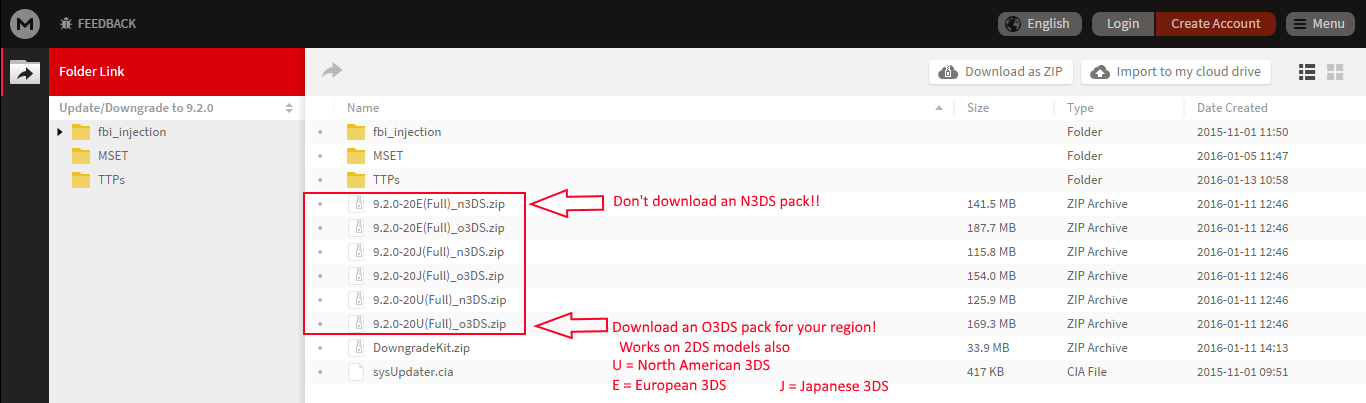
  1. See AidanLumina's tweet here and click Files for downgrade/manual update.
  2. Download one of the O3DS 9.2 packs
  3. Picture
    h535.png
  4. Once downloaded, open the archive and find the "updates" folder; place it on your SD card. There should be many cia files in that folder.
    • Example: SD:/updates/0004013000008003.cia
  5. Download Sysupdater
  6. Open the archive and put sysUpdater.cia on your SD card
  7. Insert your SD card in your 3DS
  8. Hold L while launching rxTools to get into the rxTools menu. If using rxTools 2.5.2, hold R instead.
  9. Press DPAD RIGHT until you highlight ADVANCED OPTIONS, then press A. Skip this step if using rxTools 2.5.2
  10. Go down to DEVMODE or PASTA MODE and press A
  11. After a few seconds, you should now be in sysnand; firmware spoofing is disabled but cias can still be launched in this mode.
  12. Launch you CIA installer
  13. Install sysUpdater.cia (Destination: SD if using FBI)
  14. Once installed, press HOME to see sysUpdater wrapped as a gift; unwrap it.
  15. Launch sysUpdater
  16. sysUpdater will ask you if you are sure you want to go ahead with the update; choose to accept it.
    • It will also tell you that you shouldn't be in Gateway mode, or have firmware spoofing. Do not worry about this, DEVMODE / PASTA MODE has no firmware spoofing, so sysUpdater will work as intended. Just be absolutely sure you are in DEVMODE / PASTA MODE (line 13), not RXMODE SYSNAND!
  17. Wait for sysUpdater to finish. When it is done, your 3DS will reboot into 9.0 or 9.2 firmware! You can now follow the steps to use Menuhax if you'd like.
If you can't find the 9.2 pack in AidanLumina's MEGA folder
  1. Click HERE
  2. Click the CIA Format DLC's, Themes & Updates [Archive] result
  3. Click View Full Version : CIA Format DLC's, Themes & Updates at the top of the page
  4. Find the thread titled [MEGA] [CIA/BIN] MSET 4.X & 6.X backups, Browser backups, Update packs (All Regions)
  5. Scroll down to the section titled Updates
  6. Download either the 9.2 modified update pack for your region, or a 9.0 or 9.2 Full Update Pack for you region

 
I have CFW already? I need to upgrade from Ver 7.2.0 to Ver 9.2.0. so I can use Ctrbootmanager which will only work with Ver 9 and up
 
borrow a copy of smash bros from a friend to update to 9.2.

best and safest way ever.
 
So I managed to use the systupdater and it said success but I am still on Ver 7.2.0! Any suggestions?
 
Last edited by toby1978,
Hopefully I didn't come too late

DONT DO THAT! YOU'LL BRICK YOUR SYSTEM

follow the steps here: (taken from This Thread)
Ah, good thing you came in with the save there. For some reason I thought sysupdater would work fine for upgrading sysnand. Hadn't heard of it being a brick risk before. ...well, at least not in the context of upgrading. Most of the issues people report with it these days are about downgrades.
 
Ah, good thing you came in with the save there. For some reason I thought sysupdater would work fine for upgrading sysnand. Hadn't heard of it being a brick risk before. ...well, at least not in the context of upgrading. Most of the issues people report with it these days are about downgrades.
It should, I think he misunderstood thinking you meant to run it from CFW sysNAND.
Though the memchunkhax2 version of sysupdater is risky whether used for downgrades or upgrades, but even more so for downgrades.
 
I am not trying to run it from sysnand. Sydupdater is being ran from my emunand, and its tells me its a success but does not change my sysnand Version.
 

Site & Scene News

Popular threads in this forum