Tutorial  Updated

Trinket Internal Install.

Here's A Guide To Installing The Trinket M0 Into The Switch.

Program The Trinket Before You Remove The Usb Port, Saves You Doing It After You Complete The Install.

First Thing To Do Is Remove The Usb Port From The Trinket, If You Have A Hot Air Wand Then Use That To Remove The Port It Will Reduce The Risk Of Damage To The Pads.
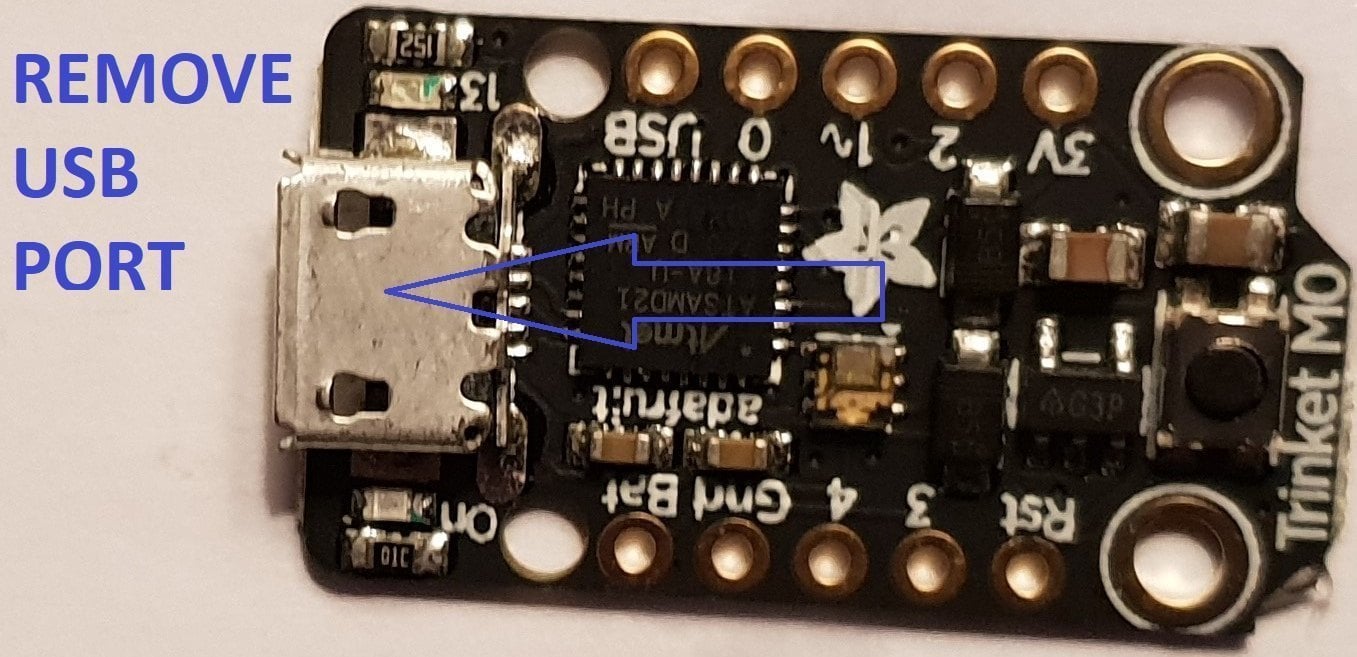
usb intact.jpg


Now That The Usb Port Has Been Removed You Want To Solder Wire To The Data Pads, White = Data- And Green Data+ In This Guide.

Now Solder Wire To The Bat Pad = Red, Gnd Pad = Black, Pad 4 = Orange & Pad 3 = Brown In This Guide.

Also Remove The Resistor Next To The Ppower Led Mark Out In Purple In This Guide.
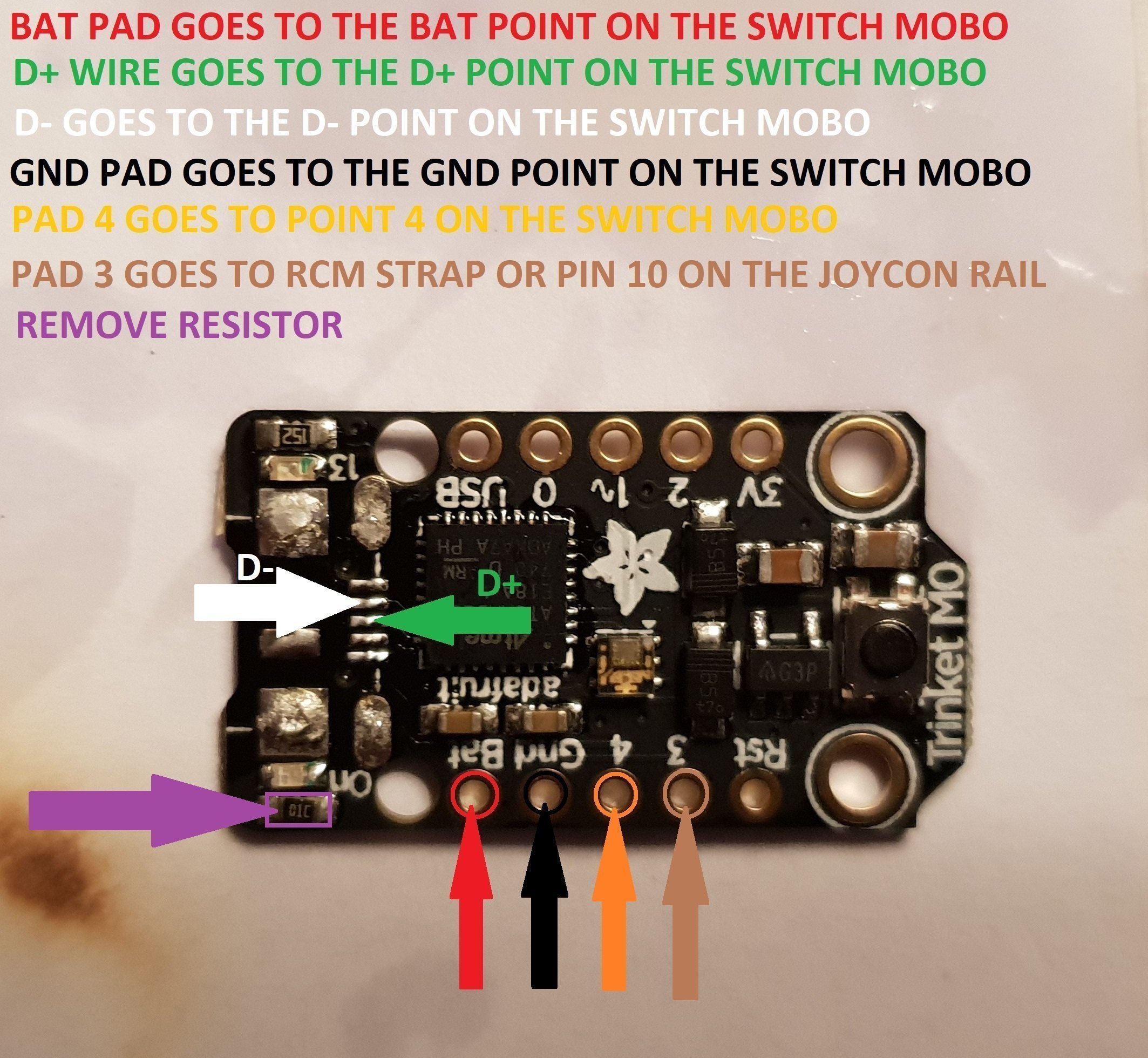
Trinket Points.jpg


When You Have The Trinket All Prepared, You Can Now Proceed To The Install To The Switch.
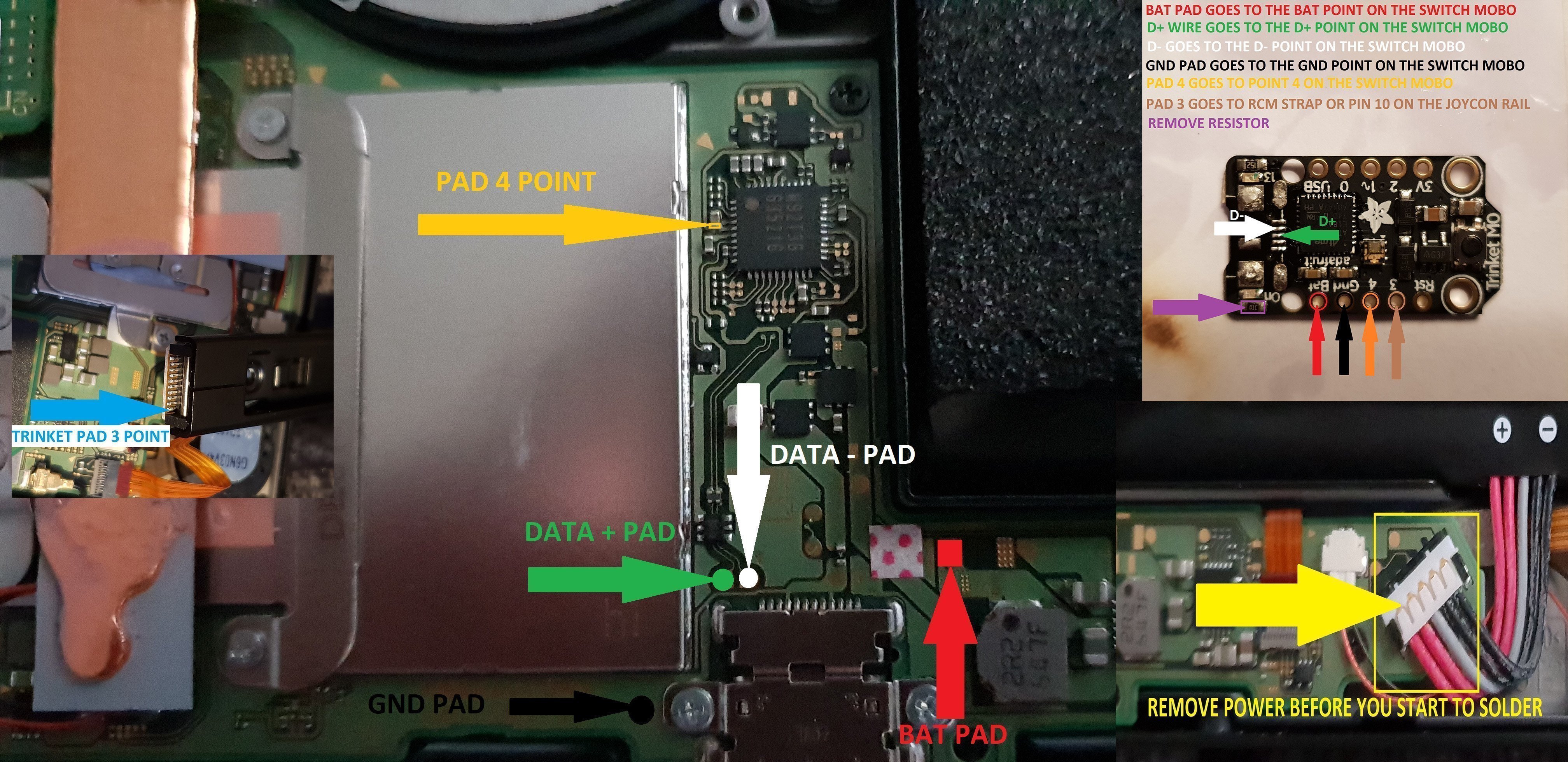
trinket install points.jpg


Once The Install Is Completely Done Then Clean Up The Points You Have Soldered To Using Isopropyl And Cotton Buds/Q-Tips.
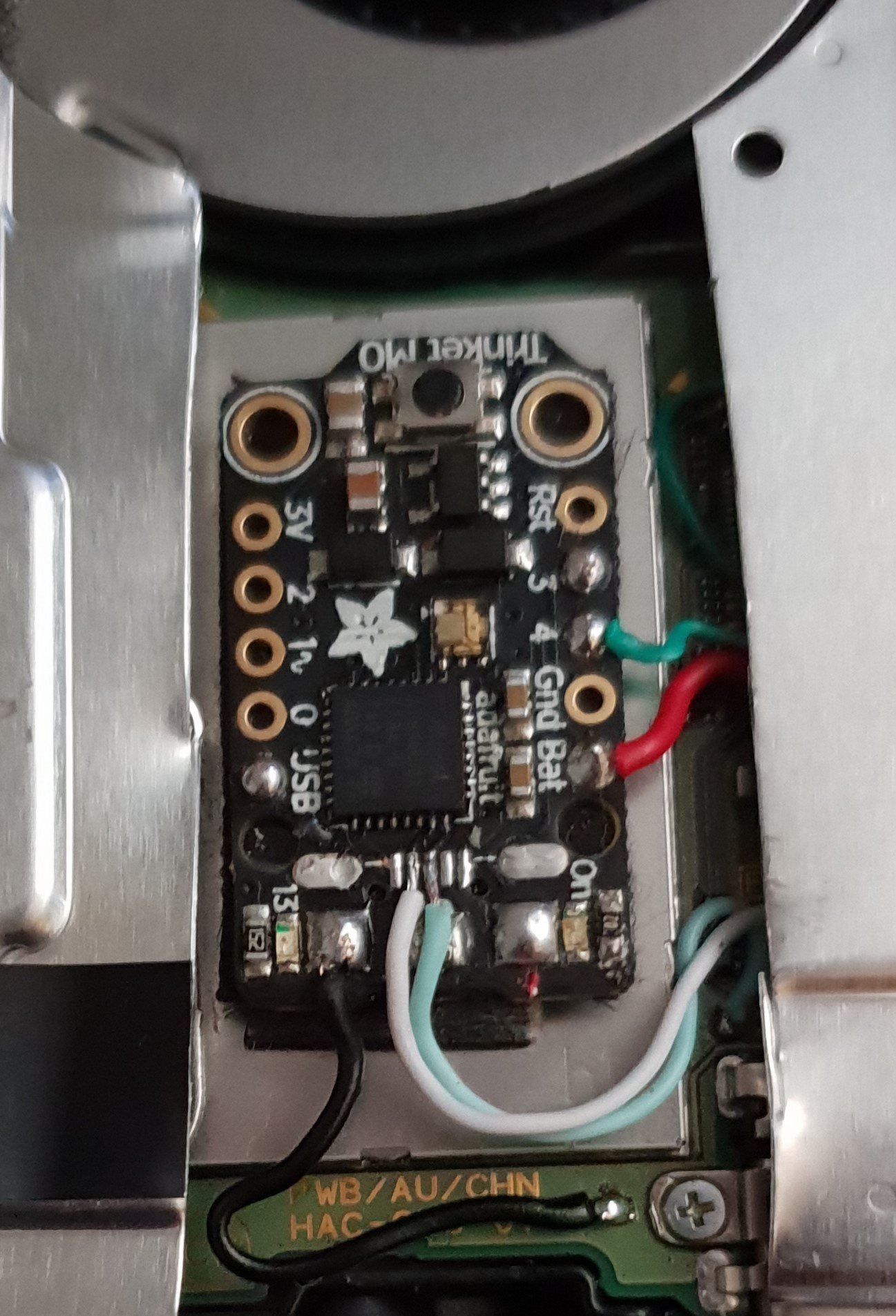
Finished.jpg


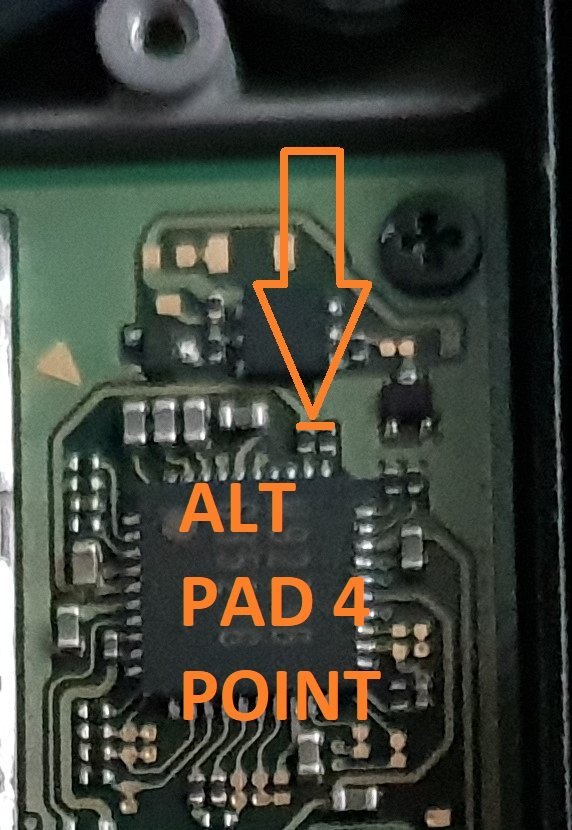
Alternative Point For Pad 4.

Altternative Pad 4 Point.jpg


Alternative Points For Joycon Rail Pin 10.

If You Decide On Using This Alternative Point Then Use Enamel Coated Jumper Wire 0.10mm.
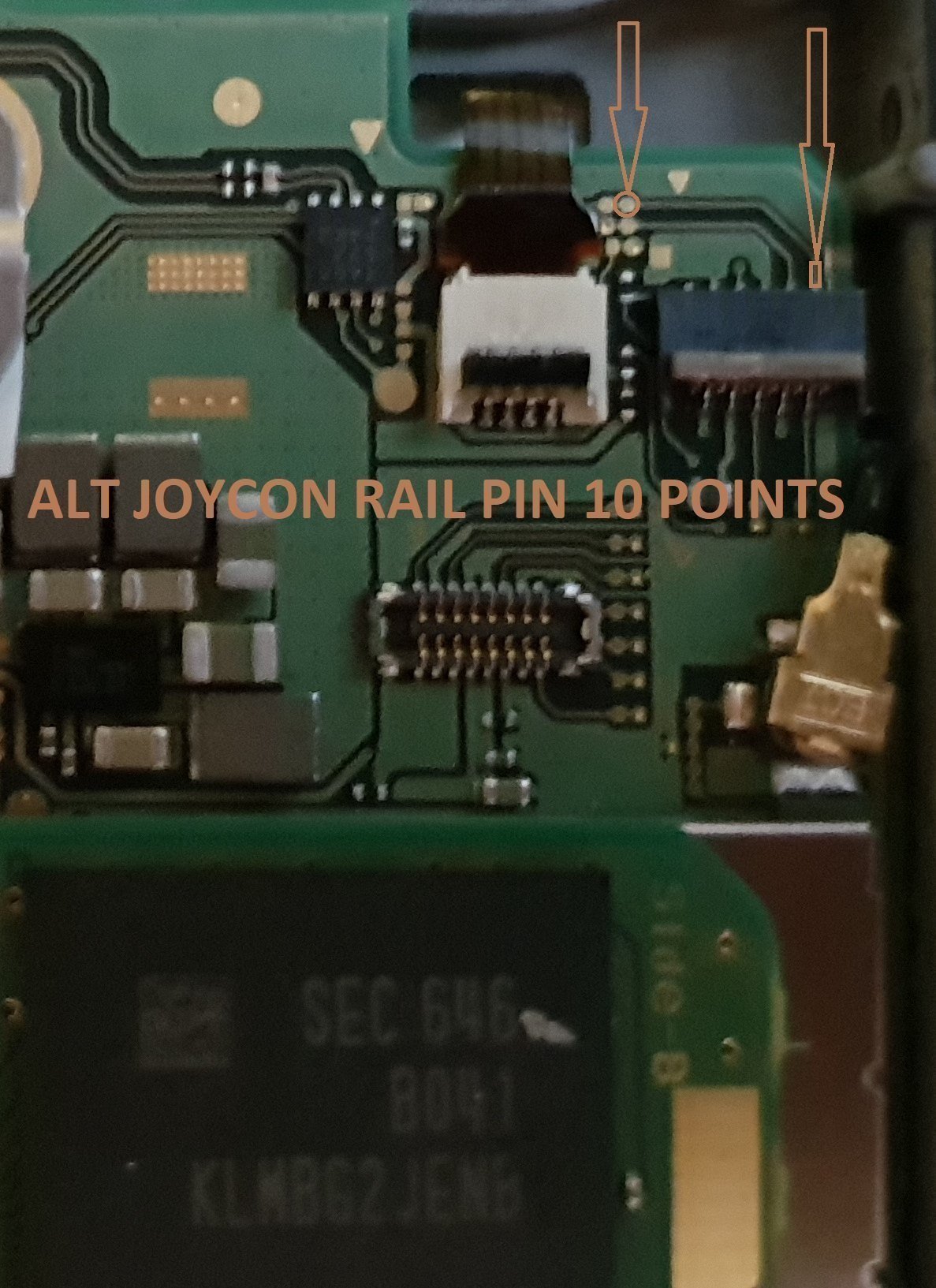
Alt Joycon Rail Pin 10 Point.jpg


Remember Take Your Time It's Not A Race lol. Rushing Can Lead To Mistakes.

Tools Required.

Kynar Wire 30 AWG.
Soldering Iron.
Hot Air Wand For Usb Port Removal(Optional)
Isopropyl.
Cotton Bud/Q-Tips.
Flux.
Solder.
Enamel Jumper Wire (Optional)


Thanks And Credit Goes To Xboxexpert For This Solution.

I Think That Covers Everything.

EDIT..

here's another method for the install of the trinket, this method does away with the pad 4, as some may find it tricky to solder to the cap used on the mobo.

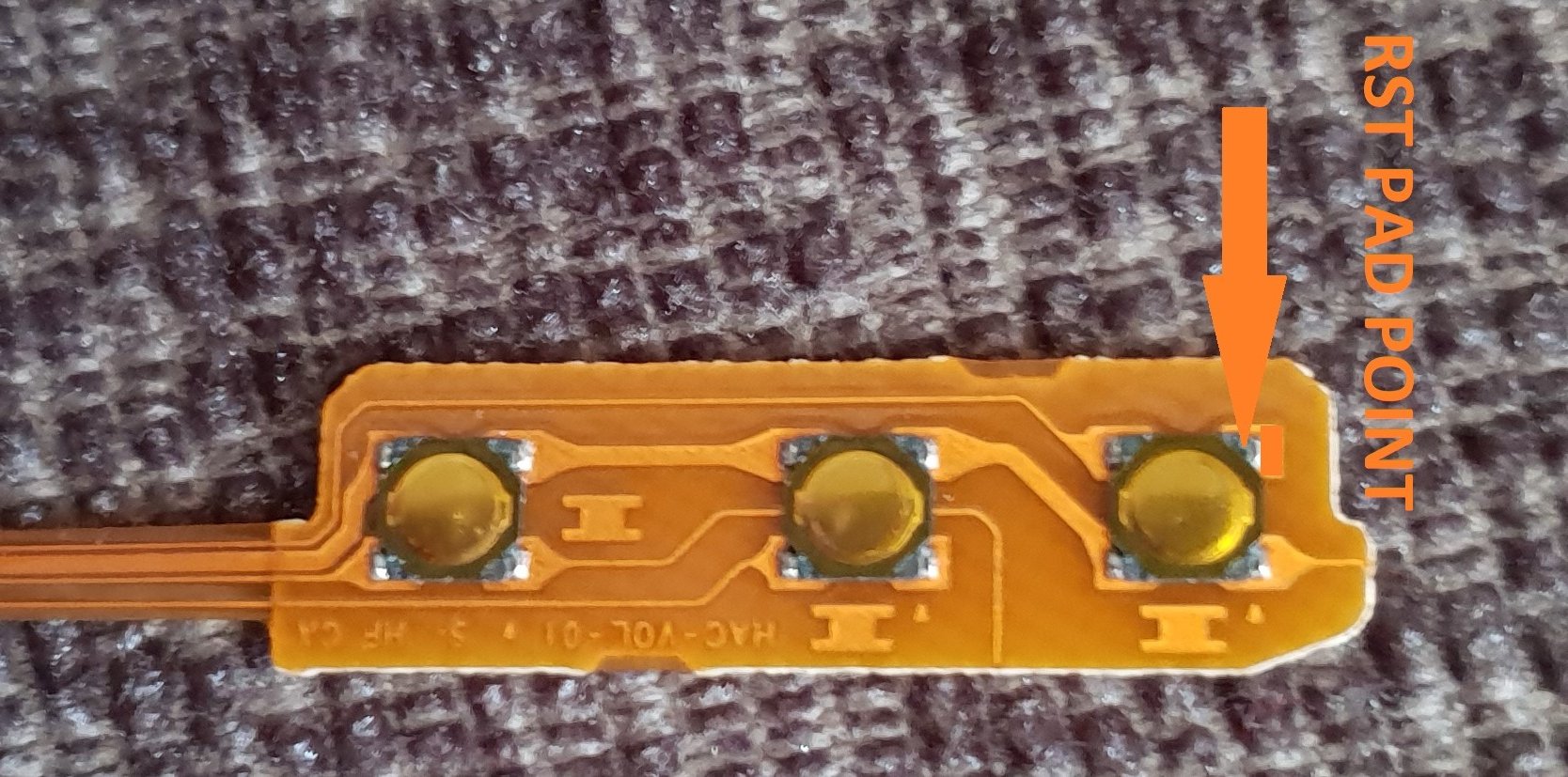
the rst pad is used instead and the wire is linked to the power button, Also this has a bonus that you can double press the power button to put the trinket into boot loader mode for uploading a new payload.

of course you don't have to use the rst pad at all, you can't just press power button and volume up button, then press reset button for rcm mode.

this method should be ok for the novices.

install at your own risk.
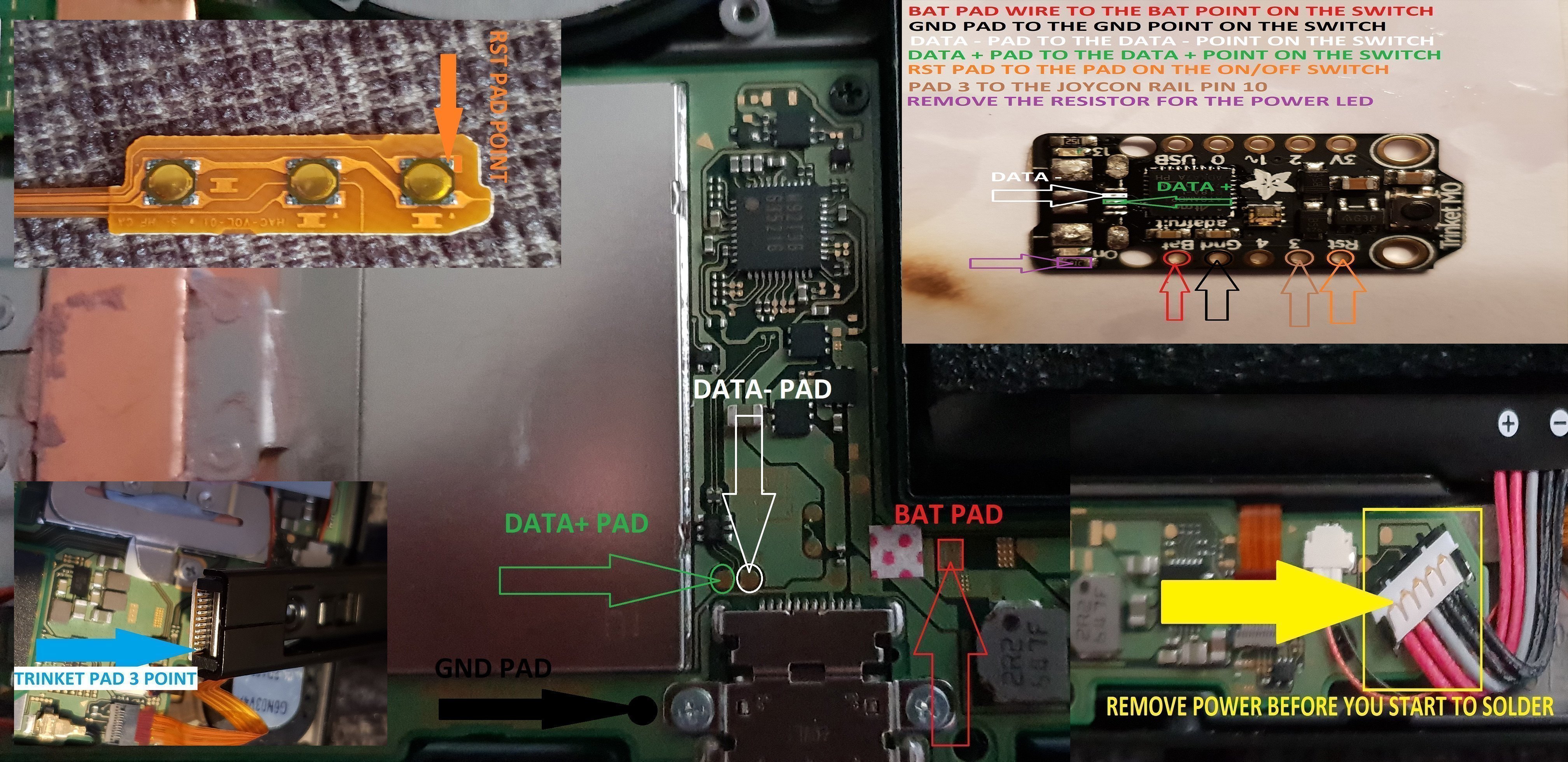
another install.jpg


the pad on the power button to use.

power button point.jpg


i have one more method to try but I really think this one is not to bad method.

the more methods the better I say, of course to try and make it as easy as possible for pros and novices.

EDIT...
another method for the install of the trinket.

this method is basically same as all other methods, just a different points uses for the bat pad and rst pad.

this install will allow you to have the trinket power off when you fully power off the switch.

double press the reset button on the trinket to get into boot loader mode, this may take a couple of attempts to do.

the payload that you use already will work with this method no need for new ones.

here's the diagram for method 3, you could possibly have this as a 4 wire install, if you install auto rcm mode, but as my sd card module port is buggerd I couldn't test that out.
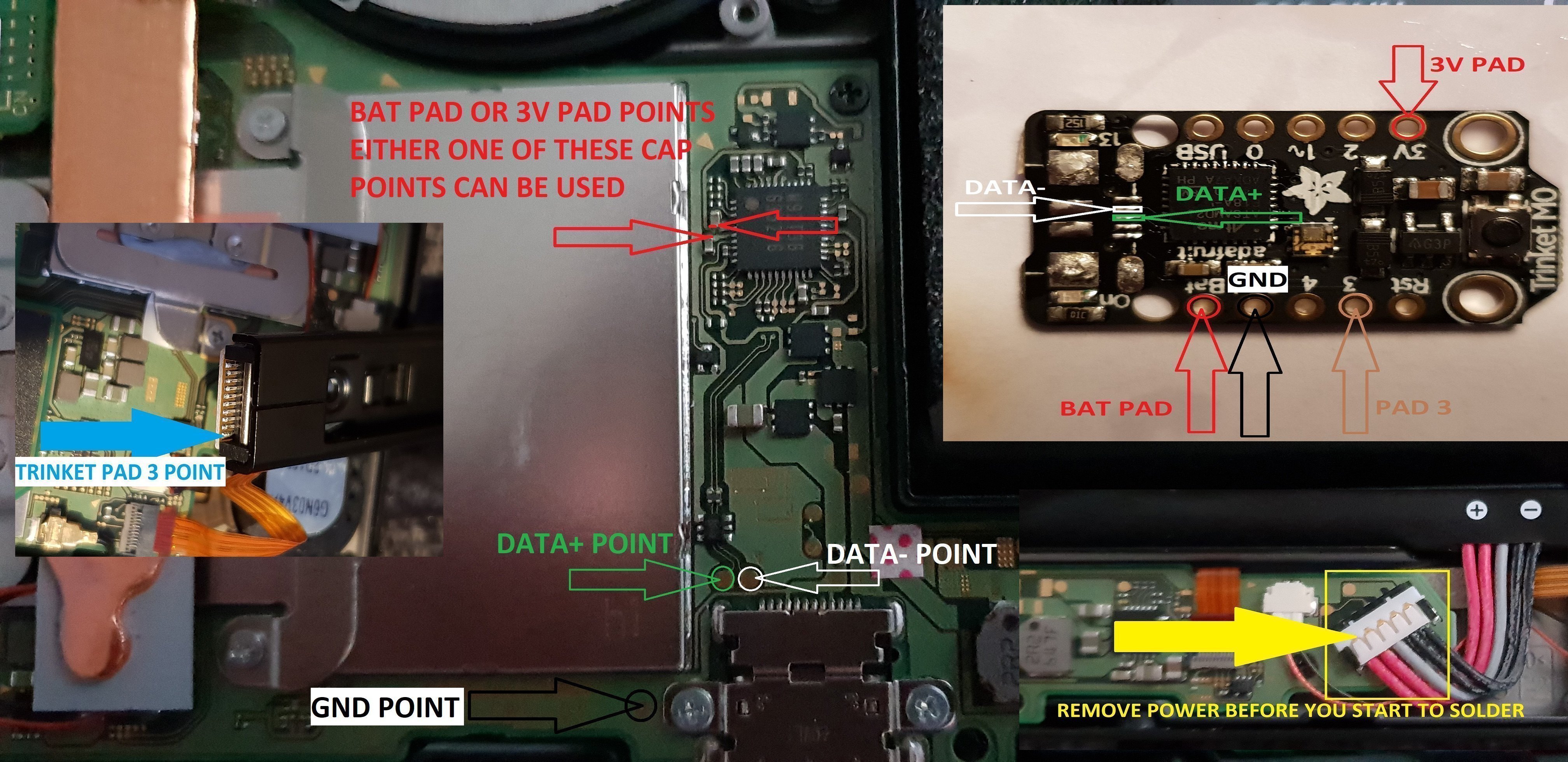
twinket power off.jpg


ok it seems method 3 needs auto rcm installed for it to work without the need to use the rst pad

so for them that don't want to use auto rcm mode then solder a wire from rst pad to the point on the power button, and use pad 3 to the pin 10 on the joycon rail or one of the alt points on mobo.

beware the alt points are small so use at your own risk.

ok anyone with changing issues test these 2 points, you should get 5v on the usb port side, and around 3.2v on the switch side.

if your getting the volts on the switch side that are fluctuating up & down then replace the part with the v on top it's a diode, you want one that fits so the actual size is either 0402 or 0603 in dimension (i'm using 0402/0603 as an example for size purpose only)

around page 16 has more info about this component..

dont come moaning if you damage your console doing this install, i'm not responsible for you opening or taking a soldering iron to your console.
you do this at your own risk any damage is down to yourself.
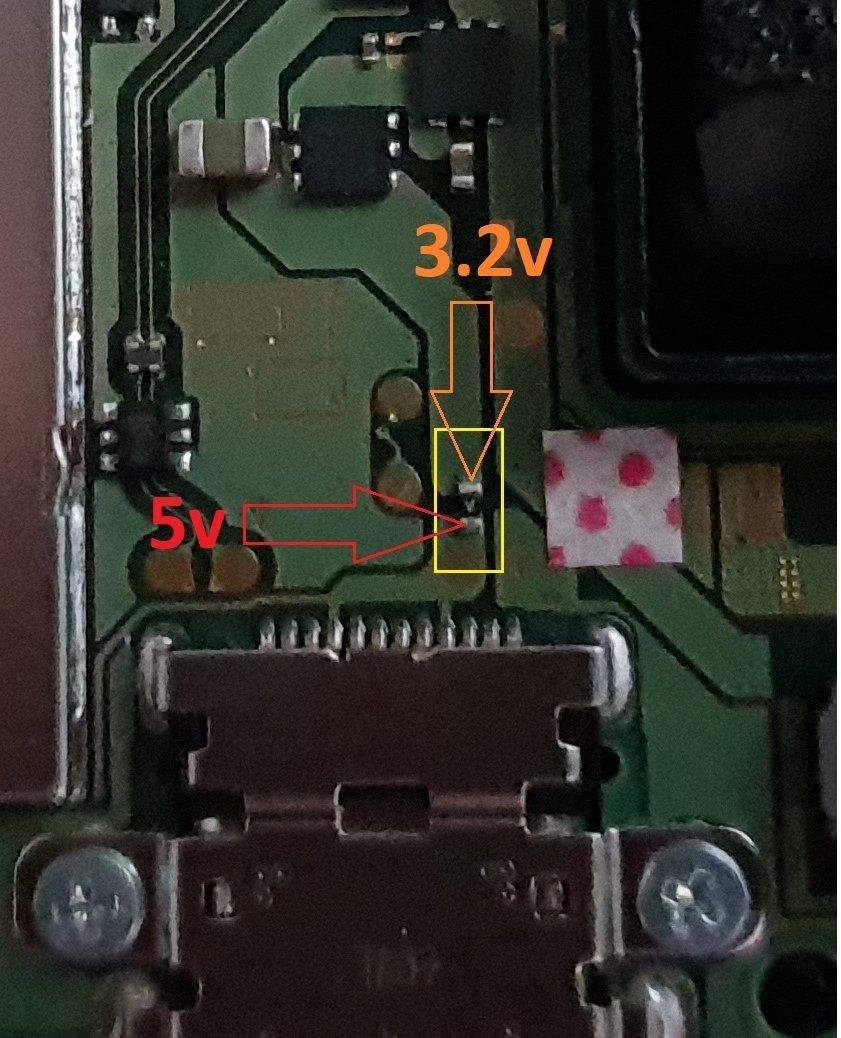

charger_issue_volts.jpg


another thing if your trinket starts to get very hot to the point you can't touch it, then the atmel ATSAMD21E18A-U ic is on it's way out, so you will need to replace the ic or just replace your trinket.

at some point it wont power up after this has happened.
1 = gets very hot.
2 = reset starts to become tempermental .
3 = dead
4 = fix replace the atmel ATSAMD21E18A-U ic

edit

added uf2 drag and drop files for r4 trinket gemma dongles or for a 4 wire internal install.

atmosphere
hekate 4.2
Sxos
rajnx
reinx
 

Attachments

Last edited by M-O-B, , Reason: added updated uf2 file.
Yeah that's what I found out right away too back when we were trying out different wiring options, it's either a simple install with AutoRCM or harder install without (but then there's the chance of a crash etc going to OFW).

I tried going off the joycon power rails early on too but it doesn't init fast enough either.

I may have a simple method without the need for auto rcm.

but until I have personally tested it then I'll not post info.

maximum 4 wires if it actually does work...
 
  • Like
Reactions: Deleted User
I may have a simple method without the need for auto rcm.

but until I have personally tested it then I'll not post info.

maximum 4 wires if it actually does work...

Very interesting...

Waiting. :)
 
if it works as I hope then it be perfect lol.

while I remember your multi uf2 files has it got the ino file or just uf2

Sounds good, I've been following this thread for a while.
Im about to mod my switch soon and deciding between one of your methods or mattyrogs methods, but i'd like to see your last perfect method, any ETA? :)
 
Hi, I need some help with some mess I made trying to install my Trinket M0.

A week ago Aug 7th I finished installing it and it worked fine the first time as I could boot CFW by pressing vol+ and power. After I finished closing the Switch, it didn't woke up so I had to press power for 12sec to power it off.
When I turned it on again it got stuck in the nintendo switch logo, I turned it off, opened it again and found a red permanent led light in the trinket, unplugged battery and tried again. This time I got the Blue Screen of Death!!! Scared as hell, removed everything and kept trying but the blue screen still appeared and no hope or solution could be found on internet. The only thing I could relate to my condition was a possible M92T36 failure which I expexct to arrive in 2 or 3 weeks from now.

A technician friend of mine helped me removing the cap where trinket 4 conection was made because we thought it was damaged but it was ok. We left the switch without it because he told me it just work as a filter and that it could work without it (I don't know if it's true but I guess it is). He also repaired the D- pad I lifted trying desperately to remove the trinket.

Two nights ago , I wondered if I could connect as RCM using the jig + hold vol+ and plug the USB (usually enough to get RCM mode for TegraRCMGUI) but it didn't work until I held also Power button. I injected the payload and could boot to the SXOS menu but after trying to boot either OFW and CFW i got stuck in the Nintendo logo. After just a couple of tries, blue screen of death again.

Last night I tried again and at the first try (without RCM mode) it booted to OFW! I could play! But it didn't charge by charger or dock and after I pressed power it went to sleep and didnt wake up. Again stuck in nintendo logo.

Tonight the same thing happened, I could boot and play but just once. Stuck in logo but No blue screen!!!
I checked today the diode and I get 5V at both sides. I'll try to change it tomorrow.

Any idea what is going on with my Switch or what else should I check?

Summary:
1. Cap removed. I will reinstall it tomorrow.
2. D- pad Repaired
3. Diode with 5V at both sides. I will replace it tomorrow.
4. Stuck in logo at boot (once in a while boots ok)
5. No charge
6. Apparently no more Blue Screen of death. Look like it's healing slowly by itself...
7. A little bit of hope after number 6.
8. Waiting for M92T36
9. For being in RCM is not enough to plug usb, I need to hold Power.

If someone took the time to read all of this. Thanks, thanks a lot!
 

Attachments

  • 20180809_180507.jpg
    20180809_180507.jpg
    1.5 MB · Views: 269
  • 20180815_234915.jpg
    20180815_234915.jpg
    1.1 MB · Views: 260
  • 20180815_235302.jpg
    20180815_235302.jpg
    1.3 MB · Views: 268
  • Like
Reactions: FXDX
Sounds good, I've been following this thread for a while.
Im about to mod my switch soon and deciding between one of your methods or mattyrogs methods, but i'd like to see your last perfect method, any ETA? :)

no eta as my kid has my personal switch and is on holiday.


Hi, I need some help with some mess I made trying to install my Trinket M0.

A week ago Aug 7th I finished installing it and it worked fine the first time as I could boot CFW by pressing vol+ and power. After I finished closing the Switch, it didn't woke up so I had to press power for 12sec to power it off.
When I turned it on again it got stuck in the nintendo switch logo, I turned it off, opened it again and found a red permanent led light in the trinket, unplugged battery and tried again. This time I got the Blue Screen of Death!!! Scared as hell, removed everything and kept trying but the blue screen still appeared and no hope or solution could be found on internet. The only thing I could relate to my condition was a possible M92T36 failure which I expexct to arrive in 2 or 3 weeks from now.

A technician friend of mine helped me removing the cap where trinket 4 conection was made because we thought it was damaged but it was ok. We left the switch without it because he told me it just work as a filter and that it could work without it (I don't know if it's true but I guess it is). He also repaired the D- pad I lifted trying desperately to remove the trinket.

Two nights ago , I wondered if I could connect as RCM using the jig + hold vol+ and plug the USB (usually enough to get RCM mode for TegraRCMGUI) but it didn't work until I held also Power button. I injected the payload and could boot to the SXOS menu but after trying to boot either OFW and CFW i got stuck in the Nintendo logo. After just a couple of tries, blue screen of death again.

Last night I tried again and at the first try (without RCM mode) it booted to OFW! I could play! But it didn't charge by charger or dock and after I pressed power it went to sleep and didnt wake up. Again stuck in nintendo logo.

Tonight the same thing happened, I could boot and play but just once. Stuck in logo but No blue screen!!!
I checked today the diode and I get 5V at both sides. I'll try to change it tomorrow.

Any idea what is going on with my Switch or what else should I check?

Summary:
1. Cap removed. I will reinstall it tomorrow.
2. D- pad Repaired
3. Diode with 5V at both sides. I will replace it tomorrow.
4. Stuck in logo at boot (once in a while boots ok)
5. No charge
6. Apparently no more Blue Screen of death. Look like it's healing slowly by itself...
7. A little bit of hope after number 6.
8. Waiting for M92T36
9. For being in RCM is not enough to plug usb, I need to hold Power.

If someone took the time to read all of this. Thanks, thanks a lot!

place the cap between the bat and gnd pads on the trinket, this will do same job as being in it's normal place.

20180810_231504.png


the diode shouldn't be 5v on both sides, remove the diode and check the volts on the switch side.

rcm mode you press power + volume up button this is normal.

well it's how I've always done it.

did you remove top or bottom cap, the cap is needed it won't do jack shit if it is missing.

as I recall one of them will not let the dock work if it is not there.

if you actually read though the thread a lot of this stuff is covered.

especially the cap and diode.

freezing could be a heat issue or maybe your sd card.

I alway tend to go for heat related first since you strip the console, then never replace the compound, so replace the thermal paste first.

then sd card files second.
 
Last edited by M-O-B,
thanks to mattytrogs for the multi payload he posted in his thread I found a bit of time to have a mess about and edit it a small bit, replaced the payload.h with one with sx os,hekate and ReiNX.

red = sx os
white = hekate/atmosphere
blue = ReiNX


I did try to add rajnx but the flash on the trinket is to small, even without sx os the flash was to small.

I think I'll try find something with bigger flash to see if have any joy.

only thing extra I added was a button to pad1 in trinket going to gnd on my cell battery breakout board.
 
had another mess about with this dongle code, and added multi payload to it with bits from mattytrogs multi source so thanks to him for the idea and bits from his code which I used for this, and the 2 guys for the original 2 codes which I used, can't remember who they was now

have RajNX disabled untill i or someone finds a chip with bigger flash that'll work.

multi-payload.jpg


rajnx disabled.jpg


only one problem is the trinket flash is to small for all 4 payloads.

sxos/Hekate/ReiNX/RajNX
you get flash overflowed by 102732 bytes.

sxos/Hekate/RajNX
you get flash overflowed by 32332 bytes.

Hekate/ReiNX/RajNX
you get flash overflowed by 75084 bytes.

sxos/ReiNX/RajNX fits and works fine
sxos/Hekate/ReiNX fits and works fine.
sketch uses 234060 bytes (89%) of program storage space.

maximum is 262144 bytes.

so I'm hoping to try and find something with a bigger flash that will work and around the same dimensions as the trinket or smaller.

I have it set as below but can be changed to what colour you prefer.

sxos = red
hekate = white
ReiNX = blue


pad 1 on trinket to gnd on trinket or any gnd point for the dongle.

20180825_052449.jpg
 
Last edited by M-O-B,
here's a couple of dongle-v2 uf2 files drag and drop.

gemma/trinket A0/1 is the payload change pad.

itsybitsy A0 is payload change pad.

have not tested the itsybitsy one as I have not got one to hand.

should work though as it's exactly the same as the trinket/gemma code just with a couple of add extra line added to code.

red = sxos
white = hekate
blue = ReiNX

button from A0/1 to a gnd point on the trinket.
 

Attachments

here's a couple of dongle-v2 uf2 files drag and drop.

gemma/trinket A0/1 is the payload change pad.

itsybitsy A0 is payload change pad.

have not tested the itsybitsy one as I have not got one to hand.

should work though as it's exactly the same as the trinket/gemma code just with a couple of add extra line added to code.

red = sxos
white = hekate
blue = ReiNX

button from A0/1 to a gnd point on the trinket.
hi can i use this on r4 donggle?
and is the henkate use the 4.0? or 3.2?
 
hi can i use this on r4 donggle?
and is the henkate use the 4.0? or 3.2?

it's hekate 4.0 that's used, as for the r4 dongle I couldn't say it will work on that as I have no clue what chip is used in it, not even look into the r4 dongle tbh.

if it uses the same chip as the trinket mo or itsybitsy then it should work but would depend on if it has a pad for the A0/1 payload change.
 
op updated and replaced all my old files with the new ones I use.

Updated Payload INO Files These Are Now All In One, So You Enable The Payload You WantTo Use, And Disable The 3 You Don't Want To Use.

the only UF2 d&d files are for the multi payload gemma/trinket

the itsybitsy UF2 File has not been tested as of yet as I don't have one to hand.

gemma/trinket and itsybitsy files are for dongle only at moment as.

pad A0 = payload change on gemma and itsybitsy.

pad 1 = payload change on the trinket.

the multi can only have 3 payloads enabled due to flash on the trinket/gemma & itsybitsy flash not being big enough.

red = sxos
white = hekate
blue = ReiNX

demo of the multi payload on my trinket.


demo if multi payload working.


ReiNX
RajNX
SXOS
Hekate 4.0
 
it difrend :(

r4 use this
UF2 Bootloader v2.0.0-adafruit.5-dirty SFHWRO
Model: RCM_DONGLE
Board-ID: SAMD21E18A-RCMD-v0


can u make file henkate only payload?
 
it difrend :(

r4 use this
UF2 Bootloader v2.0.0-adafruit.5-dirty SFHWRO
Model: RCM_DONGLE
Board-ID: SAMD21E18A-RCMD-v0


can u make file henkate only payload?

sure here you go uf2 drag and drop files and should work on the r4 dongle also from that info you posted.

hekate 4.0 only
 

Attachments

  • Like
Reactions: ganons
just picked up a cheapo switch stand to experiment with, so this is the out come of the experiment.


shall look for a better stand plus look into a dock version also, but I really need to find a better chip with a bigger flash now as the trinket just ain't up to the job I want it for now.
 
this will do me multi4 payload for trinket dongle, untill I get something with a bigger flash.

 
Hello, great tutorial btw, i have done it on a bunch of systems so far, just wondering, is there a way to bypass having to press volume up and just always boot into cfw without using autorcm, like jumping the power button to the volume up or something like that?
 
Hello, great tutorial btw, i have done it on a bunch of systems so far, just wondering, is there a way to bypass having to press volume up and just always boot into cfw without using autorcm, like jumping the power button to the volume up or something like that?

Only if you keep the trinket powered all of the time. Even when off. It cannot init fast enough to beat the Ninty bootloader from a powered-off cold boot.
 

Site & Scene News

Popular threads in this forum