Tutorial  Updated

Trinket Internal Install.

Here's A Guide To Installing The Trinket M0 Into The Switch.

Program The Trinket Before You Remove The Usb Port, Saves You Doing It After You Complete The Install.

First Thing To Do Is Remove The Usb Port From The Trinket, If You Have A Hot Air Wand Then Use That To Remove The Port It Will Reduce The Risk Of Damage To The Pads.
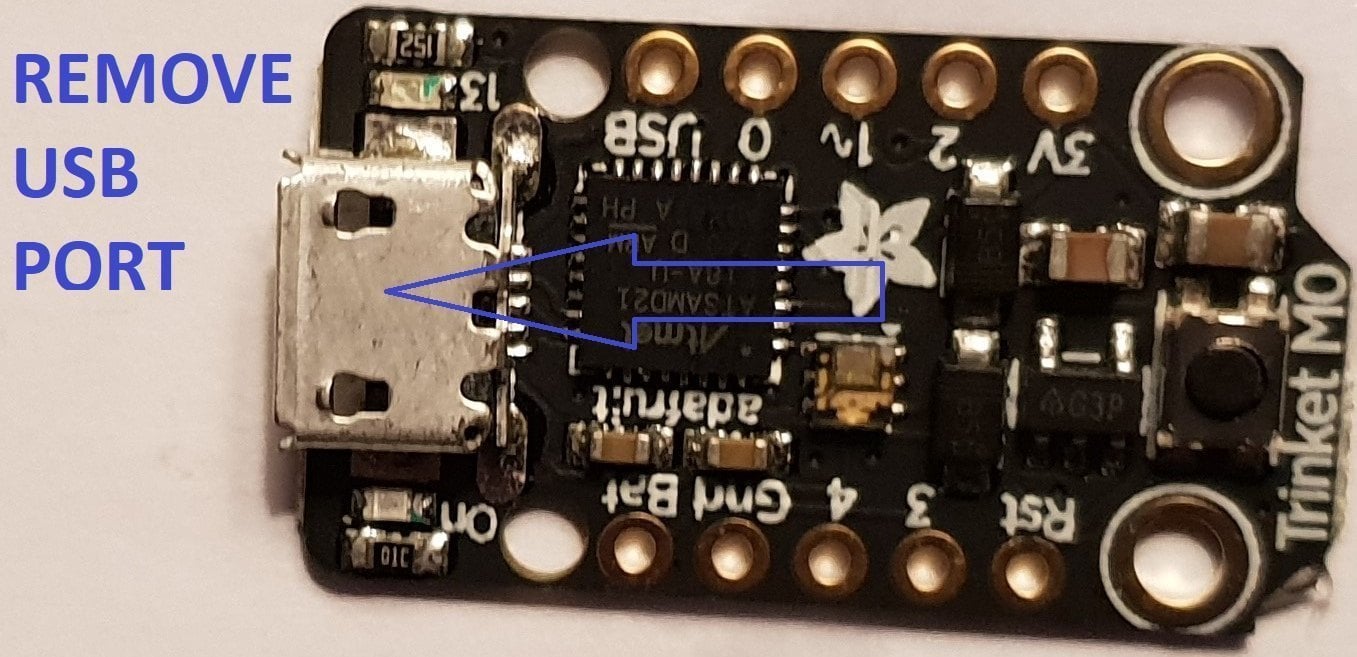
usb intact.jpg


Now That The Usb Port Has Been Removed You Want To Solder Wire To The Data Pads, White = Data- And Green Data+ In This Guide.

Now Solder Wire To The Bat Pad = Red, Gnd Pad = Black, Pad 4 = Orange & Pad 3 = Brown In This Guide.

Also Remove The Resistor Next To The Ppower Led Mark Out In Purple In This Guide.
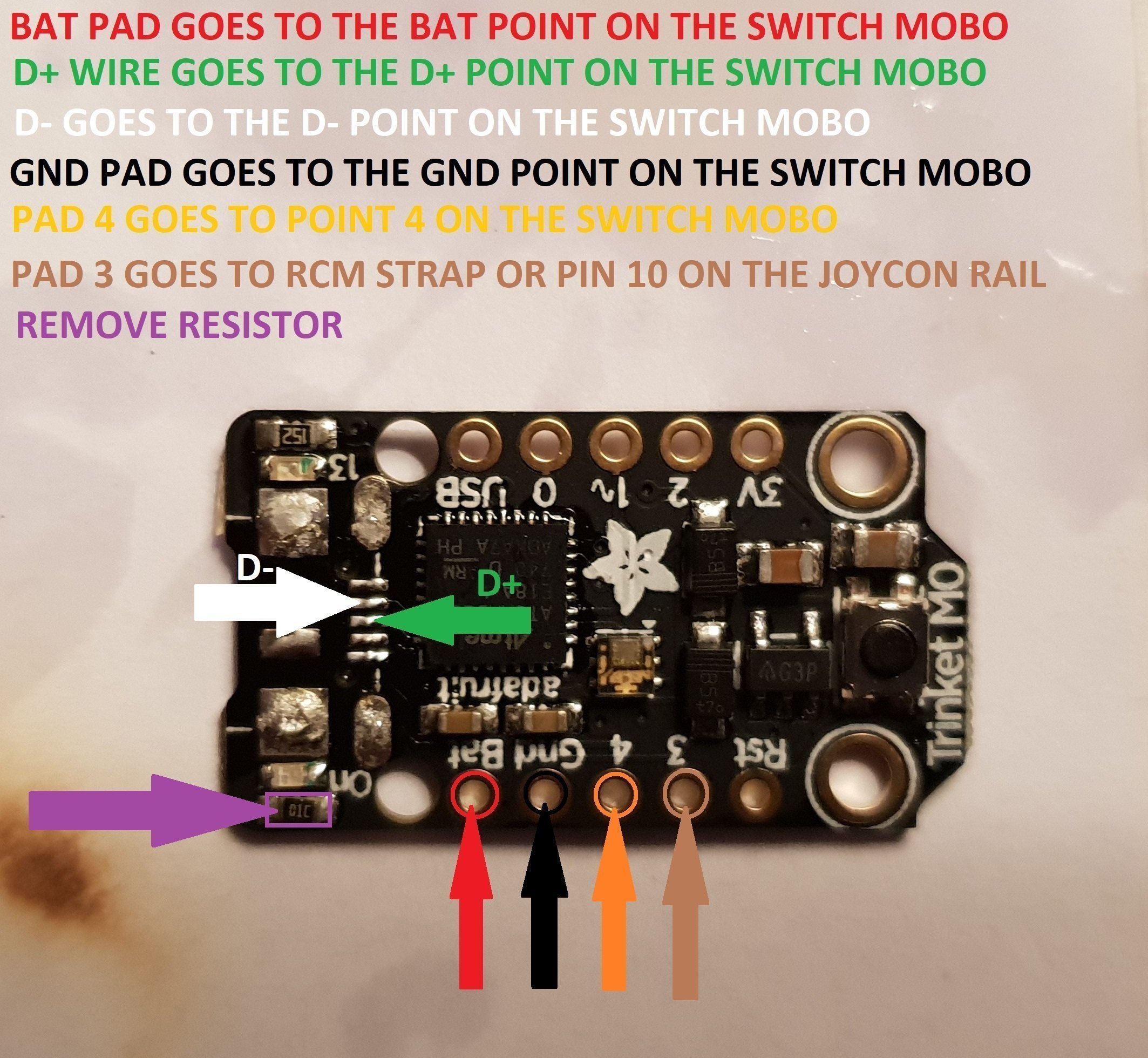
Trinket Points.jpg


When You Have The Trinket All Prepared, You Can Now Proceed To The Install To The Switch.
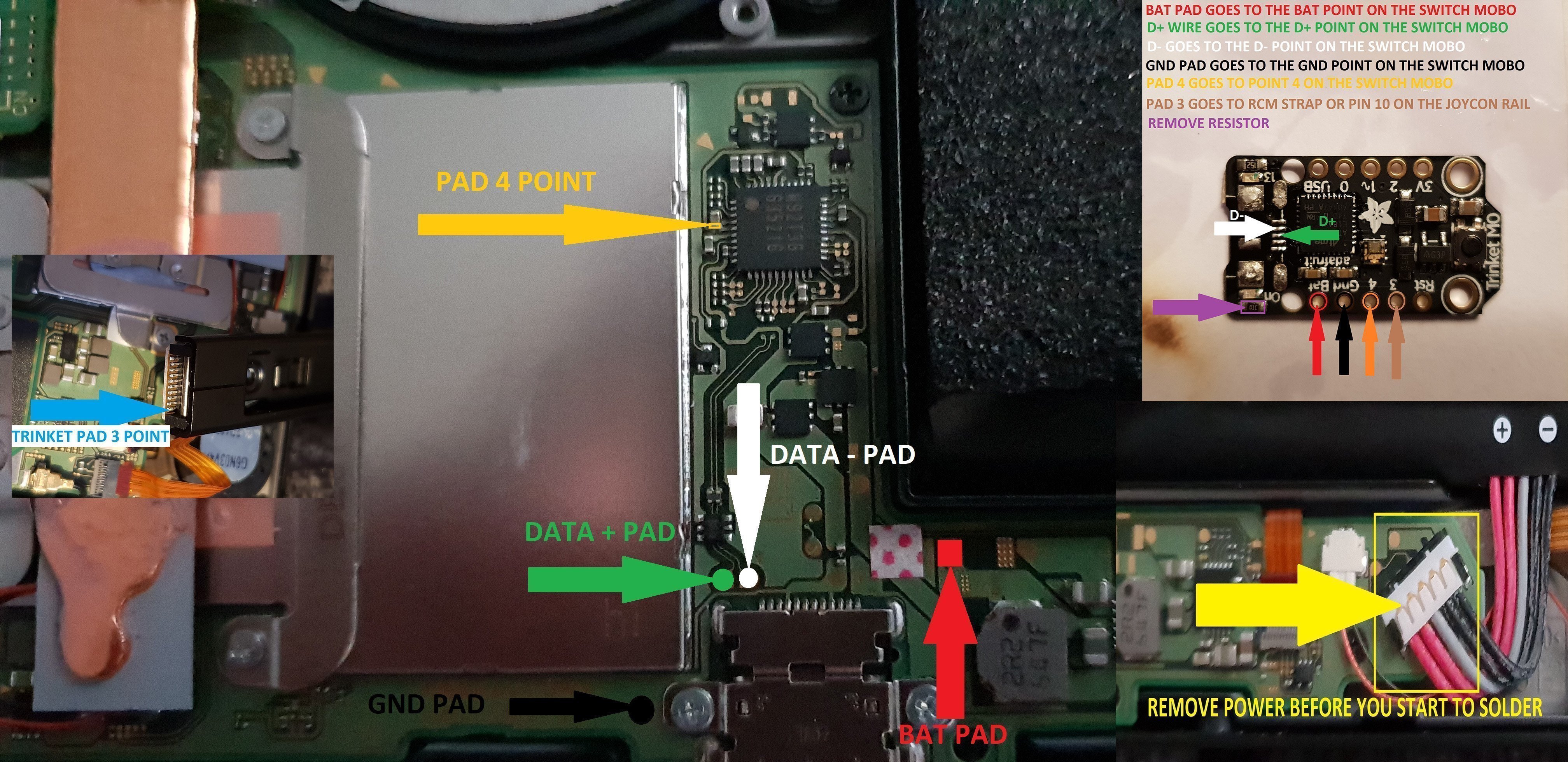
trinket install points.jpg


Once The Install Is Completely Done Then Clean Up The Points You Have Soldered To Using Isopropyl And Cotton Buds/Q-Tips.
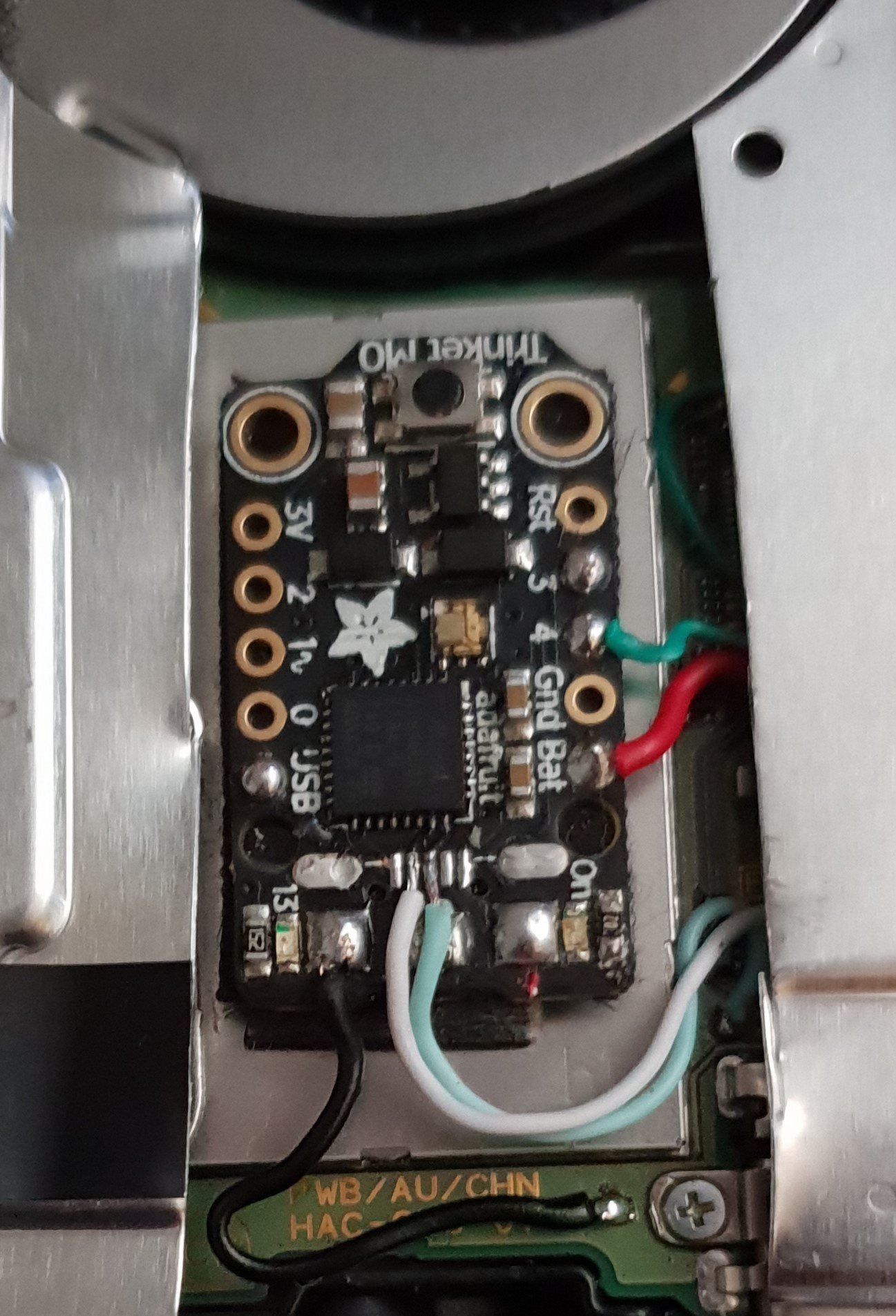
Finished.jpg


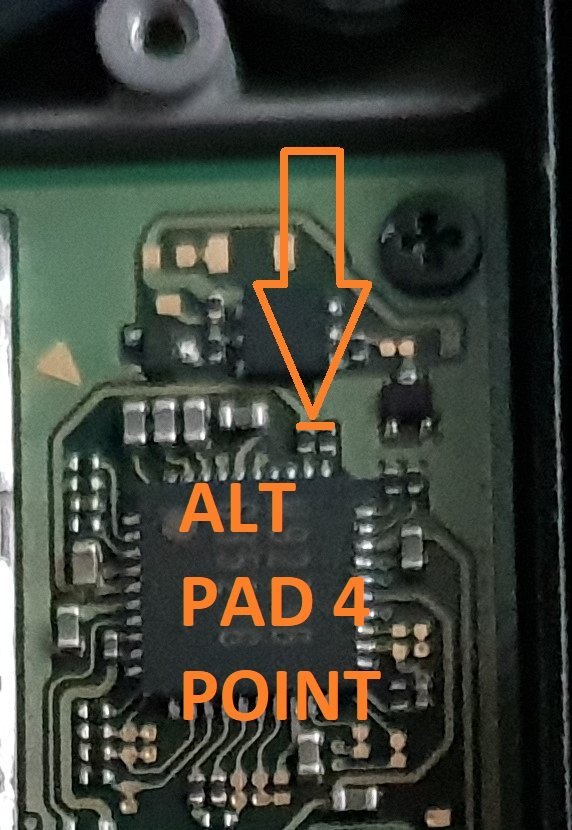
Alternative Point For Pad 4.

Altternative Pad 4 Point.jpg


Alternative Points For Joycon Rail Pin 10.

If You Decide On Using This Alternative Point Then Use Enamel Coated Jumper Wire 0.10mm.
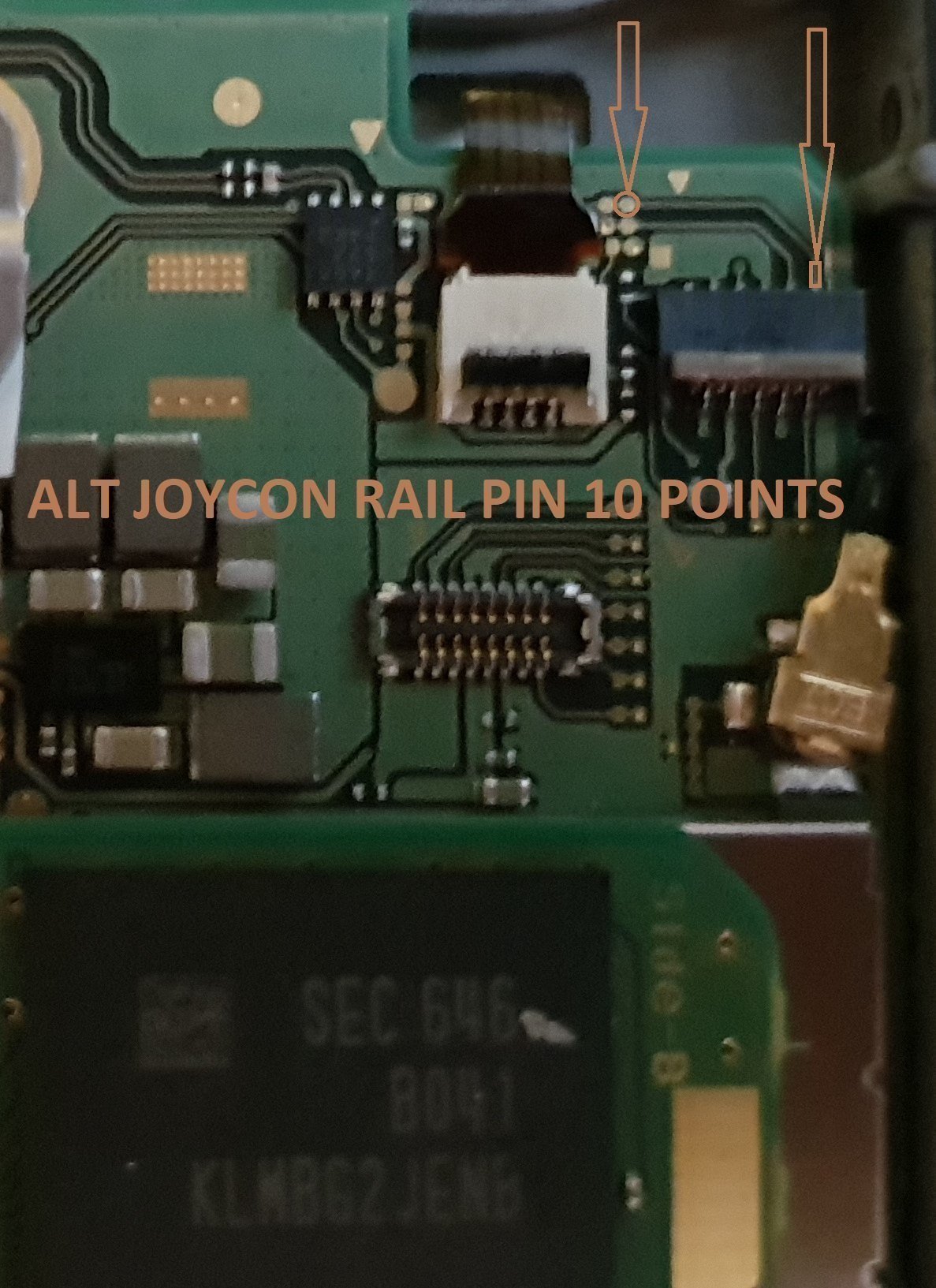
Alt Joycon Rail Pin 10 Point.jpg


Remember Take Your Time It's Not A Race lol. Rushing Can Lead To Mistakes.

Tools Required.

Kynar Wire 30 AWG.
Soldering Iron.
Hot Air Wand For Usb Port Removal(Optional)
Isopropyl.
Cotton Bud/Q-Tips.
Flux.
Solder.
Enamel Jumper Wire (Optional)


Thanks And Credit Goes To Xboxexpert For This Solution.

I Think That Covers Everything.

EDIT..

here's another method for the install of the trinket, this method does away with the pad 4, as some may find it tricky to solder to the cap used on the mobo.

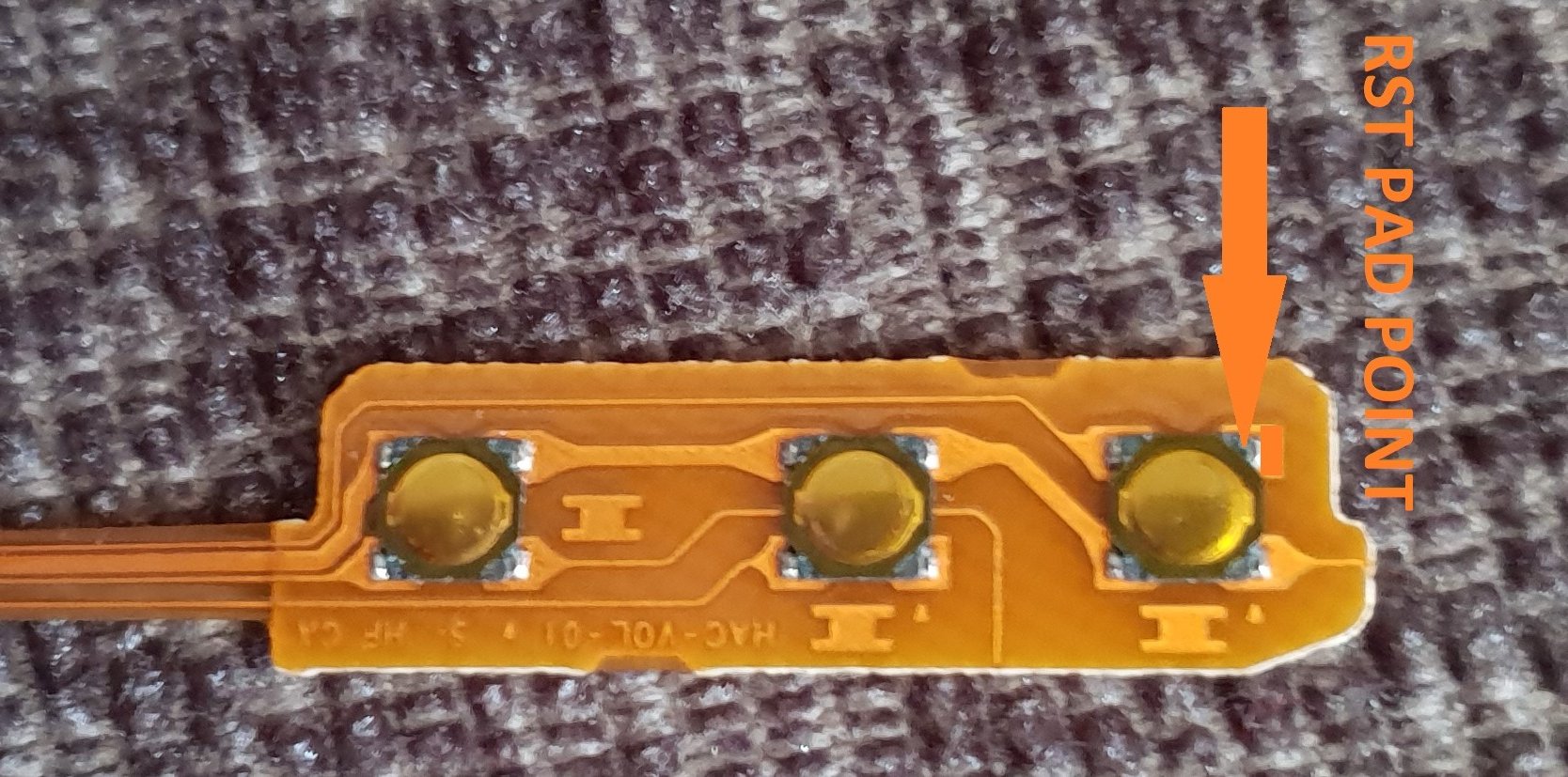
the rst pad is used instead and the wire is linked to the power button, Also this has a bonus that you can double press the power button to put the trinket into boot loader mode for uploading a new payload.

of course you don't have to use the rst pad at all, you can't just press power button and volume up button, then press reset button for rcm mode.

this method should be ok for the novices.

install at your own risk.
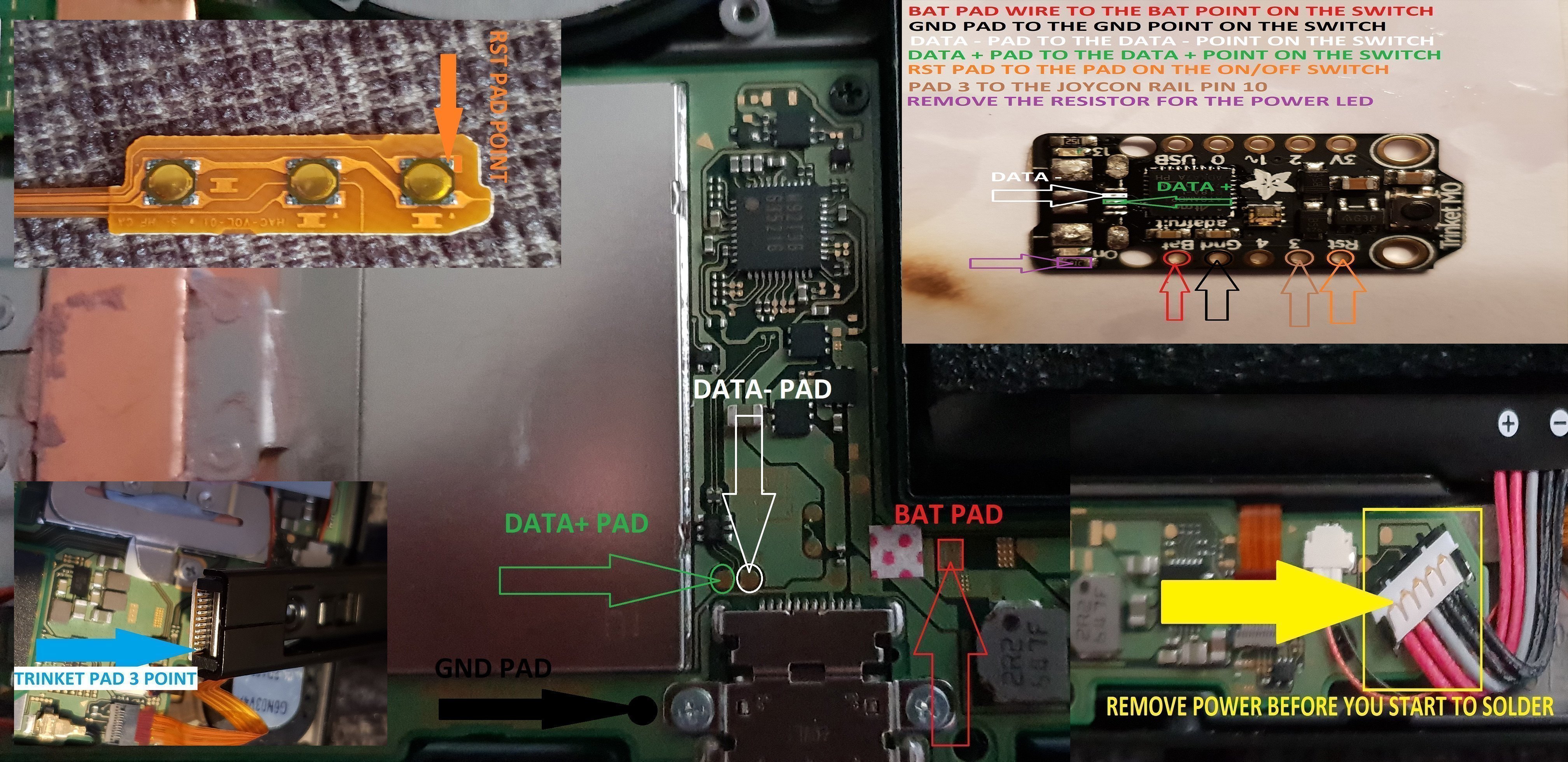
another install.jpg


the pad on the power button to use.

power button point.jpg


i have one more method to try but I really think this one is not to bad method.

the more methods the better I say, of course to try and make it as easy as possible for pros and novices.

EDIT...
another method for the install of the trinket.

this method is basically same as all other methods, just a different points uses for the bat pad and rst pad.

this install will allow you to have the trinket power off when you fully power off the switch.

double press the reset button on the trinket to get into boot loader mode, this may take a couple of attempts to do.

the payload that you use already will work with this method no need for new ones.

here's the diagram for method 3, you could possibly have this as a 4 wire install, if you install auto rcm mode, but as my sd card module port is buggerd I couldn't test that out.
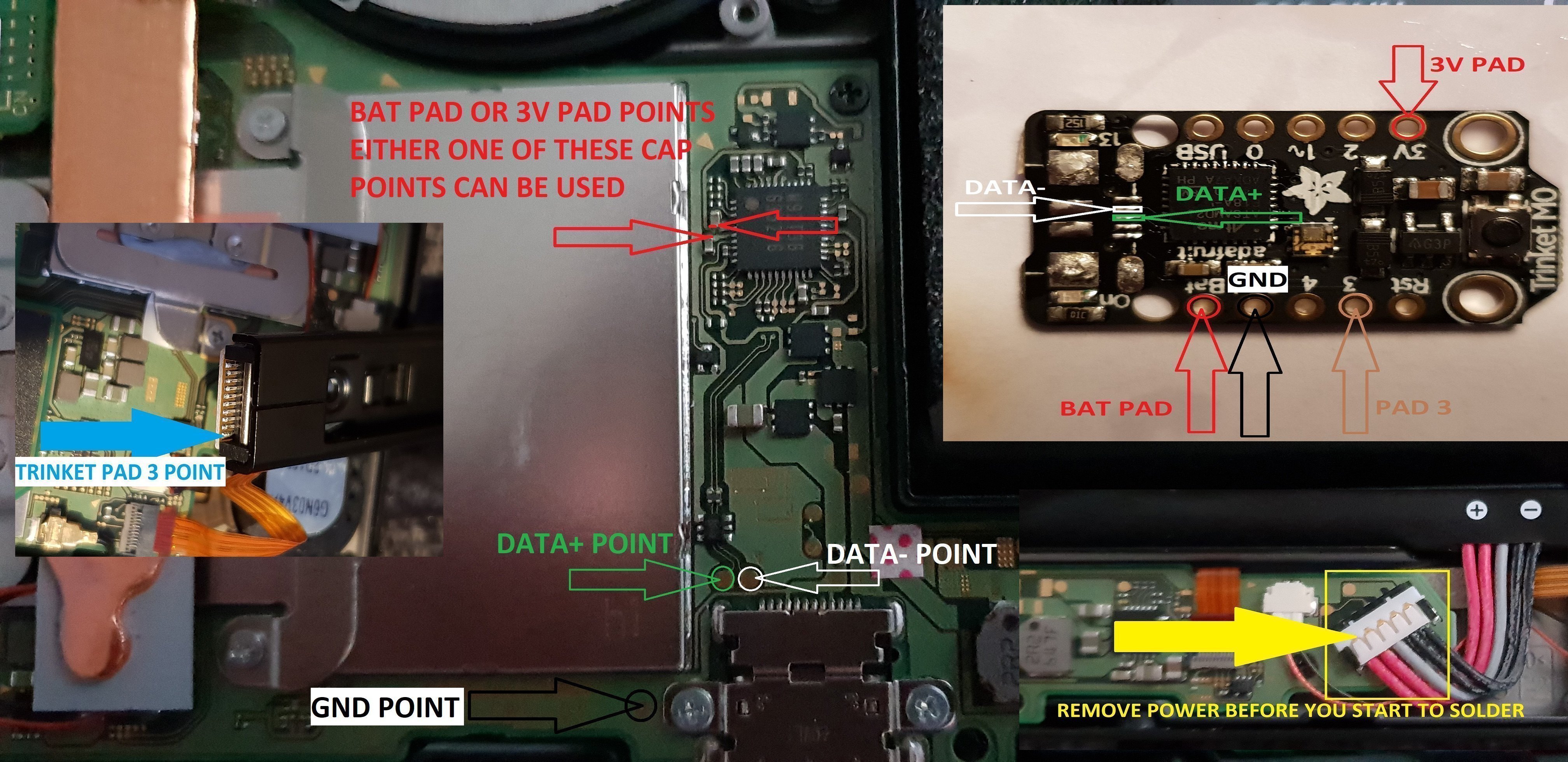
twinket power off.jpg


ok it seems method 3 needs auto rcm installed for it to work without the need to use the rst pad

so for them that don't want to use auto rcm mode then solder a wire from rst pad to the point on the power button, and use pad 3 to the pin 10 on the joycon rail or one of the alt points on mobo.

beware the alt points are small so use at your own risk.

ok anyone with changing issues test these 2 points, you should get 5v on the usb port side, and around 3.2v on the switch side.

if your getting the volts on the switch side that are fluctuating up & down then replace the part with the v on top it's a diode, you want one that fits so the actual size is either 0402 or 0603 in dimension (i'm using 0402/0603 as an example for size purpose only)

around page 16 has more info about this component..

dont come moaning if you damage your console doing this install, i'm not responsible for you opening or taking a soldering iron to your console.
you do this at your own risk any damage is down to yourself.
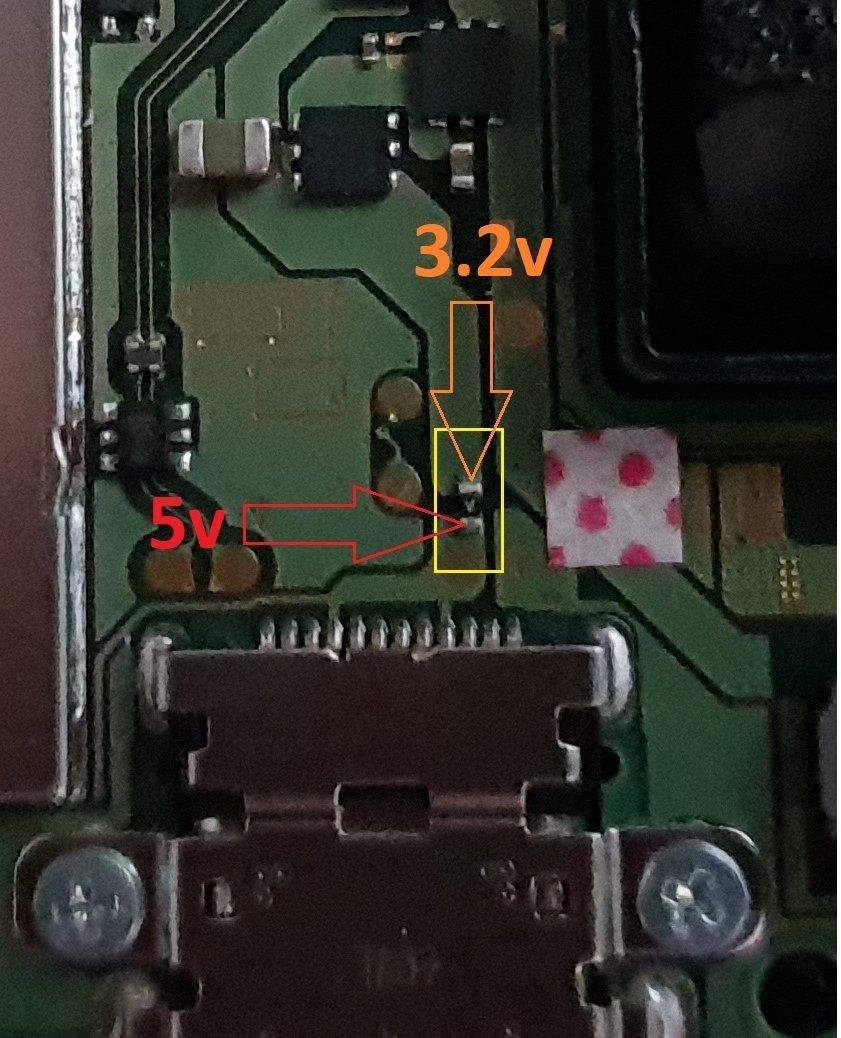

charger_issue_volts.jpg


another thing if your trinket starts to get very hot to the point you can't touch it, then the atmel ATSAMD21E18A-U ic is on it's way out, so you will need to replace the ic or just replace your trinket.

at some point it wont power up after this has happened.
1 = gets very hot.
2 = reset starts to become tempermental .
3 = dead
4 = fix replace the atmel ATSAMD21E18A-U ic

edit

added uf2 drag and drop files for r4 trinket gemma dongles or for a 4 wire internal install.

atmosphere
hekate 4.2
Sxos
rajnx
reinx
 

Attachments

  • Trinket All In One.jpg
    Trinket All In One.jpg
    123.9 KB · Views: 3,983
  • Trinket-R4-Gemma-D&D-Files.zip
    421.3 KB · Views: 534
Last edited by M-O-B, , Reason: added updated uf2 file.

M-O-B

Well-Known Member
OP
Member
Joined
Jun 23, 2018
Messages
281
Trophies
0
Age
53
XP
573
Country
United Kingdom
What about battery
drain if trinket is always on?

I couldn't say if it drains the battery more with it fitted, maybe other's who have done and used it can say what the drain is.

this is one reason to remove the power led so it's not on, as far as I'm aware the trinket is idle once it's done the job needed so technically if that's the case then it's going to drain battery as normal no faster.

another reason to use the code with the leds turn off.
 
Last edited by M-O-B,
  • Like
Reactions: Crazywhitie

noX1609

B9S freak ;)
Member
Joined
Aug 30, 2016
Messages
477
Trophies
0
Age
32
XP
466
Country
Germany
ok so had another play about with this, this is another variation of the install using 2 different codes, one that was posted by nihoh-fox in a thread on here and the other was done by Xboxexport or Xboxexpert can't remember exactly.

both codes seem to work fine with this method, I have not used pad 4 at all as I'm trying to figure out a easier install for them that ain't up to par with soldering aka the novices.

we all know that the cap for pad 4 can be tricky, anyway I think that this may do for another method for the install.

I have decided not to use the volume up button as that chucks out 1.8v not pressed.

anyway I noticed with the first code flashed to the trinket that if I pressed the reset button then the switch went into rcm mode.

so as the rst pad gives 3.2v I decided to test the power button on the switch and it gives 3.6v but maybe more if my battery was fully charged.

so I solder a wire from the rst pad going to one of the points for the power button and bingo.

press power button twice to reprogram the trinket.


That‘s a nice idea to use the power button for entering the Bootloader Mode.
Think i will do the same on my installed Trinket :)
But one question: Which side of the button needs to be used? Because normally one side has to be gnd and the other side for the currency
 

M-O-B

Well-Known Member
OP
Member
Joined
Jun 23, 2018
Messages
281
Trophies
0
Age
53
XP
573
Country
United Kingdom
That‘s a nice idea to use the power button for entering the Bootloader Mode.
Think i will do the same on my installed Trinket :)
But one question: Which side of the button needs to be used? Because normally one side has to be gnd and the other side for the currency

i will post an image later once I have sorted one out, Also using this method with the code that has the leds off or sleep, the wakeup needs to be disabled in the code it seems, coz it you power off in the hekate ctcaer menu it seems powers on as soon as you press power, only just noticed that in the video I posted.
 

mrdude

Developer
Developer
Joined
Dec 11, 2015
Messages
2,481
Trophies
1
Age
55
XP
6,614
Nice one, I've ordered some smd transistors - I'll use that point to connect to the base of the transistor, then connect the ground point of the trinket to the collector of the transistor - and the emitter on the transistor to gnd on the switch.

That way when the switch power comes on - it will 'activate' the transistor and power up the trinket - no need to add a manual switch, and no power drain with the trinket being constantly powered up (no need to remove the resistor on the trinket either).

pinout-jpg.134439
 
Last edited by mrdude,
  • Like
Reactions: Deleted User

M-O-B

Well-Known Member
OP
Member
Joined
Jun 23, 2018
Messages
281
Trophies
0
Age
53
XP
573
Country
United Kingdom
think I've stopped the console rebooting now when you select power off in the hekate ctcaer menu..

hopefully I've disabled the correct lines..


Nice one, I've ordered some smd transistors - I'll use that point to connect to the base of the transistor, then connect the ground point of the trinket to the collector of the transistor - and the emitter on the transistor to gnd on the switch.

That way when the switch power comes on - it will 'activate' the transistor and power up the trinket - no need to add a manual switch, and no power drain with the trinket being constantly powered up (no need to remove the resistor on the trinket either).

I'm not sure how much more it drains if any really, as the trinket is idle once it's done the job, with no leds on its not going to use much power, the way I see it is the trinket is in standby or something like that.
 
  • Like
Reactions: mrdude

mrdude

Developer
Developer
Joined
Dec 11, 2015
Messages
2,481
Trophies
1
Age
55
XP
6,614
@M.O.B

Did you change the code in the trinket for that? The transitor will stop the power 100% though so no drain, the only thing I am wondering about is will the trinket power on fast enough to send the payload to the switch as it won't be constantly powered.
 

M-O-B

Well-Known Member
OP
Member
Joined
Jun 23, 2018
Messages
281
Trophies
0
Age
53
XP
573
Country
United Kingdom
@M.O.B

Did you change the code in the trinket for that? The transitor will stop the power 100% though so no drain, the only thing I am wondering about is will the trinket power on fast enough to send the payload to the switch as it won't be constantly powered.

yeah I disabled a few lines in the code, as for the trinket power on fast enough you not going to know till you try it, I've just charged my switch to 100% and put it in sleep mode to see how much it drains, I'll check the percentage in a few hours time.
 

mrdude

Developer
Developer
Joined
Dec 11, 2015
Messages
2,481
Trophies
1
Age
55
XP
6,614
yeah I disabled a few lines in the code, as for the trinket power on fast enough you not going to know till you try it, I've just charged my switch to 100% and put it in sleep mode to see how much it drains, I'll check the percentage in a few hours time.

You should check it without the trinket connected, and then with it connected - to see if there is any difference when the switch is powered off (not in standby).
 
Last edited by mrdude,

M-O-B

Well-Known Member
OP
Member
Joined
Jun 23, 2018
Messages
281
Trophies
0
Age
53
XP
573
Country
United Kingdom
You should check it without the trinket connected, and then with it connected - to see if there is any difference when the switch is powered off (not in standby).

yeah that's the plan I'm just doing it trinket install check first standby and powered off. then standby and powered off without the trinket.
 

noX1609

B9S freak ;)
Member
Joined
Aug 30, 2016
Messages
477
Trophies
0
Age
32
XP
466
Country
Germany
@M-O-B: Ok thanks, looking forward for the image. Could you also upload the modified file (with the SX Bootfile because i’m using SX OS) or tell me which lines of code need to be disabled?

@mrdude: Sounds interessting too. Will watch the thread for updates about this method :)
 

mrdude

Developer
Developer
Joined
Dec 11, 2015
Messages
2,481
Trophies
1
Age
55
XP
6,614
@mrdude: Sounds interessting too. Will watch the thread for updates about this method :)

You'll be waiting a while - I've ordered smd npn transistors from China - which take about a month to arrive (99 pence for 100 though so very cheap). Basically a transistor is just an electric switch - you supply it with a small electrical feed (1.8v in this case), and it 'switches' on and allows electrons to flow through it. No electrical supply to it = no flow (so just what a switch does).

When the switch powers on the 1.8v supply to the transistor will allow the switch to get a ground and turn on and then push the payload to it. Timing might be an issue though (won't know until I try) - although that could be sorted by using capacitors I guess.

So I'd remove the way GND is currently wired to the trinket and solder the smd transistor to the ground point where the USB port was removed - that will hold the transistor in place and give it the ground it needs:

1604g90.jpg
 
Last edited by mrdude,
  • Like
Reactions: Deleted User

noX1609

B9S freak ;)
Member
Joined
Aug 30, 2016
Messages
477
Trophies
0
Age
32
XP
466
Country
Germany
@mrdude: No problem, have time to wait ;) The normal version where it is powered the whole time works good atm so no reason to rush ;)

Bit one question: Why don‘t you solder it directly to the point you marked?
Why do you add a transistor?
Sorry if that‘s a stupid question but i don‘t know much about things like that (otherwise i didn‘t have to ask ;)). My main interrest with computers are the software development for macOS
 

M-O-B

Well-Known Member
OP
Member
Joined
Jun 23, 2018
Messages
281
Trophies
0
Age
53
XP
573
Country
United Kingdom
You'll be waiting a while - I've ordered smd npn transistors from China - which take about a month to arrive (99 pence for 100 though so very cheap). Basically a transistor is just an electric switch - you supply it with a small electrical feed (1.8v in this case), and it 'switches' on and allows electrons to flow through it. No electrical supply to it = no flow (so just what a switch does).

When the switch powers on the 1.8v supply to the transistor will allow the switch to get a ground and turn on and then push the payload to it. Timing might be an issue though (won't know until I try) - although that could be sorted by using capacitors I guess.

So I'd remove the way GND is currently wired to the trinket and solder the smd transistor to the ground point where the USB port was removed - that will hold the transistor in place and give it the ground it needs:

1604g90.jpg


so basically something like the mmbt2222a, damm that's a long time to wait for something from china i usually get stuff no longer than 2 weeks.
 

mrdude

Developer
Developer
Joined
Dec 11, 2015
Messages
2,481
Trophies
1
Age
55
XP
6,614
so basically something like the mmbt2222a, damm that's a long time to wait for something from china i usually get stuff no longer than 2 weeks.

Spookily enough, that's the exact ones I ordered. Sometimes stuff comes quick - other times it's been about 3 months, just depends on where in china they are coming from I guess, as it's a big country and they need to end up on a container on a boat, so that adds to the the shipment time I guess.
 

pandavova

56
Member
Joined
Oct 27, 2015
Messages
900
Trophies
0
XP
2,079
Country
Germany
So i orderd the M0 today and read a bit trough here.
Currently its better to wait before the installation, right?
There is possibly a better solder solution, then right now, did i understand it correctly?

I purchased it to dont worry about the Software solution, my plan is to later boot a CFW EmuNand and play offline "backups" from it. (If i someday decide to buy a online game with the normal and clean Nand.)
 

M-O-B

Well-Known Member
OP
Member
Joined
Jun 23, 2018
Messages
281
Trophies
0
Age
53
XP
573
Country
United Kingdom
Spookily enough, that's the exact ones I ordered. Sometimes stuff comes quick - other times it's been about 3 months, just depends on where in china they are coming from I guess, as it's a big country and they need to end up on a container on a boat, so that adds to the the shipment time I guess.

i think I have something knocking about that may do the job, Also sounds something similar to how the Xbox one power leds work. yeah depends on the seller also some are real so at processing orders.

So i orderd the M0 today and read a bit trough here.
Currently its better to wait before the installation, right?
There is possibly a better solder solution, then right now, did i understand it correctly?

I purchased it to dont worry about the Software solution, my plan is to later boot a CFW EmuNand and play offline "backups" from it. (If i someday decide to buy a online game with the normal and clean Nand.)

you can install the version in the op, you can also do the same install as the op but don't solder the pad 4 wire at all, then press volume up and power button release then press the reset button on the trinket once and it load whatever payload you flashed to the trinket.
 
Last edited by M-O-B,
  • Like
Reactions: pandavova

M-O-B

Well-Known Member
OP
Member
Joined
Jun 23, 2018
Messages
281
Trophies
0
Age
53
XP
573
Country
United Kingdom
battery drain test so far around 2 hours on each.

trinket not installed.

sleep mode = 18%
full powered off = 0%

trinket installed with the power led enabled.

sleep mode = 19%
full powered off = 1%

also had a mess around with the code as I'm not using the pad 4 or pad 0, so removed anything to do with them from the code.

don't like orange so change that led function to blue.

blink time I changed but not sure about that so may revert that back to what it originally was.

now I need to charge my switch up, then I'll do the standby test with trinket inalled.

how my trinket behaviour is now not really much difference from original code, just minus the wake up parts really.

 
Last edited by M-O-B,

noX1609

B9S freak ;)
Member
Joined
Aug 30, 2016
Messages
477
Trophies
0
Age
32
XP
466
Country
Germany
@M-O-B: 1% in 2h is very low so i think there is no need to turn it completely off.
Did you solder it so it is powered all the time for the test? Because that‘s the info i‘m interested most :)
 
Last edited by noX1609,

M-O-B

Well-Known Member
OP
Member
Joined
Jun 23, 2018
Messages
281
Trophies
0
Age
53
XP
573
Country
United Kingdom
@M-O-B: 1% in 2h is very low so i think there is no need to turn it completely off.
Did you solder it so it is powered all the time for the test? Because that‘s the info i‘m interested most :)

trinket is installed as in the op apart from the pad 4 ain't used, the green power led hasn't been disabled, so that's on all the time, the other 2 leds only on when needed on power up for rcm mode.

I'm going to double check what the battery drain is when the switch is powered off again after I've done the standby test.

it really shouldn't use much power as the trinket is idle most of the time.
 

noX1609

B9S freak ;)
Member
Joined
Aug 30, 2016
Messages
477
Trophies
0
Age
32
XP
466
Country
Germany
@M-O-B: Sounds great, looking forward to the % you get. Because if it‘s about 1% in that time i don‘t need to search for method to disable power of the trinket after injection of the payload.

Some one posted in another thread that there is a 1.8v pad that‘s only powered if switch is on or in sleep mode.
But there is the question: Is 1.8V enoght for the trinket or does it need higher voltage?
Because if it‘s enoght you could just solder the point to the bat point on trinket i think.
 
General chit-chat
Help Users
  • No one is chatting at the moment.
    Skelletonike @ Skelletonike: 1H left, such a slow week.