





Hacking triiforce mrc

  • Thread starter Thread starter marc_max
  • Start date Start date
  • Views Views 350,226
  • Replies Replies 982
Duuude!! Awesome job on v8
yaywii.gif
Transparent console
smile.gif
you sly devil, didnt even mention it. Now there's no limits on the background. Good stuff marc! Thanks for the update.
 
kallstar said:
Transparent console
smile.gif
you sly devil, didnt even mention it. Now there's no limits on the background.
Care to elaborate for those of us not on our wii's (still at work
frown.gif
) Does it load a custom background of sd/usb or something?
 
xflak40 said:
Care to elaborate for those of us not on our wii's (still at work
frown.gif
) Does it load a custom background of sd/usb or something?

No, but the console lines at the bottom of the menu (2 lines of text stretching across most of the bottom with the game name and 1/2:sort Home:menu) is now transparent. So there doesnt need to be a solid color for the bottom. Also the console that pops up when you press the home button with the game settings is translucent.. so you can see whats behind it.
 
I was thinking about the "restart/wii menu" crash problem while running an emulated nand in triiforce and thought maybe someone could create a custom wii menu that has no function other than resetting the wii when called upon. We could then load our nand backup in showmiiwad (showmiinand) and install the custom system menu into our nand backup. Then when you'd want to exit the wiiware/VC game, you'd select "wii menu" and the wii would be reset and the non-emulated system menu would boot up.

Not possible? I dunno, just an idea...
 
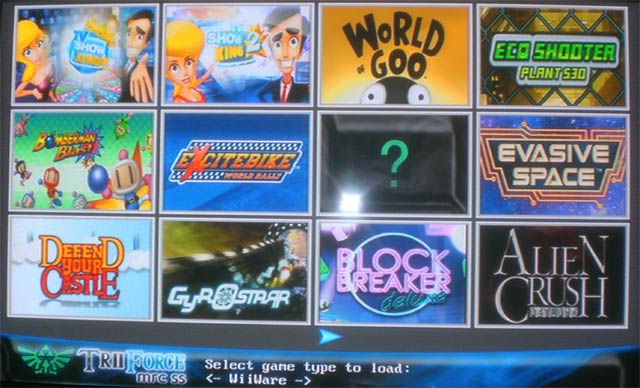
Quick integration of MRC SS into marc's latest v8 triiforce mrc.
This is a USB ONLY version of Triiforce. It will only load images and nand from USB.

changes ported over from SS

*AUTO USB ONLY
*console selection
*return to console selection on B
*settings path changed to usb saving/loading

other changes
-console selection defaults to 12 icon layout
-all new background/logo

notes
*changing layout to 9icon layout doesnt save properly in the config file
frown.gif
my bad
*no dvd-style icons in this yet, just 12 and 9 icon layout

Kallstar

(updated less crashy version - thank you marc for pointing it out
smile.gif
)
TriiForce MRC SS v2.01 Integration Release -Kallstar.rar (1.47mb)
Mirrors
TriiForceMRCSSv2USBOnly.jpg

Compiled version included. Put the boot.dol into your triiforce folder to use it.
Source to TriiForce MRC v8 and TriiForce MRC SS included.

Any possible integrated code dumps included free of charge
rofl2.gif
I've got it to crash a few times but its not that unstable. Feel free to find the leaks.
 
kallstar said:
Quick integration of MRC SS into marc's latest v8 triiforce mrc.
This is a USB ONLY version of Triiforce. It will only load images and nand from USB.

changes ported over from SS

*AUTO USB ONLY
*console selection
*return to console selection on B
*settings path changed to usb saving/loading

other changes
-console selection defaults to 12 icon layout
-all new background/logo

notes
*changing layout to 9icon layout doesnt save properly in the config file
frown.gif
my bad
*no dvd-style icons in this yet, just 12 and 9 icon layout

Compiled version included. Put the boot.dol into your triiforce folder to use it.
Source to TriiForce MRC v8 and TriiForce MRC SS included.

Any possible integrated code dumps included free of charge
rofl2.gif
I've got it to crash a few times but its not that unstable. Feel free to find the leaks.
I'm going to release a v9 soon with your USB saving feature.
I tried to save the configuration to USB using the ISFS commands but it seemed to fail to create the permissions for the file. Then I tried to use the libogc usbstorage functions, but it never initalized the USB correctly. It seems that the only solution was using the Kwiirk libraries like you did.
I also changed the way the configuration file is loaded, now it uses ISFS commands too (I don't know why I left this).
I used the usbstorage files you posted there, and I cleaned the way you initialized the USB. For example, you were initializing USB when reading images, that's not necessary! Images are loaded with ISFS commands. Maybe that's why it's crashing for you.
I also will include some small bugfixes taken from the original Triiforce.
Thank you.
 
@ kallstar,

Have you changed location for images?

I was using your first 12 icon mod, and it points to USB \triiforce_mrc\140x112.

When I load the new .dol, the images do not come up anymore.

At least the new "not found" question mark looks better than the triiforce one from the older version. imo.

(edit) NEVER MIND! Just cut the icons one folder up to the triiforce_mrc folder, and everything´s hunkey dorey.

Like the way the new game loading looks and sounds. Thanks!
 
@guitarloser85

There is already a fix for that problem.

Just delete the system folder (for recovery purposes it's better to rename it to something else) in your emulated nand 'ticket' folder and, because the folder can no longer be found, when 'Wii Menu' is selected the Wii restarts.

So it doesn't attempt to display the system menu (and hang with a black screen) but restarts, obviously booting whatever your Wii is using as a System Menu

I did this several months ago, and every game resets the Wii when I choose 'home' then 'Wii Menu' which, for me, then boots up my usbloader - perfect!

For me this also led to the natural progression of pensioning off triiforce in favour of forwarder ISOs, once all games could be started and ended using the same procedure

I select all games, including Wiiware, from the usbloader
 
Hi Kallstar, nice work on V2
yaywii.gif
!... I just have a small request:
kallstar said:
changes ported over from SS

*console selection
Can you add "Game Type Auto-Booting" (a new feature) on app starting? I mean, put another Game Type Selection option (WiiWare, NES, SNES, All...) into de app settings window (the black window that appears when pressing HOME button) to choose a particular Game Type to autoboot on starting. Thanks.

See ya!
 
marc_max said:
I'm going to release a v9 soon with your USB saving feature.

I cleaned the way you initialized the USB. For example, you were initializing USB when reading images, that's not necessary! Maybe that's why it's crashing for you.

Thanks! That seems to be what was causing it for the most part!! I don't know how that even got in there, i was doing way too many things, way too quickly, at once lol. Not a good combo.. I'm looking forward to the v9 release
yaywii.gif

Sinyk said:
Damn Kallstar, you are fast
yaywii.gif

Oh i'm not very fast hehe, its pretty much YOUR work. I just ran through the files putting this here, that there. I honestly don't think i deserve much (if any) credit for that. Thanks for all the work on SS!
QUOTE(wichoxp @ Feb 13 2010, 03:10 AM)
Hi Kallstar, nice work on V2
yaywii.gif
!... I just have a small request:
Can you add "Game Type Auto-Booting" (a new feature) on app starting? I mean, put another Game Type Selection option (WiiWare, NES, SNES, All...) into de app settings window (the black window that appears when pressing HOME button) to choose a particular Game Type to autoboot on starting. Thanks.

See ya!
I'm not 100% sure what it is you're asking... is it
1) auto-start a specific game-type when you initially load triiforce, or
2) once in triiforce and passed the console selection, a setting to auto-boot say n64 vc games because of their generic sounds?

answer to 1 is no
Edit
Actually now that i think about it, they are both VERY good ideas.. sorry for the quick reply, i was thinking about it weird.. I'll look into it, but im hoping maybe marc will put something like that in the official v9 release. I'd much rather have this stuff in the official releases, they are a far far superior source then my edits.

Speaking of, heres a little update of my previous release. Thanks to marc's infinite wisdom it should now crash far far far far far less
smile.gif
No other changes.. sources included. Very very slight update. (links with mirrors updated on previous page as well.

TriiForce MRC SS v2.01 Integration Release -Kallstar.rar
Mirrors
 
Tristar said:
@guitarloser85

There is already a fix for that problem.

Just delete the system folder (for recovery purposes it's better to rename it to something else) in your emulated nand 'ticket' folder and, because the folder can no longer be found, when 'Wii Menu' is selected the Wii restarts.

So it doesn't attempt to display the system menu (and hang with a black screen) but restarts, obviously booting whatever your Wii is using as a System Menu

I did this several months ago, and every game resets the Wii when I choose 'home' then 'Wii Menu' which, for me, then boots up my usbloader - perfect!

For me this also led to the natural progression of pensioning off triiforce in favour of forwarder ISOs, once all games could be started and ended using the same procedure

I select all games, including Wiiware, from the usbloader
thanks man, i'll give that a shot
 
kallstar said:
wichoxp said:
Hi Kallstar, nice work on V2
yaywii.gif
!... I just have a small request:
Can you add "Game Type Auto-Booting" (a new feature) on app starting? I mean, put another Game Type Selection option (WiiWare, NES, SNES, All...) into de app settings window (the black window that appears when pressing HOME button) to choose a particular Game Type to autoboot on starting. Thanks.

See ya!
I'm not 100% sure what it is you're asking... is it
1) auto-start a specific game-type when you initially load triiforce...

Actually now that i think about it, they are both VERY good ideas.. sorry for the quick reply, i was thinking about it weird.. I'll look into it, but im hoping maybe marc will put something like that in the official v9 release. I'd much rather have this stuff in the official releases, they are a far far superior source then my edits.

Hi again.

Yeah, I was thinking about the first idea, hehe ^^ ... just need to fix that and the "green screen flash" issue that appears just before a game starts. I already sent a function to marc_max to fix that but he didn't added it on the new release o.O ... anyway, I will submit it here:
Code:
void green_fix() //GREENSCREEN FIX
{ ÂÂÂÂ
ÂÂÂÂVIDEO_Configure(rmode);
ÂÂÂÂVIDEO_SetNextFramebuffer(xfb);
ÂÂÂÂVIDEO_SetBlack(TRUE);
ÂÂÂÂVIDEO_Flush();
ÂÂÂÂVIDEO_WaitVSync();
}

After add that function, just call it on the next code:
CODE
if (hooktypeoption != 0)
ÂÂÂÂ{
ÂÂÂÂÂÂÂÂdo_codes(titleid);
ÂÂÂÂ}
ÂÂÂÂ
ÂÂÂÂpatch_dol(bootcontentloaded);

ÂÂÂÂprintf("Loading complete, booting...\n");

ÂÂÂÂappJump = (entrypoint)entryPoint;

ÂÂÂÂ//sleep(5);

ÂÂÂÂsetVideoMode();
ÂÂÂÂgreen_fix(); //GREENSCREEN FIX
And voilá!... no more green flash screen
biggrin.gif
!

See ya!
 
I totally forgot about your code wichoxp
frown.gif
I left the project paused for some months and I totally forgot about that. Anyway, the green screen is not that annoying, I'll live with it!

I posted v9, the latest one I hope!
* finally, it saves configuration to USB too! (thanks to kallstar)
* a lot of code cleaning
* new method for getting installed games, clean and faster
* updated video detection & patch to latest Triiforce code

This is my last release (unless there is a huge bug or Waninkoko updates his cIOS), now it's time for you to change it, improve it, make infinite skins and whatever you want
smile.gif
I have no time for so many projects, so I leave Triiforce mrc here!
I'll be updating the image repository. I want to update all my N64 games to the new format:
NARP.png
 
wichoxp said:
Hi again.

Yeah, I was thinking about the first idea, hehe ^^ ... just need to fix that and the "green screen flash" issue that appears just before a game starts. I already sent a function to marc_max to fix that but he didn't added it on the new release o.O ... anyway, I will submit it here:
Code:
void green_fix() //GREENSCREEN FIX
{ ÂÂÂÂ
ÂÂÂÂVIDEO_Configure(rmode);
ÂÂÂÂVIDEO_SetNextFramebuffer(xfb);
ÂÂÂÂVIDEO_SetBlack(TRUE);
ÂÂÂÂVIDEO_Flush();
ÂÂÂÂVIDEO_WaitVSync();
}

After add that function, just call it on the next code:
Code:
if (hooktypeoption != 0)
ÂÂÂÂ{
ÂÂÂÂÂÂÂÂdo_codes(titleid);
ÂÂÂÂ}
ÂÂÂÂ
ÂÂÂÂpatch_dol(bootcontentloaded);

ÂÂÂÂprintf("Loading complete, booting...\n");

ÂÂÂÂappJump = (entrypoint)entryPoint;

ÂÂÂÂ//sleep(5);

ÂÂÂÂsetVideoMode();
ÂÂÂÂgreen_fix(); //GREENSCREEN FIX
And voilá!... no more green flash screen
biggrin.gif
!

See ya!
Could someone please apply this to v9 and release it.

Thanks for your time.

EDIT: My bad I didn't know the source was included in v9.
 
Stupid question (& a quick one to probably answer): What is the best (NAND) dumper? I can use the Wii NAND & USB NAND but also SD card nand and I think I need to (re)dump(?) the NAND.
 
I use bootmii to make a nand backup (nand.bin) and then use showmiiwads to extract the nand to a folder but that's just how I do it I'm sure there are other ways.

EDIT: or you could read the readme.
smile.gif
 

Site & Scene News

Popular threads in this forum