Hacking The M3 Sakura FAQ

  • Thread starter Thread starter Densetsu
  • Start date Start date
  • Views Views 1,509,932
  • Replies Replies 2,118
  • Likes Likes 2
creating skins isn't that difficult.
download the official m3sakura, since it comes with skin making tools.
edit the included skin images
and run the make-skin program
 
thedicemaster said:
did anyone find out the distance between the top and bottom screens yet?(in pixels)
when you set a wallpaper you can set it to take the "blank spot" between the screens in account when displaying the image.
i'd like to know as how big m3sakura treats that "blank spot"
If I remember correctly it's 96 pixels.
 
They're both in the current release. You just need to press Y to access options. However, they haven't been translated (see the first post) and you will need to power cycle your DS when you're done setting them.
 
QUOTE said:
The Japanese text remaining is in the menu that can be accessed by sliding an NDS/GBA ROM towards the left (CONFIG menu). We originally could not locate the file in which the text resides, but it seems that the text is in the files "setupnds.ext" and "setupgba.ext". Last time I tried to translate the "messages.932" file, I damaged it somehow and this removed homebrew capabilities until thedicemaster fixed it. If someone else can edit the "setupnds.ext" and "setupgba.ext" files using the translations below without messing up the files, by all means, please do! I'll add them to the Translation Files at the top of this FAQ.

I'm not sure if those messages are really inside the setupnds.ext or setupgba.ext .... i've searched trough them completely, and i cant find those specific parts in there. i also searched with a tool for all of these strings you provided that are not translated till yet, and they are not inside any of the files (at least not in one piece).

i'm pretty sure that i could probably edit those files without damaging them, but i really need to find out where exactly the menu text is written in.
 
The fact that nobody knows where is it actually placed,is the main reason why it's not translated yet..Somone over here might help you with that..
I don't have skills for it, but few people over here, knows how to hexedit, and stuff like that really well..
 
treasure said:
QUOTE said:
The Japanese text remaining is in the menu that can be accessed by sliding an NDS/GBA ROM towards the left (CONFIG menu). We originally could not locate the file in which the text resides, but it seems that the text is in the files "setupnds.ext" and "setupgba.ext". Last time I tried to translate the "messages.932" file, I damaged it somehow and this removed homebrew capabilities until thedicemaster fixed it. If someone else can edit the "setupnds.ext" and "setupgba.ext" files using the translations below without messing up the files, by all means, please do! I'll add them to the Translation Files at the top of this FAQ.

I'm not sure if those messages are really inside the setupnds.ext or setupgba.ext .... i've searched trough them completely, and i cant find those specific parts in there. i also searched with a tool for all of these strings you provided that are not translated till yet, and they are not inside any of the files (at least not in one piece).

i'm pretty sure that i could probably edit those files without damaging them, but i really need to find out where exactly the menu text is written in.
hehe what encoding did you use?
if you don't use the right encoding(shift-jis i think) it doesn't display the text properly.
 
treasure said:
I'm not sure if those messages are really inside the setupnds.ext or setupgba.ext .... i've searched trough them completely, and i cant find those specific parts in there. i also searched with a tool for all of these strings you provided that are not translated till yet, and they are not inside any of the files (at least not in one piece).

i'm pretty sure that i could probably edit those files without damaging them, but i really need to find out where exactly the menu text is written in.
The messages are definitely in those files...I just found them as well:

1. Rename "setupnds.ext" to "setupnds.ext.txt."
2. Right-click the file and click "Open With," then choose Firefox. You'll end up with garbled text.
3. In the top menu of the browser, click View>Character Encoding>Japanese (Shift_JIS). If you don't already have "Japanese (Shift_JIS)" as an option on your encoding list, try View>Character Encoding>More Encodings>East Asian.
4. Most of the text will still be garbled, but now you'll be able to do a search for the text.

You can do the same thing for "setupgba.ext." Hope this helps you help us!
 
with the wallpapers.
i found out, apparently the gap between the screens isn't 96 pixels, might be 64(need to check first)
also a nice feature, m3sakura has 2 wallpaper using screens.
the "tools/recently used" screen, and the browser screen.
if you use a wallpaper with a width of 512 or higher it will do the following:
the filebrowser screen will use the 1st 256 pixels in width as wallpaper, and the tools screen uses pixels 257-512
 
thedicemaster said:
with the wallpapers.
i found out, apparently the gap between the screens isn't 96 pixels, might be 64(need to check first)
also a nice feature, m3sakura has 2 wallpaper using screens.
the "tools/recently used" screen, and the browser screen.
if you use a wallpaper with a width of 512 or higher it will do the following:
the filebrowser screen will use the 1st 256 pixels in width as wallpaper, and the tools screen uses pixels 257-512

I've tested it with my wallpapers, and I'm sure it's 96 pixels.
 
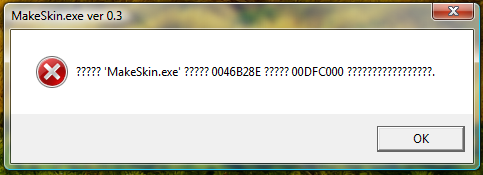
I've had to halt my skin (Sakura Aero) because if this stupid error while compiling the skin:
error-1.png


I wish I knew why I'm getting this error! Has anyone else had the problem?
 
I've gotten that error when I was making this file "Launch_Tab1_NDS". All the bitmaps are 256 pixels wide but that one is only 240 pixels wide.
Just make sure all your picture are the same pixels as the original and you should be all set, at least it was in my case.
 
Some news about the release: the guy in charge of the spanish translation (I mean the official one) has received today the english text to translate (he received the text 2 months ago but looks like they've lost/discarded it). So it shouldn't be long before it's released
yaynds.gif


P.S. He says that the text looks a bit weird, as if it weren't a flashcart OS but more of a utility for card formatting etc
blink.gif
 
nagaroth: that's messages.(insert language code number here)
it contains mostly error messages in case the built-in disk checker finds an error in the filesystem.
 
gangsterboi said:
When and where did you get this info from?

Everyone seems to get official info and i never do.... do you have to sign up to something like a newsletter?

I just happen to be a member of a spanish forum where the console scene is discussed, one of the admins there is the guy that traslates stuff from M3 Team to spanish.
Dunno where everyone else gets the info from tho
unsure.gif
 

Site & Scene News

Popular threads in this forum