
Homebrew [Release] Luma3DS/Rosalina Screenshot Tool

  • Thread starter Thread starter GizmoTheGreen
  • Start date Start date
  • Views Views 20,102
  • Replies Replies 12
  • Likes Likes 11

GizmoTheGreen

Well-Known Member
Member
Joined
Oct 8, 2009
Messages
813
Reaction score
278
Trophies
1
XP
931
Country
Merges the two screenshots. you choose your screenshot folder and then choose from the numbered list, it let's you see the preview then you can save it...

can be improved. quick and dirty lol. source is provided. feel free to modify it xD
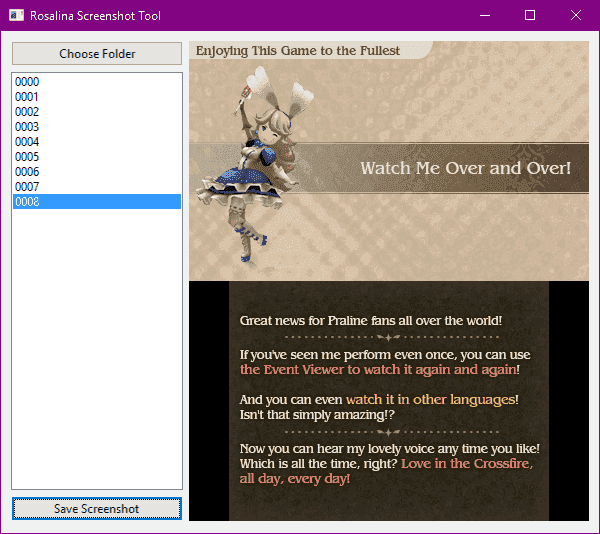
rosascreenshottool.png


https://github.com/GizmoTheGreen/Rosalina-Screenshot-Tool/releases/tag/1
 

Attachments

It's not for the 3ds, it just merges the screenshots taken from rosalina, it saves one image per screen.

Just transfer your screenshot folder to PC. Start this program and browse for the folder.
Well I still haven't found out how to screenshot using Rosa. Can't find info to install it nor can I figure out how to use ntr screenshot either. This is annoying
 
Well I still haven't found out how to screenshot using Rosa. Can't find info to install it nor can I figure out how to use ntr screenshot either. This is annoying

Open luma menu, choose take screenshot.

--------------------- MERGED ---------------------------

Open lumas rosalina menu, choose take screenshot.
 
what is the problem?

Hi, I think that new version of rosalina names screenshots in different way (for example, this is one: 2020-04-04_07-15-24.417_top), so i had to edit your regular expression and now it recognize the screenshots. I also edit one thing, i put as "last time edit" property in the new file, the date when the screenshot was captured. If you want I can send you my code.
 
  • Like
Reactions: GizmoTheGreen
Hi, I think that new version of rosalina names screenshots in different way (for example, this is one: 2020-04-04_07-15-24.417_top), so i had to edit your regular expression and now it recognize the screenshots. I also edit one thing, i put as "last time edit" property in the new file, the date when the screenshot was captured. If you want I can send you my code.
you can just fork it on github, really cool that you updated it :)
 

Site & Scene News