Hacking Hardware Picofly - a HWFLY switch modchip

  • Thread starter Thread starter mathew77
  • Start date Start date
  • Views Views 3,657,845
  • Replies Replies 17,050
  • Likes Likes 15
Tried to install 2040 on several of my switches, but everything comes down to a yellow LED blinking after attempting a glitch. I tried on v1, v2, OLED. All consoles except one have Samsung memory, while the other has Toshiba memory. If you short two LED pins at the back, the end will light up green instead of orange. I tried two different 2040s and flashed the firmware with Ubuntu after flash nuke, but the result is always the same.
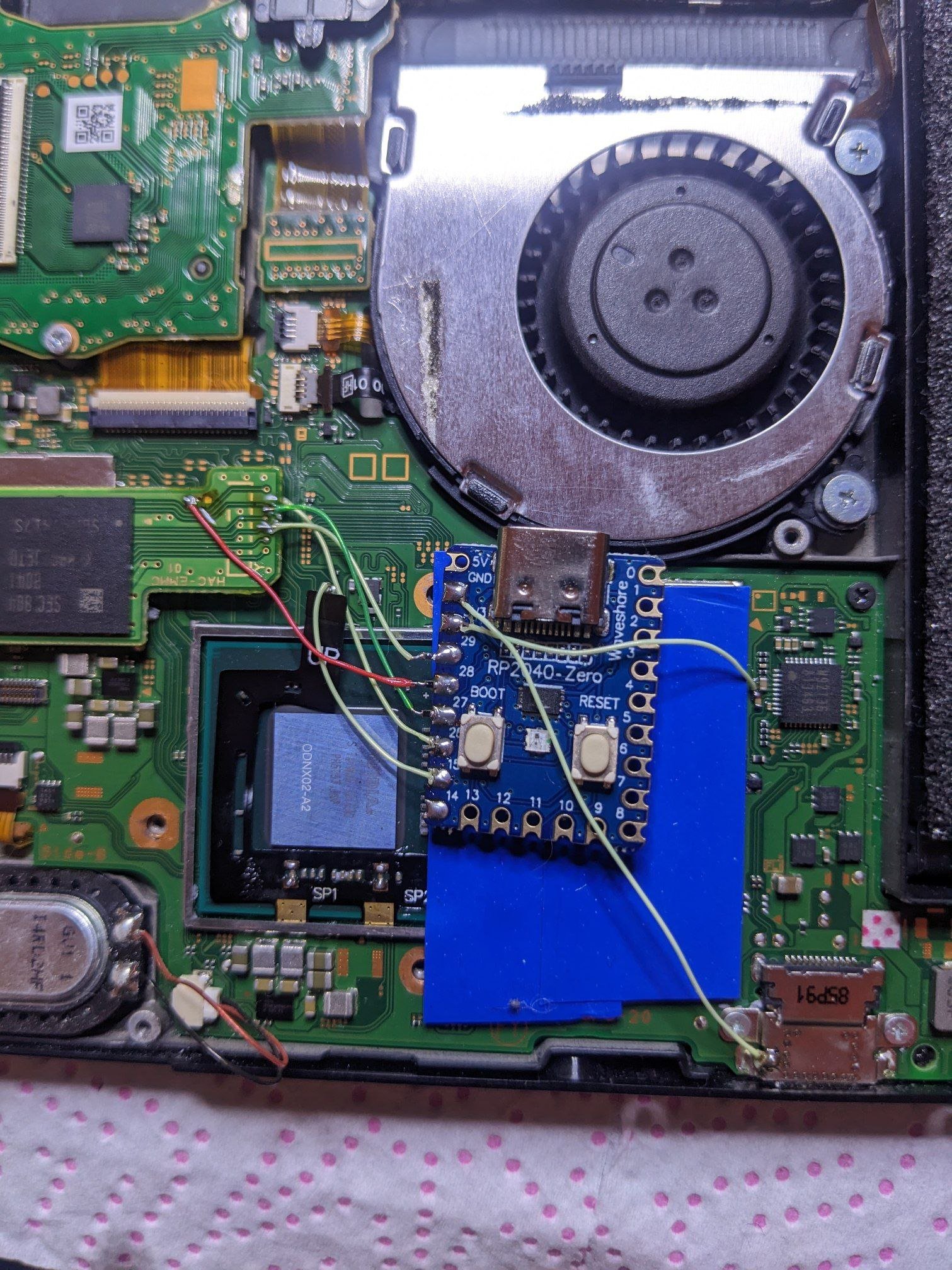

photo_2023-03-03_15-29-12.jpg


Tried to install 2040 on several of my switches, but everything comes down to a yellow LED blinking after attempting a glitch. I tried on v1, v2, OLED. All consoles except one have Samsung memory, while the other has Toshiba memory. If you short two LED pins at the back, the end will light up green instead of orange. I tried two different 2040s and flashed the firmware with Ubuntu after flash nuke, but the result is always the same.


View attachment 356853


View attachment 356852
Try
 
I'm wondering, what's the actual payload/sdloader the unbuntu firmware is injecting. Again it seems to me it's doing what sx did and that's clearing the keyslots after the glitch happens preventing us from booting hos.

Is it possible just to change out the payload it's injecting to standard hekate would even be feasible
Post automatically merged:

Tried to install 2040 on several of my switches, but everything comes down to a yellow LED blinking after attempting a glitch. I tried on v1, v2, OLED. All consoles except one have Samsung memory, while the other has Toshiba memory. If you short two LED pins at the back, the end will light up green instead of orange. I tried two different 2040s and flashed the firmware with Ubuntu after flash nuke, but the result is always the same.


View attachment 356853


View attachment 356852
It was originally stated this won't work on v1 units
 
Last edited by Adran_Marit,
Oh, what’s specifically incorrect?

Mosfet goes from (S)ource to (D)rain and is controlled by the (G)ate, no? Pico controls the (G)ate.

so in short G to pico then, got it

let me try this,
wish me luck not gonna break my lite lol solder this fukin mosfet is the harder one lol
 
  • Like
Reactions: binkinator
so in short G to pico then, got it
I’m just a layman that tries to read as much as I can in order to get my feeble mind wrapped around things and when corrected so matter of factly I like to understand why before I tear down the mental construct I built in my head. (G)ate being controlled by the Pico was what I thought it was supposed to be.

09A1D39E-FC26-4C6C-9DE9-8B6549F666EF.jpeg


sauce: https://www.electronics-tutorials.ws/transistor/tran_6.html
 
Last edited by binkinator,
Firmwares
Latest firmware here

ChangeLog:

v2.0 + Active MMC communication
v2.1 + Toshiba support
v2.2 + Fix Toshiba boot fail
v2.3 + SanDisk support
v2.4 + Faster Toshiba boot
v2.5 + fix OFW boot
v2.6 + software update, xiao & itsy support
v2.61 + Instinct-NX sdloader, bug fixes
v2.62 + Make 16.0.1 happy (fix OFW boot)
v2.63 + roll back some 2.62 boot speed tricks
v2.64 + enable back the board detection
v2.65 + RP Pico support, double reset removed
v2.66 + Bypass to OFW after update for proper fuse burning
v2.67 + Don't bypass to OFW on first install
v2.70 + new LED indication, i2c undervoltage hack
v2.71 + support for SQc open-source board
v2.72 + disable CLK check, it's unstable
v2.73 + add LED signal on success
v2.74 + 300 mhz precision rp2040 may be not stable at 300mhz
v2.75 + back to 200mhz, remove SRAM powerdown
v2.76 + rewrite the timing selection a bit
v2.77 + rp2040-tiny indication fix
v2.78..v2.80 + try to fix the rare boot error

= is long pulse, * is short pulse:

= USB flashing done

** RST is not connected
*= CMD is not connected
=* D0 is not connected
== CLK is not connected

*** No eMMC CMD1 responce (bad eMMC?)
**= No eMMC block 1 read (should not happen)
*=* No eMMC block 0 read (eMMC init failure?)
*== No eMMC CMD1 request (poor wiring, or dead CPU)

=** eMMC init failure during glitch process
=*= CPU never reach BCT check, should not happen
==* CPU always reach BCT check (no glitch reaction, check mosfet)
=== Glitch attempt limit reached, cannot glitch

=*** eMMC init failure
=**= eMMC write failure - comparison failed
=*=* eMMC write failure - write failed
=*== eMMC test failure - read failed
==** eMMC read failed during firmware update
==*= BCT copy failed - write failure
===* BCT copy failed - comparison failure
==== BCT copy failed - read failure

If your glitch is unstable (==* error), and the proper boot happens only when you press Reset after joycon logo, you can add two more wires to make glitch much better.

board pins:
Waveshare rp2040: SDA=12, SCL=13
Pi Pico: SDA = 19, SCL = 20
XIAO 2040: SDA=3, SCL=4
ItsyBitsy 2040: SDA = 18, SCL = 19

NS points (v2, Lite, OLED):
v2i2c.jpg

i2clite.jpg

i2coled.jpg

pinout.jpg

XIAO2040 Pinout.jpg

ItsyBitsy Pinout.jpg

picutv2.png

erista.jpg

pinout_emmc.jpeg

mariko.jpg

pinout_lite.jpeg

lite_v.jpeg

mariko_s.jpeg

mosfet_v2.jpg

lite_alt.jpg

erista_v.jpeg

erista_s.jpeg

mosfet_v1.jpg

rpico.jpg

Q: What is supported?
A: Erista (v1), Mariko (v2, Lite, OLED)

Q: eMMC types support?
A: Tested on Hynix, Samsung, Toshiba, SanDisk

Q: rp2040 boards support
A: WaveShare 2040-zero/one, xiao-rp2040, adafruit itsybitsy (Pi Pico is not supported for now)

Q: GREEN, but instant reset
A: Clean flux near the RST point

Q: Do I really need 47 Ohm resistors?
A: You can skip them, however in this case you will have to use emuMMC due to the line interference, sysNAND would not boot (sysNAND data can be damaged).

Q: Does the firmware has learning? How to reset statistics
A: Short pin 0 to either 1 or GND during start for chip reset. The statistics is collected each boot. The more you start it - the better it boots.

Q: open source?
A: https://github.com/rehius

Q: why you made it?
A: to prove it possible!

Q: run Atmosphere?
A: no piracy

v2.5 firmware had a bug with BOOT0 corruption. To recover it:
- boot "Full Stock" using hekate
- update to the latest official firmware over Wi-Fi

- boot "Full Stock" using hekate
- perform a full system reset

- show firmware information
- update firmware from SD card (place update.bin into the root folder)
- rollback to the backup firmware slot
- reset learning statistics
- dump / write sdloader

if you have an rp2040-zero from waveshare/ali then it has a neopixel. It is used for diagnosing proper firmware flashes as well as console glitching. If you plug it in, and flash the uf2 firmware to it and immediately see a red light after flashing (this is not the same as flashing, then unplugging and replugging), then no rgb jumper needs to be made. If on the other hand, you get one quick green flashing light, then you need to bridge the jumper pads indicated to swap the LED colors for proper diagnoses capability.
 

Attachments

Last edited by rehius,
Is there anyone here that knows a bit about Pico development in C and the PIOs and maybe the emmc protocol? If yes, you can write me a PM
 
  • Like
Reactions: impeeza
first try success, bek still missing
20-30K Ohm to RST
Post automatically merged:
confirm, samsung works. first attempt also, no issues booting hekate.
Post automatically merged:

Is there anyone here that knows a bit about Pico development in C and the PIOs and maybe the emmc protocol? If yes, you can write me a PM
i'm not sure if @webhxd is here, he made picoboot based on shuriken for the gamecube, it's a modchip, ipl repl for the gamecube using pico
 
Last edited by leerz,

Site & Scene News

Popular threads in this forum