Hacking Hardware Picofly - a HWFLY switch modchip

  • Thread starter Thread starter mathew77
  • Start date Start date
  • Views Views 3,677,217
  • Replies Replies 17,052
  • Likes Likes 15
I finished my PDF guide and sent a PM to @linuxares so it will likely end up in some central location like the AIO thread, but until such a time, here's a public download link to the 21MB PDF file.

Any suggestions to improve it, just let me know, but this seems like a pretty good overview guide to me.

https://easyupload.io/v2vujw
I would suggest to add a few moments:

- RST point is extremely sensitive. Even a tiny amount of flux may cause problems like instant reboot after startup, so it is highly recommended to clean the board after soldering
- "Slow eMMC mode" as Hekate says, may also be caused by flux, too thin, or too long eMMC wires (CLK, CMD, D0). In some cases double resistors (47+47 = 94 Ohm) on the CMD & D0 lines may help.
- A diagram with single mosfet which is properly connected to both VCC points should be pretty enough, the 0.2mm diameter enameled wire is recommended.
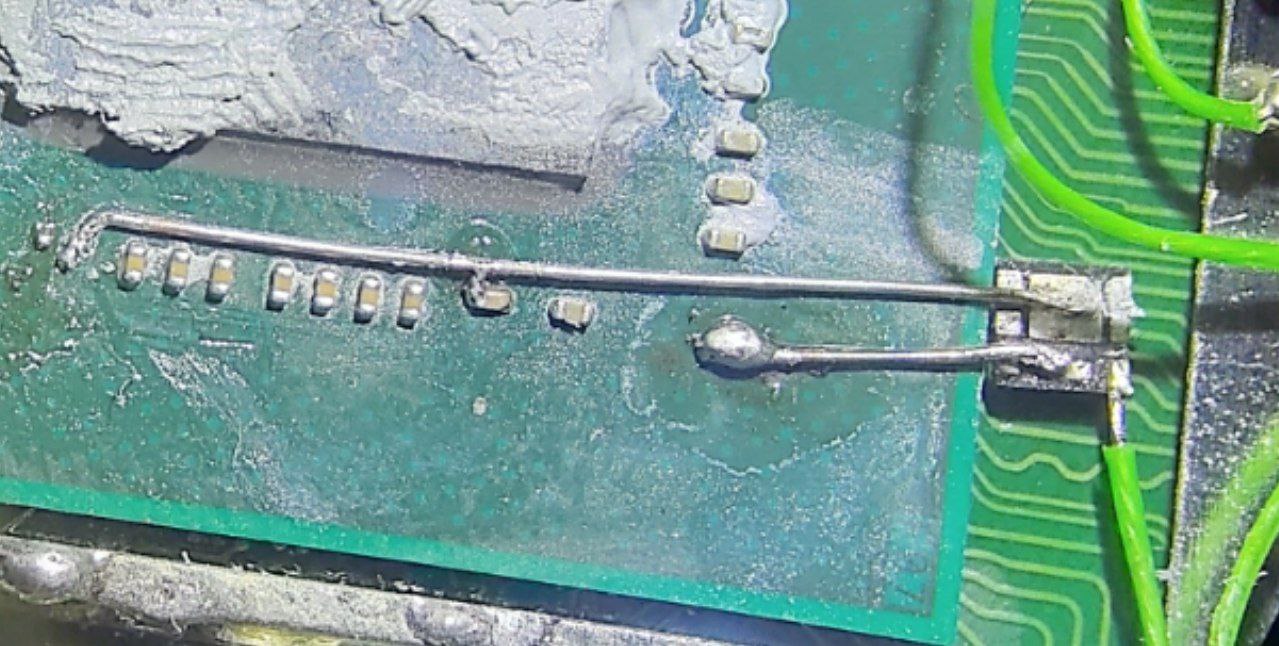
I know for sure this soldering sucks, the capacitor is lost, but you can do better!
lite_alt.jpg

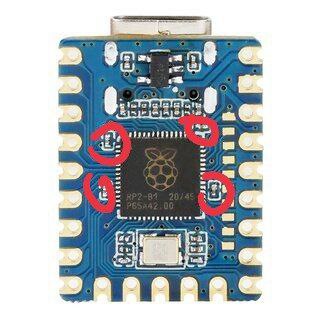
- the APU soldering is complicated, and some people may break, or lose capacitors there, in this case, it is possible to replace them with the ones from the pico board!
actually there are more 100nF caps, but I'm too lazy to ensure which are the required ones
pico_caps.jpg
 
I would suggest to add a few moments:

- RST point is extremely sensitive. Even a tiny amount of flux may cause problems like instant reboot after startup, so it is highly recommended to clean the board after soldering
- "Slow eMMC mode" as Hekate says, may also be caused by flux, too thin, or too long eMMC wires (CLK, CMD, D0). In some cases double resistors (47+47 = 94 Ohm) on the CMD & D0 lines may help.
- A diagram with single mosfet which is properly connected to both VCC points should be pretty enough, the 0.2mm diameter enameled wire is recommended.
I know for sure this soldering sucks, the capacitor is lost, but you can do better!
View attachment 364397

- the APU soldering is complicated, and some people may break, or lose capacitors there, in this case, it is possible to replace them with the ones from the pico board!
actually there are more 100nF caps, but I'm too lazy to ensure which are the required ones
View attachment 364398
Well said Rehius, your RP2040-zero capacitor theft trick is what saved my wireless function. I will modify and whip out a rev .2 of the PDF here shortly
 
  • Like
Reactions: DonZott and Dee87
I finished my PDF guide and sent a PM to @linuxares so it will likely end up in some central location like the AIO thread, but until such a time, here's a public download link to the 21MB PDF file.

Any suggestions to improve it, just let me know, but this seems like a pretty good overview guide to me.

https://easyupload.io/v2vujw
nice job :grog:
 
Today I made my first erista with pico and cpu flex, I have a 8342 mosfet but it was impossible for me to use it, is there a tutorial using a mosfet or another larger mosfet that is more friendly for soldering?

View attachment 364374

great, but to weld such a tiny component we need more than photos of a completed installation, if there was a detailed video, for those of us who do not have our technique so refined, it would help us a lot

View attachment 364389
There is no specific way to solder the mosfet. If you have enough skills/tools to solder it you should know how to do it without a guide. Each person have their own way of doing it, so just find your way.

To be honest, if you don't mind the wait and 12$, I highly recommend getting the flex cable. That would be much much easier.
 
There is no specific way to solder the mosfet. If you have enough skills/tools to solder it you should know how to do it without a guide. Each person have their own way of doing it, so just find your way.

To be honest, if you don't mind the wait and 12$, I highly recommend getting the flex cable. That would be much much easier.
Can you provide a link to this cable for that price? I can't post links yet, but the one I found in the official HWFly store on AliExpress named "Official For Hwfly V3/V4/V4.1 Core/Lite/Oled Chip Cable Set Accessories" for the Switch Lite is $27 Canadian. Is there a less expensive one I can use?
 
Can you provide a link to this cable for that price? I can't post links yet, but the one I found in the official HWFly store on AliExpress named "Official For Hwfly V3/V4/V4.1 Core/Lite/Oled Chip Cable Set Accessories" for the Switch Lite is $27 Canadian. Is there a less expensive one I can use?
https://www.aliexpress.com/item/100...1!sea!PL!739136213&curPageLogUid=wuz1ZJotzXsh


https://www.aliexpress.com/item/100...4!sea!PL!739136213&curPageLogUid=laHmBZ8JCegt
 
@KarimPolska So all I need for my Lite is the "Lite curved cable" for $14 Canadian. That makes sense! For whatever reason, the Ali link I was on only showed me the set that included the "lite straight cable" as well for more money. Thank you!!!
Post automatically merged:

@KarimPolska So all I need for my Lite is the "Lite curved cable" for $14 Canadian. That makes sense! For whatever reason, the Ali link I was on only showed me the set that included the "lite straight cable" as well for more money. Thank you!!!
@KarimPolska Can you confirm that these cables also have the integrated MOSFETs?
 
Last edited by MegaDeKay,
  • Like
Reactions: KarimPolska
it lights up blue then red, does that mean that it works? i thought red was for error. And after trying to get emmunand to work, now OFW gives me a blue screen and i cant boot to hakete anymore
 
it lights up blue then red, does that mean that it works? i thought red was for error. And after trying to get emmunand to work, now OFW gives me a blue screen and i cant boot to hakete anymore
there are some waveshare batches that has fcked up rgb led, where red is success and green is fail lol -, where you need grb rgb bridge
 
Last edited by leerz,
there are some waveshare batches that has fcked up rgb led, where red is success and green is fail lol
bruh yup that makes sense
Post automatically merged:

Anyways, my switch was brand new, didnt even have it setup. (which may have been the mistake) anyways my picofly booted up normally (even ofw worked but i still havent set it up) so i went it to make an emunand and once the process started, my switch was gltiched and i saw a semi green screen but also the emmunand process at the same time (idk how to explain) anyways the chip still works, hakate now doesnt and my ofw is showing up a blue screen. Fml
 
Last edited by naldo29,
bruh yup that makes sense
Post automatically merged:

Anyways, my switch was brand new, didnt even have it setup. (which may have been the mistake) anyways my picofly booted up normally (even ofw worked but i still havent set it up) so i went it to make an emunand and once the process started, my switch was gltiched and i saw a semi green screen but also the emmunand process at the same time (idk how to explain) anyways the chip still works, hakate now doesnt and my ofw is showing up a blue screen. Fml
See my post in the AIO thread, we'll try to help you over there.
 
First happy, then sad.

It was my first trying in modding chip. I learn soldering by myself one week ago.

The job was right, I reach the no sd screen. But when I tried to mount and close the switch, the 3.3 cable was desoldered.

When I tried to solder It again, accidentally I ripped the 3.3 capacitor. So no power on no more.
 

Attachments

  • IMG_20230412_011903.jpg
    IMG_20230412_011903.jpg
    2 MB · Views: 108
  • IMG_20230412_035550.jpg
    IMG_20230412_035550.jpg
    983.3 KB · Views: 116
Before i do the mod, i factory reset the OFW (still in the setup stuff). The picofly running fine, the CFW running fine.
Post automatically merged:


Seems like you use a bigger cable. So when the cable got force, the force is forwarded to the pad, and will ripped it up. Use a very thin cable, its super cheap only $0.15 for like 15meter. So when the thin cable got force, the force will ripped the cable itself rather than the pad.
Something like this:
https://www.aliexpress.com/item/1005004180752761.html?spm=a2g0o.productlist.main.31.711d36a4UJjeTg&algo_pvid=50fd1083-5293-4160-8688-b92254c9ab0d&algo_exp_id=50fd1083-5293-4160-8688-b92254c9ab0d-15&pdp_npi=3@dis!IDR!14924.0!9746.0!!!!!@211bd3cb16812671188491390d0753!12000028302990061!sea!ID!3430123615&curPageLogUid=urZODSg28Qdl
But the Switch doesn't power on because there's no capacitor on 3.3v point. And I haven't got any capacitor to replace the lost one. I used 30awg in all points.

I did it thinking Lite will dead so not worries at all. I will find somebody with professional tools and skills to repair it.

At least my attemp worked a few minutes. As I said, It was my first attempting with only two weeks from muy first time soldering.
 
  • Like
Reactions: QuiTim
Usually those kind of cap used only for smoothing voltage, without it should be running fine.

I use 0,1 mm or in american standard it is like 38awg cables for the 3.3v. It seems its enough, everything running fine.

Possibly I'm wrong, but I think it's 100% sure that it doesn't turn on since that capacitor is missing.

I have tried to turn it on several times and it does not respond.

A few moments before when it was, if it started and without problems.
 

Site & Scene News

Popular threads in this forum